Salut,
Merci de ta réponse.
Voici les informations de Jeedom qui sont affichées sur mon MM.
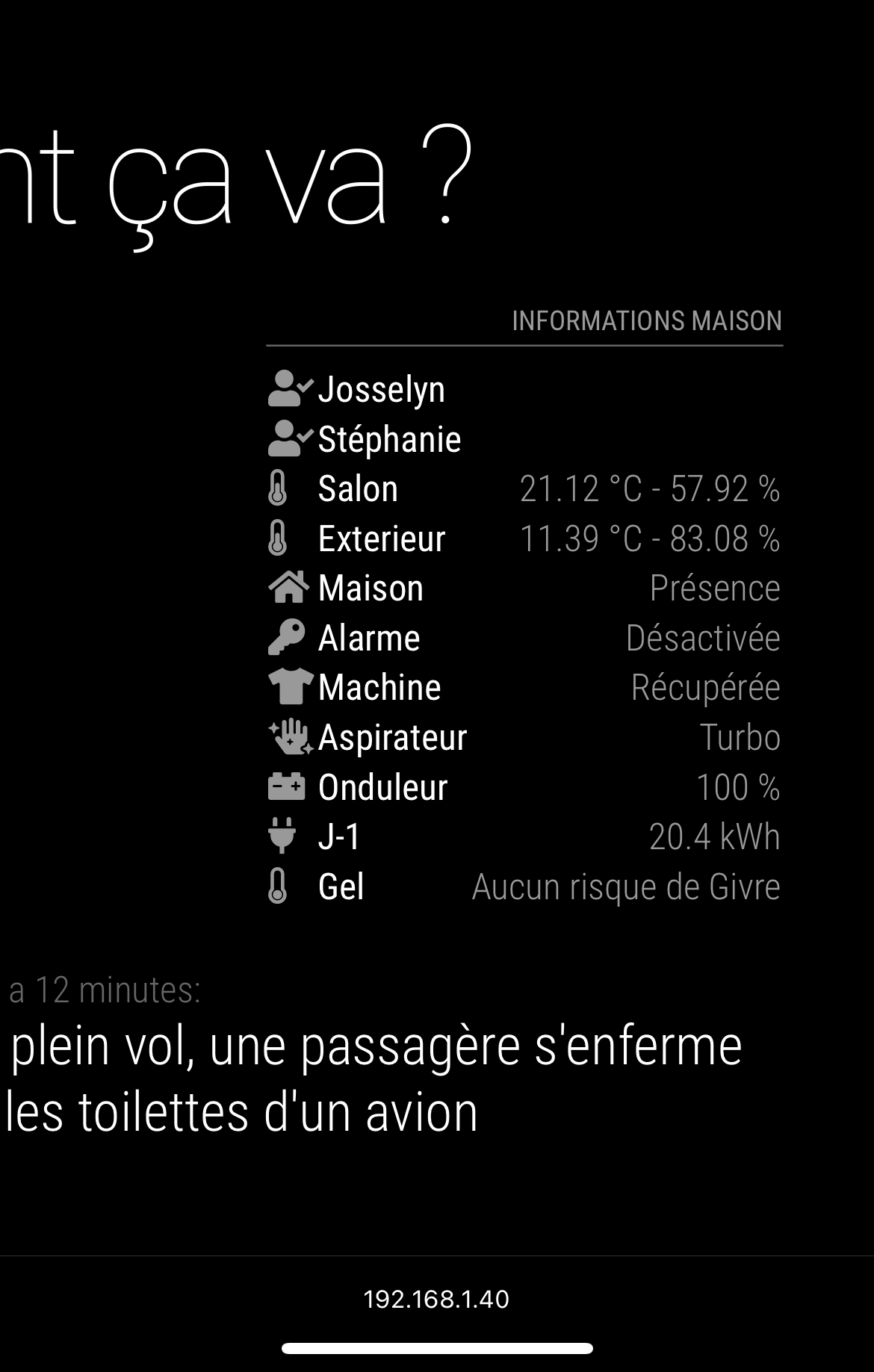
J’aimerai que nos présences soient affichées sur la même ligne, ou a defaut que la présence ne soit affichée que si le booleen a true (presence)
Salut,
Merci de ta réponse.
Voici les informations de Jeedom qui sont affichées sur mon MM.
J’aimerai que nos présences soient affichées sur la même ligne, ou a defaut que la présence ne soit affichée que si le booleen a true (presence)
Hi Elmago,
Sorry, I haven’t solution for you, but i search for similar thing trough next request : https://forum.magicmirror.builders/topic/15953/mmm-jeedom-display-presence-on-same-line
So if you sucess to proceed, please tell me it could be interesting for me.
Have nice holidays too.
Ps : where are you from ? France ?
@sdetweil said in Questions about update:
@selyjohns cool… mine saves the list of modules (git url) and config.js to a local git repo with a tag with the date
Perfect :) Git seem to be a good solution. For next evolution haha
For the json, it’s because i’ve define a lot of compliments and it’s more clean on external json that in config.js
Just scripted what I want. Not externalized for the moment. Just a simple copy of modules folder and personnalized files.
Sorry if it’s not perfect, but i’m not a developer :)
#!/bin/bash

#BACKUP FOLDER
mkdir -p /var/backups/MM
cd /var/backups/MM

#OLD BACKUPS PURGE
echo "--- PURGE TASK ---"
echo "Check for existing backups..."
nb_save=$(ls | wc -l)
if [ $nb_save -gt 4 ]
then
        oldest_folder=$(ls -lt | tail -1 | cut -d " " -f10)
        echo "Limit of 5 backups reach. Deleting of the oldest one : $oldest_folder"
        rm -rf "$oldest_folder"
        echo "DELETED."
else
        echo "Limit of 5 backups doesn't reach, skip to backup task."
fi

#BACKUP
echo "--- BACKUP TASK ---"
echo "Starting..."
d=$(date +%Y-%m-%d_%H:%M)
mkdir -p $d
cd $d
cp /home/pi/MagicMirror/config/config.js config.js
cp /home/pi/MagicMirror/css/custom.css custom.css
cp /home/pi/MagicMirror/modules/default/compliments/compliments.json compliments.json
cp /boot/config.txt config.txt
mkdir -p modules
cp -R /home/pi/MagicMirror/modules/ .
echo "DONE. CURRENT LIST OF BACKUPS :"
cd ..
ls -A1
Hi,
Yes, it’s a good solution that works great once installed.
To build my MM, I have made some modifications on everywhere to obtain the result I want, and if i had to rebuild all it will take a lot of time because it’s impossible to remember everything (like modifications on boot.txt)
And I agree about SD Card. It’s a really difficult to preserve it. So the solution is to externalize backups.
I’ve a NAS server with NFS possibilities. I think I’ll build a script to save every night for example a backup of config.js, custom.css, compliments.js and boot.txt (to compare in case of rebuild).
But, i’m also agree is represent a lot of work for a system that not modify every day. A big backup on every major modification is sufficient.
Have a nice day.
Hello,
Is it possible to know when the next update (from develop branch) will be merged on the master branch ?
When I use the git status command, here’s the result
pi@MagicMirror:~/MagicMirror $ git status
Sur la branche master
Votre branche est à jour avec 'origin/master'.

Fichiers non suivis:
  (utilisez "git add <fichier>..." pour inclure dans ce qui sera validé)
        css/custom.css_backup
        modules/default/compliments/compliments.js_backup
        modules/default/compliments/compliments.json
        modules/default/compliments/compliments.json_backup

aucune modification ajoutée à la validation mais des fichiers non suivis sont présents (utilisez "git add" pour les suivre)
Of course, I want to keep my backup files. Does I need to use git add to preserve my file ?
Thank you.
Solved ! :)
After multiples tests, the problem was the raspberry has CPU overload when hdmi plugged.
I’ve deduce this with this test : disable the remotecontrol module, that need a lot of CPU to works, and it was better.
So, I’ve tried to modify some parameters on /boot/config.txt, and the good one was to define manually the hdmi_group and hdmi_mode
My display is old vga screen 1680x1050 60Hz
So, according to the documentation, the good parameters is
hdmi_group=2
hdmi_mode=58
But, result was the same. So I’ve tested with reduced blanking mode
hdmi_group=2
hdmi_mode=57
And now all works great :)
Have a nice day.
Hi,
I’m under construction of my first MM.
It’s very good software.
From the scratch, i’m only work on the rpi with no display connected. All was good.
Today, i’ve plug the display (hdmi > hdmi vga adaptator > VGA monitor)
When the display is conneted, my rpi is not stable anymore. The latency is very important, the rpi drop 80% of ping. There is no internet connection so most of modules are not functionning.
I’ve tested with officiel alimentation of RPI.
I’ve tested with MeanWell RS-15-5, same result…
Do you know why and if there is a solution ?
Thank you guys.
@sdetweil said in MMM-Jeedom - align to left:
#identifier .time.align-right {
text-align: left;
}
yep
Works perfectly with the identifier of the two module
#module_9_MMM-Jeedom .time.align-right  {
text-align: left;
}

#module_10_MMM-Jeedom .time.align-right  {
text-align: left;
}
Thank you…again :) !
Have a nice week-end
Hi again,
Finally, I’ve a problem.
The modification is applied to all jeedom module, not only on the bottom left one.
Is anything possible to apply only the align left to the jeedom module on bottom left only ?
I want to keep the align right for the jeedom module on bottom_right
Thx.
@sdetweil said in MMM-Jeedom - align to left:
.MMM-Jeedom .time.align-right
{
text-align: left;
}
Works great, in custom.css instead main.css :)
Thank you for your help
With the inspector, I’ve been able to do this :)
in main.css
.region.bottom.left .time.align-right
 {
  text-align: left;
}
I think it’s not the best optimisation.
I don’t found how to apply only this parameter to Jeedom module, only on bottom_left.
Thank you.
Hi,
I only use waze.
I’m suprising that there is no module for this, but its exist on Jeedom (plugin Wazeintime). Do you know why ?
So i think it’s possible to create a dedicated module ?
For the moment I use MMM-Jeedom to display traffic information (from wazeintime) on MM :) It works it’s just an alternative. (Mapbox with MMM-Traffic is not very accurate in France…)
Thank you :)
Solved, please see issue on github.
My fault :)
@selyjohns Hi,
Any help for my problem ? :(
Thank you
Hi,
The module displays information with “CustomTitle” align to left, and value of idx align to right (see on bottom_right)
For 2 other MMM-Jeedom (positionned on bottom_left), I want the result align to left.

Is it possible ?
Thank you.
Hi,
I’ve an error while i want to fetch https://actu.fr/toulouse/rss.xml on newsfeed.
0|mm  | [07.12.2021 11:35.16.791] [ERROR]
0|mm  | Newsfeed Error. Could not fetch newsfeed:  https://actu.fr/toulouse/rss.xml Error: Forbidden
0|mm  |     at NodeHelper.checkFetchStatus (/home/pi/MagicMirror/js/node_helper.js:121:9)
0|mm  |     at processTicksAndRejections (internal/process/task_queues.js:93:5)
Do you know why ? The page seem to be reachable.
Thank you.
@sdetweil good :)
Ok so thank you for your help. Maybe it need to be more explicit on documentation.
And they are confusion between compliments and MMM-compliments
I will now close this case.
Have a good day