on the remote Browser it shows normal and colored, but at the internet HDMI Display / Browser the icons are only B&W.
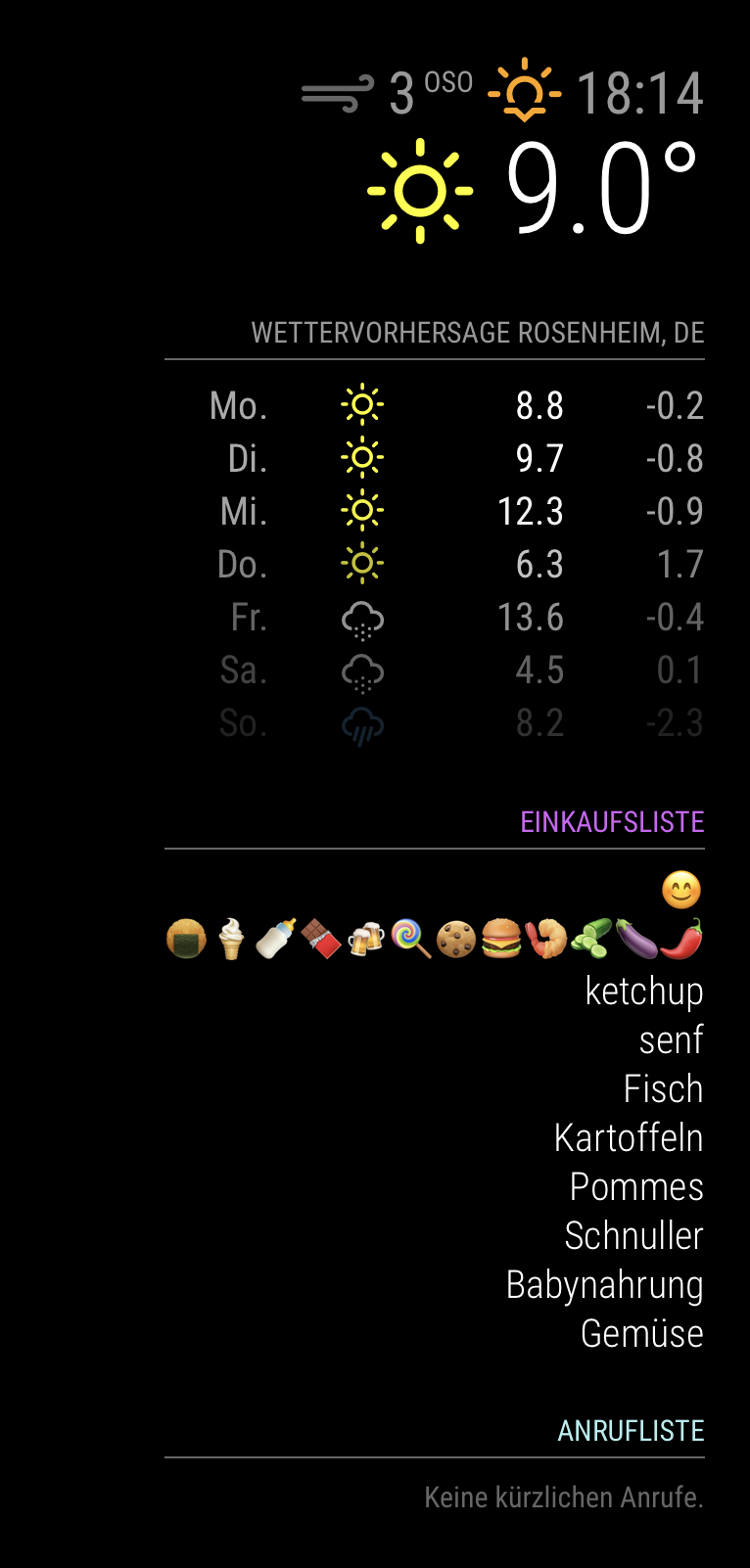
on the remote Browser it shows normal and colored, but at the internet HDMI Display / Browser the icons are only B&W.
Hallo together,
i´ve installed the Emoji font vom GIT
Emoji Font
the font runs, but it will only shows the icons in Black & White like this:
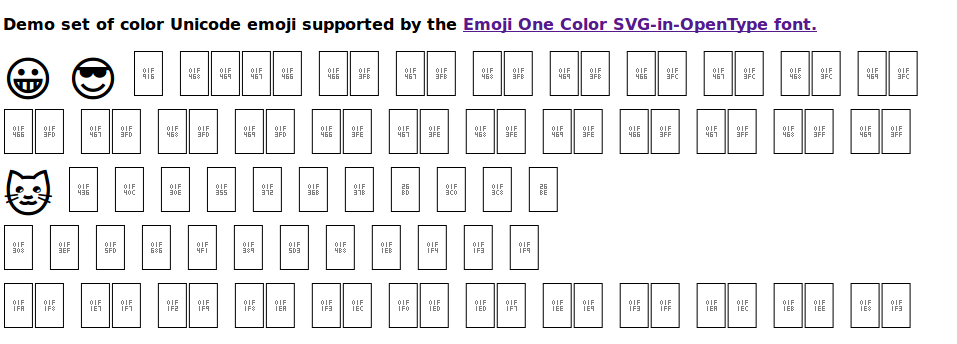
i want Color :grinning:
Anyone a hint how I can fix the issue?
Thanks for answer ;-)
# 1. Download the latest version
wget https://github.com/eosrei/emojione-color-font/releases/download/v1.3/EmojiOneColor-SVGinOT-Linux-1.3.tar.gz
# 2. Uncompress the file
tar zxf EmojiOneColor-SVGinOT-Linux-1.3.tar.gz
# 2.1. install Vera Bitstream Font
sudo apt-get install install ttf-bitstream-vera
# 3. Run the installer
cd EmojiOneColor-SVGinOT-Linux-1.3
./install.sh
Hi,
{
				        module: 'MMM-Todoist',
				        position: 'bottom_center',  // This can be any of the regions. Best results in left or right regions.
				        header: 'Todoist', // This is optional
				        config: { // See 'Configuration options' for more information.
				            accessToken: 'c7xxxxxxxxxxxxxxxxxxxxxxxe3b54',
							//lists: ["edit in MMM-Todoist.js"],
				            maximumEntries: 10,
				            interval: 60,
				            fade: true,
				      }
				    },
this is my config.js
you must edit the /home/pi/MagicMirror/modules/MMM-Todois/MMM-Todoist.js
edit the list entry from list: [“inbox”] to [“1234567890”]
defaults: {
	maximumEntries: 10,
	lists: ["198511455"],
	interval: 60,
	fade: true,
	fadePoint: 0.25
i have figured out why the list is blank:
in MMM-Todoist.js is the default
Module.register("MMM-Todoist", {

 defaults: {
	maximumEntries: 10,
	lists: ["inbox"],
	interval: 60,
	fade: true,
	fadePoint: 0.25
 },
maybe a result of the fork from Wunderlist.
you can see that with pm2 logs
0|mm | Create new todo fetcher for list: inbox - Interval: 60000
the added value in the config.js doesn’t accept.
so I write the correct list in MMM-Todoist.js
 defaults: {
	maximumEntries: 10,
	lists: ["198511455"],
	interval: 60,
	fade: true,
	fadePoint: 0.25
save and restart MM with pm2 restart mm
then look at pm2 logs
|mm | Create new todo fetcher for list: 198511455 - Interval: 60000
tadaaaa ;-) the correct fetcher ^^
but why the config.js variable not in use — I don’t know ;-)
@psm9 said in MMM-Todoist - Your todoist tasks on your mirror:
Hi, all,
Does anybody know how to sort this list? It adds new items at the bottom, so if there is no more room on the mirror, I can’t see them. I can’t figure out how to sort them on Todoist’s site easier, except alphabetically. I am using the “Alexa Shopping List” list in Todoist
Thanks
Hy, please can you post your working config for the Todoist module?
My Module is starting but the Todos are blank ;-)
Thank you
on this site is the git clone command false:
MMM-PIR
the correct clone command is:
git clone https://github.com/**Patrick-Remy**/MMM-PIR-Sensor.git
ahh, -ok thank you,
i have used the old configuration options.
Thank You
sorry maybe i expressed wrong:
this module is running perfectly but I need a OFF-DELAY (mirror turns on and stay a while on before switch off)
like time.sleep(50)
Hello together,
it is possible to add a off delay to the module?
if true ? --> Where? ;-)
Thanks for answers
Best Greets
you the best! Thank you!
it runs,
Made my Day!!
ok thank you I try your changes and will report asap ;-)
Hello together,
I added the Wunderlist-Module in config.js.
But when I restart the MM, it shows please create a config file.
What is wrong with my config.js?
can please everyone check my file?
/* Magic Mirror Config
 *
 * By Michael Teeuw http://michaelteeuw.nl
 * MIT Licensed.
 */

var config = {
	port: 8080,
	ipWhitelist: ["127.0.0.1", "::ffff:127.0.0.1", "::1"],

	language: 'de',
	timeFormat: 24,
	units: 'metric',

	modules: [
		{
			module: 'alert',
		},
			{
			module: "updatenotification",
			position: "top_bar"
		},
		{
			module: 'clock',
			position: 'top_left'
		},
		{
		        module: 'MMM-Wunderlist',
		        position: 'top_right',  // This can be any of the regions. Best results in left or right regions.
		        header: 'Shopping', // This is optional
		        config: {
		            // See 'Configuration options' for more information.
					lists: [“inbox”],
					accessToken: '0ad48eb706f0xxxxxxxxxx8c4f8def79581'
					clientID: '046xxxxxxxxxx6a8'
					fade: false,
					intervall: 60,
		        }
		    }
		{
		    module: 'MMM-Globe',
		    position: 'lower_third',
		    config: {
		        style: 'geoColor',
		        imageSize: 800,
		        ownImagePath:'',
		        updateInterval: 10*60*1000
		    }
		},
		{
			module: 'calendar',
			header: 'Kalender',
			position: 'top_left',
			config: {
				calendars: [
					{
						symbol: 'calendar-check-o ',
						url: 'https://p36-calendars.icloud.com/published/2/xxxxxxxxX_p'
					}
				]
			}
		},
		{
			module: 'calendar',
			header: 'Arbeits-Termine',
			position: 'top_left',
			config: {
				calendars: [
					{
						symbol: 'calendar-check-o ',
						url: 'http://kerioxxxxxxx/Calendar'
					}
				]
			}
		},
		{
			module: 'compliments',
			position: 'lower_third'
		},
		{
			module: 'currentweather',
			position: 'top_right',
			config: {
				location: 'Rosenheim',
				locationID: '2844988',  //ID from http://www.openweathermap.org
				appid: '46c0147xxxxxxb7eeb0'
			}
		},
		{
			module: 'weatherforecast',
			position: 'top_right',
			header: 'Wettervorhersage',
			config: {
				location: 'Rosenheim',
				locationID: '2844988',  //ID from http://www.openweathermap.org
				appid: '46c0147xxxxxx44b7eeb0'
			}
		},
		{
			module: 'newsfeed',
			position: 'bottom_bar',
			config: {
				feeds: [
					{
						title: "Tagesschau",
						url: "http://www.tagesschau.de/xml/rss2"
					}
				],
				showSourceTitle: true,
				showPublishDate: true
			}
		},
	]
};

/*************** DO NOT EDIT THE LINE BELOW ***************/
if (typeof module !== 'undefined') {module.exports = config;}