@kpl4184
You can add
dtoverlay=gpio-shutdown,gpio_pin=3, active_low=1,gpio_pull=up
in the /boot/config.txt
Connect a pushbutton with gpio 3 and GND
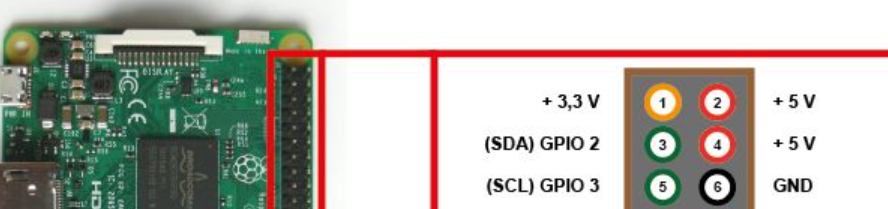
…one push will shutdown the RPI, a second will restart it.
…and use it on your own risk:-)
 T
Offline
T
Offline
A New Chapter for MagicMirror: The Community Takes the Lead
Read the statement by Michael Teeuw here.
Read the statement by Michael Teeuw here.
Posts
-
RE: Factory Reset button
-
RE: MMM-futar - how to add modules multiple time?
Hi @0livia, I had some trouble when I tried to locate modules at the same region…so I would use first to set one occurrence to top_left and the second to top_right.
-
RE: Display logos?
@Bungle68 I have good experiences with MMM-EasyPix.
You have to store your logo(s) in the subfolder “pix” of the module. -
Mouseclick via Notification
Hi, is it possibel to send a noticication with x-y-coordinates as payload witch end-up as a mouseclick at the screen?
Thank you in advance. -
RE: Way to insert a HTML link in var
@Tom_LabHIdouille I’m not familiar with compliments, but can’t you create a locale html-file at the modules folder with the link to the picture you prefer and add the name of the html at all the compliments-module(s).
The benefit would be only to change the locale file and all the compliments-modules should show your picture. -
RE: MMM-GrafanaCharts and MMM-GrafanaGauges: Display you data with Charts and Gauges. Beautifully.
@Egnos You can use RDDTOOL, I described it here: https://forum.magicmirror.builders/topic/16575/cpu-temperature-as-a-graph-with-rrdtool?_=1666781012238
But instead of creating an extra html, you can use the output directly with MMM-EasyPix://################################################################################# { disabled: false, module: "MMM-EasyPix", position: "top_center", config: { picName: "cputemp.gif", maxWidth: "100%", // sounds: ["1.mp3", "me2.mp3"], updateInterval: 600000, animationSpeed: 1000, } }, //################################################################################# -
RE: [Default clock] Incorrect week number
@sdetweil said in [Default clock] Incorrect week number:
I see the code set moment from the language set in config.js
DE
-
RE: [Default clock] Incorrect week number
@sdetweil it is set to Berlin = CEST
and my clock-config-entry is like this:
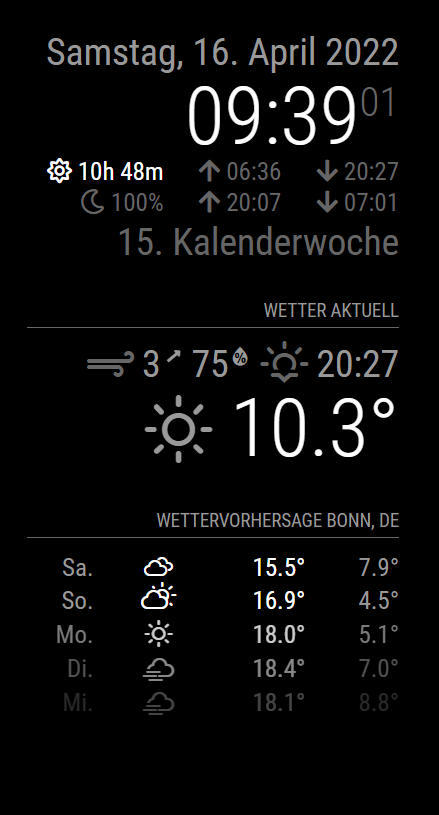
//################################################################################# { disabled: false, module: "clock", position: "top_right", config: { // The config property is optional. // See "Configuration options" for more information. showWeek : true, showSunTimes : true, showMoonTimes : true, lat : 50.658821, lon : 7.193084, } }, //################################################################################# -
RE: [Default clock] Incorrect week number
@sdetweil That is a good answer:-)
I’m from Germany and my mirror shows 42, the answer to all questions.
-
RE: Struggling with Weather... module
@sdetweil I know, but to have a first sense of achievement he will see something different than “LOADING”
-
RE: Struggling with Weather... module
@D3dl3g as a first check, you can use my working config-entry and extend it one by one with your needs:
//#################################################################################
		{
			disabled: false,
			module: "weather",
			position: "top_right",
			header: "Wetter aktuell",
			config: {
				type: "current",
				location: "Bonn",
				locationID: "2946447",
				apiKey: "myKey",
				showWindDirectionAsArrow: true,
				showHumidity: true,
				showFeelsLike: false
				}
		},
//#################################################################################
Just replace the apikey.
-
RE: pm2 Lost My MagicMirror
@N6NG Do you know? The system is case-sensitive:
pm2 stop magicmirror is different to
pm2 stop MagicMirror -
RE: Weather module
@yagger to come back to your first post, I fixed it this way:
added two entries in config.js
//#################################################################################
		{
			disabled: false,
			module: "weather",
			position: "top_right",
			header: "Wetter aktuell",
			config: {
				type: "current",
				location: "Bonn",
				locationID: "2946447",
				apiKey: "myKey",
				showWindDirectionAsArrow: true,
				showHumidity: true,
				showFeelsLike: false
				}
		},
//#################################################################################
		{
			disabled: false,
			module: "weather",
			position: "top_right",
			header: "Wetter in",
			config: {
				type: "forecast",
				location: "Bonn",
				locationID: "2946447",
				apiKey: "myKey",
				showWindDirectionAsArrow: true,
				showHumidity: true,
				showFeelsLike: false
				}
		},
//#################################################################################
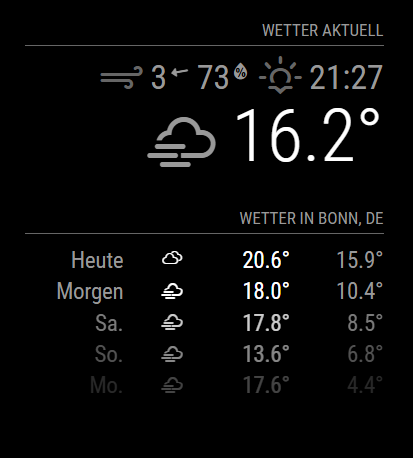
first as type current, second as type forecast. The keys are identical…the one I used before.
Leads to this output:
-
RE: Bathroom mirror: "Frameless, thin, gesture and voice controlled"
@Robert_K
Nice mirror.
One hint, in your video, you mentioned, that the front-door-cameras refresh every time they are shown resp. the page is displayed. I guess, you use SmartWebDisplay for it? Try to replace it with MMM-iFrame, should no longer flicker at the start of the page. -
RE: MMM-CovidStats
@mayfield
Your favorite countries appear in the sequence you add them in the config.js:countries: ["DEU","NLD","PER","FRA","DNK","NOR","SWE","FIN"],Thomas
-
RE: Deutsche Anleitung MagicMirror auf RaspberryPi 3
Moin @35110, ich bekomme zwar Mecker:

…aber funktioniert trotzdem…Hast Du einen zweiten Key für weatherforecast? Ich habe den von weaher genommen.
-
RE: Deutsche Anleitung MagicMirror auf RaspberryPi 3
@35110
So//################################################################################# { disabled: false, module: "weatherforecast", position: "top_right", header: "Wettervorhersage", config: { location: "Bonn", locationID: "2946447", appid: "Hier kommt Dein Key rein" } }, //#################################################################################funktioniert es bei mir.