MagicMirror Forum
    • Recent
    • Tags
    • Unsolved
    • Solved
    • MagicMirror² Repository
    • Documentation
    • 3rd-Party-Modules
    • Donate
    • Discord
    • Register
    • Login
    1. Home
    2. wishmaster270
    3. Posts
    A New Chapter for MagicMirror: The Community Takes the Lead
    Read the statement by Michael Teeuw here.
    Offline
    • Profile
    • Following 0
    • Followers 6
    • Topics 16
    • Posts 340
    • Groups 2

    Posts

    Recent Best Controversial
    • RE: Does this Module still work?

      @r3zi3lr
      Hi, installed the module in my development environment a few minutes ago.
      Everything works but make sure to run

      npm install
      

      in the module folder.
      The installation instructions in the readme of the module are wrong at this point as only the “async” package will be installed.

      posted in Education
      wishmaster270W
      wishmaster270
    • RE: Widgit accessabililty

      @JohnGalt
      @N6NG

      I am not sure what exactly is your question.
      As sdetweil and JohnGalt already mentioned MagicMirror is a framework which is able to display additional information by including modules.
      MagicMirror itself is one big website where all modules will be included.

      If you want to display a webpage on the mirror there are modules like my MMM-EmbedURL for it.
      There are several HTML-elements for this purpose (iframe, webview, embed, object, etc.). The most popular and best supported one is iframe.
      As the website that embeds a other website can access all elements and variables of the embedded one there can be some scurity issues (i.e. if somebody embeds the website of your online banking, presents it with a other address but can read and manipulate all of your input even if the transfer of the data is secured with https). Because of the security issues some sites forbid to be embedded. Others forbid it because they simply do not like it.
      The electron browser (which is the default one if you do not run your mirror in “server only” mode) is the only one which supports “webview”. “webview” is a different approach where there is started a isolated process that displays the embeded website and the elements and variables are NOT accessible. Thats why electron ignores the flags of sites which not want to be embedded.

      Some sites allow to embed only parts of the page and provide the code to embed the parts. I.e. if you like to embed a YouTube video with autoplay you can hit the share button under the video, add “?autoplay=1” to the url and get code like this:

      <iframe width="560" height="315" src="https://www.youtube.com/embed/dIHr96KqfDI?autoplay=1" title="YouTube video player" frameborder="0" allow="accelerometer; autoplay; clipboard-write; encrypted-media; gyroscope; picture-in-picture" allowfullscreen></iframe>
      

      There are similar options for i.e. Grafana panels and stuff like this.

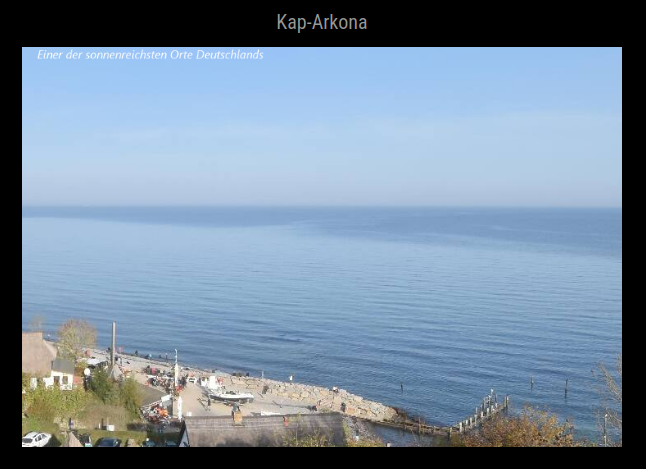
      In my MMM-EmbedURL module i provide a example of howto display a webpage that shows a webcam and position and size the embedded element to hide the header and footer of the website.

      There are other modules of other developers to embed websites, too. You way want to take a look at the 3rd-party-modules page of the MagicMirror documentation.
      There are listed a lot of modules (not all, but a lot) for different purposes.

      posted in Development
      wishmaster270W
      wishmaster270
    • RE: MMM-CalvinAndHobbes

      If you prefer scrolling from left-right than up-down animations are your friend as well:

      .MMM-CalvinAndHobbes .module-content {
        max-width: 300px;
        width: 300px;
        overflow: hidden;
      }
      
      #cahcomiccontent {
        width: 600px;
      }
      
      #cahcomiccontent {
        animation-direction: normal;
        animation-duration: 30s;
        animation-timing-function: steps(2, end);
        animation-name: slide;
        animation-iteration-count: infinite;
      }
      
      @keyframes slide {
        0% {
          margin-left: 0px;
        }
      
        50% {
          margin-left: -300px;
        }
      
        100% {
          margin-left: -600px;
        }
      }
      
      posted in Entertainment
      wishmaster270W
      wishmaster270
    • RE: MMM-CalvinAndHobbes

      @plainbroke
      Hi, i did not use the value but made a quick setup to figure out how to resize the image…

      Scrolling did not work in my browser (Firefox). I disabled the complete scrolling and sizing of the module with the config option “limitComicHeight”.
      My config looks like this:

                       {
      			module: 'MMM-CalvinAndHobbes',
      			position: 'top_center',
      			config: {
      				invertColors: false, // Optional, default: false
      				grayScale: false, // Optional, default: false
      				updateInterval: 1000 * 60 * 60 * 12, // 12 Hr
      				limitComicHeight: -1,
      			},
      		},
      

      Then you can define the height of the image in your custom.css with:

      #cahcomiccontent {
        height: 100px;
      }
      

      Edit: If you want to use sliding you can do that with CSS-Animations that should work in all modern browsers.
      Add something like the following to your custom.css will do the trick:

      .MMM-CalvinAndHobbes .module-content {
        max-height: 100px;
        height: 100px;
        overflow: hidden;
      }
      
      #cahcomiccontent {
        height: 300px;
      }
      
      #cahcomiccontent {
        animation-direction: normal;
        animation-duration: 5s;
        animation-timing-function: steps(2, end);
        animation-name: slide;
        animation-iteration-count: infinite;
      }
      
      @keyframes slide {
        0% {
          margin-top: 0px;
        }
      
        50% {
          margin-top: -100px;
        }
      
        100% {
          margin-top: -300px;
        }
      }
      

      Explanation:
      First we limit the height of the outer container “.module-content” to a specific height (100px) and hide all parts that are bigger (overflow: hidden).
      No we set the height of the inner container (the image with id cahcomiccontent) to a height that is bigger than the outer one ( height: 300px).
      In a third step we define a custom animation (@keyframes slide) and add it to the image container (the one with id cahcomiccontent).
      If you want to dive deeper to CSS animations i can suggest this page.

      posted in Entertainment
      wishmaster270W
      wishmaster270
    • RE: [MMM-TouchButton] A module to add clickable buttons to send notifications or run commands

      @Sierra0815 Great to hear that. I developed the module a view years ago to provide buttons to toggle some modules (like snowfall) and to realize user presence notifications via remote connection.

      posted in Utilities
      wishmaster270W
      wishmaster270
    • RE: More then one Grafana Chart

      @michaelJoosten
      I tried some things with Grafana the last days and developed a module called MMM-EmbedURL.

      It is able to display multiple Grafana panels in Iframes or Webviews. No matter what type of panel it can be displayed (Chart, Gauge, etc.).
      BUT: You will need to configure Grafana to allow anonymous access to the panels you like to embed. I added a HowTo of a possible Grafana configuration.
      All anonymous access will be mapped to one organization. If you configure two different organizations you can decide which panels should be visible without login and which ones require authentication.

      The module supports multi-instance. You can add it with different configuration to different positions.

      Edit: Depending of which module you use to realize the pages you may need to copy the module cause i.e. MMM-pages uses the module name as identifier. MMM-ProfileSwitcher instead uses “classes”.

      posted in Utilities
      wishmaster270W
      wishmaster270
    • RE: Using MMM-Widget for images

      @sdetweil Hi Sam, your right. Did avoid this in the past because it was a problem if someone copied the module to have multiple instances. As most of my modules provide multi instance now this shouldn’t be a problem anymore.

      I will check the css files of my modules and add prefix all CSS with MMM-ModuleName.

      posted in Utilities
      wishmaster270W
      wishmaster270
    • RE: Using MMM-Widget for images

      @N6NG I put a small section about styling to the readme.
      It is done via custom.css

      .embed .embeded {
          width: 800px;
          height: 400px;
      }
      
      posted in Utilities
      wishmaster270W
      wishmaster270
    • [MMM-TouchButton] A module to add clickable buttons to send notifications or run commands

      Description:

      If you control your mirror by mouse or with a touch panel and want to add buttons to send notifications or run commands this is your module.
      The module can be added at different locations with different configurations and supports to change the classes and/or change the icons based on the output/return code of the called commands since version 0.0.2.

      Screenshots:

      threeColoredButtons.png

      twoModules.png

      Download:

      Download
      [card:Tom-Hirschberger/MMM-TouchButton]


      Version 0.0.9

      • bumped version of jsonpath-plus library to 10.1.0

      Version 0.0.8

      • bumped version of jsonpath-plus library to 10.1.0

      Version 0.0.7

      • bumped jsonpath-plus library to version 10.0.1

      Version 0.0.6

      • classes now will be added to the title element, too
      • fixed string handling in conditions
      • it is possible to send notifications without payload now

      Version 0.0.5

      • fixed not running actions of Iconify icons
      • added support to validate the payload of notifications as condition
      • added support to parse the value of conditions with jsonpath-plus

      Version 0.0.4

      • added support of Iconify icons

      Version 0.0.3

      • fixed a bug which caused a black screen if no additional classes had been set
      • prefixed all CSS configuration with the modules main class

      Version 0.0.2

      • configure multiple instances of the module at different positions with different configuration
      • add additional classes to the elements
      • hide/show buttons based on the current active profile
      • change the icon or/and classes the the buttons based on the output and/or return code of the called commands

      Version 0.0.1

      • Add as much buttons as you like. Each with a unique css class and an Font Awesome (The build in version of MagicMirror, currently 4.7) icon assigned.
      • If a button gets pressed either a command (with arguments) can be executed on the command line or an notification (with payload) can be send.
      posted in Utilities
      wishmaster270W
      wishmaster270
    • RE: Using MMM-Widget for images

      @N6NG
      Sorry, there was a copy paste mistake in the example. The module name was wrong…

      {
        module: "MMM-EmbedURL",
        position: "top_center",
        header: "Embed-URL",
        config: {
          updateInterval: 120,
          embedElementType: "img", 
          embed: [
              "https://www.hamqsl.com/solarmuf.php" 
          ]
        },
      },
      
      posted in Utilities
      wishmaster270W
      wishmaster270
    • RE: Using MMM-Widget for images

      @N6NG Hi,

      I do not know the MMM-Widget module but you could use my MMM-EmbedURL for this job. Simply set the “embedElementType” to “img”.

      The config will look something like:

      {
        module: "MMM-MMM-EmbedURL",
        position: "top_center",
        header: "Embed-URL",
        config: {
          updateInterval: 120,
          embedElementType: "img", 
          embed: [
              "https://www.hamqsl.com/solarmuf.php" 
          ]
        },
      },
      
      posted in Utilities
      wishmaster270W
      wishmaster270
    • [MMM-EmbedURL] Embed one or multiple websites to the mirror

      Description:

      There are already a lot of modules out there that provide support to embed different other websites like MMM-EmbedYoutube or MMM-GrafanaChart. Most of them simply rebuild the URL they should display by some information the users configure and embed the content with i a IFrame.
      If the pages do not support embedding and the build in electron browser is used modules like MMM-WebView can be used to embed the content.

      BUT:
      I needed a module that allows me to embed multiple panels of my Grafana installation, maybe a Webcam that is visible on a webpage and my NodeRED dashboard at different positions and/or pages of my mirrors.
      Wherever possible i wanted to use IFrame but needed Webview for NodeRED.

      As there was module that supports embedding different sites with different parameters i created this one.

      The module supports multiple instances and is able to add css classes to the different instances. This way different styling for the instances is possible.
      As the module it self uses Flexbox-Layout styling is highly possible without fix tables.

      If you can not use webview (cause you do not use the electron browser) the Readme contains some information about extensions for Firefox and Chrome Browser that will remove the headers preventing the websites to be embedded and do an automatic cookie consent.

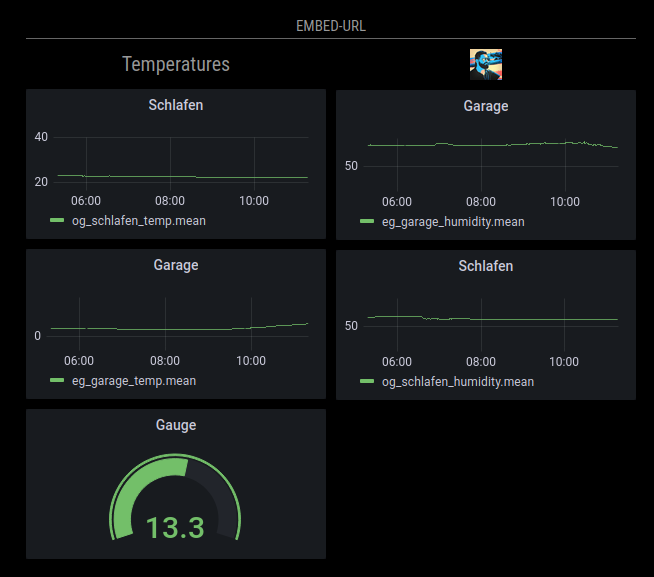
      Screenshots:

      SomeGrafanaPanels.png

      webcam.png

      Download:

      Download
      [card:Tom-Hirschberger/MMM-EmbedURL]


      Version 0.0.9

      • removed unused node_helper.js (thanks to @sdetweil)
      • added configs to make it possible to configure the module with MMM-Config (thanks to @sdetweil)

      Version 0.0.8

      • introducing the updateDomOnResume option. If you do not want the html elements to be recreated when the module is shown after it was hidden you can set this option to false now.

      Version 0.0.7

      • changed the way attributes get handled
      • introducing a new code style (thanks to @KristjanESPERANTO) and fixed all ESLint issues

      Version 0.0.6

      • add a new function to the module which periodically checks if the content of embedded img elements is decodeable. If not the src URL is removed and set again to reload the image. The feature can be activated by setting a interval in seconds in the configuration with the new option imgDecodeCheckInterval.
      • fixed all issues reported by the new automatic module scanning script developed by @KristjanESPERANTO

      Version 0.0.5

      • Added new option appendTimestamp which controls if a current timestamp is added to each URL. This is to avoid caching issues.

      Version 0.0.4

      • automatic refresh now can be disabled by setting updateInterval to 0 or lower
      • the default basicElementType changed from “span” to “div” as i.e. “webview” does not work properly with “span”

      Version 0.0.3

      • added support of Iconify icons
      • All CSS definitions are now prefixed with the main class of the module (MMM-EmbedURL)

      Version 0.0.2

      • Fixed attributes with value “0” being added without value in some cases

      Version 0.0.1

      • embed one or multiple other websites
      • choose how often the websites should be refreshed (all at once)
      • choose which websites should be displayed if different profiles are active
      • set custom attributes to the elements that include the websites
      • choose which HTML element should be used to embed the websites (normally iframe or webview)
      • add icons and/or titles before or after the embedded websites
      • icons can be either images or Font Awesome 4.7 icons
      • the order the icons/titles/elements will be added can be configured
      • different options can be configured for different websites by nesting embed elements
      posted in Utilities
      wishmaster270W
      wishmaster270
    • RE: Online Radio

      @tanvir586 Hi, bad to hear that.
      At the moment I do not have any other idea.

      posted in Entertainment
      wishmaster270W
      wishmaster270
    • RE: Online Radio

      @tanvir586

      It looks like you use the right version but only the path in the “customCommand” option was wrong. With the following config it should work:

      	{
      		module: "MMM-MplayerRadio",
      		header: "Radio",
      		position: "top_center",
      		config: {
      			stations: [
      				{
      					title: "Almubarak",
      					url: "https://relay.emasjidlive.uk/almubarakradio",
      					logo: "https://almubarakradio.com/wp-content/uploads/2021/04/logorectangle-1024x326.png",
      					customCommand: "./modules/MMM-MplayerRadio/scripts/streamlinkWrapper.bash",
      					customCommandArgs: ["10", "30", "###URL###"],
      				},
      			],
      		},
      	},
      
      posted in Entertainment
      wishmaster270W
      wishmaster270
    • RE: Online Radio

      @tanvir586 You installed to a different user. Your path will be

      /home/tanvir/MagicMirror/modules/MMM-MplayerRadio/scripts/streamlinkWrapper.bash
      
      posted in Entertainment
      wishmaster270W
      wishmaster270
    • RE: Online Radio

      @tanvir586 Are you sure you are running the latest version of the module?
      The error says that the wrapper script I added yesterday does not exist.
      Can you please check the script folder and check if the file is executable?

      posted in Entertainment
      wishmaster270W
      wishmaster270
    • RE: Online Radio

      @tanvir586 Sorry, i am not at my pc at the moment. You only need the first customCommand line. The one with vlc is wrong.
      You can try to run the run the command directly on the shell and see what happens.

      /home/pi/MagicMirror/modules/MMM-MplayerRadio/scripts/streamlinkWrapper.bash 10 30 https://relay.emasjidlive.uk/almubarakradio
      

      You can end it by pressing CRTL+c

      posted in Entertainment
      wishmaster270W
      wishmaster270
    • RE: Online Radio

      @tanvir586
      Normal installation is the right thing. If you got sound with the new configuration everything is fine.
      Hope the disconnect will be recognized correctly and your stream restarts now.

      posted in Entertainment
      wishmaster270W
      wishmaster270
    • RE: Online Radio

      @tanvir586
      I release a new version of MMM-MplayerRadio (0.0.10) a few minutes ago which contains a new script called “streamlinkWrapper.bash” script. This script uses the streamlink tool to wrap the stream and restarts it if the connection gets lost.
      You will find a example configuration in the examples directory for streamlinkWrapper which contains the configuration needed for your case.

      Make sure to install streamlink:

      sudo apt -y update && sudo apt -y install streamlink
      
      posted in Entertainment
      wishmaster270W
      wishmaster270
    • RE: Online Radio

      @tanvir586 I will try to dig deeper the next days but I can not promise that I will have the time.
      Maybe I can write a simple wrapper for vlc which ends the process when the streams stops or is unreachable and tries to start the process every few seconds.
      Did not find any better solution til now.

      posted in Entertainment
      wishmaster270W
      wishmaster270
    • 1
    • 2
    • 9
    • 10
    • 11
    • 12
    • 13
    • 16
    • 17
    • 11 / 17