MagicMirror Forum
    • Recent
    • Tags
    • Unsolved
    • Solved
    • MagicMirror² Repository
    • Documentation
    • 3rd-Party-Modules
    • Donate
    • Discord
    • Register
    • Login
    1. Home
    2. wishmaster270
    3. Posts
    A New Chapter for MagicMirror: The Community Takes the Lead
    Read the statement by Michael Teeuw here.
    Offline
    • Profile
    • Following 0
    • Followers 6
    • Topics 16
    • Posts 338
    • Groups 2

    Posts

    Recent Best Controversial
    • [MMM-ValuesByNotification] Display the payloads of notifications with titles and icons

      Description:

      Need a MagicMirror² module which is able to display information which is send by a other module like MMM-MQTTbridge or MMM-CommandToNotification?
      The information is provided as a simple message or as an JSON-Object?
      You want to re-format the message before displaying it or want to select single values within the JSON-Object?
      You need more than one instance and do want to style the instances different?
      Do you want to style the elements or change displayed icons based on thresholds?
      Do you want some elements to only be visible if a certain profile is active?

      Then this is the module you need!

      BUT i think i created a monster. The configuration can be very tricky!

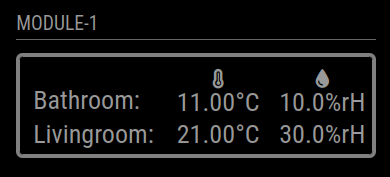
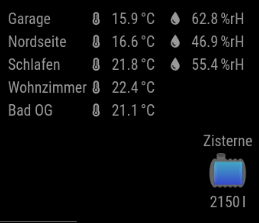
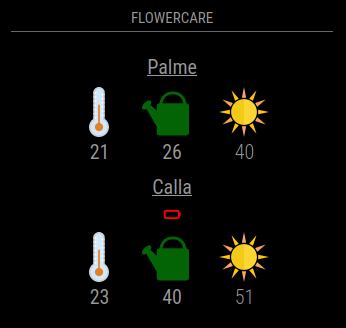
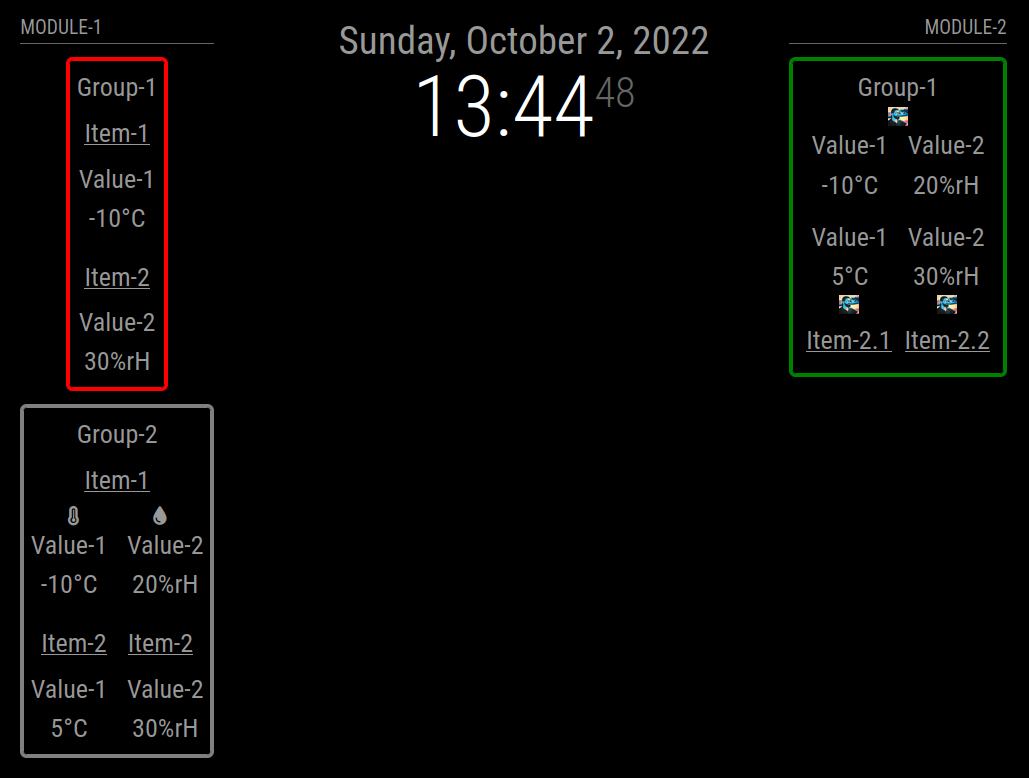
      Screenshots:
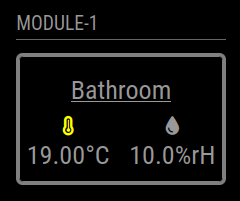
      oneModuleOnlyBathroomWithValueIconsThresholdslt20.png

      oneModuleBathroomAndLivingroomOnlyOnetimeIconsAltStyle.png

      twoGroupsWithEnvSensorsAndWatertank.png

      flowercare.png

      twoModulesWarning.png

      Download:

      Download
      [card:Tom-Hirschberger/MMM-ValuesByNotification]


      Version 0.1.6

      • bumped version of jsonpath-plus library to 10.3.0

      Version 0.1.5

      • bumped version of jsonpath-plus library to 10.1.0

      Version 0.1.4

      • it is possible to set the reuseCount on group level now

      Version 0.1.3

      • added a postinstall script which creates a copy of the imported JSONPath library cause MagicMirror only imports files with ending js and not cjs to fix JSONPath

      Version 0.1.2

      • bumped jsonpath-plus library to version 10.0.1
      • do not log every received notification anymore
      • be more verbose if debug is enabled and the value format fails

      Version 0.1.1

      • Reverted the jsonpath-plus dependency upgrade (used version is 5.1.0 now) cause version 7.2.0 only worked with the newest MagicMirror version (2.24.0)
      • fixed a bug which caused empty values to be converted to html and causing a exception in this process
      • introduce a debug config flag which causes some more information being printed to console if enabled

      Version 0.1.0

      • Each time a value is reused the values html elements get two classes added. The one configured with the new config option reusedClass (default: “reused”) and the config option prefixed by a “-” and the count of reuses.
      • Updated the jsonpath-plus dependency to version 7.2.0. As this required a change to the import of the module this is a breaking change.

      Version 0.0.10

      • Introducing a feature to define own functions to transform the values (valueTransformers). Added a example to values documentation
      • Changed the way titles, values and units are converted the html elements
      • Added a new option called unitSpace to prefix the unit with a non-breakable space

      Special thanks to @BKeyport for contribution

      Version 0.0.9

      • fixed a bug which caused selected JSON values with value 0 being interpreted as not existing and replaced by naValue

      Version 0.0.8

      • fixed a bug which caused values not being formatted if values before format are not of type String
      • fixed a bug which caused newline replacement called even if no valueFormat was set

      Version 0.0.7

      • added new option valueNaPositions which defines the positions of title, value, unit and icon of the value elements if naValue is used
      • added support to override valuePositions by threshold configurations (will override valueNaPositions, too!)

      Version 0.0.6

      • only the first element of a jsonpath result is used now
      • if html is added as value which contains more than one html element they are wrapped in a span now

      Version 0.0.5

      • added support of Iconify icons
      • all CSS definitions are now prefixed with the modules main class (MMM-ValuesByNotification)

      Version 0.0.4

      • fixed handling of new line characters in notifications; new lines will be replaced now before handling the values (default is a single space, see newlineReplacement option)
      • fixed classes not bubbling up correctly
      • added a flowercare example

      Version 0.0.3

      • if searching the value with “jsonpath” fails the “naValue” will be set now
      • added a new option “formatNaValue” which controls if the naValue should be formatted as the regular are

      Version 0.0.2

      • Only classes which are added by thresholds are now set to higher (wrapper) elements if “letClassesBubbleUp” is set to “true”

      Version 0.0.1

      • Display values received as payload of notifications either as String or JSON Object
      • Select single values with Jsonpath within the JSON objects
      • Re-format the values with javascript functions (see valueFormat option)
      • Group the values in items and groups and add titles and/or icons to the wrappers
      • Re-order the elements in the wrappers based on position definition strings
      • Filter elements based on the current active profile (MMM-ProfileSwitcher)
      • Add classes or change icons based on thresholds reached by the values
      posted in Utilities
      wishmaster270W
      wishmaster270
    • [MMM-CommandToNotification] Run scripts and send the outputs as configurable notifications peridocally

      Description:

      Ever wanted to run scripts periodically and provide their output as notifications?
      Want to run the scripts within different time periods?

      Then MMM-CommandToNotification is your module!

      You can define a base rhythm the module iterates all scripts.
      You can specify skips per script to run scripts only each (skips+1) iterations.
      You can send the output as payload of one or multiple notifications.

      You may want to use my MMM-ValuesByNotification to display the payload.

      Download:

      Download
      [card: Tom-Hirschberger/MMM-CommandToNotification]


      Version 0.0.8

      • added a script called venvWrapper.py which can be used to create a virtual Python environment, install the dependencies of Python scripts to it and call the scripts with the wrapper in the virtual environment
      • the htu21 script now uses the CircuitPython libraries of Adafruit now

      Version 0.0.7

      • scripts in the scripts directory now can be called without adding a additional ./ as prefix, now
      • the module first checks if scripts do exist and if they are executable before trying to call them. If the file is missing or permissions are not set correctly the module prints a log message and skips the command now
      • reduced the console output drastically. Use debug: true config option to re-enable the console output. Errors are printed to console without the debug flag as before

      Version 0.0.6

      • add a debug flag to configuration which enables/disables some console messages
      • added a new dummy example script which simply outputs the content of a text file
      • fixed all issues reported by the new automatic module scanning script developed by @KristjanESPERANTO

      Version 0.0.5

      • Fixed a bug which caused the module to not return output for any command if one of the scripts closes with no output

      Version 0.0.4

      • added sync option to make it possible to configure if the commands should be run one after another or if they should be started as fast as possible
      • added delayNext option which makes it possible to wait a configurable amount of milliseconds before the next command is processed (i.e. if you want to make 10 API calls but the API only supports one connection each second)

      Version 0.0.3

      • fixed the additional parameters like “timeout” being ignored
      • the scripts now will be called with working directory set to “scripts” directory
      • added a new option to send the notifications with custom payloads instead of the output of the script

      Version 0.0.2

      • Added new “conditions” option which causes notifications only be send if the scripts exits with a specified return code and/or the output contains a specified string
      • The flowercare-mm.bash script now returns a JSON instead of JSON5 object
      • Added a script to watch files for changes
      • Added more documentation of the scripts

      Version 0.0.1

      • Specify a period in which the module calls all scripts
      • Configure scripts (with their arguments) to be called and the notifications which the outputs of the scripts should be send to
      • Configure a skip count per script if you do not want the script to be called each iteration
      • Configure a timeout to stop the call of a script if it does not respond within a given time
      • Scripts to query the temperature and humidity information of BME280, DHT11, DHT22, DS18B20 and HTU21 are included
      • A script to query the temperature, moisture, light, conductivity and battery level of Miflora flowercare sensors is included
      • Two scripts to generate either a single random integer or a JSON object which contains a integer and float value are included (for debugging purpose)
      posted in Utilities
      wishmaster270W
      wishmaster270
    • RE: BME280 sensor with esp 8266

      Hi,

      i integrated some examples into my MMM-Temperature module (GitHub). There are serveral ones using an BME280 sensor connected to an ESP8266 or ESP32 sending the data either via plain TCP or MQTT.

      posted in Utilities
      wishmaster270W
      wishmaster270
    • RE: MMM-MQTTbridge

      @Cr4z33 Hi, I am working on a module which will be called MMM-ValuesByNotification (https://github.com/Tom-Hirschberger/MMM-ValuesByNotification) and will perfectly fit your needs.
      If the payload of the notification is a valid json string the values can be selected with the JsonPath syntax.

      If needed the values can be reformatted.

      I am using it to display the temperature and humidity of different sensors in my house and the level of my watertank.

      Screenshot

      The module is functional already but not documented yet. The configuration can be a little bit tricky but I am planning to add a lot of examples to the readme in the next weeks.

      posted in System
      wishmaster270W
      wishmaster270
    • RE: PIR sensor to turn on LED strip

      @Egnos Hi, as the picture says they use the 5V power source of the led strip to power the Pi, too.
      Instead of powering the pi via USB they use the 5V GPIO pin.
      If you want to power the Pi via USB instead be sure to connect the Ground of the strip with ground of the pi.

      posted in General Discussion
      wishmaster270W
      wishmaster270
    • RE: PIR sensor to turn on LED strip

      Hi,

      I would suggest the solution of @sdetweil as well.

      An other, but much more complicate version would be to use my PythonLedControl and control it with the MMM-MQTTbridge module.

      posted in General Discussion
      wishmaster270W
      wishmaster270
    • RE: electron-rebuild and MagicMirror v2.18 (and more)

      @sdetweil Hi, i did a fresh install and added the module manually. I do not use MMM-PIR-Sensor but some other users had the same problem with MMM-Gestures (which i do not use either). Did a clean install of MagicMirror on a development Pi with your script and added modules manually.

      posted in Development
      wishmaster270W
      wishmaster270
    • RE: electron-rebuild and MagicMirror v2.18 (and more)

      @sdetweil

      I generally suggest the same as bugsoutnet…The best way would be to use one of the other PIR modules.
      But i also found an solution which worked in my setup. I used the sdetweil script to install the current version of MagicMirror.
      In the module directory of MMM-PIR-Sensor you need to delete package-lock.json and the node_modules folder:

      rm -rf ~/MagicMirror/modules/MMM-PIR-Sensor/node_modules
      rm -rf ~/MagicMirror/modules/MMM-PIR-Sensor/package-lock.json
      

      Then you need to replace the whole content of package.json file with the following one that uses the MagicMirror-rebuild library of bugsounet…

      {
        "name": "Magic-Mirror-Module-PIR-Sensor",
        "version": "1.1.0",
        "description": "PIR motion sensor module for the Magic Mirror.",
        "repository": {
          "type": "git",
          "url": "git+https://github.com/paviro/MMM-PIR-Sensor"
        },
        "keywords": [
          "magic mirror",
          "smart mirror",
          "PIR-Sensor",
          "module",
          "motion"
        ],
        "author": "Paul-Vincent Roll",
        "contributors": "https://github.com/paviro/MMM-PIR-Sensor/graphs/contributors",
        "license": "MIT",
        "bugs": {
          "url": "https://github.com/paviro/MMM-PIR-Sensor/issues"
        },
        "homepage": "https://github.com/paviro/MMM-PIR-Sensor#readme",
        "scripts": {
      	  "postinstall": "node_modules/.bin/MagicMirror-rebuild"
        },
        "dependencies": {
          "onoff": "latest",
          "magicmirror-rebuild": "latest"
        }
      }
      

      Then you need to run npm install

      npm install
      
      posted in Development
      wishmaster270W
      wishmaster270
    • RE: Any modules that could display a livestream

      @tanvir586
      Hi,

      i use MMM-WebView (Repository) to display my NodeRed-Dashboard. Did a quick check and it looks like the Webpage you want to show on your mirror gets displayed.
      Maybe you want to give it a try.
      Make sure you set the electron options as suggested in the Readme.

      I use this configuration:

              electronOptions: {
      		webPreferences: {
      			webSecurity: false,
      			webviewTag: true,
      		}
      	},
      
                     {
      			module: 'MMM-WebView',
      			position: 'top_center',
      			config: {
      			  url: 'https://www.bbc.co.uk/iplayer/live/bbcone',
      			  width: '500px',
      			  height: '1000px',
      			},
      		},
      

      Edit: Checked the Mega-Link as well and it works too.

      posted in Requests
      wishmaster270W
      wishmaster270
    • RE: DHT Sensor Modules

      @bkeyport My favorites are BME280 and Htu21 because they are fast and reliable. If a waterproof sensor is needed i only know the DS18B20. My module provides scripts to read the values of all of them.

      posted in Troubleshooting
      wishmaster270W
      wishmaster270
    • 1
    • 2
    • 23
    • 24
    • 25
    • 26
    • 27
    • 33
    • 34
    • 25 / 34