MagicMirror Forum
    • Recent
    • Tags
    • Unsolved
    • Solved
    • MagicMirror² Repository
    • Documentation
    • 3rd-Party-Modules
    • Donate
    • Discord
    • Register
    • Login
    A New Chapter for MagicMirror: The Community Takes the Lead
    Read the statement by Michael Teeuw here.

    Volvo on Call

    Scheduled Pinned Locked Moved Solved Troubleshooting
    34 Posts 4 Posters 12.2k Views 4 Watching
    Loading More Posts
    • Oldest to Newest
    • Newest to Oldest
    • Most Votes
    Reply
    • Reply as topic
    Log in to reply
    This topic has been deleted. Only users with topic management privileges can see it.
    • JerryPJ Offline
      JerryP
      last edited by

      @mz-ber
      What is your config look like?

      MZ-BERM 1 Reply Last reply Reply Quote 0
      • MZ-BERM Offline
        MZ-BER @JerryP
        last edited by MZ-BER

        Hey @jerryp - I’m getting the output as soon as I write voc list. So that seems to work.

        f60f9ae1-a829-42ba-8a4d-fc17b43b10c6-image.png

        My config:

        {
          module: "MMM-VolvoOnCall",
          position: "top_right",
          config: {
        	scanInterval: 1000 * 60 * 30,
                units: "metric", 
                timestampFormat: "MMM D. HH:mm:ss",
        	durationFormat: "HH:mm",
                }
        },
        

        @JerryP Can you please share your config? I’m not sure what I’m doing wrong.

        JerryPJ 1 Reply Last reply Reply Quote 0
        • JerryPJ Offline
          JerryP @MZ-BER
          last edited by JerryP

          @mz-ber
          yes but now you miss the data in the config

          			module: "MMM-VolvoOnCall",
          			disabled: false, //false, true
          			position: "bottom_left",
          			config: {
          			units: "metric", 
          			mapConfig: {
          				apiKey: "",  // Your Google Map API Key
          			display: { // You can control which section will be displayed or not.
          				info: false,
          				position: false,
          				status: true,
          				notice: true,
          				trip: false,
          		}}},
          
          MZ-BERM 1 Reply Last reply Reply Quote 0
          • MZ-BERM Offline
            MZ-BER @JerryP
            last edited by

            @jerryp Okay, do I need an api key from google maps?

            JerryPJ 1 Reply Last reply Reply Quote 0
            • JerryPJ Offline
              JerryP @MZ-BER
              last edited by

              @mz-ber
              yes i’f you use the map function. I have add the api and it’s working fine

              MZ-BERM 1 Reply Last reply Reply Quote 0
              • MZ-BERM Offline
                MZ-BER @JerryP
                last edited by

                @jerryp is it working for you without the map function? I’m actually not interested in it.

                JerryPJ 1 Reply Last reply Reply Quote 0
                • JerryPJ Offline
                  JerryP @MZ-BER
                  last edited by

                  @mz-ber
                  Yes but i have put the api key in the config. I dont have try it whitout the key

                  MZ-BERM 1 Reply Last reply Reply Quote 0
                  • MZ-BERM Offline
                    MZ-BER @JerryP
                    last edited by

                    @jerryp Would you do me a favor and test it without the key or a wrong key? Just wondering if that is the issue

                    JerryPJ 1 Reply Last reply Reply Quote 0
                    • JerryPJ Offline
                      JerryP @MZ-BER
                      last edited by

                      @mz-ber
                      yes it’s working like above whit out api key

                      MZ-BERM 1 Reply Last reply Reply Quote 0
                      • MZ-BERM Offline
                        MZ-BER @JerryP
                        last edited by

                        @jerryp Hi Jerry - thank you for checking! I still stuck and I dont know where I’m doing something wrong. I dont want to give up because I know it is still working for you.

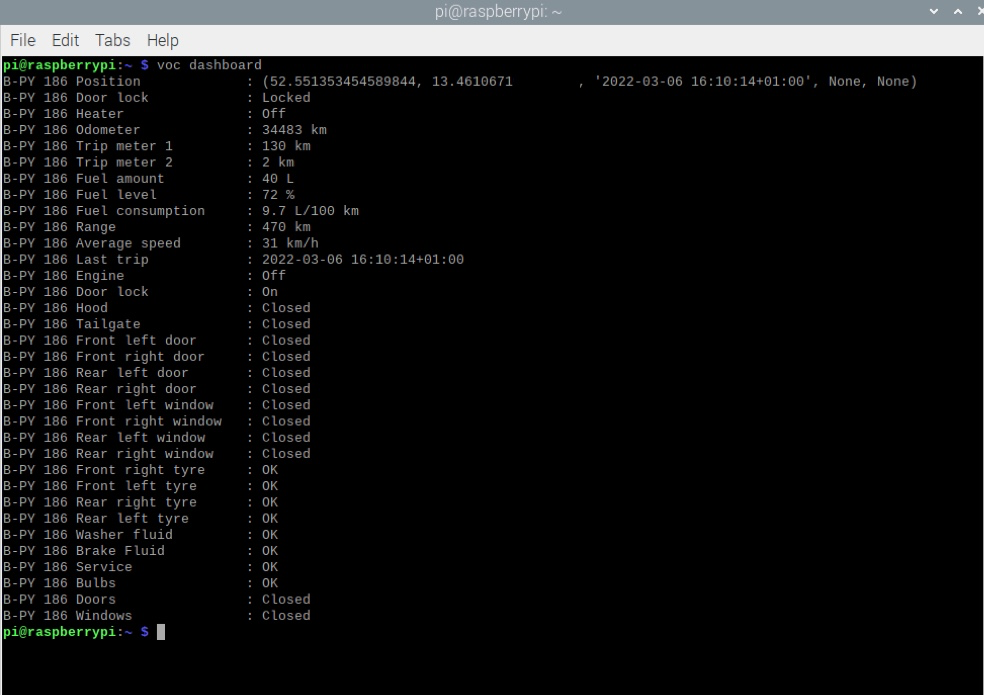
                        The weird thing is that the API works perfect. I can pull all informations from my car via voc dashborad.
                        Only the module is telling me: No vehicle found
                        67c14e9f-cf68-4f2a-a410-4ec4b5289826-image.png

                        That is my current config:

                        {
                        	  module: "MMM-VolvoOnCall",
                        	  disabled: false,
                        	  debug: true,
                        	  position: "top_left",
                        	  config: {
                        		scanInterval: 1000 * 60 * 30,
                        		units: "metric", 
                        		timestampFormat: "MMM D. HH:mm:ss",
                        		durationFormat: "HH:mm",
                        		display: { 
                        					info: true,
                        					position: true,
                        					status: true,
                        					notice: true,
                        					trip: true,
                        					}
                        				}
                        			},
                        

                        It is setup correctly I guess.

                        I’m wondering where in this node_helper.js is the voc pulled from? I’m not good in JavaScript :-(

                        const exec = require('child_process').exec
                        const spawn = require('child_process').spawn
                        const moment = require("moment")
                        
                        var NodeHelper = require("node_helper")
                        
                        module.exports = NodeHelper.create({
                          start: function() {
                            this.config = null
                            this.carInfo = []
                          },
                        
                          socketNotificationReceived: function(noti, payload) {
                            if (noti == "SCAN") {
                              this.scan()
                              this.trip()
                            }
                            if (noti == "INIT") {
                              this.config = payload
                              this.list()
                            }
                          },
                        
                          list: function() {
                            exec("voc list", (e, sdo, sde)=>{
                              if (e) {
                                console.log("[VOC] ERROR(>list):", e.toString())
                              } else {
                                this.listResult(sdo)
                              }
                            })
                          },
                        
                          listResult: function(output) {
                            var re = /^([^ ]+)\s\(([^\)]+)\)\s([^ ]+)$/gm
                            var matches = null
                            var result = []
                            while (matches = re.exec(output)) {
                              this.carInfo.push({
                                id: matches[1],
                                type: matches[2],
                                vin: matches[3]
                              })
                            }
                            if (this.carInfo.length > 0) {
                              this.sendSocketNotification("INITIALIZED", this.carInfo)
                            } else {
                              console.log("[VOC] ERROR: No vehicle found. Check your account. Module stopped.")
                            }
                        
                          },
                        
                        
                          scan: function() {
                            exec("voc dashboard", (e, sdo, sde)=> {
                              if (e) {
                                console.log("[VOC] ERROR:", e.toString())
                              } else {
                                this.scanResult(sdo)
                                //this.sendSocketNotification("RESULT", sdo)
                              }
                            })
                          },
                        
                          scanResult: function(output) {
                            var carIndex = this.carInfo.map((value, index, array)=>{
                              return value.id
                            })
                            var result = []
                            var re = /^([^\s]+)\s([\w\s]+)\:\s(.+)$/gm
                            var matches = null
                            while (matches = re.exec(output)) {
                              var idx = carIndex.indexOf(matches[1])
                              var key = matches[2].trim()
                              var value = this.reformValue(key, matches[3].trim())
                              if (typeof result[idx] == 'undefined') {
                                result[idx] = []
                              }
                              result[idx].push({
                                id: matches[1],
                                key: key,
                                value: value
                              })
                            }
                        
                            if (Object.keys(result).length == 0) {
                              console.log("[VOC] ERROR: No information could be retrieved.")
                              console.log(output)
                            } else {
                              this.sendSocketNotification("SCAN_RESULT", result)
                            }
                          },
                        
                          reformValue: function(key, value) {
                            if (key == "Position") {
                              var re = /([0-9\.\-]+)\,\s([0-9\.\-]+),\s\'([^\']+)\'/
                              var matches = re.exec(value)
                              if (matches) {
                                return {
                                  lat: matches[1],
                                  long: matches[2],
                                  time: moment(matches[3]).format("X")
                                }
                              } else {
                                return null
                              }
                            }
                            if (key == "Fuel level") {
                              return value.replace(/\s/, "")
                            }
                            if (key == "Fuel amount" || key == "Range" || key == "Odometer" || key == "Average speed") {
                              return value.replace(/[^0-9\.]+/g, '')
                            }
                            if (key == "Fuel consumption") {
                              var re = /^([0-9\.]+)/g
                              var matches = re.exec(value)
                              if (matches) {
                                return matches[1]
                              }
                            }
                        
                            return value
                          },
                        
                          trip: function() {
                            for(var i = 0; i < this.carInfo.length; i++) {
                              try {
                                carId = this.carInfo[i].id
                                var sdo = ""
                                var result = spawn('voc', [
                                  '-i', carId,
                                  '--json', 'trips'
                                ])
                                result.stdout.on('data', (data)=>{
                                  sdo += data
                                })
                                result.on('close', (killcode)=>{
                                  this.tripResult(carId, JSON.parse(sdo))
                                })
                              } catch (e) {
                                console.log("[VOC] ERROR:", e.toString())
                              }
                            }
                          },
                        
                          tripResult: function(carId, obj) {
                            if (Array.isArray(obj) && obj.length > 0) {
                              var trip = obj[0]
                              var detail = trip.tripDetails[0]
                              var ret = {
                                title: trip.name,
                                category: trip.category,
                                note: trip.userNotes,
                                fuelConsumption : detail.fuelConsumption,
                                electricalConsumption : detail.electricalConsumption,
                                electricalRegeneration: detail.electricalRegeneration,
                                distance: detail.distance,
                                startTime: moment(detail.startTime).format("X"),
                                startPosition: detail.startPosition,
                                endTime: moment(detail.endTime).format("X"),
                                endPosition: detail.endPosition,
                              }
                              this.sendSocketNotification("TRIP_RESULT", {id:carId, data:ret})
                            } else {
                              return
                            }
                          }
                        
                        })
                        
                        S 1 Reply Last reply Reply Quote 0
                        • S Do not disturb
                          sdetweil @MZ-BER
                          last edited by

                          @mz-ber

                          list: function() {
                              exec("voc list", (e, sdo, sde)=>{
                                if (e) {
                                  console.log("[VOC] ERROR(>list):", e.toString())
                                } else {
                                  this.listResult(sdo)
                                }
                              })
                            },
                          

                          then the good results are parsed in listResult()

                          Sam

                          How to add modules

                          learning how to use browser developers window for css changes

                          MZ-BERM 1 Reply Last reply Reply Quote 0
                          • MZ-BERM Offline
                            MZ-BER @sdetweil
                            last edited by

                            @sdetweil Thank you Sam! Can you please tell me what the letters in the bracket mean? (e, sdo, sde)

                            MZ-BERM 1 Reply Last reply Reply Quote 0
                            • MZ-BERM Offline
                              MZ-BER @MZ-BER
                              last edited by MZ-BER

                              @mz-ber Oh I guess I understand. If the function is not getting the right details than -> e if everything is okay than -> sdo

                              S 1 Reply Last reply Reply Quote 0
                              • S Do not disturb
                                sdetweil @MZ-BER
                                last edited by sdetweil

                                @mz-ber exec(“voc list”, (e, sdo, sde)=

                                execs the command “voc list”
                                and the exec function returns
                                error (e)
                                stdout (sdo)
                                and stderr(sde)

                                so if no error (e is null)

                                it sends the command output to the listResults function

                                Sam

                                How to add modules

                                learning how to use browser developers window for css changes

                                MZ-BERM 1 Reply Last reply Reply Quote 0
                                • MZ-BERM Offline
                                  MZ-BER @sdetweil
                                  last edited by

                                  @sdetweil Thank you for the explanation. Is the function executing voc list in the terminal? If I’m doing manually voc list I’m getting a result.

                                  Is there a way to see what the script is getting back in detail?

                                  Again, thank you very much!

                                  S 1 Reply Last reply Reply Quote 0
                                  • S Do not disturb
                                    sdetweil @MZ-BER
                                    last edited by

                                    @mz-ber yes executing just like on console

                                    nothing built in to show results.

                                    but you could add a

                                    console.log(sdo)

                                    before the call to listResults()

                                    and see it where u start mm
                                    npm start

                                    it should be the same outout

                                    Sam

                                    How to add modules

                                    learning how to use browser developers window for css changes

                                    MZ-BERM 1 Reply Last reply Reply Quote 0
                                    • MZ-BERM Offline
                                      MZ-BER @sdetweil
                                      last edited by MZ-BER

                                      @sdetweil Alright, I added the console.log before the call listResult() and it is getting the details from my car. I feel sooo close to get this running but I dont know where it is stuck. :anguished_face:

                                      91d24ae5-cc19-4460-8dca-fae88fc947e2-image.png

                                      Is maybe the regex search not getting the details viewed?

                                      listResult: function(output) {
                                          var re = /^([^ ]+)\s\(([^\)]+)\)\s([^ ]+)$/gm
                                      
                                      S 1 Reply Last reply Reply Quote 0
                                      • S Do not disturb
                                        sdetweil @MZ-BER
                                        last edited by

                                        @mz-ber so the regular expression isn’t finding your text

                                        /^([^ ]+)\s\(([^\)]+)\)\s([^ ]+)$/gm
                                        

                                        I use this for building and testing rejects

                                        https://regex101.com/

                                        Sam

                                        How to add modules

                                        learning how to use browser developers window for css changes

                                        MZ-BERM 1 Reply Last reply Reply Quote 0
                                        • MZ-BERM Offline
                                          MZ-BER @sdetweil
                                          last edited by

                                          @sdetweil Yes, I also checked that with regex101. Can I just parse in the details I have?

                                          listResult: function(output) {
                                              var re = B-PY 186 (V90) XVASS123345
                                          
                                          S 2 Replies Last reply Reply Quote 0
                                          • S Do not disturb
                                            sdetweil @MZ-BER
                                            last edited by

                                            @mz-ber the regex returns an array of matched things

                                            Sam

                                            How to add modules

                                            learning how to use browser developers window for css changes

                                            1 Reply Last reply Reply Quote 0

                                            Hello! It looks like you're interested in this conversation, but you don't have an account yet.

                                            Getting fed up of having to scroll through the same posts each visit? When you register for an account, you'll always come back to exactly where you were before, and choose to be notified of new replies (either via email, or push notification). You'll also be able to save bookmarks and upvote posts to show your appreciation to other community members.

                                            With your input, this post could be even better 💗

                                            Register Login

                                            • 1
                                            • 2
                                            • 1 / 2
                                            • First post
                                              Last post
                                            Enjoying MagicMirror? Please consider a donation!
                                            MagicMirror created by Michael Teeuw.
                                            Forum managed by Sam, technical setup by Karsten.
                                            This forum is using NodeBB as its core | Contributors
                                            Contact | Privacy Policy