Read the statement by Michael Teeuw here.
RPi 3B+ with 'Bullseye' can't rotate screen?
-
I have a RPi 3B+ with Buster on it, and it works ok, though I can’t have screencast and remote installed at the same time. So I wanted to make a new install, and I downloaded the RaspberryOS Bullseye 32bit.
With that I can run the two modules together, but now I can’t rotate the screen to portrait.
The old version was just a question of adding display_hdmi_rotate=1 to the /boot/config.txt, but this doesn’t work with bullseye.
So how do I rotate the screen on the Bullseye?
I tried doing it from inside ‘X’ by using the Screen Configuration app, but when I do that (rotation=left), the screen goes black, and nothing happens, I can’t press the ‘verify’ button, so if I reboot it, it is still in landscape mode.
What can I do? -
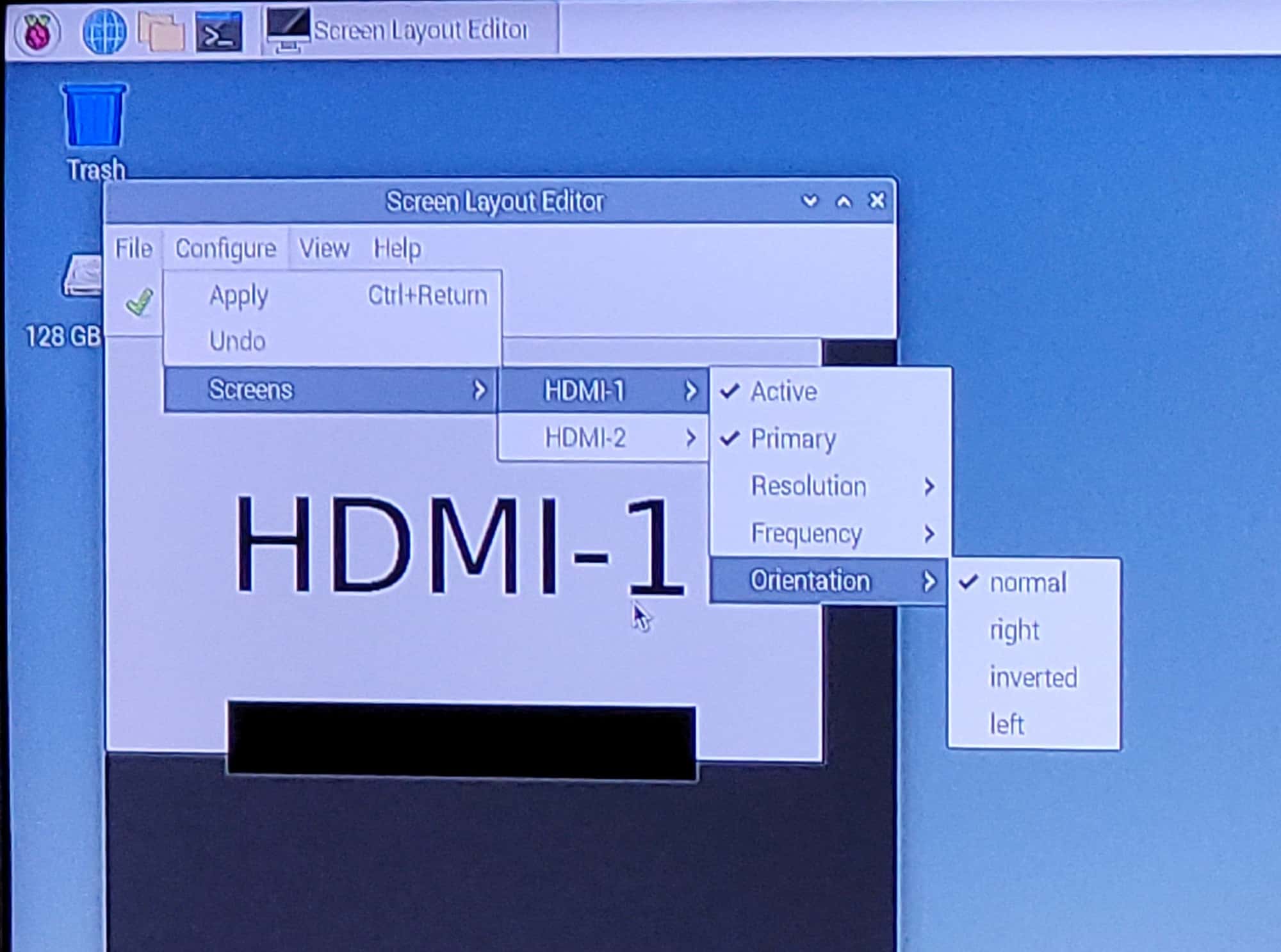
@fribse on my pi4 w bullets I see this config setting app
left menu, preferences, screen configuration
configure menu
-
@sdetweil I’ve never seen that on a 3, FWIW.
-
-
@fribse I do not know. maybe a bad HDMI cable or a bad adapter if using HDMI to DVI, or a bad monitor?
all my monitors and TV’s work in any orientation.
-
@fribse and is work on rpi3 to 😉
-
@fribse I don’t actually have a 3 with Bullseye, however, My next step would be to try the other GL drivers through
raspiconfig. -
@sdetweil That would be odd, as it works with previous versions of Raspberry Pi OS?
-
@BKeyport That is worth a try, didn’t think of that!
-
@fribse Hmm, can’t make this work. I can get it to work on a RPi4, but not on a RPi3 with the ‘Screenconfiguration’ app.
It’s really annoying, I would like to have screencast and remote-control modules enabled, so that Home Assistant can integrate to it, through the remote-control module, but that doesn’t work on Buster (the integration fails to set up), it fails because of some weird problem in the integration combined with the screencast, which the author can’t reproduce, which is very odd, as I can show it every time.
I can get the integration to work on Bullseye together with the remote-control module and the screencast, but not on a RPi3, only on a RPi4, and even rotate the screen, but I don’t want to place a very hot and overly powerfull RPi4 behind the magicmirror.
Damned if I do, and damned if I don’t.
-
@fribse Ok, so now I’ve gotten a second RPi3b+. Apparently the monitor doesn’t like the way that Bullseye rotate the screen (by using the ‘Screen orientation’ in the GUI).
So how do I rotate the screen in ‘the old way’ which works fine on the monitor.
My guess is that it’s modifying the refresh rate beyond the capabilities of the monitor.
It’s usually running on 60Hz, and I tried changing it to 50Hz, but that didn’t change anything.So what do I do now? I would really like to use the bullseye, as I can’t get Home Assistant to control the mirror if I have screencast installed on the mirror under Buster.
-
@fribse I use a RPi3 B+ and Bullseye and I do the rotate in the boot/config.txt and it works ok for me.
-
I have no solution for your problem but if you use the WebUI to change screen settings in bullseye the changes are made here:
pi@pi4:~ $ cat /usr/share/dispsetup.sh
#!/bin/sh
if ! grep -q 'Raspberry Pi' /proc/device-tree/model || (grep -q okay /proc/device-tree/soc/v3d@7ec00000/status 2> /dev/null || grep -q okay /proc/device-tree/soc/firmwarekms@7e600000/status 2> /dev/null || grep -q okay /proc/device-tree/v3dbus/v3d@7ec04000/status 2> /dev/null) ; then
if xrandr --output HDMI-1 --primary --mode 1920x1080 --rate 60.000 --pos 0x0 --rotate normal --output HDMI-2 --off --dryrun ; then
xrandr --output HDMI-1 --primary --mode 1920x1080 --rate 60.000 --pos 0x0 --rotate normal --output HDMI-2 --off
fi
fi
if [ -e /usr/share/tssetup.sh ] ; then
. /usr/share/tssetup.sh
fi
exit 0
So you could play with the
xrandrcommand, may this helps … -
@N6NG Ok, and what are you writing in the config for it to work? That would be a big help for me :-)
-
@fribse it’s not in the mirror config. you have to change the rasperrypi’s actual configuration
-
@kayakbabe Yes, I’m referring to /boot/config.txt, not Magicmirror/config/config.yaml :-)
-
@fribse It is in the boot/config.txt file itself. Not in the MagicMirror/config/config.js file.
Just cd /boot and sudo nano config.txt and either find the display_rotate=0 and change it to display_rotate=1
or add the line display_rotate=1 I added it under the #config_hdmi_boost=4 line but I suspect you could add it just about anywhere…
Dennis N6NG -
@karsten13 said in RPi 3B+ with 'Bullseye' can't rotate screen?:
/usr/share/dispsetup.sh
The created file looks different in my case.
#!/bin/sh
if ! raspi-config nonint is_pi || raspi-config nonint is_kms ; then
if xrandr --output HDMI-1 --primary --mode 1920x1080 --rate 60.000 --pos 0x0 --rotate right --dryrun ; then
xrandr --output HDMI-1 --primary --mode 1920x1080 --rate 60.000 --pos 0x0 --rotate right
fi
fi
if [ -e /usr/share/tssetup.sh ] ; then
. /usr/share/tssetup.sh
fi
if [ -e /usr/share/ovscsetup.sh ] ; then
. /usr/share/ovscsetup.sh
fi
exit 0
I configure my MM with ansible. All old settings via /boot/config.txt don’t work anymore with my RPi3 B+ and Bullseye.
Using dispsetup.sh is the only working solution.I also had to set this in /boot/config.txt:
... # Enable DRM VC4 V3D driver #dtoverlay=vc4-kms-v3d ... [all] dtoverlay=vc4-fkms-v3d -
@doctore Ok, I’ll try to see if that works, thankyou!
-
 K karsten13 referenced this topic on



Hello! It looks like you're interested in this conversation, but you don't have an account yet.
Getting fed up of having to scroll through the same posts each visit? When you register for an account, you'll always come back to exactly where you were before, and choose to be notified of new replies (either via email, or push notification). You'll also be able to save bookmarks and upvote posts to show your appreciation to other community members.
With your input, this post could be even better 💗
Register Login