MagicMirror Forum
    • Recent
    • Tags
    • Unsolved
    • Solved
    • MagicMirror² Repository
    • Documentation
    • 3rd-Party-Modules
    • Donate
    • Discord
    • Register
    • Login
    A New Chapter for MagicMirror: The Community Takes the Lead
    Read the statement by Michael Teeuw here.

    Electricity Bill Module Development

    Scheduled Pinned Locked Moved Utilities
    19 Posts 3 Posters 4.7k Views 3 Watching
    Loading More Posts
    • Oldest to Newest
    • Newest to Oldest
    • Most Votes
    Reply
    • Reply as topic
    Log in to reply
    This topic has been deleted. Only users with topic management privileges can see it.
    • S Offline
      SopaMaruchan
      last edited by

      Hi there!
      I’m developing a new module for a Magic Mirror to display Electricity Bill data but I’m struggling with something. The thing is that I consume an API which requires Bearer Token as an authentication to retrieve the data. I handle it using a node_helper file, but the thing is that I only get to display the data on the console but not visually on screen: 3001fe30-5cfb-4a4a-923e-f6c58e949e3e-image.png

      How can I send that data from node_helper to my MMM-CFE and place it on a meter element?
      MMM-CFE:
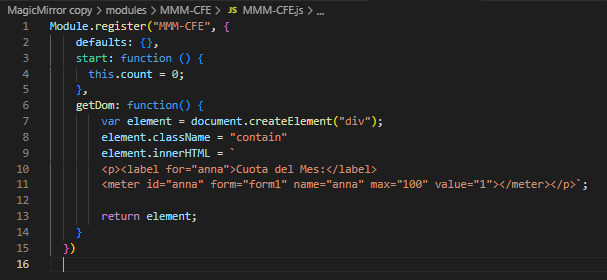
      24a3f6b7-560e-445d-af1a-ed6011281f2a-image.png
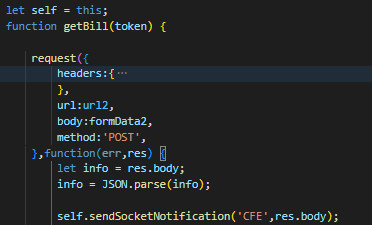
      node_helper:
      49c33b4e-73f8-4b3c-ae4f-d6ff6849228f-image.png
      Thought of socketNotification but I couldn’t figure it out, any ideas?

      S 1 Reply Last reply Reply Quote 0
      • S Offline
        sdetweil @SopaMaruchan
        last edited by sdetweil

        @SopaMaruchan get data from API

        let’s call the object foo

        then

        this.sendSocketNotification(“fribble”, foo)

        then on the module side

          receiveSocketNotification(code, data){
                  if(code === 'fribble'){
                         this.savePointer = data
                         this.updateDom()
                  }
           }
        

        then

              getDom(){
                       //  use  this.savePonter
              }
        

        Sam

        How to add modules

        learning how to use browser developers window for css changes

        S 1 Reply Last reply Reply Quote 0
        • S Offline
          SopaMaruchan @sdetweil
          last edited by

          @sdetweil I named my retreived data as “foo” and then used sendSocketNotification as you previously told me but I got this as output:

          e9ba4fa8-aca0-4167-b503-ec9c105d2bb4-image.png
          I did it this way on my node_helper file (Highlighted the lines I added):
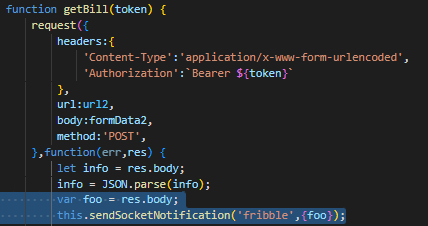
          c59c8d5a-fce8-46b6-8305-9454cad39dbf-image.png
          Did I missed anything?

          S 2 Replies Last reply Reply Quote 0
          • S Offline
            sdetweil @SopaMaruchan
            last edited by

            @SopaMaruchan ah, so much fun!

            you are inside the callback of the request,so ‘this’ I pointing to some request object and not the node_helper instance…

            sooooo

            before request(…

            add
            let self = this

            and change this. to self.

            object oriented programming is tricky

            Sam

            How to add modules

            learning how to use browser developers window for css changes

            1 Reply Last reply Reply Quote 0
            • S Offline
              sdetweil @SopaMaruchan
              last edited by

              @SopaMaruchan and {foo} is unnecessary

              you could just use
              res.body

              it’s the same stuff, why waste memory w a new pointer only being used once

              (same w info there too)

              Sam

              How to add modules

              learning how to use browser developers window for css changes

              S 1 Reply Last reply Reply Quote 0
              • S Offline
                SopaMaruchan @sdetweil
                last edited by

                @sdetweil Hahahaha true that!
                Kinda fixed it guided by your recommendations but the thing is that I’m still getting the same output: 098fca99-2a82-4ccd-8758-b81dcaedc3b6-image.png

                Here the code:
                80366fb7-a775-46ea-a207-88b196b918cd-image.png

                S 1 Reply Last reply Reply Quote 0
                • S Offline
                  sdetweil @SopaMaruchan
                  last edited by

                  @SopaMaruchan hm…

                  sample from one of my modules

                  self.sendSocketNotification("SLEEP_HIDE")
                  

                  Sam

                  How to add modules

                  learning how to use browser developers window for css changes

                  S 1 Reply Last reply Reply Quote 0
                  • S Offline
                    SopaMaruchan @sdetweil
                    last edited by

                    hmm, actually it does help. I’ll be testing around and tell you when I get it to work!
                    Anyways your help was a huge pilar to keep myself going with this, much thanks brother💝

                    S 1 Reply Last reply Reply Quote 0
                    • S Offline
                      SopaMaruchan @SopaMaruchan
                      last edited by

                      Does it help if I tell you that I got everything on my onstart function of the node_helper file?

                      S S 2 Replies Last reply Reply Quote 0
                      • S Offline
                        sdetweil @SopaMaruchan
                        last edited by

                        @SopaMaruchan never done it in start.

                        I usually wait til the module sends it’s 1st request

                        Sam

                        How to add modules

                        learning how to use browser developers window for css changes

                        1 Reply Last reply Reply Quote 0
                        • S Offline
                          SopaMaruchan @SopaMaruchan
                          last edited by

                          @SopaMaruchan I’m realizing that my my receiveSocketNotification is not being triggered on my MM-Module file:
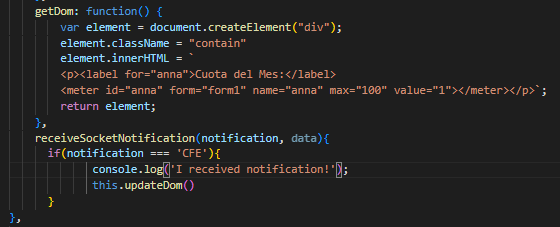
                          f111ce89-0276-4196-a41b-2ad73b016eaa-image.png
                          I logged some text after calling receiveSocketNotification function but there’s no output on console.

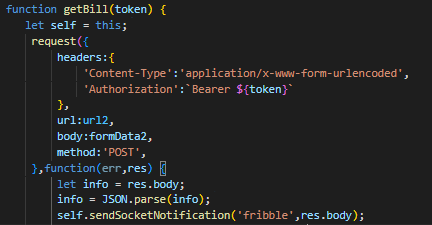
                          node_helper:
                          74f933d7-53b1-483c-b0a3-0abfe6827b34-image.png

                          S mumblebajM 4 Replies Last reply Reply Quote 0
                          • S Offline
                            sdetweil @SopaMaruchan
                            last edited by

                            @SopaMaruchan if the send fails like that, not sent

                            Sam

                            How to add modules

                            learning how to use browser developers window for css changes

                            1 Reply Last reply Reply Quote 0
                            • S Offline
                              sdetweil @SopaMaruchan
                              last edited by

                              @SopaMaruchan
                              let self=this

                              has to be inside the getBill() function
                              otherwise it could be set wrong…

                              Sam

                              How to add modules

                              learning how to use browser developers window for css changes

                              1 Reply Last reply Reply Quote 0
                              • S Offline
                                sdetweil @SopaMaruchan
                                last edited by sdetweil

                                @SopaMaruchan maybe for debug

                                inside the request() callback function,

                                do a

                                console.log(JSON.stringify(self, null,2))

                                to see what ‘this’ was pointing to

                                Sam

                                How to add modules

                                learning how to use browser developers window for css changes

                                S 1 Reply Last reply Reply Quote 0
                                • S Offline
                                  SopaMaruchan @sdetweil
                                  last edited by

                                  @sdetweil it’s indeed pointing to my module. Here’s the output: 55021cd9-1c10-46c3-8a9d-5de1e97674a1-image.png
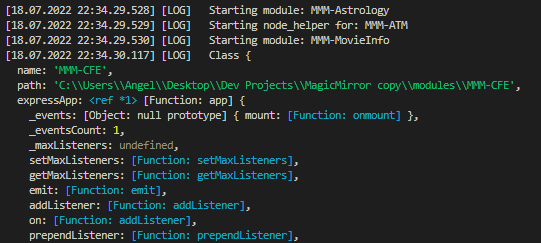
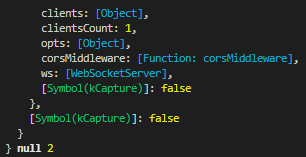
                                  and the huge LOG ends with the last 2 arguments: null & 2 e2503443-14c0-45ad-9614-37a9392997c0-image.png
                                  S 1 Reply Last reply Reply Quote 0
                                  • S Offline
                                    sdetweil @SopaMaruchan
                                    last edited by

                                    @SopaMaruchan

                                    problem is that the sockets are not connected at start time. so the sendSocketNotification is a no-op.

                                    u need wait til the module sends a socket message

                                    the module config is not visible to the node_helper, so the module has to send it over/down…

                                    Sam

                                    How to add modules

                                    learning how to use browser developers window for css changes

                                    1 Reply Last reply Reply Quote 0
                                    • mumblebajM Offline
                                      mumblebaj Module Developer @SopaMaruchan
                                      last edited by

                                      @SopaMaruchan Maybe the below example would help or serve as a guide to see if you may have the send call in the wrong place.

                                      module.exports = NodeHelper.create ({
                                          start: function() {
                                              console.log('Starting node_helper for module: ' + this.name)
                                          },
                                      
                                          getLights: async function(payload) {
                                              var url = "http://" + payload.bridgeip + "/api/" + payload.userid + "/" + payload.lightsOrGroups;
                                              
                                              var response = await fetch(url)
                                              if (!response.status == 200) {
                                                  console.error(`Error retrieving data: ${response.statusCode} ${response.statusText}`)
                                                  return;
                                              }
                                      
                                              var result = await response.json()
                                              
                                              this.sendSocketNotification("lightsorgroups", result)
                                          },````

                                      Check out my modules at: https://github.com/mumblebaj?tab=repositories
                                      Check my blog-post: https://mumblebaj.xyz/
                                      Check my MM Container: https://hub.docker.com/repository/docker/mumblebaj/magicmirror/general

                                      S 1 Reply Last reply Reply Quote 0
                                      • S Offline
                                        sdetweil @mumblebaj
                                        last edited by

                                        @mumblebaj he is calling from start:

                                        but sockets not setup yet.

                                        he really needs to wait til the module sends the 1st notification down ( what we use to send config info from module to helper)

                                        Sam

                                        How to add modules

                                        learning how to use browser developers window for css changes

                                        mumblebajM 1 Reply Last reply Reply Quote 0
                                        • mumblebajM Offline
                                          mumblebaj Module Developer @sdetweil
                                          last edited by

                                          @sdetweil Ah, hopefully he caught that and changes it.

                                          Check out my modules at: https://github.com/mumblebaj?tab=repositories
                                          Check my blog-post: https://mumblebaj.xyz/
                                          Check my MM Container: https://hub.docker.com/repository/docker/mumblebaj/magicmirror/general

                                          1 Reply Last reply Reply Quote 0

                                          Hello! It looks like you're interested in this conversation, but you don't have an account yet.

                                          Getting fed up of having to scroll through the same posts each visit? When you register for an account, you'll always come back to exactly where you were before, and choose to be notified of new replies (either via email, or push notification). You'll also be able to save bookmarks and upvote posts to show your appreciation to other community members.

                                          With your input, this post could be even better 💗

                                          Register Login

                                          • 1 / 1
                                          • First post
                                            Last post
                                          Enjoying MagicMirror? Please consider a donation!
                                          MagicMirror created by Michael Teeuw.
                                          Forum managed by Sam, technical setup by Karsten.
                                          This forum is using NodeBB as its core | Contributors
                                          Contact | Privacy Policy