Read the statement by Michael Teeuw here.
Mirror broken after v2.22.0 upgrade
-
@ecirpnaes ok, what system are u running on?
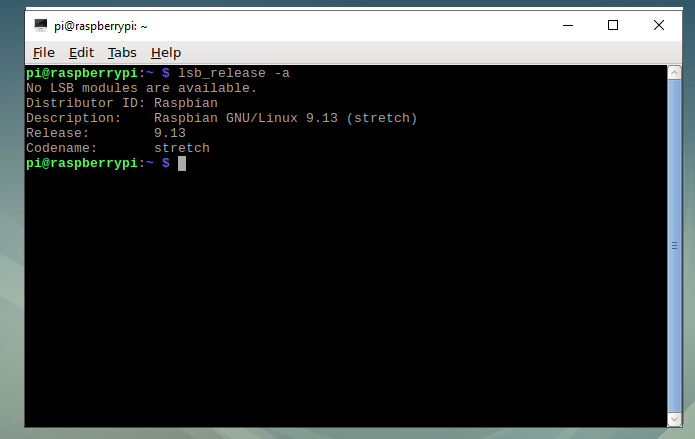
lsb_release-a
uname -aI did the install on pi os, and on Intel Linux.
what desktop are u running?
Wayland, x11, ?? -
@sdetweil
Distributor ID: Raspbian
Description: Raspbian GNU/Linux 9.13 (stretch)
Release: 9.13
Codename: stretchLinux raspberrypi 4.19.66-v7+ #1253 SMP Thu Aug 15 11:49:46 BST 2019 armv7l GNU/Linux
Honestly not sure what desktop it is running. I usually just putty into it from a windows machine.
-
@ecirpnaes ok stretch is too old for this latest electron
I think u have to move up to buster(release after stretch) as least
bullseye is the current
and another one coming soon… this year I think.
u might be able to backup,/restore using my scripts
https://github.com/sdetweil/MagicMirror-backup-restoreand use my script to install latest to restore config to.
https://github.com/sdetweil/MagicMirror_scripts -
@sdetweil That sounds about right. It’s been a couple years since I’ve updated my base image. I assumed it was going to come to that sooner or later.
Thanks for the confirmation. I’ll definitely take a look at your scripts. -
@sdetweil said in Mirror broken after v2.22.0 upgrade:
@ecirpnaes ok, do this
cd ~/MagicMirror
rm -rf node_modules
npm install --omit=dev --no-audit --no-fund
i just did this on my pi4 after upgrading from 2.21
Great!
Solved my problem too!
Thanks.
Peter -
@Peter awesome!
-
@Peter I have done same but in my case only server is running
-
@Knight are u only running server mode on purpose?
-
no, I want to run directly, but it is giving the same error
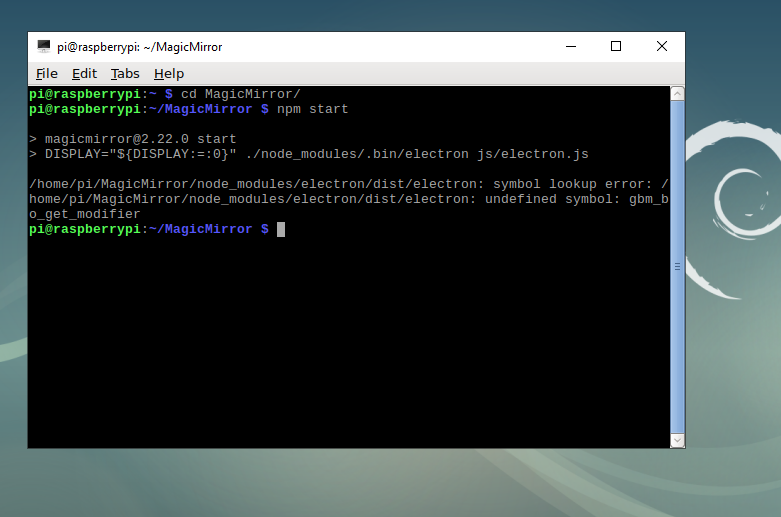
/home/pi/MagicMirror/node_modules/electron/dist/electron: symbol lookup error: /home/pi/MagicMirror/node_modules/electron/dist/electron: undefined symbol: gbm_bo_get_modifier .
So I run server mode -
@sdetweil
I’m getting an Electron error on startup.Specifically… .node_modules/[…]/dist/electron: symbol lookup error: undefined symbol: gbm_bo_get_modifier
So I run in server mode -
@Knight can you show output of
lsb_release -a
-
-
@sdetweil
My problem is resolved. I upgraded to bullseye and reinstalled the mirror. I used your alternative install script vs cloning manually. It worked flawlessly setting up the mirror and the pm2 autostart. So many thanks for that.I think I spent more time getting the mirror to rotate properly than anything else. File locations have changed for bullseye vs some of the older versions so it took a little hunting around to get things configured.
But all good now. Thanks again! -
@Knight Your problem is the exact same as what I had.
Same error message.
Same outdated OS.The fix is to back up your config file(s), update your OS to the latest (bullseye), reinstall the mirror software and any custom modules.
Sam has a bunch on scripts in git repo that make this a very simple operation. Took me less than an hour, with the vast majority of that waiting for package files to download.
-
@Knight yes sadly the latest electron will not run on 3 year old stretch…
-
@ecirpnaes said in Mirror broken after v2.22.0 upgrade:
@sdetweil
My problem is resolved. I upgraded to bullseye and reinstalled the mirror. I used your alternative install script vs cloning manually. It worked flawlessly setting up the mirror and the pm2 autostart. So many thanks for that.I think I spent more time getting the mirror to rotate properly than anything else. File locations have changed for bullseye vs some of the older versions so it took a little hunting around to get things configured.
But all good now. Thanks again!Here everything works fine now except rotation of the screen …
Somebody have an idea?
I tried display_rotate=1 in config.txt; it looks good but as soon as MM starts the screen rotates back to the left.
Peter -
@Peter use the preferences, top left on desktop, display rotation
-
@sdetweil preferences gives the same problem: screens turns back to normal after restarting MM.
I am trying custom CSS now (saw it somewhere).
Keep you informed.
Peter -
@Peter take your stuff out of config.txt
-
@sdetweil did that.
Custom CSS did not do the job!
The search goes on.
Peter
Hello! It looks like you're interested in this conversation, but you don't have an account yet.
Getting fed up of having to scroll through the same posts each visit? When you register for an account, you'll always come back to exactly where you were before, and choose to be notified of new replies (either via email, or push notification). You'll also be able to save bookmarks and upvote posts to show your appreciation to other community members.
With your input, this post could be even better 💗
Register Login