Read the statement by Michael Teeuw here.
MMM-WeatherAlerts
-
I created a module that displays active weather alerts from the openWeatherMap ‘onecall’ API.
Screenshot
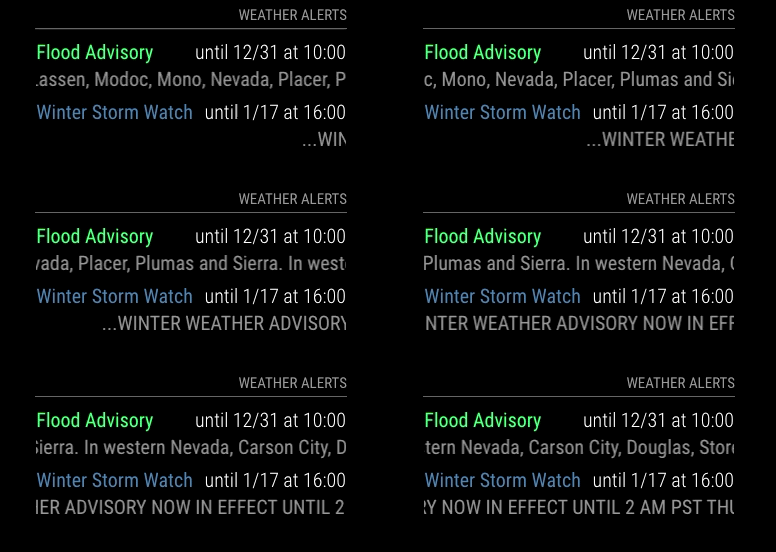
Details and Usage: MMM-WeatherAlerts
-
@Gjones93 Thanks for the module - it should be very useful. Can you tell us what constitutes an ‘alert’ that will trigger the module? I have installed the module and have no output. My location is currently under a NWS ‘Wind Advisory’, but I get no output from the module. I have also input the lat and long for a place in Alaska that currently has a blizzard warning in effect - and that still does not trigger the module. Below is the configuration I am using.
{ module: "MMM-WeatherAlerts", position: "bottom_bar", // top_right header: "Weather Alerts", config: { // See 'Configuration options' for more information. lat: "62.037360", // Alaska lon: "-163.272301", // Alaska apiKey: "bc95bfa26f5d55522eb3d2cd0cdc7580", colored: true }, }, -
Is there a specific lat/lon list to use, I’ve tried several different combinations and locations and I can’t get module to show?
-
@JohnGalt Thanks for checking out my module.
With regard to your question of “what constitutes an alert that will trigger the module”: the answer is any alert that is provided by the openWeatherMap one-call API. As far as “what alerts are provided by openWeatherMap”, the details are shared on their website in the section linked here. They list the following reporting agencies for the US:
- Environmental Protection Agency (EPA), Air Quality Alerts
Integrated Public Alerrt and Warning System (IPAWS) - National Oceanic and Atmospheric Administration (NOAA)
- National Tsunami Warning Center
- National Oceanic and Atmospheric Administration (NOAA)
- National Weather Service
- National Oceanic and Atmospheric Administration (NOAA)
- National Weather Service - Marine Zones
- U.S. Geological Survey (USGS), Volcano Hazard Program
I verified the behavior that you described for the lan and lon you provided. Upon further investigation, it looks like the module is performing properly, but there is no alert coming from the OpenWeatherMap API.
I am sending the OpenWeatherMap team an email with the details of the NWS Blizzard Warning and lack of a corresponding alert data from their API. I will let you know if I hear a reply.
From the testing I have done previously, it looks like the NWS has different regions that are responsible for sending their own alerts. There may be an outage from the Alaska region, specifically National Weather Service Fairbanks AK.Unrelated to this issue, I noticed that you have the module position set to “bottom-bar”. I hadn’t tested that position until just now and the styling is not optimized for that location. I’m going to see about fixing that.
- Environmental Protection Agency (EPA), Air Quality Alerts
-
@croc_dad72 The module will only be visible if an alert is active for the given lat/lon. Are you expecting an active weather alert for the location you are using? If yes, can you share a lat/lon and I would be happy to investigate further?
Here is a lat/lon that currently has an active alert and the module appears with the relevant alerts; you can use these as a test:
lat: "38.93323" lon: "-119.98435" -
@Gjones93 I think the issue is the one call subscription, I thought this worked with the free api or the same api at the weather forecast api.
-
@croc_dad72 If your API key is for version 3.0 of the API, then yes you would need to subscribe to their onecall API to be able to receive alert data. Unfortunate that they changed the onecall model to subscriber based.
-
@Gjones93 Honestly, im not really sure what I have, I know I signed up for free? I also put in lat/lon for concord ms(42.4604,-71.3489), which is under an active watch and nothing is showing on my mirror? Sorry for the trouble, in relatively new to this, so im sure I did something wrong!
-
@Gjones93: I do have it working now [I think the original issue was bad installation on my part]. FWIW, I also moved it up from the bottom bar to the top bar, and it is displaying the current wind alert at my location just fine. Thanks again.
-
@Gjones93: BTW, when I set alertTimeFormat to absolute [overriding the default ‘relative’] - I get a black screen on the display, and the web page won’t load on the remote machine. I haven’t done any troubleshooting on this yet, but it has the feel of a module using an old library that is no longer supported…
-
@Gjones93 Maybe I don’t understand how to get right api then? I went in and subscribed, created a new api in the api generator, and is still isn’t working? I was able to borrow someone else’s api key for a min and it worked?
-
@croc_dad72 I tried that lat and lon and I am seeing the winter weather advisory.
Let me ask this: For the other weather modules (e.g. forecast), are you setting an apiVersion parameter in your config file? If yes, to what?
Lastly, are you able to share your config layout for the MMM-WeatherAlerts module, minus your apiKey? I’m expecting something like this:
{ module: "MMM-WeatherAlerts", position: "top_right", header: "Weather Alerts", config: { lat: "42.4604", lon: "-71.3489", colored: true, alertTimeFormat: "absolute", } }, -
@JohnGalt unable to replicate this issue. I setup my computer as MagicMirror server and then I am able to access the server from my computer’s web-browser and from my raspberry pi acting as a client with both displays showing as expected.
Am I misunderstanding your current configuration? Did you happen to set the ‘alertDateFormat’ parameter in your configuration as well?
-
@Gjones93 said in MMM-WeatherAlerts:
@croc_dad72 I tried that lat and lon and I am seeing the winter weather advisory.
Let me ask this: For the other weather modules (e.g. forecast), are you setting an apiVersion parameter in your config file? If yes, to what?
Lastly, are you able to share your config layout for the MMM-WeatherAlerts module, minus your apiKey? I’m expecting something like this:
Im just using the default weather from MM, and I have changed any of those parameters at all, just added my api key, and city id.
My config:
{ module: "MMM-WeatherAlerts", position: "top_right", // top_right header: "Weather Alerts", config: { // See 'Configuration options' for more information. lat: "42.4604", lon: "-71.3489", apiKey: "", colored: true } }, -
@croc_dad72 please use code block markers for config info
paste your text into the message editor,
select the text you just pasted
and hit the button above the editor that looks like </>that module config is not from MagicMirror
that would be
{ module:'weather' -
@sdetweil my apologies, thank you for fixing it!
-
@Gjones93 Well it seems to be working now, I guess I just needed to give the api time to start working, thanks for all the help!
-
@Gjones93 - I am unable to replicate this today, too. It appears to be working as designed today. [There is no active alert at my location, so I changed the lat/lon to the same location in Alaska as before, and a Winter Weather Advisory displays. Both the local and Alaska work on the display and when accessing via a browser at port 8080 on my desktop.] For completeness, no - I did not set or change alertDateFormat from the default in the config.js.
Related but separate query: Does the module take up any space or affect existing modules when it is not actively displaying an alert? I ask because I have several instances of the default weather module stacked in the top_right region, and this module appears to affect their placement.
-
@JohnGalt appreciate the update.
For the module interference while no alerts are active, good eye. This is caused by the default “margin-bottom” that MagicMirror gives to each module. The result is that when no alerts are visible, the module takes up no space, but its margin is still pushing surrounding modules to create the undesired effect that you observed.
I have a quick (slightly-hacky) solution. In your “custom.css” file, add the following:
.MMM-WeatherAlerts {
  margin-bottom: 0px;
}
That should clean up the impact on your default weather modules. The side effect of this is that when there are alerts active, they will be stacked more tightly on-top of one another. I will look and see if I can find a robust way of handling this styling issue so that the spacing is included when the alerts are active and the spacing is “off” when there are no alerts to show. The trick here is that the spacing (margin-bottom) is set by the main app, and not by my module so it may take some work to implement a good solution.
FYI, on my mirror I have the alert module at the bottom of my default weather modules so it avoids this issue all together. Just another option…
-
@Gjones93 - Humm, this is interesting. Thanks for the update. While I might just try moving the alert module to the bottom of the stack of weather modules, the core issue I have with it is it appears to also hold on to horizontal real estate when not actively displaying an alert - with the effect of carrying all the modules in that region with it. In my case, I have the weather modules down the right side of the display, narrowed to 82% in custom.css. Sadly, when running your alerts module, I cannot get custom.css to narrow it using the same code, and it also pads out the other modules from the side of the monitor… FWIW, I also tried controlling the alert module width using an absolute number of pixels, but that also had no effect.
The weather css code follows:
.module.weather {
  background-color:rgba(255,255,255,0.1);
  border-radius:8px;
  padding:8px;
  text-align: left !important;
  width: 82%;
  max-width: 82%;
  min-width: 82%;
}
Hello! It looks like you're interested in this conversation, but you don't have an account yet.
Getting fed up of having to scroll through the same posts each visit? When you register for an account, you'll always come back to exactly where you were before, and choose to be notified of new replies (either via email, or push notification). You'll also be able to save bookmarks and upvote posts to show your appreciation to other community members.
With your input, this post could be even better 💗
Register Login