MagicMirror Forum
    • Recent
    • Tags
    • Unsolved
    • Solved
    • MagicMirror² Repository
    • Documentation
    • 3rd-Party-Modules
    • Donate
    • Discord
    • Register
    • Login
    A New Chapter for MagicMirror: The Community Takes the Lead
    Read the statement by Michael Teeuw here.

    Testing my module, it is stuck loading

    Scheduled Pinned Locked Moved Solved Troubleshooting
    31 Posts 2 Posters 10.0k Views 2 Watching
    Loading More Posts
    • Oldest to Newest
    • Newest to Oldest
    • Most Votes
    Reply
    • Reply as topic
    Log in to reply
    This topic has been deleted. Only users with topic management privileges can see it.
    • L Offline
      l0zarus @sdetweil
      last edited by

      @sdetweil well my module isn’t even in the modules folder even though it is in the config file which is confusing to me. I noticed in your screenshot that default is a subfolder of modules. That is true in my path to the module, but they are appearing as one combined folder. I’m not sure why that is the case. In any event, clearly my module was never actually loading at all. Any idea what the issue is here? I’ll start to update my code to remove the API call from the getDom function.

      S 1 Reply Last reply Reply Quote 0
      • S Do not disturb
        sdetweil @l0zarus
        last edited by

        @l0zarus AH, now we’re getting somewhere

        go to the console tab and put part of your module name in the filter field

        also,

        modulename in config.js = folder name in modules folder = filename of the .js file
        AND the register name

        config.js 
             module:"SampleModule", 
        modules/SampleModule/SampleModule.js
        Module.register("SampleModule", {
        

        ALL these MUST match else your module is not loaded
        system is case sensitive

        Sam

        How to add modules

        learning how to use browser developers window for css changes

        L 2 Replies Last reply Reply Quote 0
        • L Offline
          l0zarus @sdetweil
          last edited by l0zarus

          @sdetweil Alright I have a few errors showing, and I’m having an issue moving my file to the modules folder. I have verified the name is the same across the folder, the js file, and the config file.

          First, I got the following message when trying to move it:

          mv MMM-ConcertsAroundMe /modules
          mv: cannot move 'MMM-ConcertsAroundMe' to '/modules': Permission denied
          

          Will paste the console errors as well, I am moving between my mac and raspberry pi

          S 2 Replies Last reply Reply Quote 0
          • S Do not disturb
            sdetweil @l0zarus
            last edited by

            @l0zarus its not /modules (that is in the root)

            depending where your module is , the quick way

            mv MMM-ConcertsAroundMe ~/MagicMirror/modules
            

            Sam

            How to add modules

            learning how to use browser developers window for css changes

            L 1 Reply Last reply Reply Quote 0
            • L Offline
              l0zarus @sdetweil
              last edited by

              @sdetweil aha! I had tried that as well, but I did not include the ~. I am learning so much from this project :)

              S 1 Reply Last reply Reply Quote 0
              • S Do not disturb
                sdetweil @l0zarus
                last edited by

                @l0zarus said in Testing my module, it is stuck loading:

                I am moving between my mac and raspberry pi

                magicmirror will run on your mac…

                use my install script

                Sam

                How to add modules

                learning how to use browser developers window for css changes

                1 Reply Last reply Reply Quote 0
                • S Do not disturb
                  sdetweil @l0zarus
                  last edited by

                  @l0zarus ~ means users home folder (less letters to type, remember most of this linux console stuff was created on slow 300bps phone lines… the fewer letters the better)

                  Sam

                  How to add modules

                  learning how to use browser developers window for css changes

                  1 Reply Last reply Reply Quote 0
                  • L Offline
                    l0zarus @sdetweil
                    last edited by

                    @sdetweil alright here are the errors:
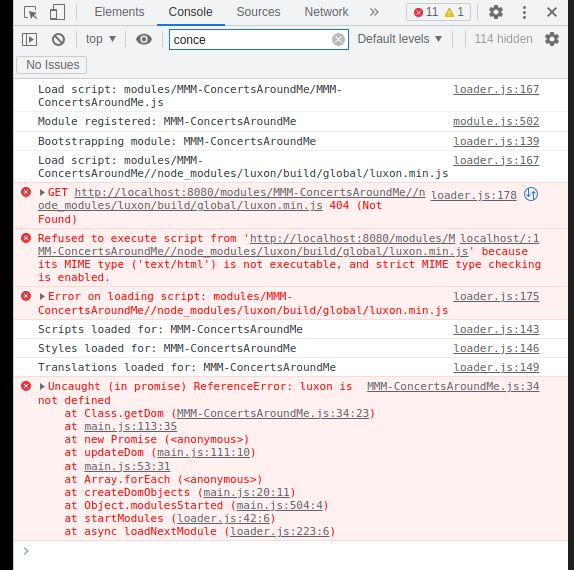
                    Screenshot 2023-05-07 at 8.25.35 PM.png

                    S 1 Reply Last reply Reply Quote 0
                    • S Do not disturb
                      sdetweil @l0zarus
                      last edited by

                      @l0zarus did yiu npm install luxon in your module folder

                      npm init -y 
                      npm install luxon 
                      

                      if u don’t do the npm init in your module folder the module will be installed in the root MM node_modules, then not found here

                      Sam

                      How to add modules

                      learning how to use browser developers window for css changes

                      L 1 Reply Last reply Reply Quote 0
                      • L Offline
                        l0zarus @sdetweil
                        last edited by

                        @sdetweil ok that was an issue! I got luxon installed in the right place. Now I’m getting the following errors:
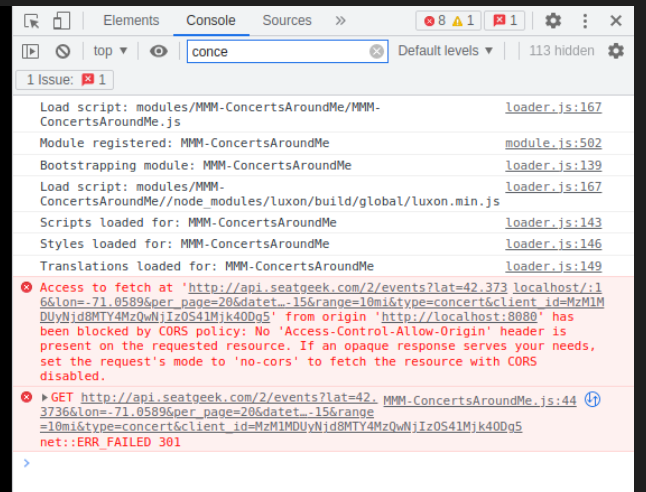
                        Screenshot 2023-05-07 at 8.41.45 PM.png

                        I tested the exact link from the first error “Access to fetch at…” in postman and I get a clean response

                        S 1 Reply Last reply Reply Quote 0
                        • S Do not disturb
                          sdetweil @l0zarus
                          last edited by sdetweil

                          @l0zarus lovely CORS… welcome to the fun

                          postman didn’t use localhost it used the local IP address

                          you ‘might’ get to fix it in config.js ? maybe

                          from terminal window do

                          ip addr

                          that give u the local machine ip address
                          use that in the config.js

                          address:""
                          

                          instead of locahost…

                          CORS basically means, “hey, you are not in our known approved access network, get lost”

                          Sam

                          How to add modules

                          learning how to use browser developers window for css changes

                          L 1 Reply Last reply Reply Quote 0
                          • L Offline
                            l0zarus @sdetweil
                            last edited by

                            @sdetweil ugh, well that did not do it unfortunately. I’m not sure what to do now. It recommends setting the requests mode to ‘no-cors’. Is that something that might work here?

                            S 1 Reply Last reply Reply Quote 0
                            • S Do not disturb
                              sdetweil @l0zarus
                              last edited by sdetweil

                              @l0zarus CORS is controlled by the server side, NOTHING the client can do except change the capability

                              there used to be free services where you could send the request to them and they would forward (from a known address) and send the response back to you
                              a CORS proxy, most of those have gone away or are no longer free.

                              we’ve added a cors safe fetch (we think) to the MM system

                              see ~/MagicMirror/js/server_functions.js
                              ( I have tried to break that into understandable reusable sections below )

                              u change your url request to this cors_url

                              let header_stuff_if_any="sendheaders=header1:value1,header2:value2&expectedheaders=header1,header2"
                              // empty string, "",  if no headers
                              
                              let original_url="http://www.test.com/path?param1=value1"
                              
                              -----------
                              
                              let_cors_url=
                              
                              "http://"+
                              // use the config.address value, unless its "0.0.0.0", then use "localhost"
                              config.address==="0.0.0.0"?"localhost":config.address
                              +
                              ":"
                              +config.port+
                              "/cors?"+ 
                              header_stuff
                              +"&url="+
                              original_url 
                              

                              and we will send it, and return the response to your fetch

                              Sam

                              How to add modules

                              learning how to use browser developers window for css changes

                              L 1 Reply Last reply Reply Quote 0
                              • L Offline
                                l0zarus @sdetweil
                                last edited by

                                @sdetweil I’m struggling to understand the first part. I don’t think there is any header stuff that I know of? the url is based on this format: https://api.seatgeek.com/2/events?client_id=MYCLIENTID&client_secret=MYCLIENTSECRET with other stuff added as you saw in my source code in the original post.

                                honestly the whole thing is a bit confusing to me. I’m not sure where it is supposed to go… as part of where I define the URL variable?

                                S 1 Reply Last reply Reply Quote 0
                                • S Do not disturb
                                  sdetweil @l0zarus
                                  last edited by sdetweil

                                  @l0zarus ok, no headers set it to “”

                                  you use that code to build your fetch url (and put it in the original_url variable)

                                  I just created the JS code to do the build from the parts
                                  the comment in the linked file just doesn’t help me at all…

                                  and when you execute the fetch, it sends it to magic mirror code that forwards on supposedly to avoid the cors problem…

                                  Sam

                                  How to add modules

                                  learning how to use browser developers window for css changes

                                  L 1 Reply Last reply Reply Quote 0
                                  • L Offline
                                    l0zarus @sdetweil
                                    last edited by sdetweil

                                    @sdetweil I’m going to try to fill it out like a template, let me know if I’m following.

                                    let header = "",
                                    
                                    let original_url = "https://api.seatgeek.com/2/events?client_id=MYCLIENTID&client_secret=MYCLIENTSECRET "
                                    
                                    let cors_url = "http://" + config.address==="IP ADDRESS HERE"?"localhost":config.address + ":" + config.port + "/cors?" + header + "&url=" + original_url
                                    

                                    and then I fetch(cors_url)?

                                    Is this right?

                                    S 1 Reply Last reply Reply Quote 0
                                    • S Do not disturb
                                      sdetweil @l0zarus
                                      last edited by sdetweil

                                      @l0zarus said in Testing my module, it is stuck loading:

                                      Is this right?

                                      yes

                                      almost …

                                      "IP ADDRESS HERE"
                                      

                                      MUST be

                                      "0.0.0.0" 
                                      

                                      (which is the MM value for listen on any network adapter)

                                      Sam

                                      How to add modules

                                      learning how to use browser developers window for css changes

                                      L 1 Reply Last reply Reply Quote 0
                                      • L Offline
                                        l0zarus @sdetweil
                                        last edited by

                                        @sdetweil

                                            ```
                                        

                                        // this next block is to deal with a CORS permissions issue with the API
                                        let header = “”;

                                            // this is the API call url
                                            let original_url = "http://api.seatgeek.com/2/events?lat=" + self.config.latitude + "&lon=" + self.config.longitude + "&per_page=" + self.config.eventCount + "&datetime_utc.gte=" + today + "&datetime_utc.lte=" + oneweek + "&range=" + self.config.range + "&type=concert" + "&client_id=" + self.config.clientID + "&client_secret=" + self.config.clientSecret;
                                            
                                            // this is the cors URL
                                            let cors_url = "http://" + config.address==="0.0.0.0"?"localhost":config.address + ":" + config.port + "/cors?" + header + "&url=" + original_url;
                                        
                                        S 1 Reply Last reply Reply Quote 0
                                        • S Do not disturb
                                          sdetweil @l0zarus
                                          last edited by

                                          @l0zarus looks good

                                          Sam

                                          How to add modules

                                          learning how to use browser developers window for css changes

                                          L 1 Reply Last reply Reply Quote 0
                                          • L Offline
                                            l0zarus @sdetweil
                                            last edited by

                                            @sdetweil I got a new console error:

                                            Screenshot 2023-05-07 at 10.06.40 PM.png

                                            S 1 Reply Last reply Reply Quote 1

                                            Hello! It looks like you're interested in this conversation, but you don't have an account yet.

                                            Getting fed up of having to scroll through the same posts each visit? When you register for an account, you'll always come back to exactly where you were before, and choose to be notified of new replies (either via email, or push notification). You'll also be able to save bookmarks and upvote posts to show your appreciation to other community members.

                                            With your input, this post could be even better 💗

                                            Register Login

                                            • 1
                                            • 2
                                            • 1 / 2
                                            • First post
                                              Last post
                                            Enjoying MagicMirror? Please consider a donation!
                                            MagicMirror created by Michael Teeuw.
                                            Forum managed by Sam, technical setup by Karsten.
                                            This forum is using NodeBB as its core | Contributors
                                            Contact | Privacy Policy
