MagicMirror Forum
    • Recent
    • Tags
    • Unsolved
    • Solved
    • MagicMirror² Repository
    • Documentation
    • 3rd-Party-Modules
    • Donate
    • Discord
    • Register
    • Login
    A New Chapter for MagicMirror: The Community Takes the Lead
    Read the statement by Michael Teeuw here.

    Error starting after upgrade

    Scheduled Pinned Locked Moved Solved Troubleshooting
    41 Posts 5 Posters 13.8k Views 5 Watching
    Loading More Posts
    • Oldest to Newest
    • Newest to Oldest
    • Most Votes
    Reply
    • Reply as topic
    Log in to reply
    This topic has been deleted. Only users with topic management privileges can see it.
    • S Do not disturb
      sdetweil @wwats
      last edited by

      @wwats there are no versions shown?
      I see this on my dev machine
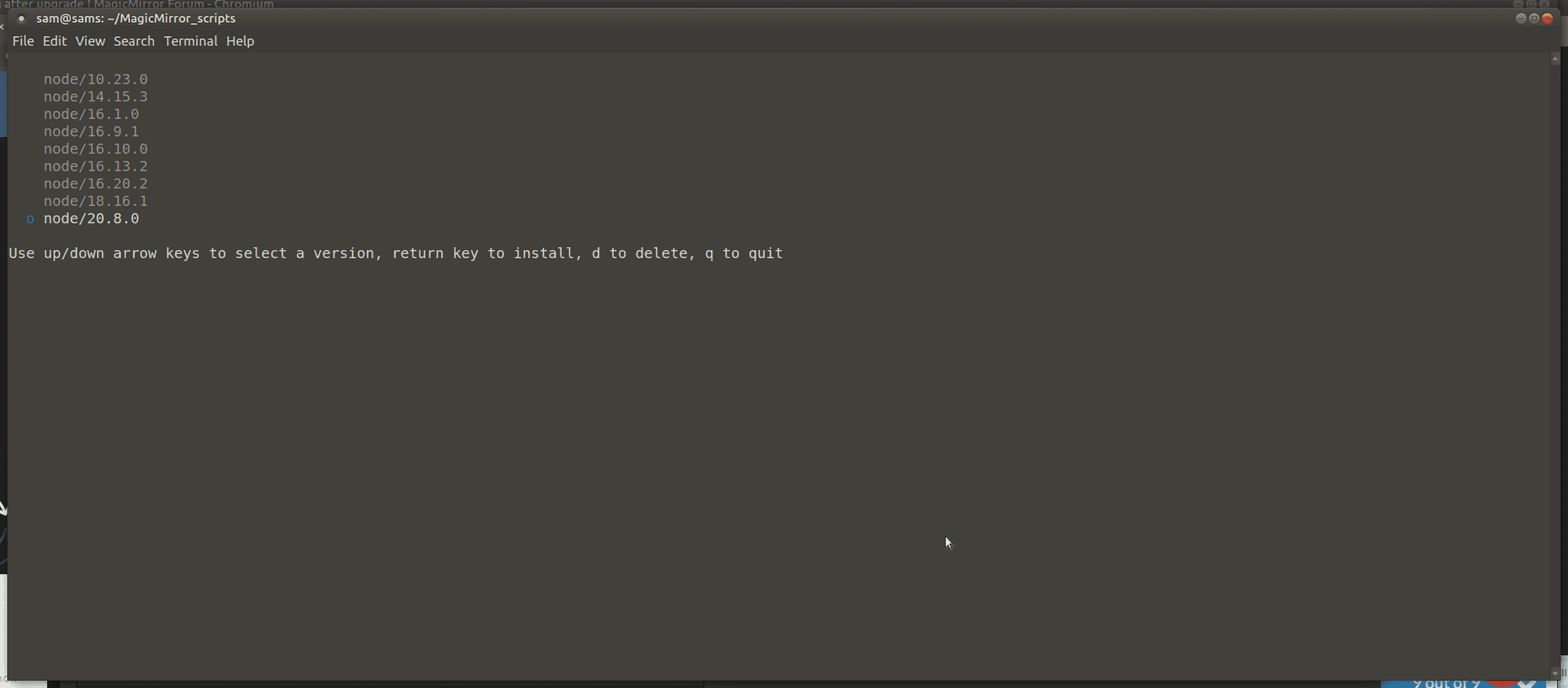
      Screenshot at 2023-10-09 10-14-43.png

      Sam

      How to add modules

      learning how to use browser developers window for css changes

      W 1 Reply Last reply Reply Quote 0
      • W Offline
        wwats @sdetweil
        last edited by

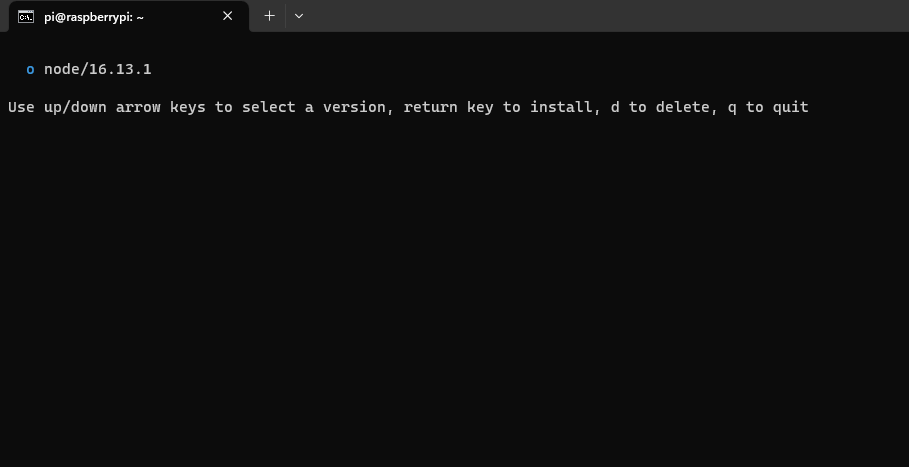
        No, unfortunately not. i see:
        cfb25966-6702-4e56-8fd5-397730677743-image.png

        S 1 Reply Last reply Reply Quote 0
        • S Do not disturb
          sdetweil @wwats
          last edited by sdetweil

          @wwats ok, do

          d

          to delete it

          then node -v

          Sam

          How to add modules

          learning how to use browser developers window for css changes

          W 1 Reply Last reply Reply Quote 1
          • W Offline
            wwats @sdetweil
            last edited by

            @sdetweil ok i did. I still have version 16.13.1 :-(
            Am I perhaps in the wrong directory?
            I have to run the script in the lowest directory directly at pi@raspberrypi:~ $, right?

            S 1 Reply Last reply Reply Quote 1
            • S Do not disturb
              sdetweil @wwats
              last edited by

              @wwats try this from the n info

              Remove the installed Node.js (does not affect the cached versions). This can be useful to revert to the system version of node (if in a different location)

              sudo n prune
              sudo n uninstall
              

              Sam

              How to add modules

              learning how to use browser developers window for css changes

              W 1 Reply Last reply Reply Quote 1
              • W Offline
                wwats @sdetweil
                last edited by

                @sdetweil ok this was sucessfull… and what do I have to do now? reinstall? How?
                Thank you very much and sorry, I’m not an IT specialist…

                S 1 Reply Last reply Reply Quote 1
                • S Do not disturb
                  sdetweil @wwats
                  last edited by

                  @wwats and what does
                  node -v
                  show now?

                  Sam

                  How to add modules

                  learning how to use browser developers window for css changes

                  W 1 Reply Last reply Reply Quote 1
                  • W Offline
                    wwats @sdetweil
                    last edited by

                    @sdetweil

                    pi@raspberrypi:~ $ node -v
                    -bash: /usr/local/bin/node: Datei oder Verzeichnis nicht gefunden

                    S 1 Reply Last reply Reply Quote 0
                    • S Do not disturb
                      sdetweil @wwats
                      last edited by

                      @wwats can u do

                      ls -laF /usr/local/bin/node

                      Sam

                      How to add modules

                      learning how to use browser developers window for css changes

                      W 1 Reply Last reply Reply Quote 1
                      • W Offline
                        wwats @sdetweil
                        last edited by

                        @sdetweil no… :
                        pi@raspberrypi:~ $ ls -laF /usr/local/bin/node
                        ls: Zugriff auf ‘/usr/local/bin/node’ nicht möglich: Datei oder Verzeichnis nicht gefunden

                        S 1 Reply Last reply Reply Quote 0
                        • S Do not disturb
                          sdetweil @wwats
                          last edited by sdetweil

                          @wwats ok, try this

                          which node

                          on my desktop returns

                          /usr/local/bin/node

                          and there is a file there…

                          Sam

                          How to add modules

                          learning how to use browser developers window for css changes

                          W 1 Reply Last reply Reply Quote 0
                          • W Offline
                            wwats @sdetweil
                            last edited by

                            @sdetweil i’m very sorry but i don’t understand this and what i have exactly to do… Can you explain it in a different way?

                            S 1 Reply Last reply Reply Quote 0
                            • S Do not disturb
                              sdetweil @wwats
                              last edited by

                              @wwats

                              type the command

                              which node
                              

                              and show the output

                              Sam

                              How to add modules

                              learning how to use browser developers window for css changes

                              W 1 Reply Last reply Reply Quote 1
                              • W Offline
                                wwats @sdetweil
                                last edited by wwats

                                @sdetweil
                                ok i understand - output is
                                /usr/bin/node

                                maybe is this important: i work directly on my raspberry with ssh

                                S 1 Reply Last reply Reply Quote 0
                                • S Do not disturb
                                  sdetweil @wwats
                                  last edited by

                                  @wwats ok, lets run this

                                  bash -c  "$(curl -sL https://raw.githubusercontent.com/sdetweil/MagicMirror_scripts/master/node20_install.sh)"
                                  

                                  Sam

                                  How to add modules

                                  learning how to use browser developers window for css changes

                                  W 1 Reply Last reply Reply Quote 1
                                  • W Offline
                                    wwats @sdetweil
                                    last edited by

                                    @sdetweil
                                    Everything works :thumbs_up: :thumbs_up: ! Thank You very much - so the mirror is running again. Can I something do for You?

                                    S 1 Reply Last reply Reply Quote 0
                                    • S Do not disturb
                                      sdetweil @wwats
                                      last edited by

                                      @wwats said in Error starting after upgrade:

                                      Can I something do for You

                                      no… i just like to help…

                                      Sam

                                      How to add modules

                                      learning how to use browser developers window for css changes

                                      W 1 Reply Last reply Reply Quote 0
                                      • W Offline
                                        wwats @sdetweil
                                        last edited by

                                        @sdetweil said in Error starting after upgrade:

                                        @wwats said in Error starting after upgrade:

                                        Can I something do for You

                                        no… i just like to help…

                                        thank you so much :folded_hands_light_skin_tone:

                                        1 Reply Last reply Reply Quote 0
                                        • R Offline
                                          rmcon
                                          last edited by

                                          Sam,

                                          I’m having similar problems since the recent upgrade. Big disclaimer here that I’m also not the savviest with technology, but was able to get the MM up and running with 95% of what I envisioned and I’m adventurous enough to try and find solutions before asking questions.

                                          I have been searching and attempting various ways to fix my issues, which I fear may have made this more complex to solve (i.e. attempted to reinstall the newest upgrades both using your script and manually, everything I found short of using the “force” option). My previous attempts have been working directly on the Pi with keyboard, currently attempting via SSH with same results so far.

                                          I’m at a crossroads in my mind now and I’m hoping you can provide steering. Have I gunked this up so much that I should remove and reinstall MM (keeping copes of the previously working config.js, custom.css, and modules folders that I saved on the Pi desktop to try and make the reinstall easier) or can this be fixed? Second concern is that now I’m very hesitant to attempt future upgrades after dealing with this issue (and being far beyond my own capabilities). Any tips or tricks to avoid this in the future?

                                          I tried the steps above in this thread with the following results:

                                          • “n” and “nvm”, got messages that “command not found” (both in the main folder and MM folder)
                                          • “sudo n prune” and “sudo n uninstall”, similar message “sudo n: command not found” (both in main and MM folders)
                                          • “node -v” gave me “v20.8.0” (I have ran your script for the node update several times now)
                                          • “ls-laf…” method to find the usr/bin location didn’t work (“no such file or directory”, both main and MM folders attempted), but “which node” DID work, showed “/usr/bin/node”

                                          Just re-ran the script you linked above and still seeing the same results, posted below. (I used “npm start”, was using pm2 to auto start MM before the upgrade.)

                                          magicmirror@2.25.0 start
                                          DISPLAY=“${DISPLAY:=:0}” ./node_modules/.bin/electron js/electron.js

                                          [10.10.2023 03:10.39.346] [LOG] Starting MagicMirror: v2.25.0
                                          [10.10.2023 03:10.39.359] [LOG] Loading config …
                                          [10.10.2023 03:10.39.371] [DEBUG] config template file not exists, no envsubst
                                          [10.10.2023 03:10.39.384] [LOG] Loading module helpers …
                                          [10.10.2023 03:10.39.391] [LOG] No helper found for module: alert.
                                          [10.10.2023 03:10.39.463] [LOG] Initializing new module helper …
                                          [10.10.2023 03:10.39.465] [LOG] Module helper loaded: updatenotification
                                          [10.10.2023 03:10.39.473] [LOG] No helper found for module: clock.
                                          [10.10.2023 03:10.39.490] [ERROR] (node:26678) UnhandledPromiseRejectionWarning: Error: Cannot find module ‘digest-fetch’
                                          Require stack:

                                          • /home/rmco01/MagicMirror/modules/default/calendar/calendarfetcher.js
                                          • /home/rmco01/MagicMirror/modules/default/calendar/node_helper.js
                                          • /home/rmco01/MagicMirror/js/app.js
                                          • /home/rmco01/MagicMirror/js/electron.js
                                          • /home/rmco01/MagicMirror/node_modules/electron/dist/resources/default_app.asar/main.js
                                          • at node:internal/modules/cjs/loader:1084:15
                                            at Function. (node:electron/js2c/browser_init:2:117419)
                                            at Module._resolveFilename (/home/rmco01/MagicMirror/node_modules/module-alias/index.js:49:29)
                                            at node:internal/modules/cjs/loader:929:27
                                            at Function._load (node:electron/js2c/asar_bundle:2:13327)
                                            at Module.require (node:internal/modules/cjs/loader:1150:19)
                                            at require (node:internal/modules/cjs/helpers:110:18)
                                            at Object. (/home/rmco01/MagicMirror/modules/default/calendar/calendarfetcher.js:9:16)
                                            at Module._compile (node:internal/modules/cjs/loader:1271:14)
                                            at Object…js (node:internal/modules/cjs/loader:1326:10)
                                            at Module.load (node:internal/modules/cjs/loader:1126:32)
                                            at node:internal/modules/cjs/loader:967:12
                                            at Function._load (node:electron/js2c/asar_bundle:2:13327)
                                            at Module.require (node:internal/modules/cjs/loader:1150:19)
                                            at require (node:internal/modules/cjs/helpers:110:18)
                                            at Object. (/home/rmco01/MagicMirror/modules/default/calendar/node_helper.js:9:25)
                                            (Use electron --trace-warnings ... to show where the warning was created)
                                            [10.10.2023 03:10.39.492] [ERROR] (node:26678) UnhandledPromiseRejectionWarning: Unhandled promise rejection. This error originated either by throwing inside of an async function without a catch block, or by rejecting a promise which was not handled with .catch(). To terminate the node process on unhandled promise rejection, use the CLI flag --unhandled-rejections=strict (see https://nodejs.org/api/cli.html#cli_unhandled_rejections_mode). (rejection id: 1)
                                            [26678:1010/031040.523164:ERROR:object_proxy.cc(590)] Failed to call method: org.freedesktop.portal.Settings.Read: object_path= /org/freedesktop/portal/desktop: org.freedesktop.DBus.Error.ServiceUnknown: The name org.freedesktop.portal.Desktop was not provided by any .service files
                                            MESA-LOADER: failed to retrieve device information
                                            MESA-LOADER: failed to retrieve device information
                                            MESA-LOADER: failed to retrieve device information

                                          I understand that the weblink and MESA-LOADER messages are from some relegated elements which aren’t around anymore and just nuisance messages.

                                          My previous efforts were trying to find a solution to the “digest-fetch” module, since that appears to be the main problem that I see. I have previously attempted to fix the “envsubst” debug message using guidance in other threads, which either didn’t work, or has been undone by my repeated attempts to solve this problem.

                                          Apologies for the long and rambling note, just wanted to give as much detail that may be useful. Thank you!

                                          S 1 Reply Last reply Reply Quote 0
                                          • S Do not disturb
                                            sdetweil @rmcon
                                            last edited by

                                            @rmcon said in Error starting after upgrade:

                                            Cannot find module ‘digest-fetch’

                                            this is the prior release code

                                            which means you didn’t run the upgrade

                                            either my script or the manual upgrade

                                            note my script is 2 part, test and run a second time w a parameter to actually do the upgrade

                                            Sam

                                            How to add modules

                                            learning how to use browser developers window for css changes

                                            R 1 Reply Last reply Reply Quote 0

                                            Hello! It looks like you're interested in this conversation, but you don't have an account yet.

                                            Getting fed up of having to scroll through the same posts each visit? When you register for an account, you'll always come back to exactly where you were before, and choose to be notified of new replies (either via email, or push notification). You'll also be able to save bookmarks and upvote posts to show your appreciation to other community members.

                                            With your input, this post could be even better 💗

                                            Register Login

                                            • 1
                                            • 2
                                            • 3
                                            • 1 / 3
                                            • First post
                                              Last post
                                            Enjoying MagicMirror? Please consider a donation!
                                            MagicMirror created by Michael Teeuw.
                                            Forum managed by Sam, technical setup by Karsten.
                                            This forum is using NodeBB as its core | Contributors
                                            Contact | Privacy Policy