MagicMirror Forum
    • Recent
    • Tags
    • Unsolved
    • Solved
    • MagicMirror² Repository
    • Documentation
    • 3rd-Party-Modules
    • Donate
    • Discord
    • Register
    • Login
    A New Chapter for MagicMirror: The Community Takes the Lead
    Read the statement by Michael Teeuw here.

    Config for a simple clean montly calendar

    Scheduled Pinned Locked Moved Development
    25 Posts 8 Posters 26.1k Views 9 Watching
    Loading More Posts
    • Oldest to Newest
    • Newest to Oldest
    • Most Votes
    Reply
    • Reply as topic
    Log in to reply
    This topic has been deleted. Only users with topic management privileges can see it.
    • P Offline
      Plainbroke 0 @mlcampbe
      last edited by

      @mlcampbe
      I know this is an old post, but I need some help setting up a full screen calendar.

      Can you send me your config.Js and custom.css or however you made that calendar you show above. I have been waiting for someone to come up with that exact calendar…
      Did you use the default calendar or something else…? I could combine my 3 different calendars into one… Saving realestate.

      Jeff Burdick aka Plainbroke

      M 1 Reply Last reply Reply Quote 0
      • M Offline
        mlcampbe @Plainbroke 0
        last edited by

        @Plainbroke-0

        Take a look at https://forum.magicmirror.builders/topic/11001/config-for-a-simple-clean-montly-calendar/8 as it has the css and necessary config needed.

        1 Reply Last reply Reply Quote 0
        • Piranha1605P Offline
          Piranha1605
          last edited by

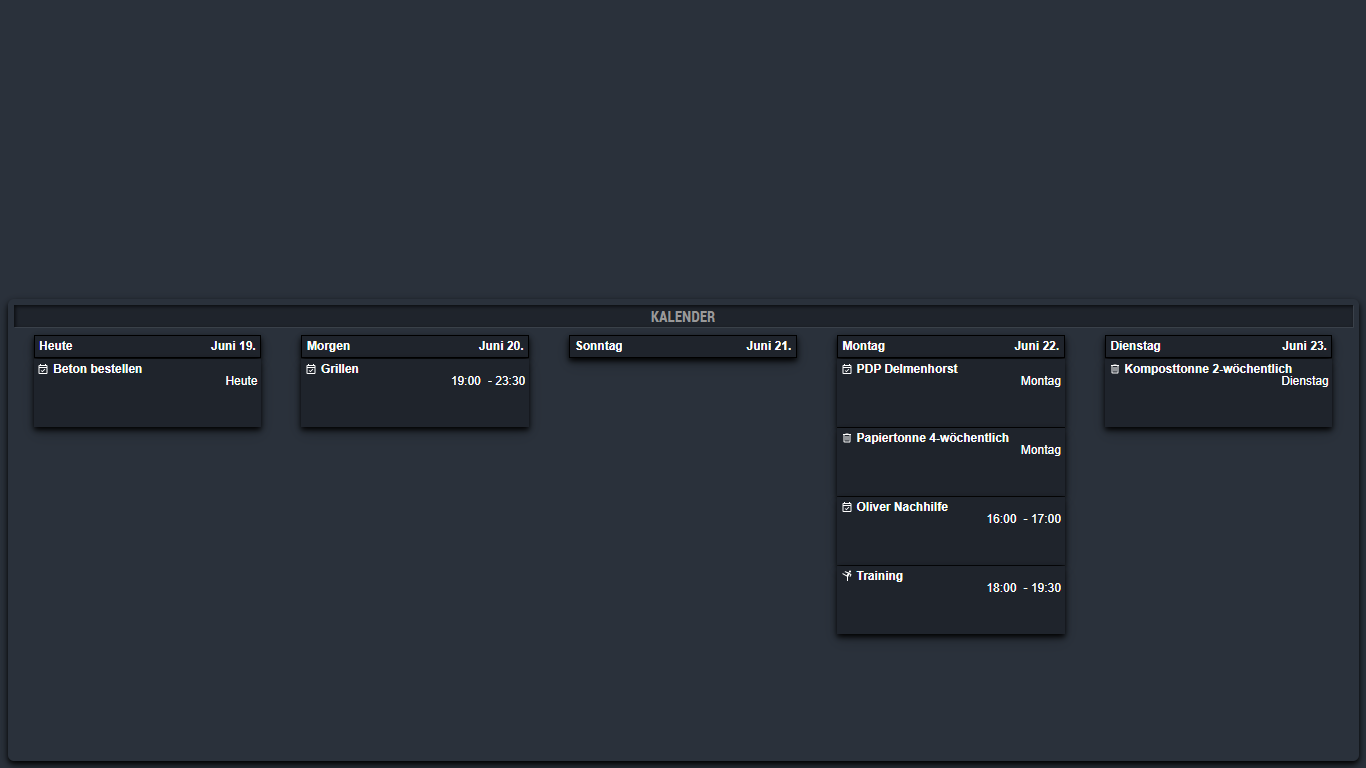
          Here is a sample for you.

          Calendar.png

          
          /**
           * module.width_height
           */
          
           .module.MMM-CalendarExt2 {
            height: 600px;
          }
          
          
          /**
           * module.color_border_shadow
           */
          
           .module.MMM-CalendarExt2 {
            background-color:#2a313b;
            border-radius:8px;
            padding:8px;
            box-shadow: 0 4px 8px 0 rgba(0, 0, 0, 1), 0 8px 20px 0 rgba(0, 0, 0, 0.19);
          }
          
          /**
           * MMM-CalendarExt2.
           */
          
          .CX2 .slot .event{
          	background: #1f242c;
          }
          .CX2 .agenda .eventSub {
          	display:none;
          }
          .CX2 .slot .slotHeader{
            background: #1f242c;
            border: 1px solid black;
            box-shadow: 0 4px 8px 0 rgba(0, 0, 0, 1), 0 8px 20px 0 rgba(0, 0, 0, 0.19);
            color: white;
          }
          .CX2 .today .slotHeader * {
          	color: white;
          }
           .CX2 .event.fullday {
            background: #1f242c;
            border-radius:0px;
          }
          
          .CX2 .event[data-calendar-name="Google"] {
            box-shadow: 0 4px 8px 0 rgba(0, 0, 0, 1), 0 8px 20px 0 rgba(0, 0, 0, 0.19);
            color: white;
            min-height:80px;
          }
          .CX2 .event[data-calendar-name="Karate"] {
            box-shadow: 0 4px 8px 0 rgba(0, 0, 0, 1), 0 8px 20px 0 rgba(0, 0, 0, 0.19);
            color: white;
            min-height:80px;
          }
          .CX2 .event[data-calendar-name="Abfall"] {
            box-shadow: 0 4px 8px 0 rgba(0, 0, 0, 1), 0 8px 20px 0 rgba(0, 0, 0, 0.19);
            color: white;
            min-height:80px;
          }
          .CX2 .event[data-calendar-name="Arbeit"] {
            box-shadow: 0 4px 8px 0 rgba(0, 0, 0, 1), 0 8px 20px 0 rgba(0, 0, 0, 0.19);
            color: white;
            min-height:80px;
          }
          .CX2 .event[data-calendar-name="Feiertage"] {
            box-shadow: 0 4px 8px 0 rgba(0, 0, 0, 1), 0 8px 20px 0 rgba(0, 0, 0, 0.19);
            color: white;
            min-height:80px;
          }
          
          /**
           * Iconsize.
           */
          
          .CX2 .event .eventIcon {
            min-width: calc(var(--font-size) * 2,5);
            min-height: calc(var(--font-size) * 2,5);
            margin-right:5px;
            float:left;
          }
          .CX2 .period .eventIcon {
            min-width: calc(var(--font-size) * 2,5);
            min-height: calc(var(--font-size) * 2,5);
            margin-right:5px;
            float:left;
          }
          .CX2 .weekSlot .eventIcon {
            min-width: var(--font-size);
            min-height: var(--font-size);
            margin-right:3px;
            display:block;
            padding-bottom:3px;
          }
          
          T 1 Reply Last reply Reply Quote 0
          • Piranha1605P Offline
            Piranha1605
            last edited by

            @Piranha1605 said in Config for a simple clean montly calendar:

            .CX2 .event[data-calendar-name=“Google”]

            Enter the name of your calendar here

            1 Reply Last reply Reply Quote 0
            • C Offline
              Clubjack @mlcampbe
              last edited by

              @mlcampbe
              Hey. Last days i created my calendar with your helpfull custom.css.

              Do You know the Code for changing the height of the Event-Bar?
              I need it a little bit smaller.

              Thank You.

              M 1 Reply Last reply Reply Quote 0
              • M Offline
                mlcampbe @Clubjack
                last edited by

                @Clubjack
                I am not quite sure what you mean by the Event-Bar. Is that the height of a row or title size or what exactly are you talking about? I no longer use the calendar as my needs were only for about 1 years time but might be able to help if you can tell me exactly what part you need to modify.

                C 1 Reply Last reply Reply Quote 0
                • C Offline
                  Clubjack @mlcampbe
                  last edited by

                  @mlcampbe
                  Thank You. But i found it myself. 👍🏼

                  But i have another queetion.

                  I use the calendar in week-View.
                  The Today-Header has an other Color. Thats good.
                  But is it possible to change the background-Color of the Today Slot too?
                  So it is easier to see the actual day.

                  1 Reply Last reply Reply Quote 0
                  • M Offline
                    mlcampbe
                    last edited by

                    I believe one of these should probably work:

                    .CX2 .today .slotHeader {
                    background: rgba(64,64,64,0.8);
                    color: #000;
                    }

                    .CX2 .today .slotHeader .slotTitle {
                    color: #FFF;
                    }

                    .CX2 .today .slotContent {
                    background: #eeeeee69;
                    #border: 1px solid white;
                    }

                    C 1 Reply Last reply Reply Quote 1
                    • C Offline
                      Clubjack @mlcampbe
                      last edited by

                      @mlcampbe
                      Thanks a lot.
                      The last Code was the right. 👍🏼👍🏼👍🏼👍🏼

                      1 Reply Last reply Reply Quote 0
                      • T Offline
                        TJSartain @Piranha1605
                        last edited by

                        @Piranha1605 Very nice. What does the config look like?

                        1 Reply Last reply Reply Quote 0
                        • H Offline
                          HansDampf
                          last edited by

                          is there any suggestion fpr CalendarExt3?
                          https://github.com/MMRIZE/MMM-CalendarExt3

                          1 Reply Last reply Reply Quote 0

                          Hello! It looks like you're interested in this conversation, but you don't have an account yet.

                          Getting fed up of having to scroll through the same posts each visit? When you register for an account, you'll always come back to exactly where you were before, and choose to be notified of new replies (either via email, or push notification). You'll also be able to save bookmarks and upvote posts to show your appreciation to other community members.

                          With your input, this post could be even better 💗

                          Register Login

                          • 1
                          • 2
                          • 2 / 2
                          • First post
                            Last post
                          Enjoying MagicMirror? Please consider a donation!
                          MagicMirror created by Michael Teeuw.
                          Forum managed by Sam, technical setup by Karsten.
                          This forum is using NodeBB as its core | Contributors
                          Contact | Privacy Policy