Read the statement by Michael Teeuw here.
MMM-FRITZ-Box-Callmonitor
-
oh man. I’m so stupid… i wrote really passwort instead of password…
now it work’s. Thanks for your great help @Jopyth!!!
-
hi :-)
i also have a problem with my phonebook. When i get a phone call it shows only the number of the caller, not a name.i get a small warning sign and an “unknown error”
my config looks like:{ module: 'MMM-FRITZ-Box-Callmonitor', position: 'top_right', header: "Anrufliste", config: { username: "************", password: "*************************", showContactsStatus: true, reloadContactsInterval: 1, deviceFilter: ["Wohnzimmer"] } },Could you help me? :-)
Thanks in advanced,
Kwaeksleredit: FRITZ!Box User Settings:
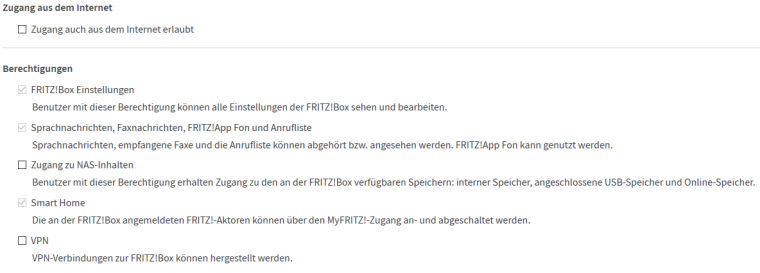
-
@kwaeksler Do u have a other IP Address for the fritzbox? Do you have activate the callmonitor with #965 from a connected Phone (Not the fon-app)?
-
Hi,
Is there a way to show internal calls?
For external calls it´s working fine.But I couldn´t get it to work for internal calls from a locally connected SIP phone…
-
@ostfilinchen said in MMM-FRITZ-Box-Callmonitor:
@kwaeksler Do u have a other IP Address for the fritzbox? Do you have activate the callmonitor with #965 from a connected Phone (Not the fon-app)?
IP Adress for the box is 192.168.178.1 and yes i activated the callmonitor with my Siemens phone.
-
The Best way to find errors is to Start the mirror with npm start dev directly on the pi. On the right side you find Infos about the error.
-
@ostfilinchen said in MMM-FRITZ-Box-Callmonitor:
The Best way to find errors is to Start the mirror with npm start dev directly on the pi. On the right side you find Infos about the error.
Mhm… i dont get any warnings or errors in the console
-
@kwaeksler if you start the mirror with pm2, what says the pm2 logs mm?
-
@ostfilinchen said in MMM-FRITZ-Box-Callmonitor:
@kwaeksler if you start the mirror with pm2, what says the pm2 logs mm?
in mm-error-0.log i searched for “callmonitor” and got this error:
TypeError: path must be a string or Buffer
at TypeError (native)
at Object.fs.readFile (fs.js:303:11)
at Object.fs.readFile (ELECTRON_ASAR.js:451:25)
at Object.parseVcardFile (/home/pi/MagicMirror/modules/MMM-FRITZ-Box-Callmonitor/node_modules/vcard-json/lib/vcard-json.js:65:6)
at Class.parseVcardFile (/home/pi/MagicMirror/modules/MMM-FRITZ-Box-Callmonitor/node_helper.js:107:9)
at Class.socketNotificationReceived (/home/pi/MagicMirror/modules/MMM-FRITZ-Box-Callmonitor/node_helper.js:56:10)
at Socket. (/home/pi/MagicMirror/modules/node_modules/node_helper/index.js:98:10)
at emitTwo (events.js:106:13)
at Socket.emit (events.js:191:7)
at Socket.onevent (/home/pi/MagicMirror/node_modules/socket.io/lib/socket.js:335:8)
Missing error handler on socket. -
@kwaeksler it looks, that u have activate the vCard option. Is that right? If no… Do u had installed the latest Version of this module?
-
@ostfilinchen
i tried the vCard option first, but actually it should be disabled…
i think so. with git pull in “/MagicMirror/modules/MMM-FRITZ-Box-Callmonitor” i get “Already up-to-date”. -
@kwaeksler can u Check this config:
{ module: 'MMM-FRITZ-Box-Callmonitor', position: 'top_left', // This can be any of the regions. Best results in left or right regions. header: "kürzliche Anrufe", // This is optional config: { // See 'Configuration options' for more information. maximumCallDistance: 7200, username: "benutzer", password: "passwort, showContactsStatus: true, //vCard: true //maximumCalls: 10 } }, -
@ostfilinchen
There is a " missing after passwort -
@ostfilinchen my current config looks like this:
	{
        module: 'MMM-FRITZ-Box-Callmonitor',
        position: 'top_right',
        header: "Anrufliste",
        config: {
        	maximumCallDistance: 7200,
			username: "***********",
			password: "********************",
			showContactsStatus: true,
			vCard: false
        }
	},
i think it looks good?
-
@kwaeksler yes. It looks good. Is the Module now working?
-
@ostfilinchen No :-(
i still get a small warning sign and an “unknown error”the incoming call shows me a number, not a name.
-
@kwaeksler puh… now I have no ideas. You have create an User and password in the fritz.box?
And… Do u have Updated your rpi?
sudo apt-get update
sudo apt-get dist-upgrade
sudo rebootIf After this the Module doesn’t work open an issue on github.
-
Hello everybody,
first of all @ostfilinchen: Thank you for your great support!
I just want to tell you, that kwaeksler is not the only one facing this problem.
Exactly this problem also appears on my MagicMirror installation.Currently i have no possibility to check anything regarding my MagicMirror installation, but as soon as i have time (this weekend) i’m going to catch some more information that may be helpful for you (firmware version FritzBox, config MagicMirror, …).
I already tried
sudo apt-get update
sudo reboot
without succes.Additionally i’m going to try
sudo apt-get update
sudo apt-get dist-upgrade
sudo rebootBest regards
Aaron -
Yes, i updated the pi yesterday with:
sudo apt-get update
sudo apt-get dist-upgrade
sudo rebootafter a long time of waiting the same warning sign :-(
-
@kwaeksler which nodejs Version Do u have? You can Check this with nodejs -v
My Version is 7.4.0
Maybe it’s a good idea to update this with
curl -sL https://deb.nodesource.com/setup_7x | sudo -E bash -
sudo apt-get install -y nodejs
sudo npm install -g npm
sudo npm install -g npm


Hello! It looks like you're interested in this conversation, but you don't have an account yet.
Getting fed up of having to scroll through the same posts each visit? When you register for an account, you'll always come back to exactly where you were before, and choose to be notified of new replies (either via email, or push notification). You'll also be able to save bookmarks and upvote posts to show your appreciation to other community members.
With your input, this post could be even better 💗
Register Login