MagicMirror Forum
    • Recent
    • Tags
    • Unsolved
    • Solved
    • MagicMirror² Repository
    • Documentation
    • 3rd-Party-Modules
    • Donate
    • Discord
    • Register
    • Login
    A New Chapter for MagicMirror: The Community Takes the Lead
    Read the statement by Michael Teeuw here.

    Issues with MMM-PIR

    Scheduled Pinned Locked Moved Solved Troubleshooting
    22 Posts 7 Posters 12.9k Views 7 Watching
    Loading More Posts
    • Oldest to Newest
    • Newest to Oldest
    • Most Votes
    Reply
    • Reply as topic
    Log in to reply
    This topic has been deleted. Only users with topic management privileges can see it.
    • E Offline
      eyesallin
      last edited by

      Hi
      I’m completely new to this.
      I have a Pi 5 on Magicmirror.
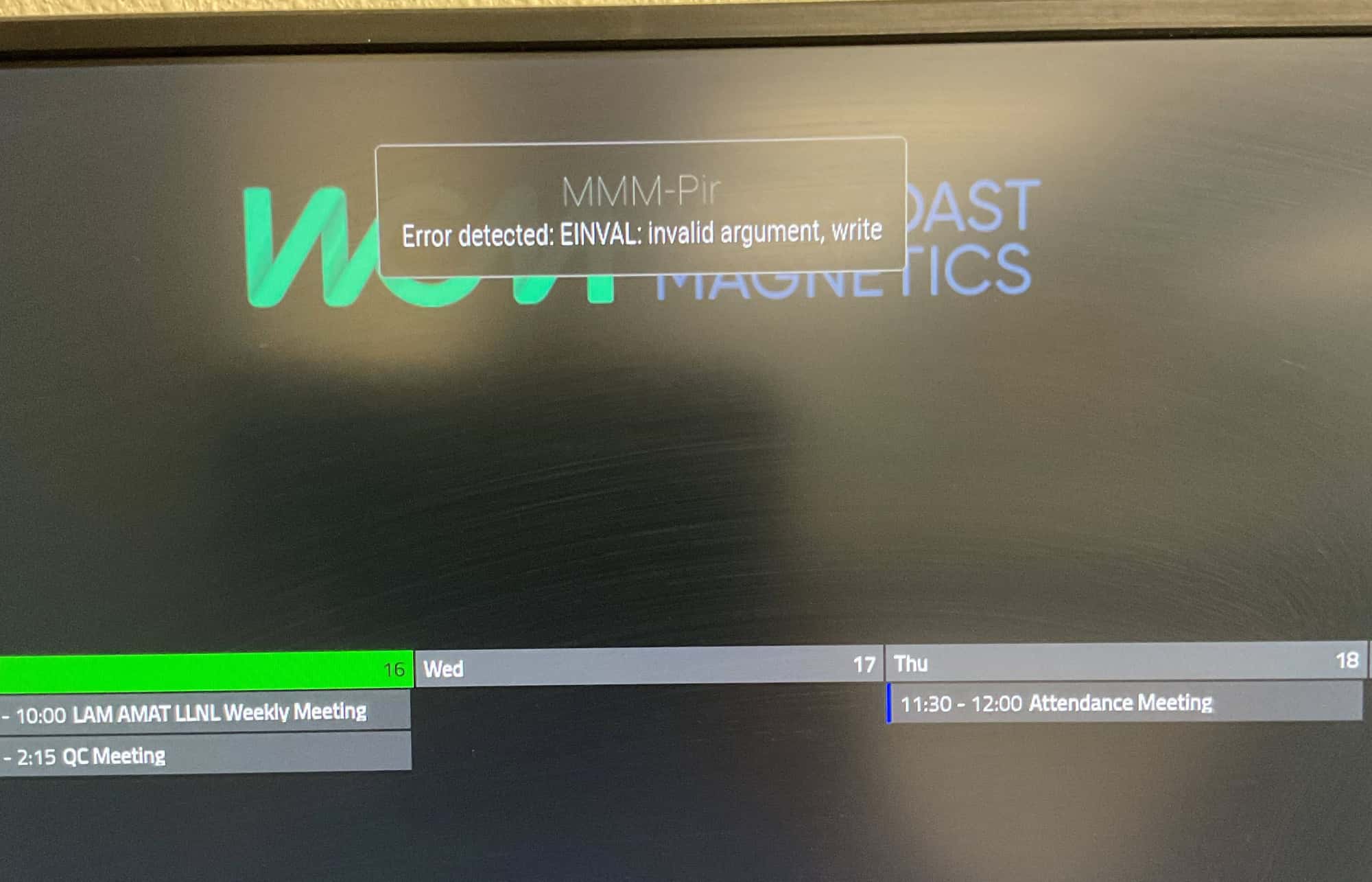
      I installed MMM-Pir when ir runs the countdown but it displays 2 errors top of screen, pir has no effect countdown expires and turns of the screen.
      Unable to recover without rebooting
      Errors on screen :
      EINVAL: Invalid argument, write
      Command failed: /usr/bin/vcgencommand display_power

      S 1 Reply Last reply Reply Quote 0
      • D Offline
        diccon @bugsounet
        last edited by

        @bugsounet thank you changing to pir_mode 1 fixed the problem. Just for awareness I am running on a RPi 3 B+ Rev 1.3 hence why I didn’t do this sooner.

        1 Reply Last reply Reply Quote 0
        • S Do not disturb
          sdetweil @eyesallin
          last edited by

          @eyesallin on pi5 by default you have to use mode 10, as Wayland is the display manager

          Sam

          How to add modules

          learning how to use browser developers window for css changes

          E 1 Reply Last reply Reply Quote 0
          • E Offline
            eyesallin @sdetweil
            last edited by

            @sdetweil
            Many thanks I’ll give it a try. Will report back.

            E 1 Reply Last reply Reply Quote 0
            • E Offline
              eyesallin @eyesallin
              last edited by

              @eyesallin

              50% unfortunately the top error is still there, any other help would be appreciated.
              EINVAL: Invalid argument, write.

              bugsounetB 1 Reply Last reply Reply Quote 0
              • bugsounetB Offline
                bugsounet Banned @eyesallin
                last edited by

                @eyesallin hi, eventually can I have the result of this commands in a terminal:

                groups
                

                thanks

                E 1 Reply Last reply Reply Quote 0
                • E Offline
                  eyesallin @bugsounet
                  last edited by

                  @bugsounet Apologies but I don’t understand what you are asking for?

                  bugsounetB 1 Reply Last reply Reply Quote 0
                  • bugsounetB Offline
                    bugsounet Banned @eyesallin
                    last edited by

                    @eyesallin

                    like that:

                    pi@raspberrypi:~ $ groups
                    pi adm dialout cdrom sudo audio video plugdev games users input render netdev lpadmin gpio i2c spi
                    pi@raspberrypi:~ $ 
                    

                    I have to see if you are in gpio group :)

                    E 1 Reply Last reply Reply Quote 0
                    • I Offline
                      ingo916
                      last edited by ingo916

                      @bugsounet said in Issues with MMM-PIR:

                      groups

                      I am also getting the error
                      MMM-Pir
                      Error detected: EINVAL:invalid argument, write

                      pi@raspberrypi:~ $ groups
                      pi adm dialout cdrom sudo audio video plugdev games users input render netdev lpadmin gpio i2c spi
                      pi@raspberrypi:~ $
                      IMG_013.jpg IMG_0130.jpg

                      I 2 Replies Last reply Reply Quote 0
                      • I Offline
                        ingo916 @ingo916
                        last edited by

                        @ingo916

                        pi@raspberrypi:~/MagicMirror/modules $ git clone https://github.com/bugsounet/MMM-Pir
                        Cloning into 'MMM-Pir'...
                        remote: Enumerating objects: 546, done.
                        remote: Counting objects: 100% (136/136), done.
                        remote: Compressing objects: 100% (111/111), done.
                        remote: Total 546 (delta 79), reused 47 (delta 24), pack-reused 410
                        Receiving objects: 100% (546/546), 287.37 KiB | 2.79 MiB/s, done.
                        Resolving deltas: 100% (308/308), done.
                        pi@raspberrypi:~/MagicMirror/modules $ cd MMM-Pir/
                        pi@raspberrypi:~/MagicMirror/modules/MMM-Pir $ npm install
                        npm WARN deprecated @npmcli/move-file@2.0.1: This functionality has been moved to @npmcli/fs
                        
                        > MMM-Pir@1.1.2 preinstall
                        > installer/preinstall.sh -d 'unclutter cec-utils ddcutil build-essential'
                        
                        
                        Welcome to MMM-Pir v1.1.2
                        
                        No root checking...
                        Checking MMM-Pir: pi/pi
                        Checking MagicMirror: pi/pi
                        
                        Checking OS...
                        OS Detected: linux-gnu (debian 12 aarch64)
                        
                        Checking all dependencies...
                        Updating package...
                        Missing package: unclutter
                        Missing package: cec-utils
                        Missing package: ddcutil
                        Installing missing package...
                        Hit:1 http://deb.debian.org/debian bookworm InRelease
                        Hit:2 http://deb.debian.org/debian-security bookworm-security InRelease
                        Hit:3 http://deb.debian.org/debian bookworm-updates InRelease
                        Hit:4 http://archive.raspberrypi.com/debian bookworm InRelease
                        Reading package lists... Done
                        Reading package lists... Done
                        Building dependency tree... Done
                        Reading state information... Done
                        The following additional packages will be installed:
                          libcec6 libp8-platform2 unclutter-startup
                        The following NEW packages will be installed:
                          cec-utils ddcutil libcec6 libp8-platform2 unclutter unclutter-startup
                        0 upgraded, 6 newly installed, 0 to remove and 0 not upgraded.
                        Need to get 549 kB of archives.
                        After this operation, 2,084 kB of additional disk space will be used.
                        Get:1 http://deb.debian.org/debian bookworm/main arm64 libp8-platform2 arm64 2.1.0.1+dfsg1-4 [20.9 kB]
                        Get:2 http://deb.debian.org/debian bookworm/main arm64 ddcutil arm64 1.4.1-1 [286 kB]        
                        Get:3 http://deb.debian.org/debian bookworm/main arm64 unclutter arm64 8-25 [15.6 kB]
                        Get:4 http://deb.debian.org/debian bookworm/main arm64 unclutter-startup all 8-25 [8,860 B]  
                        Get:5 http://archive.raspberrypi.com/debian bookworm/main arm64 libcec6 arm64 6.0.2-5+rpt2 [188 kB]
                        Get:6 http://archive.raspberrypi.com/debian bookworm/main arm64 cec-utils arm64 6.0.2-5+rpt2 [30.0 kB]
                        Fetched 549 kB in 1s (469 kB/s)     
                        Preconfiguring packages ...
                        Selecting previously unselected package libp8-platform2:arm64.
                        (Reading database ... 154590 files and directories currently installed.)
                        Preparing to unpack .../0-libp8-platform2_2.1.0.1+dfsg1-4_arm64.deb ...
                        Unpacking libp8-platform2:arm64 (2.1.0.1+dfsg1-4) ...
                        Selecting previously unselected package libcec6:arm64.
                        Preparing to unpack .../1-libcec6_6.0.2-5+rpt2_arm64.deb ...
                        Unpacking libcec6:arm64 (6.0.2-5+rpt2) ...
                        Selecting previously unselected package cec-utils.
                        Preparing to unpack .../2-cec-utils_6.0.2-5+rpt2_arm64.deb ...
                        Unpacking cec-utils (6.0.2-5+rpt2) ...
                        Selecting previously unselected package ddcutil.
                        Preparing to unpack .../3-ddcutil_1.4.1-1_arm64.deb ...
                        Unpacking ddcutil (1.4.1-1) ...
                        Selecting previously unselected package unclutter.
                        Preparing to unpack .../4-unclutter_8-25_arm64.deb ...
                        Unpacking unclutter (8-25) ...
                        Selecting previously unselected package unclutter-startup.
                        Preparing to unpack .../5-unclutter-startup_8-25_all.deb ...
                        Unpacking unclutter-startup (8-25) ...
                        Setting up libp8-platform2:arm64 (2.1.0.1+dfsg1-4) ...
                        Setting up unclutter (8-25) ...
                        update-alternatives: using /usr/bin/unclutter-classic to provide /usr/bin/unclutter (unclutter) in auto mode
                        Setting up libcec6:arm64 (6.0.2-5+rpt2) ...
                        Setting up unclutter-startup (8-25) ...
                        Setting up ddcutil (1.4.1-1) ...
                        Setting up cec-utils (6.0.2-5+rpt2) ...
                        Processing triggers for man-db (2.11.2-2) ...
                        Processing triggers for libc-bin (2.36-9+rpt2+deb12u3) ...
                        All Dependencies needed are installed !
                        
                        Installing @sdetweil sandbox fix...
                        fixing sandbox permissions
                        
                        > MMM-Pir@1.1.2 postinstall
                        > installer/postinstall.sh -r -m
                        
                        
                        Minify Main code...
                        Found: 8 files to minify
                        
                        Process File: ../MMM-Pir.js
                        Process File: ../node_helper.js
                        Process File: ../components/screenLib.js
                        Process File: ../components/screenDisplayer.js
                        Process File: ../components/progressbar.js
                        Process File: ../components/pirLib.js
                        Process File: ../components/parseData.js
                        Process File: ../components/loadLibraries.js
                        Done
                        
                        Try to Disable screen saver...
                        Found: screen saver in gsettings
                        gsettings screen saver already disabled
                        Found: screen saver in lightdm
                        screensaver via lightdm already disabled but need to be updated
                        Found: screen saver in lxsession
                        lxsession screen saver already disabled but need to updated
                        Found: screen saver in wayland
                        disable screensaver via wayfire.ini
                        
                        [WARN] There is some change for disable screen saver
                        [WARN] Please, don't forget to reboot your OS for apply the new configuration!
                        Done
                        
                        Rebuild MagicMirror...
                        make: Entering directory '/home/pi/MagicMirror/modules/MMM-Pir/node_modules/epoll/build'
                          CXX(target) Release/obj.target/epoll/src/epoll.o
                          SOLINK_MODULE(target) Release/obj.target/epoll.node
                          COPY Release/epoll.node
                        make: Leaving directory '/home/pi/MagicMirror/modules/MMM-Pir/node_modules/epoll/build'
                        Done
                        
                        MMM-Pir is now installed !
                        
                        added 218 packages in 53s
                        
                        43 packages are looking for funding
                          run `npm fund` for details
                        pi@raspberrypi:~/MagicMirror/modules/MMM-Pir $ 
                        
                        1 Reply Last reply Reply Quote 0
                        • I Offline
                          ingo916 @ingo916
                          last edited by

                          @ingo916
                          Config

                          		{
                          			module: 'MMM-Pir',
                          			position: 'top_left',
                          			config: {
                          				debug: false,
                          				delay: 2 * 60 * 1000,
                          				turnOffDisplay: true,
                          				mode: 10,
                          				ecoMode: true,
                          				displayCounter: false,
                          				//displayCounter: true,
                          				displayBar: false,
                          				//displayBar: true,
                          				displayStyle: "Circle",
                          				displayLastPresence: false,
                          				//displayLastPresence: true,
                          				lastPresenceTimeFormat: "LL H:mm",
                          				mode6_gpio: 20,
                          				mode6_clearGpioValue: true,
                          				pir_gpio: 22,
                          				//pir_gpio: 21,
                          				pir_reverseValue: false,
                          				xrandrForceRotation: "normal",
                          				wrandrForceRotation: "normal"
                          			}
                          		},
                          
                          1 Reply Last reply Reply Quote 0
                          • E Offline
                            eyesallin @bugsounet
                            last edited by

                            @bugsounet

                            Thanks for your patience, this is what i get.

                            admin@garyspi:~ $ groups
                            admin adm dialout cdrom sudo audio video plugdev games users input render netdev lpadmin gpio i2c spi
                            admin@garyspi:~ $

                            E 1 Reply Last reply Reply Quote 0
                            • S Offline
                              schris88
                              last edited by

                              your config looks good thus far, if you´re not getting it to run you can try my solution which is currently running like a charm

                              I installed it with MMM-Pir-Sensor-light and changed the code to use wayland,
                              to toggle the display on Pi5 this is working on a fresh OS install

                              WAYLAND_DISPLAY=“wayland-1” wlr-randr --output HDMI-A-1 --off
                              WAYLAND_DISPLAY=“wayland-1” wlr-randr --output HDMI-A-1 --on

                              possible outputs HDMI-A-1 (the one right next to usb-c), HDMI-A-2

                              If you monitor turns back on by itself after ~10 secs add “vc4.force_hotplug=1”(1=hmdi1 / 2=hdmi2 / 3=both) to the end of your /boot/firmware/cmdline.txt without creating a new line

                              All I did was change the command in activate and deactivate display function in the node_helper.js and added the cmdline parameter (dont forget to reboot)

                              1 Reply Last reply Reply Quote 0
                              • E Offline
                                eyesallin @eyesallin
                                last edited by

                                @eyesallin
                                I’m beginning to think that all this is Pi 5 related.
                                Also changing to mode 10 as previously stated screws with the weather modules which don’t load. Remove MMM-PIR from config and everything works fine.
                                It doesn’t help that I’m completely new to all this.

                                S 1 Reply Last reply Reply Quote 0
                                • S Offline
                                  schris88 @eyesallin
                                  last edited by

                                  @eyesallin yes it´s an “issue” with the pi5 as the os is now using wayland as graphical environment instead of x11 which was used forever, a lot of tools are written for it and now need to be updated to work with wayland. You will find a lot of scenarios where there is no updated tool or alternative for the pi5 atm. The switch was done end of 2023 so it´s very new.

                                  E 1 Reply Last reply Reply Quote 0
                                  • E Offline
                                    eyesallin @schris88
                                    last edited by

                                    @schris88
                                    Thx for the info, I guess a lot of the modules require reworking for the Pi 5.
                                    Unfortunately I do not have the ability, totally new to the Pi and programming.

                                    C 1 Reply Last reply Reply Quote 0
                                    • C Offline
                                      ChanceTime @eyesallin
                                      last edited by

                                      Is anyone able to get MMM-PIR successfully running on Bookworm? Feels like every option I’ve tried to turn my screen on and off after the PIR senses movement has been a struggle with no results. I’ve confirmed with tests that my sensor is working, but all the old ways to trigger the display on-off behaviour seem to not be running. I’m on a Pi4 running 12 with Wayland.

                                      Unfortunately I can’t go back to 11 because 10 worked like a dream, and 11 for some reason i could never successfully troubleshoot would refuse to load a taskbar in. Hardware seems to be working fine again in 12…

                                      I can post my config if it helps. Thanks for the hard work, bugsounet. :)

                                      S 1 Reply Last reply Reply Quote 0
                                      • S Do not disturb
                                        sdetweil @ChanceTime
                                        last edited by sdetweil

                                        @ChanceTime bookworm on pi4 or 5 uses a different window manager, Wayland, and requires different commands

                                        you can go back to xorg by using the raspi-config command

                                        Sam

                                        How to add modules

                                        learning how to use browser developers window for css changes

                                        1 Reply Last reply Reply Quote 0
                                        • D Offline
                                          diccon
                                          last edited by

                                          Hi

                                          I have had MMM-Pir module running perfectly for months. When I updated my RPi 3B+ to the latest updates this week the module produce the same error message

                                          Pir Error Detected: EINVAL: invalid argument, write

                                          I have tried reinstalling the module but no luck.

                                          Any help greatly appreciated

                                          Thanks

                                          S 1 Reply Last reply Reply Quote 0
                                          • S Do not disturb
                                            sdetweil @diccon
                                            last edited by

                                            @diccon which MMM-PIR?

                                            Sam

                                            How to add modules

                                            learning how to use browser developers window for css changes

                                            bugsounetB 1 Reply Last reply Reply Quote 0
                                            • bugsounetB Offline
                                              bugsounet Banned @sdetweil
                                              last edited by

                                              Hi, check pir_mode feature in readme readme

                                              by default pir_mode is on mode 0
                                              With pi 4 and pi 5, you can have EINVAL: invalid argument, write error
                                              In this case
                                              you have to use with pi 4: pir_mode: 1,
                                              with pi 5 pir_mode: 2,

                                              D 1 Reply Last reply Reply Quote 1

                                              Hello! It looks like you're interested in this conversation, but you don't have an account yet.

                                              Getting fed up of having to scroll through the same posts each visit? When you register for an account, you'll always come back to exactly where you were before, and choose to be notified of new replies (either via email, or push notification). You'll also be able to save bookmarks and upvote posts to show your appreciation to other community members.

                                              With your input, this post could be even better 💗

                                              Register Login

                                              • 1
                                              • 2
                                              • 1 / 2
                                              • First post
                                                Last post
                                              Enjoying MagicMirror? Please consider a donation!
                                              MagicMirror created by Michael Teeuw.
                                              Forum managed by Sam, technical setup by Karsten.
                                              This forum is using NodeBB as its core | Contributors
                                              Contact | Privacy Policy
