Read the statement by Michael Teeuw here.
MM current version on Raspberry Pi 5 cannot turn off monitor
-
@jbat66 not sure how much power the pi+power supply takes and if it would be worth it to shut it down overnight. Could rig a button to do a graceful shutdown, then use the power down button to shut down both the pi and the monitor. Interesting ideas here. Let me know what you come up with.
-
@BKeyport i have been transitioning to Home Assistant for my home austomation platform.
and interesting idea being described for integrating older devices, like washing machine, is to monitor the power consumption with a smart plug… (I don’t know which do that in the US)
I wonder if the ps also has a lower consumption that can be measured and used as a trigger to turn off the smart switch when the power drops after pi shuts down…
i’ll have to try to find one of these outlets
maybe
https://www.amazon.com/gp/product/B08TNF4835/ref=ox_sc_act_title_4?smid=ATVPDKIKX0DER&psc=1 -
@sdetweil Get a Yo-Link Plug. They have an API, you get your API key from an advanced menu in their app. Their plugs do grab usage, I have not used the API to grab usage, just to turn on and off, and to get temperatures from their sensors. I then use the API in MM to display the temperatures.
https://www.amazon.com/s?k=yolink+smart+plug
The whole Yo-Link echo system is great for DIY folks in home automation. -
@jbat66 trying to find devices without host connections… get more/all local
-
@BKeyport the physical Mirror’s Power supply is the only thing I plug in, and the PI gets its power from USB from the display, so no extra power source to monitor.
I will probably just do a bash script to shut down the pi at some time say 10:00pm, then I will have Alexa shut down the mirror’s power (thus the pi as well) via a Yo-Link smart plug at 10:05pm. Then at sunrise via Amazon Alexa, I will just turn on mirror.
I already do this for my RV Starlink, since I have cell modem as a backup, I can use the internet to turn on and off my internet. lol
-
@sdetweil said in MM current version on Raspberry Pi 5 cannot turn off monitor:
@jbat66 trying to find devices without host connections… get more/all local
While the Yo-Link is great it is cloud and you can’t do local yet. They have been talking about it in their forums, however.
-
@sdetweil
I looked it up and you can get power readings via the API.
http://doc.yosmart.com/docs/yolinkapi/Outlet -
@jbat66 yeh gotta get a token for each I think
-
and interesting idea being described for integrating older devices, like washing machine, is to monitor the power consumption with a smart plug… (I don’t know which do that in the US)
thats exactly what I plan for my washing machine
I wonder if the pi also has a lower consumption that can be measured and used as a trigger to turn off the smart switch when the power drops after pi shuts down…
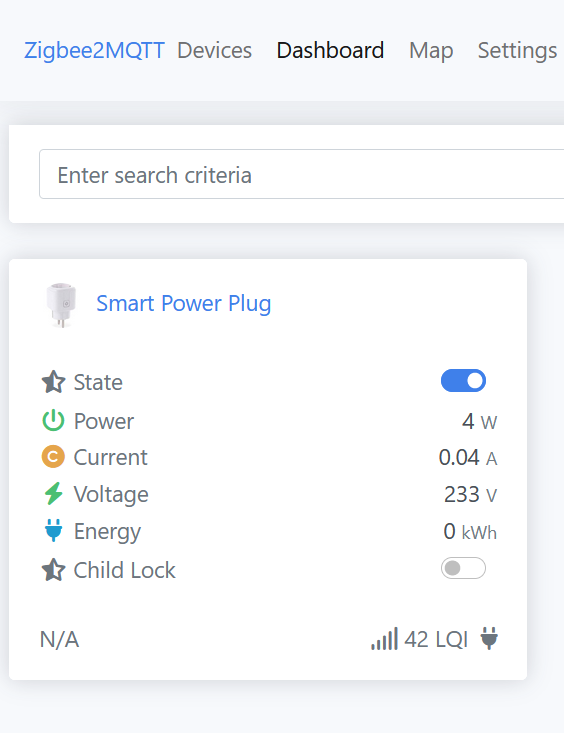
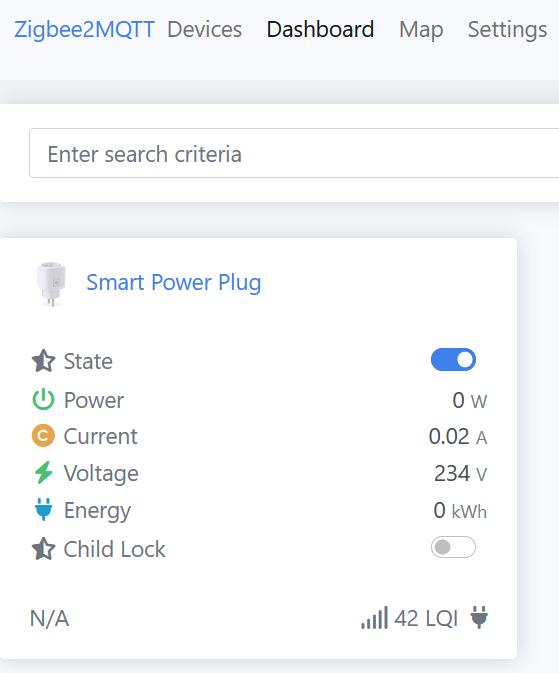
I ordered a smart plug from TuYa for this and tested this now with a raspberry pi 4.
When the pi is running:
After shutdown of the pi but red light of pi still on:
-
@karsten13 awesome. I hope my plug will be here today
-
@sdetweil So I ened up using a Yo-Link Plug, and it’s API. I have my monitor plugged into the Yo-Link Plug. I wrote a script that sets a delay time off to 1 minute for the monitor, and then 10 seconds later does a sudo power off command. So the pi shuts down gracefuly and then the monitor. The pi is powered from the usb connector on the monitor.
-
@jbat66 - thanks for the offer. If you do wind up sharing your work, I will take a look and see if it works for me.
I don’t run any remote control module, and don’t find the “MMM-remote” you reference when I search. I do, however, find at least two (2) different modules called “MMM-Remote-Control” by two different authors. Do you mean one of those?
My progress so far is that I can get the monitor to turn off using the following script (called by a cron job), but the monitor then turns back on after ~10-15 seconds:
#!/bin/bash # Script to turn off monitor display when called by crontab export WAYLAND_DISPLAY=wayland-1 export XDG_RUNTIME_DIR=/run/user/1000 /usr/bin/wlr-randr --output HDMI-A-1 --off -
@JohnGalt Can you add vc4.force_hotplug=1 to cmdline.txt (on existing line) and check if behaviour changes? Add a space at the end of the line, save and reboot.
Assuming you are using the first hdmi port closer to the usb c. If using the 2nd port then change the hot plug number to 2
-
@JohnGalt said in MM current version on Raspberry Pi 5 cannot turn off monitor:
@jbat66 - thanks for the offer. If you do wind up sharing your work, I will take a look and see if it works for me.
I don’t run any remote control module, and don’t find the “MMM-remote” you reference when I search. I do, however, find at least two (2) different modules called “MMM-Remote-Control” by two different authors. Do you mean one of those?
This one: https://github.com/Jopyth/MMM-Remote-Control
Sorry I should have been more clear.
-
@1a2a3a said in MM current version on Raspberry Pi 5 cannot turn off monitor:
vc4.force_hotplug
That does appear to work! So far I have tried it on two different Pi 4 instances, and each responded to a script called in crontab to turn off the monitor display, and then a script to turn it back on, as expected.
Thanks.
-
@1a2a3a Thank you Thank you Thank you… That worked for me as well… Message me, and I will get you a pizza like I promised to anyone who could get my pi4 running latest rasbian to turn off the monitor. Adding vc4.force_hotplug=1 to the end of the line in /boot/cmdline.txt did the trick along with using wlr-randr!!
I’m serious about the pizza.
-
@jbat66 all good mate. I’m likely in a different geographic region to you. But anyway it was an issue that someone in GitHub that resolved for me so I can’t really take credit. I would point you to the GitHub but it was quite awhile back hence I can’t find the link anymore, therefore I went into my txt file and gave you guys the code.
-
@jbat66 I know this thread isn’t about getting MMM-Remote-Control to update with this but I was curious if you know how I could go about that.
-
@devonian69 Do you mean just a normal update for the module?
-
Hey guys,
So how did you get this to work? vc4.force_hotplug ive added that to /boot/firmware/cmdline.txt
But now what?
Im running Raspbian on a Pi 5, so not sure if all of this is even for bookwork :(
Thanks


Hello! It looks like you're interested in this conversation, but you don't have an account yet.
Getting fed up of having to scroll through the same posts each visit? When you register for an account, you'll always come back to exactly where you were before, and choose to be notified of new replies (either via email, or push notification). You'll also be able to save bookmarks and upvote posts to show your appreciation to other community members.
With your input, this post could be even better 💗
Register Login