MagicMirror Forum
    • Recent
    • Tags
    • Unsolved
    • Solved
    • MagicMirror² Repository
    • Documentation
    • 3rd-Party-Modules
    • Donate
    • Discord
    • Register
    • Login
    A New Chapter for MagicMirror: The Community Takes the Lead
    Read the statement by Michael Teeuw here.

    MM failed after updating

    Scheduled Pinned Locked Moved Solved Troubleshooting
    16 Posts 3 Posters 3.7k Views 3 Watching
    Loading More Posts
    • Oldest to Newest
    • Newest to Oldest
    • Most Votes
    Reply
    • Reply as topic
    Log in to reply
    This topic has been deleted. Only users with topic management privileges can see it.
    • 1 Offline
      1a2a3a
      last edited by

      Hi, after updating my MM, when i try to start i get this error.

      node_modules/.bin/electron: not found"

      what should i do?

      S 1 Reply Last reply Reply Quote 0
      • C Offline
        chrisfr1976 @sdetweil
        last edited by

        @sdetweil I was able to fix it. git reset --hard followed by npm run install-mm fixed the issue. I don’t know why but now everything is fine again. I’ll do a SD-card back-up now :-)

        Regards, Chris.

        S 1 Reply Last reply Reply Quote 0
        • S Do not disturb
          sdetweil @1a2a3a
          last edited by

          @1a2a3a please tell me how you updated and what.platform you are on

          Sam

          How to add modules

          learning how to use browser developers window for css changes

          1 1 Reply Last reply Reply Quote 0
          • 1 Offline
            1a2a3a @sdetweil
            last edited by

            @sdetweil on pi 5. updated using your script. while attempting to google search for fixes, i seems to have broken more stuff. trying to rebuild again from scratch…using your script… to update again…

            S 1 Reply Last reply Reply Quote 0
            • S Do not disturb
              sdetweil @1a2a3a
              last edited by

              @1a2a3a can you show me the ~/MagicMirror/installers/upgrade.log

              in the future ask for help first, vs apply random answers.

              you could have just tried installing the electon version.

              Sam

              How to add modules

              learning how to use browser developers window for css changes

              1 1 Reply Last reply Reply Quote 0
              • 1 Offline
                1a2a3a @sdetweil
                last edited by

                @sdetweil i cant. i deleted the entire folder. just installed using your script. now transferring the modules folder from backup to the pi.

                thats what i did actually, installing the electron but it keep throwing error like npm ERR! signal sigint
                npm ERR! code E404

                S 1 Reply Last reply Reply Quote 0
                • S Do not disturb
                  sdetweil @1a2a3a
                  last edited by

                  @1a2a3a thanks. i needed to see the actual npm install output

                  use my backup/restore scripts

                  https://github.com/sdetweil/MagicMirror-backup-restore

                  Sam

                  How to add modules

                  learning how to use browser developers window for css changes

                  1 1 Reply Last reply Reply Quote 0
                  • 1 Offline
                    1a2a3a @sdetweil
                    last edited by

                    @sdetweil thanks. still in the midst of transferring.

                    why are you up so early? i recall you were some hours behind so when i posted this i figured i wouldnt get a response so soon hence my attempt of own answer.

                    S 1 Reply Last reply Reply Quote 0
                    • S Do not disturb
                      sdetweil @1a2a3a
                      last edited by

                      @1a2a3a i was on US west coast time for a couple months now back in central time. thanks for noticing…

                      Sam

                      How to add modules

                      learning how to use browser developers window for css changes

                      1 1 Reply Last reply Reply Quote 0
                      • 1 Offline
                        1a2a3a @sdetweil
                        last edited by 1a2a3a

                        @sdetweil i see. anyway, my calendar, stocks and google photo are not loading. it says check logs for details – where can i find the logs again?

                        edit—

                        its odd. when i run npm start dev, everything is working fine, everything loads.

                        but when i run pm2 start MagicMirror - my cal, stocks and photos are not loading. am i suppose to let it sit there for awhile?

                        S 1 Reply Last reply Reply Quote 0
                        • S Do not disturb
                          sdetweil @1a2a3a
                          last edited by

                          @1a2a3a logs are output where the npm start is done.

                          pm2 captures them
                          do this

                          pm2 stop all
                          pm2 flush
                          pm2 start MagicMirror

                          wait 15 seconds

                          pm2 stop all
                          pm2 logs --lines=75

                          Sam

                          How to add modules

                          learning how to use browser developers window for css changes

                          C 1 Reply Last reply Reply Quote 0
                          • C Offline
                            chrisfr1976 @sdetweil
                            last edited by

                            @sdetweil

                            Same issue here:

                            chris@MagicPi:~/MagicMirror $ pm2 logs --lines=75
                            [TAILING] Tailing last 75 lines for [all] processes (change the value with --lines option)
                            /home/chris/.pm2/pm2.log last 75 lines:
                            PM2        | 2024-04-03T10:25:09: PM2 log: App [mm:0] starting in -fork mode-
                            PM2        | 2024-04-03T10:25:09: PM2 log: App [mm:0] online
                            PM2        | 2024-04-03T10:25:30: PM2 log: App [mm:0] exited with code [1] via signal [SIGINT]
                            PM2        | 2024-04-03T10:25:30: PM2 log: App [mm:0] starting in -fork mode-
                            PM2        | 2024-04-03T10:25:30: PM2 log: App [mm:0] online
                            PM2        | 2024-04-03T10:25:48: PM2 log: Stopping app:mm id:0
                            PM2        | 2024-04-03T10:25:48: PM2 log: App [mm:0] exited with code [0] via signal [SIGINT]
                            PM2        | 2024-04-03T10:25:48: PM2 log: pid=3783 msg=process killed
                            
                            /home/chris/.pm2/logs/mm-out.log last 75 lines:
                            /home/chris/.pm2/logs/Display-Drehen-out.log last 75 lines:
                            /home/chris/.pm2/logs/Display-Drehen-error.log last 75 lines:
                            /home/chris/.pm2/logs/mm-error.log last 75 lines:
                            0|mm       | npm ERR! code EJSONPARSE
                            0|mm       | npm ERR! JSON.parse Invalid package.json: JSONParseError: Expected double-quoted property name in JSON at position 3351 (line 87 column 1) while parsing near "...moment\": \"^2.30.1\",\n<<<<<<< Updated upst..."
                            0|mm       | npm ERR! JSON.parse Failed to parse JSON data.
                            0|mm       | npm ERR! JSON.parse Note: package.json must be actual JSON, not just JavaScript.
                            0|mm       | 
                            0|mm       | npm ERR! A complete log of this run can be found in: /home/chris/.npm/_logs/2024-04-03T08_25_30_215Z-debug-0.log


                            Complete log:

                            0 verbose cli /usr/bin/node /usr/bin/npm
                            1 info using npm@10.5.0
                            2 info using node@v21.7.1
                            3 timing npm:load:whichnode Completed in 5ms
                            4 timing config:load:defaults Completed in 5ms
                            5 timing config:load:file:/usr/lib/node_modules/npm/npmrc Completed in 1ms
                            6 timing config:load:builtin Completed in 2ms
                            7 timing config:load:cli Completed in 6ms
                            8 timing config:load:env Completed in 2ms
                            9 timing config:load:file:/home/chris/MagicMirror/.npmrc Completed in 5ms
                            10 timing config:load:project Completed in 7ms
                            11 timing config:load:file:/home/chris/.npmrc Completed in 1ms
                            12 timing config:load:user Completed in 1ms
                            13 timing config:load:file:/usr/etc/npmrc Completed in 1ms
                            14 timing config:load:global Completed in 1ms
                            15 timing config:load:setEnvs Completed in 3ms
                            16 timing config:load Completed in 27ms
                            17 timing npm:load:configload Completed in 27ms
                            18 timing config:load:flatten Completed in 7ms
                            19 timing npm:load:mkdirpcache Completed in 0ms
                            20 timing npm:load:mkdirplogs Completed in 0ms
                            21 verbose title npm start
                            22 verbose argv "start"
                            23 timing npm:load:setTitle Completed in 2ms
                            24 timing npm:load:display Completed in 2ms
                            25 verbose logfile logs-max:10 dir:/home/chris/.npm/_logs/2024-04-03T08_25_30_215Z-
                            26 verbose logfile /home/chris/.npm/_logs/2024-04-03T08_25_30_215Z-debug-0.log
                            27 timing npm:load:logFile Completed in 23ms
                            28 timing npm:load:timers Completed in 0ms
                            29 timing npm:load:configScope Completed in 0ms
                            30 timing npm:load Completed in 107ms
                            31 silly logfile start cleaning logs, removing 2 files
                            32 timing command:run-script Completed in 21ms
                            33 timing command:start Completed in 36ms
                            34 verbose stack JSONParseError: Invalid package.json: JSONParseError: Expected double-quoted property name in JSON at position 3351 (line 87 column 1) while parsing near "...moment\": \"^2.30.1\",\n<<<<<<< Updated upst..."
                            34 verbose stack     at PackageJson.fromJSON (/usr/lib/node_modules/npm/node_modules/@npmcli/package-json/lib/index.js:162:24)
                            34 verbose stack     at PackageJson.load (/usr/lib/node_modules/npm/node_modules/@npmcli/package-json/lib/index.js:156:17)
                            34 verbose stack     at async PackageJson.normalize (/usr/lib/node_modules/npm/node_modules/@npmcli/package-json/lib/index.js:115:5)
                            34 verbose stack     at async RunScript.run (/usr/lib/node_modules/npm/lib/commands/run-script.js:72:27)
                            34 verbose stack     at async module.exports (/usr/lib/node_modules/npm/lib/cli-entry.js:61:5)
                            35 verbose cwd /home/chris/MagicMirror
                            36 verbose Linux 6.1.21-v7l+
                            37 verbose node v21.7.1
                            38 verbose npm  v10.5.0
                            39 error code EJSONPARSE
                            40 error JSON.parse Invalid package.json: JSONParseError: Expected double-quoted property name in JSON at position 3351 (line 87 column 1) while parsing near "...moment\": \"^2.30.1\",\n<<<<<<< Updated upst..."
                            41 error JSON.parse Failed to parse JSON data.
                            41 error JSON.parse Note: package.json must be actual JSON, not just JavaScript.
                            42 verbose exit 1
                            43 timing npm Completed in 228ms
                            44 verbose code 1
                            45 error A complete log of this run can be found in: /home/chris/.npm/_logs/2024-04-03T08_25_30_215Z-debug-0.log


                            :anxious_face_with_sweat:

                            Cheers,
                            Chris.

                            Regards, Chris.

                            S 1 Reply Last reply Reply Quote 0
                            • S Do not disturb
                              sdetweil @chrisfr1976
                              last edited by sdetweil

                              @chrisfr1976 can you post the few lines of package.json around line 87

                              did you use my upgrade script?
                              if so can u email me the file
                              ~/MagicMirror/installers/upgrade.log

                              using the same userid as on this post at gmail

                              Sam

                              How to add modules

                              learning how to use browser developers window for css changes

                              C 1 Reply Last reply Reply Quote 0
                              • C Offline
                                chrisfr1976 @sdetweil
                                last edited by

                                @sdetweil

                                In the beginning I’ve used the described update method here:

                                https://docs.magicmirror.builders/getting-started/upgrade-guide.html
                                

                                So only git pull && npm run install-mm was used. But I’ve used the back-up script you’ve provided. Then I found also your update script. I’ve used it then, too. But same error. I’ll send the update.log via email :-)

                                Here the lines around line 87. I’ve marked it to show the position only:

                                
                                  // Loads a package.json at given path and JSON parses
                                  static async load (path, opts = {}) {
                                    const p = new PackageJson()
                                    // Avoid try/catch if we aren't going to create
                                    if (!opts.create) {
                                      return p.load(path)
                                    }
                                *87*
                                    try {
                                      return await p.load(path)
                                    } catch (err) {
                                      if (!err.message.startsWith('Could not read package.json')) {
                                        throw err
                                      }
                                      return await p.create(path)
                                    }
                                  }


                                Chris.

                                Regards, Chris.

                                S 1 Reply Last reply Reply Quote 0
                                • S Do not disturb
                                  sdetweil @chrisfr1976
                                  last edited by

                                  @chrisfr1976 hm…

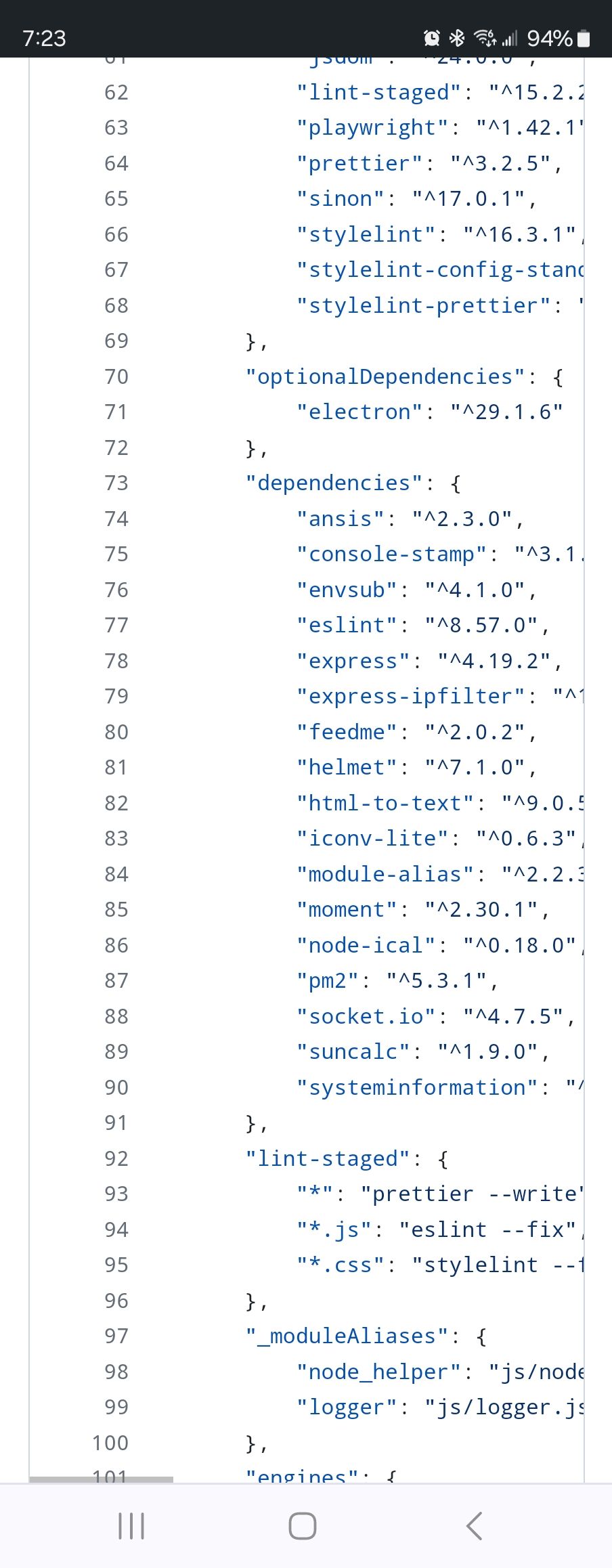
                                  package.json looks like this

                                  Screenshot_20240403_072345_Chrome.jpg

                                  Sam

                                  How to add modules

                                  learning how to use browser developers window for css changes

                                  C 1 Reply Last reply Reply Quote 0
                                  • C Offline
                                    chrisfr1976 @sdetweil
                                    last edited by

                                    @sdetweil I was able to fix it. git reset --hard followed by npm run install-mm fixed the issue. I don’t know why but now everything is fine again. I’ll do a SD-card back-up now :-)

                                    Regards, Chris.

                                    S 1 Reply Last reply Reply Quote 0
                                    • S Do not disturb
                                      sdetweil @chrisfr1976
                                      last edited by sdetweil

                                      @chrisfr1976 weird, thanks for the update
                                      Sam

                                      How to add modules

                                      learning how to use browser developers window for css changes

                                      1 Reply Last reply Reply Quote 0

                                      Hello! It looks like you're interested in this conversation, but you don't have an account yet.

                                      Getting fed up of having to scroll through the same posts each visit? When you register for an account, you'll always come back to exactly where you were before, and choose to be notified of new replies (either via email, or push notification). You'll also be able to save bookmarks and upvote posts to show your appreciation to other community members.

                                      With your input, this post could be even better 💗

                                      Register Login

                                      • 1 / 1
                                      • First post
                                        Last post
                                      Enjoying MagicMirror? Please consider a donation!
                                      MagicMirror created by Michael Teeuw.
                                      Forum managed by Sam, technical setup by Karsten.
                                      This forum is using NodeBB as its core | Contributors
                                      Contact | Privacy Policy