Read the statement by Michael Teeuw here.
MagicMirror no longer launches
-
pi@raspberrypi:~ $ npm install ansis up to date, audited 2 packages in 1s found 0 vulnerabilities pi@raspberrypi:~ $ pm2 stop all cd ~/MagicMirror npm install electron@29.1.6 npm start [PM2] Applying action stopProcessId on app [all](ids: [ 0 ]) [PM2] [MagicMirror](0) ✓ ┌────┬────────────────────┬──────────┬──────┬───────────┬──────────┬──────────┐ │ id │ name │ mode │ ↺ │ status │ cpu │ memory │ ├────┼────────────────────┼──────────┼──────┼───────────┼──────────┼──────────┤ │ 0 │ MagicMirror │ fork │ 8615 │ stopped │ 0% │ 0b │ └────┴────────────────────┴──────────┴──────┴───────────┴──────────┴──────────┘ npm ERR! code ENOTEMPTY npm ERR! syscall rename npm ERR! path /home/pi/MagicMirror/node_modules/caniuse-lite npm ERR! dest /home/pi/MagicMirror/node_modules/.caniuse-lite-6h1pL5No npm ERR! errno -39 npm ERR! ENOTEMPTY: directory not empty, rename '/home/pi/MagicMirror/node_modules/caniuse-lite' -> '/home/pi/MagicMirror/node_modules/.caniuse-lite-6h1pL5No' npm ERR! A complete log of this run can be found in: /home/pi/.npm/_logs/2024-04-26T16_37_54_575Z-debug-0.log > magicmirror@2.27.0 start > DISPLAY="${DISPLAY:=:0}" ./node_modules/.bin/electron js/electron.js [2024-04-26 18:38:03.262] [ERROR] App threw an error during load [2024-04-26 18:38:03.265] [ERROR] Error: Cannot find module 'socket.io' Require stack: - /home/pi/MagicMirror/js/server.js - /home/pi/MagicMirror/js/app.js - /home/pi/MagicMirror/js/electron.js - /home/pi/MagicMirror/node_modules/electron/dist/resources/default_app.asar/main.js - at node:internal/modules/cjs/loader:1084:15 at Function.<anonymous> (node:electron/js2c/browser_init:2:116646) at Module._resolveFilename (/home/pi/MagicMirror/node_modules/module-alias/index.js:49:29) at node:internal/modules/cjs/loader:929:27 at Function._load (node:electron/js2c/asar_bundle:2:13327) at Module.require (node:internal/modules/cjs/loader:1150:19) at require (node:internal/modules/cjs/helpers:121:18) at Object.<anonymous> (/home/pi/MagicMirror/js/server.js:8:18) at Module._compile (node:internal/modules/cjs/loader:1271:14) at Object..js (node:internal/modules/cjs/loader:1326:10) at Module.load (node:internal/modules/cjs/loader:1126:32) at node:internal/modules/cjs/loader:967:12 at Function._load (node:electron/js2c/asar_bundle:2:13327) at Module.require (node:internal/modules/cjs/loader:1150:19) at require (node:internal/modules/cjs/helpers:121:18) at Object.<anonymous> (/home/pi/MagicMirror/js/app.js:9:16) A JavaScript error occurred in the main process Uncaught Exception: Error: Cannot find module 'socket.io' Require stack: - /home/pi/MagicMirror/js/server.js - /home/pi/MagicMirror/js/app.js - /home/pi/MagicMirror/js/electron.js - /home/pi/MagicMirror/node_modules/electron/dist/resources/default_app.asar/main.js - at node:internal/modules/cjs/loader:1084:15 at Function.<anonymous> (node:electron/js2c/browser_init:2:116646) at Module._resolveFilename (/home/pi/MagicMirror/node_modules/module-alias/index.js:49:29) at node:internal/modules/cjs/loader:929:27 at Function._load (node:electron/js2c/asar_bundle:2:13327) at Module.require (node:internal/modules/cjs/loader:1150:19) at require (node:internal/modules/cjs/helpers:121:18) at Object.<anonymous> (/home/pi/MagicMirror/js/server.js:8:18) at Module._compile (node:internal/modules/cjs/loader:1271:14) at Object..js (node:internal/modules/cjs/loader:1326:10) at Module.load (node:internal/modules/cjs/loader:1126:32) at node:internal/modules/cjs/loader:967:12 at Function._load (node:electron/js2c/asar_bundle:2:13327) at Module.require (node:internal/modules/cjs/loader:1150:19) at require (node:internal/modules/cjs/helpers:121:18) at Object.<anonymous> (/home/pi/MagicMirror/js/app.js:9:16) -
-
pi@raspberrypi:~ $ npm run install-mm npm ERR! Missing script: "install-mm" npm ERR! npm ERR! Did you mean this? npm ERR! npm install # Install a package npm ERR! npm ERR! To see a list of scripts, run: npm ERR! npm run npm ERR! A complete log of this run can be found in: /home/pi/.npm/_logs/2024-04-26T16_46_42_166Z-debug-0.log pi@raspberrypi:~ $ -
-
pi@raspberrypi:~ $ npm run install-mm
@sdetweil (inside MagicMirror Folder)
maybe: (in this case)
cd ~/MagicMirror
rm -rf node_modules
git reset --hard origin
git pull
npm run install-mm
no ?
-
@bugsounet I want to see what the problem is, not just wipe everything
-
@sdetweil : yes… but inside MM² Folder not outside ;)
pi@raspberrypi:~ $ npm run install-mm
-
@bugsounet yes, of course
-
@RIKKO14 as @bugsounet noted, you have ti be in the MagicMirror folder for MagicMirror commands
I didn’t say that, as the last instructions left you in that folder
-
pi@raspberrypi:~ $ npm run install-mm
npm ERR! Missing script: "install-mm"
npm ERR!
npm ERR! Did you mean this?
npm ERR!     npm install # Install a package
npm ERR!
npm ERR! To see a list of scripts, run:
npm ERR!   npm run

npm ERR! A complete log of this run can be found in: /home/pi/.npm/_logs/2024-04-26T16_46_42_166Z-debug-0.log
pi@raspberrypi:~ $ ^C
pi@raspberrypi:~ $ git pull
fatal: ni ceci ni aucun de ses répertoires parents n'est un dépôt git : .git
pi@raspberrypi:~ $ cd ~/MagicMirror
rm -rf node_modules
git reset --hard origin
git pull
npm run install-mm
HEAD est maintenant à 5ea8a346 Release 2.27.0 (#3410)
astuce: Tirer sans spécifier comment réconcilier les branches divergentes
astuce: est découragé. Vous pouvez éliminer ce message en lançant une des
astuce: commandes suivantes avant votre prochain tirage :
astuce:
astuce:   git config pull.rebase false  # fusion (stratégie par défaut)
astuce:   git config pull.rebase true   # rebasage
astuce:   git config pull.ff only       # avance rapide seulement
astuce:
astuce: Vous pouvez remplacer "git config" par "git config --global" pour que
astuce: ce soit l'option par défaut pour tous les dépôts. Vous pouvez aussi
astuce: passer --rebase, --no-rebase ou --ff-only sur la ligne de commande pour
astuce: remplacer à l'invocation la valeur par défaut configurée.
Déjà à jour.

> magicmirror@2.27.0 install-mm
> npm install --no-audit --no-fund --no-update-notifier --only=prod --omit=dev


> magicmirror@2.27.0 postinstall
> npm run install-vendor && npm run install-fonts && echo "MagicMirror² installation finished successfully!
> "


> magicmirror@2.27.0 install-vendor
> echo "Installing vendor files ...
> " && cd vendor && npm install --loglevel=error --no-audit --no-fund --no-update-notifier

Installing vendor files ...


changed 1 package in 10s

> magicmirror@2.27.0 install-fonts
> echo "Installing fonts ...
> " && cd fonts && npm install --loglevel=error --no-audit --no-fund --no-update-notifier

Installing fonts ...


changed 2 packages in 4s
MagicMirror² installation finished successfully!


> magicmirror@2.27.0 prepare
> [ -f node_modules/.bin/husky ] && husky || echo no husky installed.

no husky installed.

added 483 packages in 2m
pi@raspberrypi:~/MagicMirror $
After a reboot of my Pi the icone on the top of my screen have change

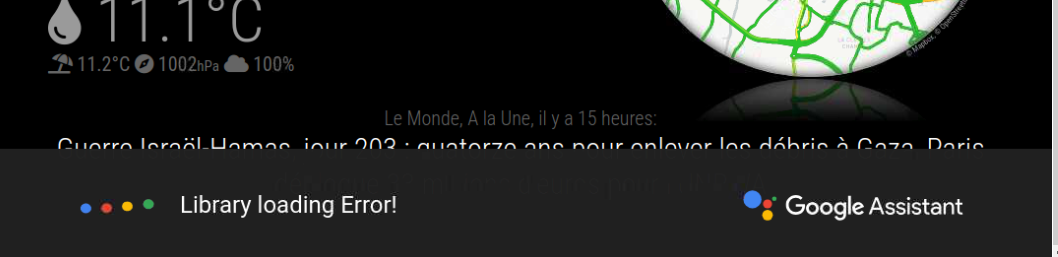
and my MM launch but I have a problem of Library :
About GA of Bugsounet “Library loading error” remains displayed on my screen…
I tried to update GA without success :
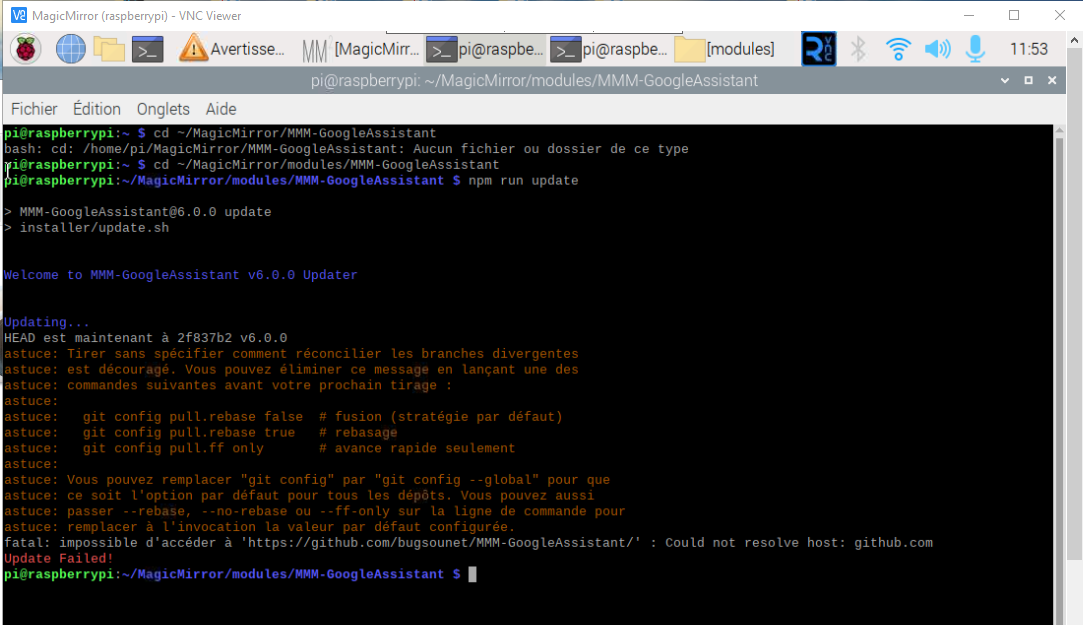
I post the question on the Bugsounet forum
thank you very much both for your help !!

Hello! It looks like you're interested in this conversation, but you don't have an account yet.
Getting fed up of having to scroll through the same posts each visit? When you register for an account, you'll always come back to exactly where you were before, and choose to be notified of new replies (either via email, or push notification). You'll also be able to save bookmarks and upvote posts to show your appreciation to other community members.
With your input, this post could be even better 💗
Register Login