Read the statement by Michael Teeuw here.
[Coding] update time from every 1 second to scheduled time
-
updateLunarCal: function() {
		var url1 =  ..... ;
		var self = this;
		var nextLoad = this.config.updateInterval;

		fetch(url1)
			.then((resp) => resp.json())
			.then(function(data) {

				self.lunar = data.LunarDate ;
				self.updateDom();
			})

			.catch(function(error) {
				// If there is any error you will catch them here
			});

		setTimeout(function() {
			self.updateLunarCal();
		}, 1000);

	},
I would like to change as above code of update time from every 1 second to scheduled time. For example: Everyday on 0:00. Please teach me. Thank you
-
@kent79 sadly there is no magic here… just grunt work…
you have to calculate the ms til 0:0:0
you can use the moment library (yes I know other folks its not the new library)
// Your moment var now = moment(); // now // Your moment at midnight var Midnight = now.clone().startOf('day'); // 00:00:00 today earlier // Difference in milliseconds var milliseconds_passed_already = now.diff(Midnight, 'milliseconds'); // since 00:00:00 then subtract var milliseconds_til_midnight_tonight = (24*60*60*1000)-milliseconds_passed_already -
May be I explain it clearly.
I am developing a lunar calender module. As my above coding, it will connect to json server to get the lunar information ervery 1 second.
I would like to change it to connect server once on Everyday 00:00.
Since I am a beginner of coding, I don’t know how to do edit it. Please teach me. Thanks
-
updateLunarCal: function() {

		var url1 = "https://abc ....";
		var self = this;

		fetch(url1)
			.then((resp) => resp.json())
			.then(function(data) {
				// Here you get the data to modify as you please
				self.lunar = data.LunarDate;
				self.updateDom();
			})

			.catch(function(error) {
				// If there is any error you will catch them here
			});

		setTimeout(function() {

			if (moment().hours() === 0 && moment().minutes() === 0 && moment().second() === 0) {

				self.updateLunarCal();

			}

			else{

			}
		}, 100);
I have revised as above code. Is it achieve my goal?
-
@kent79 well, it will work, BUT you make a check every 100 ms… so LOTS of wasted work… let the system work for you
fetchIt: function(self){ var url1 = "https://abc ...."; fetch(url1) .then((resp) => resp.json()) .then(function(data) { // Here you get the data to modify as you please self.lunar = data.LunarDate; self.updateDom(); }) .catch(function(error) { // If there is any error you will catch them here }); }, updateLunarCal: function() { let MS_in_day = 24*60*60*1000; let now = moment(); let MS_til_midnight = MS_in_day - (now.diff(now.clone().startOf('day'), 'milliseconds') // start a one time timer to end of day setTimeout((selft) =>{ //in one time timer(at 00:00:00), start interval for next start of day setInterval((selfi)=>{ // fetch data, once per day at 00:00:00 self.fetchIt(selfi) // use 'this' pointer passed to the interval routine },MS_in_day, selft) // pass 'this' pointer passed to us // fetch on the 1st start of day, one time self.fecthIt(selft) }, MS_til_midnight, this ); // pass 'this' to the timer routine // fetch data now, 1st time this.fetchIt(this); } -
	 updateLunarCal: function() {

		let MS_in_day = 24*60*60*1000;
		let now = moment();
		let MS_til_midnight = MS_in_day - (now.diff(now.clone().startOf('day'), 'milliseconds'));

		// start a one time timer to end of day
		setTimeout((selft) =>{

			//in one time timer(at  00:00:00), start interval for next start of day
			setInterval((selfi)=>{
				// fetch data, once per day at 00:00:00
				selfi.fetchIt(selfi) // use 'this' pointer passed to the interval routine
			},MS_in_day,
			  selft)  // pass 'this' pointer passed to us

			// fetch on the 1st start of day, one time
			selft.fecthIt(selft)

		}, MS_til_midnight,
		   this );  // pass 'this' to the timer routine

		// fetch data now, 1st time
		this.fetchIt(this);
	},
Thank you so much for your reply. I got error while running above function. There may be some syntax error. But I can’t fix it. Please help me again. Thanks
-
It seems OK now. I will test it on tonight and will share it to all later. Thank you so much.
-
@kent79 error, yeh, sorry, forgot to change the self?.fetchIt() to use the right self pointer… fixed now
-
@sdetweil said in [Coding] update time from every 1 second to scheduled time:
@kent79 error, yeh, sorry, forgot to change the self?.fetchIt() to use the right self pointer… fixed now
Would you like to tell me which line need to update since I don’t know how to do? I have tested the above code, no syntax error, but no working while on 00:00. Thanks
-
@kent79 I updated my prior post
-
Sorry, it still not working. I would like to share the module as below. Would you please help to fix it? Many thanks.
-
@kent79 here you go
use this repogit clone https://github.com/sdetweil/MMM-Lunar.git
then u can git init to wipe out my repo
the BIG cause was that your start routine
called
this.updateLunarCal();
not
this.updateLunarDate();start also doesn’t need to call fetchIt as the updateLunarDate does that after setting up the timer
I cleaned up the rest…
you can test by setting the ‘end time’ in ms…
hour and minute and then see it fire the setTimeout handler
see comment in the code -
Thank you for your all effort. My dream is coming true soon.
I have tested. No Luck. Don’t know is it coding program or my testing method wrong.
I am using windows brower to connect MM server. Then, changing windows clock to 23:59. After 00:00, there is no any changing of Lunar date.
-
@kent79 said in [Coding] update time from every 1 second to scheduled time:
I am using windows brower to connect MM server. Then, changing windows clock to 23:59.
you have to set the clock BEFORE opening the MM page… it doesn’t reset when the clock changes…
the code only sets up ONCE when loaded, so the clock has to be set first…
learn to use the developers window, ctrl-shift-i , sources tab,
you can step thru the code
ohhhhhh
and I gave it set to trigger BEFORE midnight… see the code, comment out and restore the 24×60… so you could test without having to reset the clock
-
I have tested again. But it is still not up to date while past 0:00 :(
-
@kent79 did u edit the code and change the constant back?
-
of course. I have still no idea
-
@kent79 if you edit the constant so it is 5 minutes from now, does it trigger?
the fetch will still get today’s time
-
I find out line 41 coding is wrong, the correct value is “MS_in_day = 10006060*24”. I have tested and work fine now. Thanks.
Orginal:
let MS_in_day =20*60*60*1000+8*60*1000 //24*60*60*1000;New:
let MS_in_day = 1000*60*60*24; -
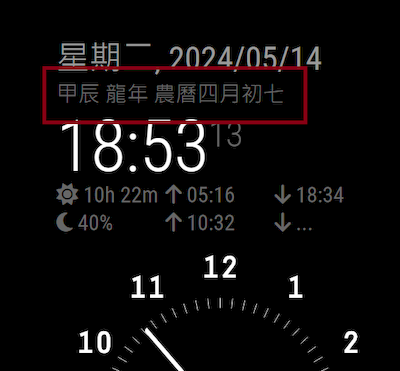
Combined the lunar script to default clock module. It looks great. Thank you again for your great help. :)
Hello! It looks like you're interested in this conversation, but you don't have an account yet.
Getting fed up of having to scroll through the same posts each visit? When you register for an account, you'll always come back to exactly where you were before, and choose to be notified of new replies (either via email, or push notification). You'll also be able to save bookmarks and upvote posts to show your appreciation to other community members.
With your input, this post could be even better 💗
Register Login