MagicMirror Forum
    • Recent
    • Tags
    • Unsolved
    • Solved
    • MagicMirror² Repository
    • Documentation
    • 3rd-Party-Modules
    • Donate
    • Discord
    • Register
    • Login
    A New Chapter for MagicMirror: The Community Takes the Lead
    Read the statement by Michael Teeuw here.

    New module installer

    Scheduled Pinned Locked Moved General Discussion
    51 Posts 7 Posters 18.4k Views 6 Watching
    Loading More Posts
    • Oldest to Newest
    • Newest to Oldest
    • Most Votes
    Reply
    • Reply as topic
    Log in to reply
    This topic has been deleted. Only users with topic management privileges can see it.
    • S Do not disturb
      sdetweil @MDWEBB
      last edited by sdetweil

      @MDWEBB hm, could not validate file…

      edit: ---- you said you reinstalled, so this is not a file corruption problem

      lets go to the MMM-CalendarExt3 folder
      and do

      git status
      

      it should not list any files

      please show the reults

      Sam

      How to add modules

      learning how to use browser developers window for css changes

      1 Reply Last reply Reply Quote 0
      • S Do not disturb
        sdetweil @MDWEBB
        last edited by sdetweil

        @MDWEBB also you changed refreshInterval to 600
        milliseconds down from 30 minutes!! (the module cannot redraw that fast)

        i think you need to change the waitFetch value up to 10000
        milliseconds.

        i don’t think refreshInterval should ever be less that 300000
        (5 minutes)

        Sam

        How to add modules

        learning how to use browser developers window for css changes

        S 1 Reply Last reply Reply Quote 0
        • S Do not disturb
          sdetweil @sdetweil
          last edited by

          @MDWEBB I could not recreate the error by setting one of my Ext3 instances to refreshInterval :600

          Sam

          How to add modules

          learning how to use browser developers window for css changes

          S 1 Reply Last reply Reply Quote 0
          • S Do not disturb
            sdetweil @sdetweil
            last edited by

            @MDWEBB

            BUT… just for the sake of testing something… MMM-Config saved the prior config.js

            so if you

            cd~/MagicMirror/config
            #rename this one out of the way
            mv config.js save-config.js
            ls config -laFt config.*
            #and copy the top one back to config.js
            #mark the filename, right click mouse
            cp -rightclick-paste config.js
            

            and then restart MagicMirror

            do you still get the error??

            Sam

            How to add modules

            learning how to use browser developers window for css changes

            1 Reply Last reply Reply Quote 0
            • S Do not disturb
              sdetweil
              last edited by

              I added the default modules to have links to their config doc too… (in configuration)

              I made significant changes to the weather form layout, using select lists and custom field sets per weather provider.
              updated the schemas MMM-Config ships to add the view readme button

              Sam

              How to add modules

              learning how to use browser developers window for css changes

              1 Reply Last reply Reply Quote 0
              • M Offline
                MMRIZE @MDWEBB
                last edited by

                @MDWEBB said in New module installer:

                [ERROR] ReferenceError: HTMLElement is not defined

                This error message seems to be caused by some JS validator trying to check the browser-oriented syntax on the nodeJS environment.

                @MDWEBB
                You’d better start from a clean configuration and then add one by one to find what was wrong.

                1 Reply Last reply Reply Quote 0
                • S Do not disturb
                  sdetweil @MDWEBB
                  last edited by sdetweil

                  @MDWEBB said in New module installer:

                  at /home/mdwebb/MagicMirror/modules/MMM-Remote-Control/node_helper.js:271:26
                  

                  I bet this is the remote-control error…

                  shouldn’t stop anything
                  but, if you want to try my fork, which captures that error

                  https://github.com/sdetweil/MMM-Remote-Control

                  just remove the existing folder and git clone mine in its place
                  no functional code change or parms… just trapping this error

                  Sam

                  How to add modules

                  learning how to use browser developers window for css changes

                  M 1 Reply Last reply Reply Quote 0
                  • M Offline
                    MDWEBB @sdetweil
                    last edited by

                    @sdetweil Apologise for slow reply i was able to remove the node modules file and run the update for the module and now my calendar is working again.

                    S 1 Reply Last reply Reply Quote 0
                    • S Do not disturb
                      sdetweil @MDWEBB
                      last edited by

                      @MDWEBB no apologies required

                      updated what module?

                      Sam

                      How to add modules

                      learning how to use browser developers window for css changes

                      M 1 Reply Last reply Reply Quote 0
                      • M Offline
                        MDWEBB @sdetweil
                        last edited by

                        @sdetweil update MMM-Remotecontrol.

                        I am getting update notifications for both the MMM-Config module and MMM-Remote-Control.
                        MMM-Config says its 3 commits behind the with_installer branch. Not sure whats happening with that
                        MMM-Remote-Control s 8 commits behind on the master branch i get the following error when trying to use the update script though

                        mdwebb@raspberrypi:~ $ cd ~/MagicMirror/modules/MMM-Remote-Control # adapt directory if you are using a different one
                        git pull
                        npm install # install (new) dependencies
                        Updating 76c0859..5c39b06
                        error: Your local changes to the following files would be overwritten by merge:
                        	modules.json
                        	package-lock.json
                        	package.json
                        Please commit your changes or stash them before you merge.
                        Aborting
                        
                        up to date, audited 340 packages in 3s
                        
                        103 packages are looking for funding
                          run `npm fund` for details
                        
                        found 0 vulnerabilities
                        
                        
                        S 1 Reply Last reply Reply Quote 0
                        • S Do not disturb
                          sdetweil @MDWEBB
                          last edited by

                          @MDWEBB yes there are updates to mmm-config

                          are you using my remotecontrol repo?

                          i would disable the updatenotification module

                          Sam

                          How to add modules

                          learning how to use browser developers window for css changes

                          M 1 Reply Last reply Reply Quote 0
                          • M Offline
                            MDWEBB @sdetweil
                            last edited by

                            @sdetweil i am using your remote control module yes very handy, however having issues utilising the MMM-Module-Scheduler to to turn my monitor on and off via Remote-Control. i can see in the developer window its trying to send the notification however my monitor isn’t turning off. Am i missing something?

                             {
                                    module: 'MMM-ModuleScheduler',
                                    config: {
                                        notification_schedule: [
                                            // TURN THE MONITOR/SCREEN ON AT 07:30 EVERY DAY
                                            {notification: 'REMOTE_ACTION', schedule: '30 7 * * *', payload: {action: "MONITORON"}},
                                            // TURN THE MONITOR/SCREEN OFF AT 22:30 EVERY DAY
                                            {notification: 'REMOTE_ACTION', schedule: '01 14 * * *', payload: {action: "MONITOROFF"}},
                                            // RESTART THE MAGICMIRROR PROCESS AT 2am EVERY SUNDAY
                                            {notification: 'REMOTE_ACTION', schedule: '0 2 * * SUN', payload: {action: "RESTART"}}
                                        ]
                                    }
                                },
                            
                            S 1 Reply Last reply Reply Quote 0
                            • S Do not disturb
                              sdetweil @MDWEBB
                              last edited by sdetweil

                              @MDWEBB issue on remotecontrol
                              is not MY remote control, I just fixed the error trap that was misleading
                              no other code change

                              https://github.com/Jopyth/MMM-Remote-Control/issues/303

                              which one of the 10 or 12 ways does it try to turn monitor off??

                              which OS is different
                              which window compositor is different x11/wayland/labwc is different

                              I know MMM-PIR has been working hard on making it woirk thru all the choices

                              did it work before and doesn’t now??

                              I don’t know the module internals…

                              Sam

                              How to add modules

                              learning how to use browser developers window for css changes

                              S 1 Reply Last reply Reply Quote 0
                              • S Do not disturb
                                sdetweil @sdetweil
                                last edited by

                                @MDWEBB I just resynced my fork with his latest remote-control

                                he had most of my changes and seemed to catch that error… maybe

                                Sam

                                How to add modules

                                learning how to use browser developers window for css changes

                                1 Reply Last reply Reply Quote 0
                                • S Do not disturb
                                  sdetweil
                                  last edited by

                                  I just updated the code again, this time to provide opening the readme for the repo in both install and config

                                  its on a different branch again

                                  git pull
                                  git checkout better_repo_url
                                  npm install     # <--- required.. added another library and copies a template file
                                  

                                  everything else is the same, except there is a button to open the module readme

                                  an example from the installer page, exactly the same on the config page

                                  still have some trouble with our own docs site, gitlab
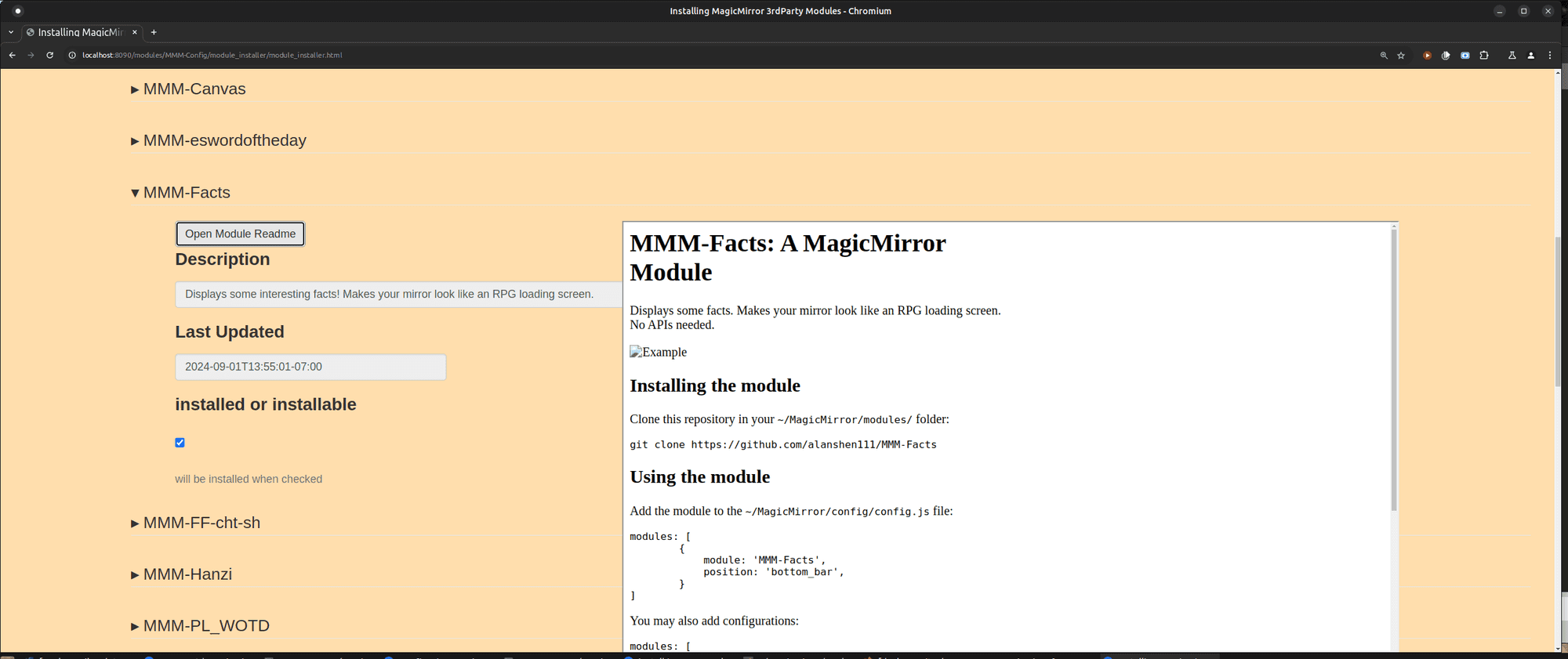
                                  Screenshot at 2025-01-22 22-03-28.png

                                  the readme window will open at the button position

                                  Sam

                                  How to add modules

                                  learning how to use browser developers window for css changes

                                  S 1 Reply Last reply Reply Quote 0
                                  • S Do not disturb
                                    sdetweil @sdetweil
                                    last edited by sdetweil

                                    @sdetweil said in New module installer:

                                    just posted another update for better handling of the repo readme (in most cases)
                                    and handles readme’s for repo ADDs to the 3rd party list list, deletes worked ok before

                                    and for the readme during config, use the file in the installed module folder, instead of trying to get the github repo version

                                    same process

                                    git pull
                                    git checkout better_repo_url  # if already there not needed
                                    npm install     # <--- required.. added another library and copies a template file
                                    

                                    the copy fixes a bug in the readme list file

                                    and if this is first time using, make sure to add
                                    MMM-Config to your config.js

                                    {
                                          module:"MMM-Config"
                                           position:"...", // only for qrcode if you use that
                                            config:{
                                            }
                                    }
                                    

                                    Sam

                                    How to add modules

                                    learning how to use browser developers window for css changes

                                    1 Reply Last reply Reply Quote 0
                                    • H Offline
                                      hadal
                                      last edited by

                                      Hi All
                                      I don’t know where I made a mistake, can you help me?

                                      b26417ab-0349-4059-9356-f9e3cdd556eb-image.png

                                      8e28874b-634e-4dfd-a6da-4da24ba78e3f-image.png

                                      S 1 Reply Last reply Reply Quote 0
                                      • S Do not disturb
                                        sdetweil @hadal
                                        last edited by sdetweil

                                        @hadal did you do the npm install? and add MMM-Config to your config.js

                                        can you show

                                        in the MMM-Config folder

                                        do
                                        git branch

                                        ls module_url_hash.json

                                        in the module_installer folder

                                        ls module_selector_schema.json

                                        Sam

                                        How to add modules

                                        learning how to use browser developers window for css changes

                                        1 Reply Last reply Reply Quote 0
                                        • S Do not disturb
                                          sdetweil
                                          last edited by

                                          added new url for launching the config side

                                          http://mm_address:mm_port/configure
                                          

                                          both main and better_repo_url branches

                                          Sam

                                          How to add modules

                                          learning how to use browser developers window for css changes

                                          1 Reply Last reply Reply Quote 0
                                          • S Do not disturb
                                            sdetweil
                                            last edited by sdetweil

                                            updated for missing calendar url… properties, and missing module header…

                                            Sam

                                            How to add modules

                                            learning how to use browser developers window for css changes

                                            S 1 Reply Last reply Reply Quote 0

                                            Hello! It looks like you're interested in this conversation, but you don't have an account yet.

                                            Getting fed up of having to scroll through the same posts each visit? When you register for an account, you'll always come back to exactly where you were before, and choose to be notified of new replies (either via email, or push notification). You'll also be able to save bookmarks and upvote posts to show your appreciation to other community members.

                                            With your input, this post could be even better 💗

                                            Register Login

                                            • 1
                                            • 2
                                            • 3
                                            • 2 / 3
                                            • First post
                                              Last post
                                            Enjoying MagicMirror? Please consider a donation!
                                            MagicMirror created by Michael Teeuw.
                                            Forum managed by Sam, technical setup by Karsten.
                                            This forum is using NodeBB as its core | Contributors
                                            Contact | Privacy Policy