MagicMirror Forum
    • Recent
    • Tags
    • Unsolved
    • Solved
    • MagicMirror² Repository
    • Documentation
    • 3rd-Party-Modules
    • Donate
    • Discord
    • Register
    • Login
    A New Chapter for MagicMirror: The Community Takes the Lead
    Read the statement by Michael Teeuw here.

    Can't get mmm-calendarext3 - customEvents to display the changed events, or more than 9 days.

    Scheduled Pinned Locked Moved Unsolved Troubleshooting
    21 Posts 2 Posters 4.4k Views 2 Watching
    Loading More Posts
    • Oldest to Newest
    • Newest to Oldest
    • Most Votes
    Reply
    • Reply as topic
    Log in to reply
    This topic has been deleted. Only users with topic management privileges can see it.
    • C Offline
      cheminge
      last edited by sdetweil

      Hello,

      I am working on my very first MagicMirror, and I am having a few issues with this 3rd party module.

      If anyone can help, I am having trouble with the customEvents section to show different color for different summary of a calendar event.

      I have 2 problems,
      1.) doesn’t change the color or symbol of the entry,

      2.) I can only see yesterday, and 8 days in the future. I wanted to be able to see the entire month if possible (from the 1st to the 31st) (or even the days that are currently showing on the one month screen).

      This is what I have in my config file:

      let config = {
      	address: "localhost",	// Address to listen on, can be:
      							// - "localhost", "127.0.0.1", "::1" to listen on loopback interface
      							// - another specific IPv4/6 to listen on a specific interface
      							// - "0.0.0.0", "::" to listen on any interface
      							// Default, when address config is left out or empty, is "localhost"
      	port: 8080,
      	basePath: "/",	// The URL path where MagicMirror² is hosted. If you are using a Reverse proxy
      									// you must set the sub path here. basePath must end with a /
      	ipWhitelist: ["127.0.0.1", "::ffff:127.0.0.1", "::1"],	// Set [] to allow all IP addresses
      									// or add a specific IPv4 of 192.168.1.5 :
      									// ["127.0.0.1", "::ffff:127.0.0.1", "::1", "::ffff:192.168.1.5"],
      									// or IPv4 range of 192.168.3.0 --> 192.168.3.15 use CIDR format :
      									// ["127.0.0.1", "::ffff:127.0.0.1", "::1", "::ffff:192.168.3.0/28"],
      
      	useHttps: false,			// Support HTTPS or not, default "false" will use HTTP
      	httpsPrivateKey: "",	// HTTPS private key path, only require when useHttps is true
      	httpsCertificate: "",	// HTTPS Certificate path, only require when useHttps is true
      
      	language: "en",
      	locale: "en-US",
      	logLevel: ["ERROR", "WARN", "INFO", "LOG"], // Add "DEBUG",  for even more logging
      	timeFormat: 12,
      	units: "imperial",
      	showPeriod: "true",
      
      modules: [
      	{module: "calendar",
      			fade: false,
      //            maximumEntries: 10,
      //            maximumNumberOfDays: 3,
                  flipDateHeaderTitle: true,
      			broadcastPastEvents: true,
                  hideDuplicates: true,
                  coloredText: true,
                  coloredBackground: false,
                  coloredSymbol: true,
      			pastDaysCount: 35,
      			wrapEvents: true,
      			config: {
      				calendars: [
      					{
      						name: "Unit Days",
      						url: "https://calendar.google.com/calendar.... someurl,						
      						symbol: "fire-extinguisher",
      						className: "Unit Days",
      						beforeDays: 60,
      						afterDays: 180,
      						color: "orange",
      						fetchInterval: 60000, //900000 is 15 minuets
      					},
      				],
      				customEvents: [{keyword: "1 - Unit", symbol: "fire-extinguisher", color: "red"}, {keyword: "2 - Unit", symbol: "fire-extinguisher", color: "green"}, {keyword: "3 - Unit", symbol: "fire-extinguisher", color: "blue"}],
      			},
      		},
      	{module: "MMM-CalendarExt3",
      			pages: {"ATFD - Work Calendar": "middle_center"},
      			position: "middle_center",
      			config: {
      				mode: "month",
      				firstDayOfWeek: 0,
      				locale:'en-US',
      				headerTitleOptions: {month: 'long'},
      				fontSize: "20px",
      				eventHeight: "22px",
      				maxEventLines: "6",
      				useWeather: false,
      				displayLegend: true,
      				useIconify: true,
      				calendarSet: ["ATFD 3 Unit", "Unit Days"],
      			}
      		},	
      ]
      };
      /*************** DO NOT EDIT THE LINE BELOW ***************/
      if (typeof module !== "undefined") { module.exports = config; }
      
      S 2 Replies Last reply Reply Quote 0
      • S Do not disturb
        sdetweil @cheminge
        last edited by sdetweil

        @cheminge is this the latest MM release??

        did you install the broadcast clipping fix??
        https://forum.magicmirror.builders/topic/19282/version-2-30-0-calendar-fix-for-clipping-broadcast-events

        also, please use the code block for any config/logs…

        paste text into editor
        select pasted text
        hit the </> button

        Sam

        How to add modules

        learning how to use browser developers window for css changes

        1 Reply Last reply Reply Quote 0
        • S Do not disturb
          sdetweil @cheminge
          last edited by sdetweil

          @cheminge said in Can't get mmm-calendarext3 - customEvents to display the changed events, or more than 9 days.:

          customEvents: [{keyword: “1 - Unit”, symbol: “fire-extinguisher”, color: “red”}, {keyword: “2 - Unit”, symbol: “fire-extinguisher”, color: “green”}, {keyword: “3 - Unit”, symbol: “fire-extinguisher”, color: “blue”}],

          those would only change the events in the calendar UI. not in Ext3…
          and you are not showing the default calendar (no position setting)

          Sam

          How to add modules

          learning how to use browser developers window for css changes

          C 1 Reply Last reply Reply Quote 0
          • C Offline
            cheminge @sdetweil
            last edited by

            Yes, I am running the latest mmm-calendarext3, but I also ran the script as suggested. “Already up to date” comes up when I run the update for mmm-calendarext3.

            The EXT3 does show the color and symbol, but not the CustomEvents. Is this because EXT3 doesn’t support that function?

            I just did the broadcast clipping fix and I am still having the two problems.

            I have other pages that show other calendarEXT3, and they seem to be working, I just left them out as they are not having these issues, so I made a simple config file with just this calendar, and it is still the same result.

            S 1 Reply Last reply Reply Quote 0
            • S Do not disturb
              sdetweil @cheminge
              last edited by

              @cheminge customevents in the default calendar is done at the UI , long after the events are broadcast

              in Ext3 there it the eventtransformer () function to allow you to
              manipulate the events before they appear

              if you look at this person’s Ext3 config here
              https://forum.magicmirror.builders/post/122721
              you will see an example of that function in the Ext3 config

              Sam

              How to add modules

              learning how to use browser developers window for css changes

              1 Reply Last reply Reply Quote 0
              • C Offline
                cheminge
                last edited by

                Thank you!!!

                I now have the color and symbol working!!!

                now, onto issue number 2. how do I get it to show more of the events?

                S 1 Reply Last reply Reply Quote 0
                • S Do not disturb
                  sdetweil @cheminge
                  last edited by

                  @cheminge did you put on the fix as I asked before… this is not an EXT3 fix, its a base MM fix

                  see https://forum.magicmirror.builders/post/122703

                  Sam

                  How to add modules

                  learning how to use browser developers window for css changes

                  C 1 Reply Last reply Reply Quote 0
                  • C Offline
                    cheminge @sdetweil
                    last edited by

                    Ok,

                    After some deep diving I realized I have broadcastPastEvents: true, in the wrong location in my config file.

                    I moved it down to be inside the “config” location and it now works!

                    Do I need to move the other items inside of the “config” location?

                    modules: [
                    	{module: "calendar",
                    			fade: false,
                                            flipDateHeaderTitle: true,
                                            hideDuplicates: true,
                                            coloredText: true,
                                            coloredBackground: false,
                                            coloredSymbol: true,
                    			pastDaysCount: 90,
                    			wrapEvents: true,
                    			updateOnFetch: true,
                    			colored: true,
                    			config: {
                    				broadcastPastEvents: true,
                    				calendars: [
                    					{
                    						name: "**CalendarName**",
                    						url: "https://**My Google Calendar Link**.ics",
                    						symbol: "person-military-to-person",
                    						className: "**ClassName**",
                    						beforeDays: 30,
                    						afterDays: 90,
                    						maximumEntries: 100,
                    						pastDaysCount: 40,
                    						color: "green",
                    						fetchInterval: 60000, //900000 is 15 minuets
                    					},
                    
                    S 2 Replies Last reply Reply Quote 0
                    • S Do not disturb
                      sdetweil @cheminge
                      last edited by sdetweil

                      @cheminge yes

                      everything BEFORE config:{
                      belongs to Magicmirror, and the module will not see it

                      ONLY stuff inside config goes to the module

                      config:{
                      ..... here
                      }
                      

                      see
                      https://docs.magicmirror.builders/modules/configuration.html#example

                      Sam

                      How to add modules

                      learning how to use browser developers window for css changes

                      1 Reply Last reply Reply Quote 0
                      • S Do not disturb
                        sdetweil @cheminge
                        last edited by

                        @cheminge did you get it working?

                        Sam

                        How to add modules

                        learning how to use browser developers window for css changes

                        C 1 Reply Last reply Reply Quote 0
                        • C Offline
                          cheminge @sdetweil
                          last edited by

                          @sdetweil

                          Everything seems to be working, but I am having one issue.

                          I have repeating events, that are “All Day” events.

                          Then the week of the event I change the event on the google calendar to be for a specific time of day.

                          When I do this, I see both the repeating “All Day” and the Specific time events. (so double events on the same day) It also doesn’t read the new times that I have put into the google calendar.

                          I don’t even know where to start to look for a solution for this.

                          Attached is a screen shot of the calendar, and for example, on January 28, all 3 are duplicate entries.
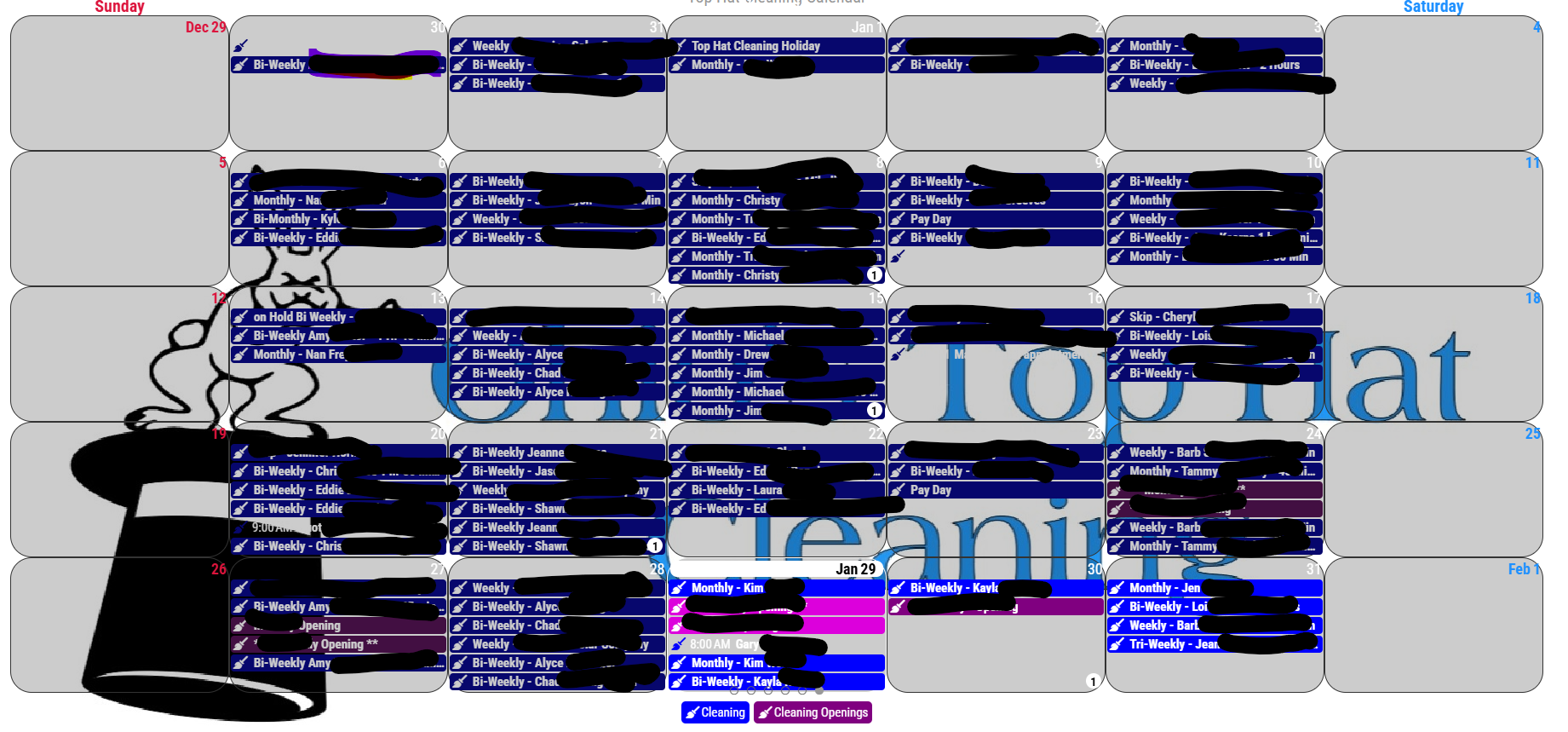
                          Duplicate and no Time entry on Calendar.png

                          S 2 Replies Last reply Reply Quote 0
                          • S Do not disturb
                            sdetweil @cheminge
                            last edited by sdetweil

                            @cheminge did you put on the fixes for calendar?
                            are you running MagicMirror version 2.30, many calendar fixes

                            if you are, i want the event that you modified
                            before and after dumped from your ics data

                            curl -sL the-cal-url >somefile.txt

                            edit , find the event

                            BEGIN:VEVENT
                            .
                            .
                            END:VEVENT
                            

                            Sam

                            How to add modules

                            learning how to use browser developers window for css changes

                            C 1 Reply Last reply Reply Quote 0
                            • C Offline
                              cheminge @sdetweil
                              last edited by

                              Yes, I think I have 2.30 and many calendar fixes installed…

                              Here is they entry for one of the entries on the 1-28-25 (duplicate of the “Alyce” entry)

                              BEGIN:VEVENT
                              DTSTART;TZID=America/New_York:20250128T103000
                              DTEND;TZID=America/New_York:20250128T113000
                              DTSTAMP:20250129T181146Z
                              UID:m6rjo4c4r97p3jm4i84aiud6ld_R20250128@google.com
                              RECURRENCE-ID;TZID=America/New_York:19691231T190000
                              CREATED:20221212T202854Z
                              LAST-MODIFIED:20250124T145109Z
                              LOCATION:**Protected Data ** (removed for protection data)
                              SEQUENCE:3
                              STATUS:CONFIRMED
                              SUMMARY:**Alyce Entry ** (removed for protection data)
                              TRANSP:TRANSPARENT
                              END:VEVENT

                              EGIN:VEVENT
                              DTSTART;VALUE=DATE:20250128
                              DTEND;VALUE=DATE:20250129
                              RRULE:FREQ=WEEKLY;WKST=SU;INTERVAL=2;BYDAY=TU
                              DTSTAMP:20250129T181146Z
                              UID:m6rjo4c4r97p3jm4i84aiud6ld_R20250128@google.com
                              CREATED:20221212T202854Z
                              LAST-MODIFIED:20250124T145109Z
                              LOCATION:**Protected Data ** (removed for protection data)
                              SEQUENCE:2
                              STATUS:CONFIRMED
                              SUMMARY:**Alyce Entry ** (removed for protection data)
                              TRANSP:TRANSPARENT
                              END:VEVENT

                              S 2 Replies Last reply Reply Quote 0
                              • S Do not disturb
                                sdetweil @cheminge
                                last edited by

                                @cheminge can you show me the output of

                                cd ~/MagicMirror 
                                git branch
                                

                                Sam

                                How to add modules

                                learning how to use browser developers window for css changes

                                C 1 Reply Last reply Reply Quote 0
                                • S Do not disturb
                                  sdetweil @cheminge
                                  last edited by

                                  @cheminge are you in the ny timezone too?

                                  Sam

                                  How to add modules

                                  learning how to use browser developers window for css changes

                                  C 1 Reply Last reply Reply Quote 0
                                  • S Do not disturb
                                    sdetweil @cheminge
                                    last edited by

                                    @cheminge ok, the RRULE rule is that the extracted event MUST match the event its extracted from

                                    you have a full day RRULE

                                    DTSTART;VALUE=DATE:20250128
                                    DTEND;VALUE=DATE:20250129
                                    RRULE:FREQ=WEEKLY;WKST=SU;INTERVAL=2;BYDAY=TU
                                    

                                    and then extracted one instance

                                    DTSTART;TZID=America/New_York:20250131T103000
                                    DTEND;TZID=America/New_York:20250131T113000
                                    

                                    by RULE, this will be FORCED to a fullday event
                                    as the source event is fullday

                                    similarly if
                                    the event is date/time
                                    then the extracted MUST be date/time

                                    AND its bi weekly, so the extracted event is ignored. as its not on a week boundary
                                    (the RRULE cycle bi weekly and ONLY on TUESDAY)
                                    RRULE:FREQ=WEEKLY;WKST=SU;INTERVAL=2;BYDAY=TU

                                    the tie between the events is the UID field
                                    UID:m6rjo4c4r97p3jm4i84aiud6ld_R20250128@google.com
                                    the calendar tool should have changed the UID field
                                    to make this a standalone event
                                    but left it as part of the recurrence,
                                    RECURRENCE-ID;TZID=America/New_York:
                                    got to be one or the other… match the RRULE or be separate

                                    Sam

                                    How to add modules

                                    learning how to use browser developers window for css changes

                                    1 Reply Last reply Reply Quote 0
                                    • C Offline
                                      cheminge @sdetweil
                                      last edited by

                                      @sdetweil

                                      This is what I get:

                                      _fix_clipping

                                      • develop
                                        master
                                      1 Reply Last reply Reply Quote 0
                                      • C Offline
                                        cheminge @sdetweil
                                        last edited by

                                        @sdetweil

                                        yes, I am in the New York time zone.

                                        S 1 Reply Last reply Reply Quote 0
                                        • S Do not disturb
                                          sdetweil @cheminge
                                          last edited by

                                          @cheminge did you see my analysis of the events you posted

                                          Sam

                                          How to add modules

                                          learning how to use browser developers window for css changes

                                          C 1 Reply Last reply Reply Quote 0
                                          • C Offline
                                            cheminge @sdetweil
                                            last edited by

                                            @sdetweil

                                            Yes I see your analysis.

                                            Are you saying that the calendar tool (google) is not separating the event out and making it a new UID?

                                            I still don’t know how to get around that.

                                            When I confirm, should I make a new event and then delete the repeating event for that day?

                                            S 1 Reply Last reply Reply Quote 0

                                            Hello! It looks like you're interested in this conversation, but you don't have an account yet.

                                            Getting fed up of having to scroll through the same posts each visit? When you register for an account, you'll always come back to exactly where you were before, and choose to be notified of new replies (either via email, or push notification). You'll also be able to save bookmarks and upvote posts to show your appreciation to other community members.

                                            With your input, this post could be even better 💗

                                            Register Login

                                            • 1
                                            • 2
                                            • 1 / 2
                                            • First post
                                              Last post
                                            Enjoying MagicMirror? Please consider a donation!
                                            MagicMirror created by Michael Teeuw.
                                            Forum managed by Sam, technical setup by Karsten.
                                            This forum is using NodeBB as its core | Contributors
                                            Contact | Privacy Policy