MagicMirror Forum
    • Recent
    • Tags
    • Unsolved
    • Solved
    • MagicMirror² Repository
    • Documentation
    • 3rd-Party-Modules
    • Donate
    • Discord
    • Register
    • Login
    A New Chapter for MagicMirror: The Community Takes the Lead
    Read the statement by Michael Teeuw here.

    Again -- MMM-Navigate can't get installed.

    Scheduled Pinned Locked Moved Solved Troubleshooting
    20 Posts 3 Posters 3.1k Views 3 Watching
    Loading More Posts
    • Oldest to Newest
    • Newest to Oldest
    • Most Votes
    Reply
    • Reply as topic
    Log in to reply
    This topic has been deleted. Only users with topic management privileges can see it.
    • R Offline
      rkorell Module Developer @crowimu
      last edited by

      @crowimu
      Only thing that comes in my mind that you have either put cable on wrong GPIO or cable is broken.
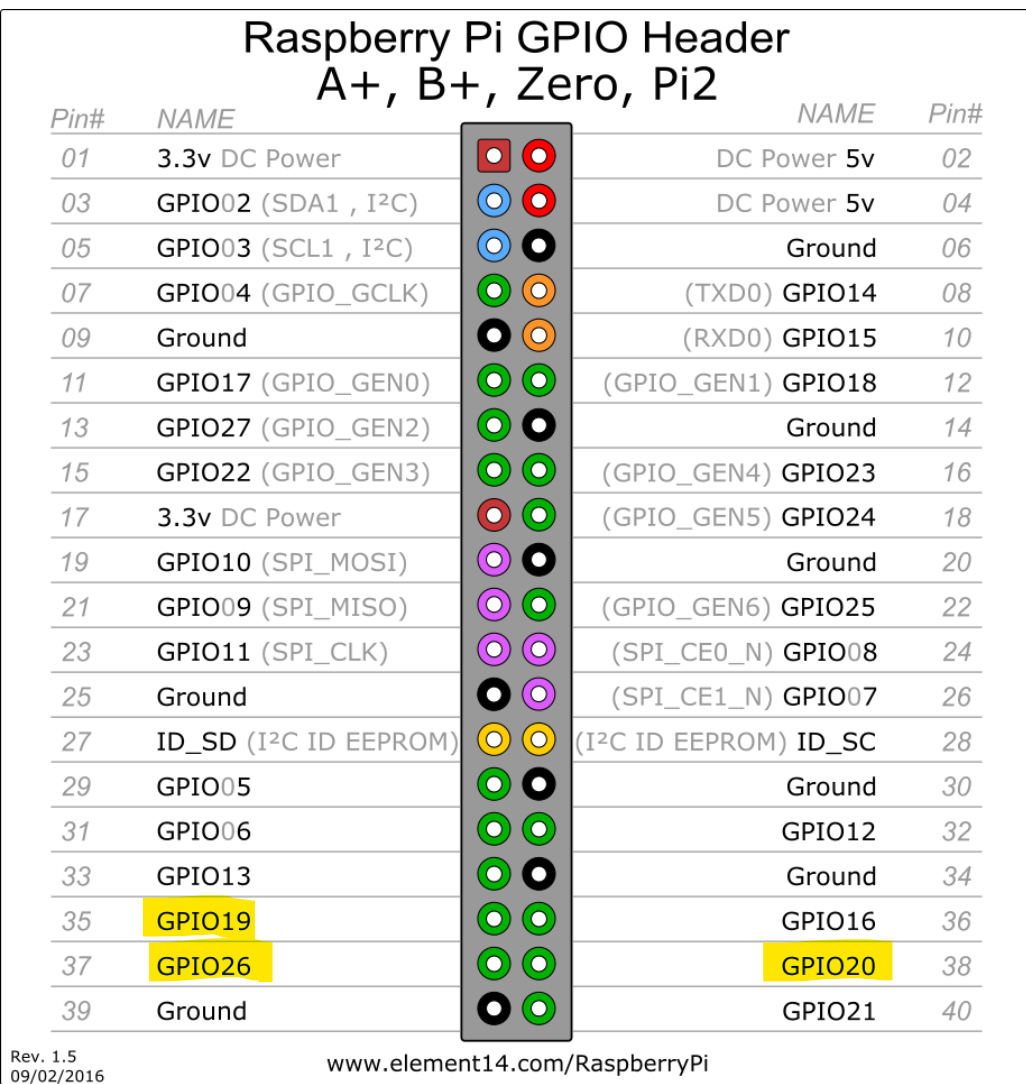
      Screenshot 2025-03-01 195116.png

      As per default you have either to use GPIOPins: [26,20,19]//rotary cw, rotary ccw, rotary press (BCM Numbering - marked yellow in the above picture) or (if occupied) enter the correct BCM (!) numbers in config of module.

      If this is all correct, module should work.

      1 Reply Last reply Reply Quote 0
      • R Offline
        rkorell Module Developer @crowimu
        last edited by rkorell

        @crowimu Last thought - after some googeling…
        Axled (the author has a thread about his module.
        In one of his posting he stated
        “rotation and click (Button press) uses the same library (onOff).”.

        “node_modules/onoff/onoff” is part of your error-listing.

        So I can imagine you need this onoff -library to read the GPIO-output.
        Further research on this let me assume that onoff in some kind is associated to node.js (@sdetweil for sure knows more on this than me…).

        At least one onoff library in this context is this one - but I’m not sure if this is the right one.
        May you give it a try…

        edit: I’ve just checked - on my own mirror there is NO onoff directory in “MagicMirror/node_modules/”

        Good luck.
        Ralf

        1 Reply Last reply Reply Quote 0
        • R Offline
          rkorell Module Developer @crowimu
          last edited by

          @crowimu Found in completely different context another hint to onoff - also related to GPIO (in concrete a GPIO related implemetation of a rotary decoder).
          There was a suggestion

          npm install --save onoff@6.0.0
          

          I currently only „assume“ that @6.0.0 is the version - cause the cited post is from 2021 there could be a new version.
          A quick google delivers this page and this one stated

          npm install onoff
          

          Will do the trick…

          Good luck.
          Ralf

          C 1 Reply Last reply Reply Quote 0
          • C Offline
            crowimu @rkorell
            last edited by

            @rkorell Thank you and all others for the hints, however up to now I did not manage to get the ‘onoff’ and the MMM-Navigate module workingon my system.
            I have recompiled onoff, installed it globally, changed the node version.
            Nothing helped yet :(

            I have started to create a simple module for my needs to control some fuctions with a rotary encoder,
            https://github.com/crowimu/MMM-RotaryNav
            It’s early stage, please wish me luck. :)

            R 2 Replies Last reply Reply Quote 0
            • R Offline
              rkorell Module Developer @crowimu
              last edited by

              @crowimu
              very unfortunate!

              cross the fingers & good luck for you…

              Ralf

              1 Reply Last reply Reply Quote 0
              • R Offline
                rkorell Module Developer @crowimu
                last edited by

                @crowimu - Just a quick question: Have you considered to use a newer version of a Pi? A 4B or even 5?
                Pi2 is somewhat old - may there is a kind of a root cause?

                Regards,
                Ralf

                C 2 Replies Last reply Reply Quote 0
                • C Offline
                  crowimu @rkorell
                  last edited by

                  @rkorell Hi Ralf,
                  I think the quadcore RPi2 is quite sufficient for a Magic Mirror, but I’ve also tested it on a RPi3 with the same results.
                  I don’t like the power consumption of RPi4 and 5 and I also don’t like to add cooling fans to an SBC.
                  So up to now I have always used RPi Zero / Zero2 / RPi 1/2 and 3 smoothly for my projects. :)

                  1 Reply Last reply Reply Quote 0
                  • C Offline
                    crowimu @rkorell
                    last edited by

                    @rkorell finally I got it solved :)

                    The issue is really the GPIO numbering, I found this SO thread:
                    https://stackoverflow.com/questions/78173749/use-raspberry-pi-4-gpio-with-node-js
                    It is also valid for Pi3 and Pi2

                    cat /sys/kernel/debug/gpio
                    
                    gpiochip0: GPIOs 512-565, parent: platform/3f200000.gpio, pinctrl-bcm2835:
                     gpio-512 (ID_SDA              )
                     gpio-513 (ID_SCL              )
                     gpio-514 (GPIO2               )
                     gpio-515 (GPIO3               )
                     gpio-516 (GPIO4               )
                     gpio-517 (GPIO5               )
                     gpio-518 (GPIO6               )
                     gpio-519 (GPIO7               |spi0 CS1            ) out hi ACTIVE LOW
                     gpio-520 (GPIO8               |spi0 CS0            ) out hi ACTIVE LOW
                     gpio-521 (GPIO9               )
                     gpio-522 (GPIO10              )
                     gpio-523 (GPIO11              )
                     gpio-524 (GPIO12              )
                     gpio-525 (GPIO13              )
                     gpio-526 (GPIO14              )
                     gpio-527 (GPIO15              )
                     gpio-528 (GPIO16              )
                     gpio-529 (GPIO17              |sysfs               ) in  hi IRQ
                     gpio-530 (GPIO18              )
                     gpio-531 (GPIO19              )
                     gpio-532 (GPIO20              )
                     gpio-533 (GPIO21              )
                     gpio-534 (GPIO22              |sysfs               ) in  hi IRQ
                     gpio-535 (GPIO23              )
                     gpio-536 (GPIO24              )
                     gpio-537 (GPIO25              )
                     gpio-538 (GPIO26              )
                     gpio-539 (GPIO27              |sysfs               ) in  hi IRQ


                    I needed to set up the numbers according to the output
                    e.g. Pin27 is 539 in the MMM-Navigate config.
                    Now everything works so far as expected, thank you all for your help!

                    R 2 Replies Last reply Reply Quote 1
                    • R Offline
                      rkorell Module Developer @crowimu
                      last edited by

                      @crowimu COOL!
                      congratulations!

                      For me the “confusing” part was the fact that INSTALL doesn’t work…
                      Installing should NOT check GPIO pinouts …

                      Really great that you worked this out!

                      Warmest regards,
                      Ralf

                      S 1 Reply Last reply Reply Quote 0
                      • R Offline
                        rkorell Module Developer @crowimu
                        last edited by

                        @crowimu said

                        It is also valid for Pi3 and Pi2

                        A Pi4 or a Pi5 had solved this as well :-)

                        1 Reply Last reply Reply Quote 0
                        • S Offline
                          sdetweil @rkorell
                          last edited by

                          @rkorell because MagicMirror is started with the electron binary, the compiled module code must match the engine version

                          electron rebuild does that.

                          tricky problem if not running under electron
                          then npm rebuild works for nodejs engine match

                          Sam

                          How to add modules

                          learning how to use browser developers window for css changes

                          R 1 Reply Last reply Reply Quote 1
                          • R Offline
                            rkorell Module Developer @sdetweil
                            last edited by

                            @sdetweil said in Again -- MMM-Navigate can't get installed.:

                            the compiled module code must match the engine version

                            OK, sounds plausible.
                            Thanks.

                            Learned a lot, today :-)

                            Regards,
                            Ralf

                            1 Reply Last reply Reply Quote 0
                            • S sdetweil has marked this topic as solved on

                            Hello! It looks like you're interested in this conversation, but you don't have an account yet.

                            Getting fed up of having to scroll through the same posts each visit? When you register for an account, you'll always come back to exactly where you were before, and choose to be notified of new replies (either via email, or push notification). You'll also be able to save bookmarks and upvote posts to show your appreciation to other community members.

                            With your input, this post could be even better 💗

                            Register Login

                            • 1 / 1
                            • First post
                              Last post
                            Enjoying MagicMirror? Please consider a donation!
                            MagicMirror created by Michael Teeuw.
                            Forum managed by Sam, technical setup by Karsten.
                            This forum is using NodeBB as its core | Contributors
                            Contact | Privacy Policy