MagicMirror Forum
    • Recent
    • Tags
    • Unsolved
    • Solved
    • MagicMirror² Repository
    • Documentation
    • 3rd-Party-Modules
    • Donate
    • Discord
    • Register
    • Login
    A New Chapter for MagicMirror: The Community Takes the Lead
    Read the statement by Michael Teeuw here.

    CSS modifications on a module which has no own css styles?

    Scheduled Pinned Locked Moved Custom CSS
    30 Posts 2 Posters 6.4k Views 2 Watching
    Loading More Posts
    • Oldest to Newest
    • Newest to Oldest
    • Most Votes
    Reply
    • Reply as topic
    Log in to reply
    This topic has been deleted. Only users with topic management privileges can see it.
    • R Offline
      rkorell @sdetweil
      last edited by rkorell

      @sdetweil said in CSS modifications on a module which has no own css styles?:

      where does it open

      <div module>
      <div class "module content">
      <div Style "margin-block-end">
        <span class> font-awesome-picture
      " HERE THE TEXT"
      </div>
      </div>
      </div>
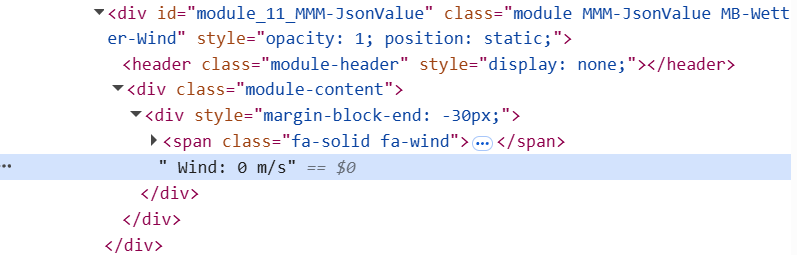
      

      Screenshot 2025-03-23 203611.png
      The " <div class “module content”> " is identified by
      "#module_10_MMM-JsonValue > div:nth-child(2) " (for the first instance of module)
      second and following instances are counted up consecutively
      "#module_11_MMM-JsonValue > div:nth-child(2) "
      "#module_12_MMM-JsonValue > div:nth-child(2) "
      "#module_13_MMM-JsonValue > div:nth-child(2) "

      R 1 Reply Last reply Reply Quote 0
      • R Offline
        rkorell @rkorell
        last edited by

        #module_10_MMM-JsonValue > div:nth-child(2) {
           color: "fuchsia";
        }


        Doesn’t work, either :-(

        1 Reply Last reply Reply Quote 0
        • S Do not disturb
          sdetweil @rkorell
          last edited by

          @rkorell prototype

          IMG_0885.jpeg

          Sam

          How to add modules

          learning how to use browser developers window for css changes

          S R 2 Replies Last reply Reply Quote 1
          • S Do not disturb
            sdetweil @sdetweil
            last edited by sdetweil

            @rkorell maybe that will work

            if you change it in the input area, does change

            Sam

            How to add modules

            learning how to use browser developers window for css changes

            S 1 Reply Last reply Reply Quote 0
            • S Do not disturb
              sdetweil @sdetweil
              last edited by

              @rkorell

              .module-content div {
              color:
              }

              Sam

              How to add modules

              learning how to use browser developers window for css changes

              R 1 Reply Last reply Reply Quote 0
              • R Offline
                rkorell @sdetweil
                last edited by

                @sdetweil Ahhhh…
                THIS “bottom” …
                Sorry for misinterpreting this.
                Will try your suggestion.

                1 Reply Last reply Reply Quote 0
                • R Offline
                  rkorell @sdetweil
                  last edited by rkorell

                  @sdetweil
                  Unfortunately

                  
                  .MB-Wetter-Temp .module-content div {
                  color: "fuchsia";
                  }


                  doesn’t work :-(

                  May you are much faster than me?
                  If you mind to try MMM-JsonValue with this

                  		{   /// WIND
                  			module: "MMM-JsonValue",
                  			position: "top_right",
                  			classes: "MB-Wetter-Wind",
                  			disabled: false,
                  			config: {
                  				apiBase: 'https://api.weather.com/v2/pws/observations/current?stationId=IGEROL23&format=json&units=m&numericPrecision=decimal&apiKey=e0658025e8d74a2da58025e8d70a2ddf',
                  				method: "GET",
                  				title: "", // Widget Title, set to null if not needed
                  				icon: "fa-solid fa-wind", // Font Awesome icon, displayed before any text, set to null if not needed
                  				prefix: "  Wind:  ", //   "Quote: \"" ---  Text displayed before the value, can be a blank String ""
                  				suffix: " m/s", // "\" (from https://api.quotable.io/random)" ----- Text displayed after the value, can be a blank String ""
                  				jsonPath: "$.observations[:1].metric.windSpeed", // value in the json to display, the module use https://github.com/dchester/jsonpath for parsing. Note: if $ is not the first character in your path, it will be added for backward-compatibility reason.
                  
                  				refreshInterval: 5 * 1000 * 60, // refresh every 5 minutes
                  				debug: false,
                  				skipPadding: false, // yo can un-comment this line if you want to display a related value below; using a second instance.
                  			}
                  		 },		 
                  

                  code snippet in config.js …
                  Gives you the windspeed on my weather station monitored by wunderground …

                  Thanks again !
                  Ralf

                  S 1 Reply Last reply Reply Quote 0
                  • S Do not disturb
                    sdetweil @rkorell
                    last edited by sdetweil

                    @rkorell said in CSS modifications on a module which has no own css styles?:

                    .MB-Wetter-Temp .module-content div {
                    color: “fuchsia”;
                    }

                    SO close… the color is NOT in quotes (in css)
                    sorry I missed that before

                    .MB-Wetter-Wind .module-content div {
                      color: blue;
                    }

                    

                    Snip20250324_1.png

                    here I am using the dev window to override the blue to red… see the top right of the right column , note that the one from custom.css (just below), is strikethru to say it is overridden by something higher up
                    if you uncheck the checkbox in front of the color:red; it will disable that value and the strikethru will go away and the text will be blue

                    Screenshot 2025-03-24 at 6.48.28 AM.png

                    Sam

                    How to add modules

                    learning how to use browser developers window for css changes

                    R 2 Replies Last reply Reply Quote 1
                    • R Offline
                      rkorell @sdetweil
                      last edited by

                      @sdetweil said in CSS modifications on a module which has no own css styles?:

                      dev window to override the blue to red

                      I guess your own CSS modification has enabled this…
                      Without this the entry #text doesn’t have any opportunity to change anything…

                      S 1 Reply Last reply Reply Quote 0
                      • R Offline
                        rkorell @sdetweil
                        last edited by

                        @sdetweil said in CSS modifications on a module which has no own css styles?:

                        SO close…

                        :-)

                        You’ve made my day!
                        THANKS a LOT!!!

                        1 Reply Last reply Reply Quote 0
                        • S Do not disturb
                          sdetweil @rkorell
                          last edited by sdetweil

                          @rkorell said in CSS modifications on a module which has no own css styles?:

                          Without this the entry #text doesn’t have any opportunity to change anything…

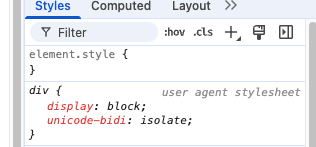
                          you are not styling the TEXT, you are styling the DIV that HOLDS the text
                          (my css entry commented out, and the div selected)
                          you cannot target the ‘text’ itself… only whatever holds it (p, div, span, table data…)
                          Snip20250324_4.png

                          Sam

                          How to add modules

                          learning how to use browser developers window for css changes

                          R 1 Reply Last reply Reply Quote 0
                          • R Offline
                            rkorell @sdetweil
                            last edited by rkorell

                            @sdetweil said in CSS modifications on a module which has no own css styles?:

                            you cannot target the ‘text’ itself…

                            Yes, understood.
                            What I cannot understand and what doesn’t work for me is exactly this, what you (formerly) asked and demosntrated in your last post: touch this div -part…
                            what you DO have:
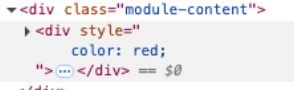
                            ScreenFloat Bildschirmfoto von Google Chrome am 24_03_2025, 16_01_53 24_03_2025, 16-01-53.jpg

                            I do NOT have ! (for whatever reason!)
                            I have the

                             <div class="module-content">
                            

                            the following

                            <div style" color: red;">
                            

                            is not present in my developer’s console:
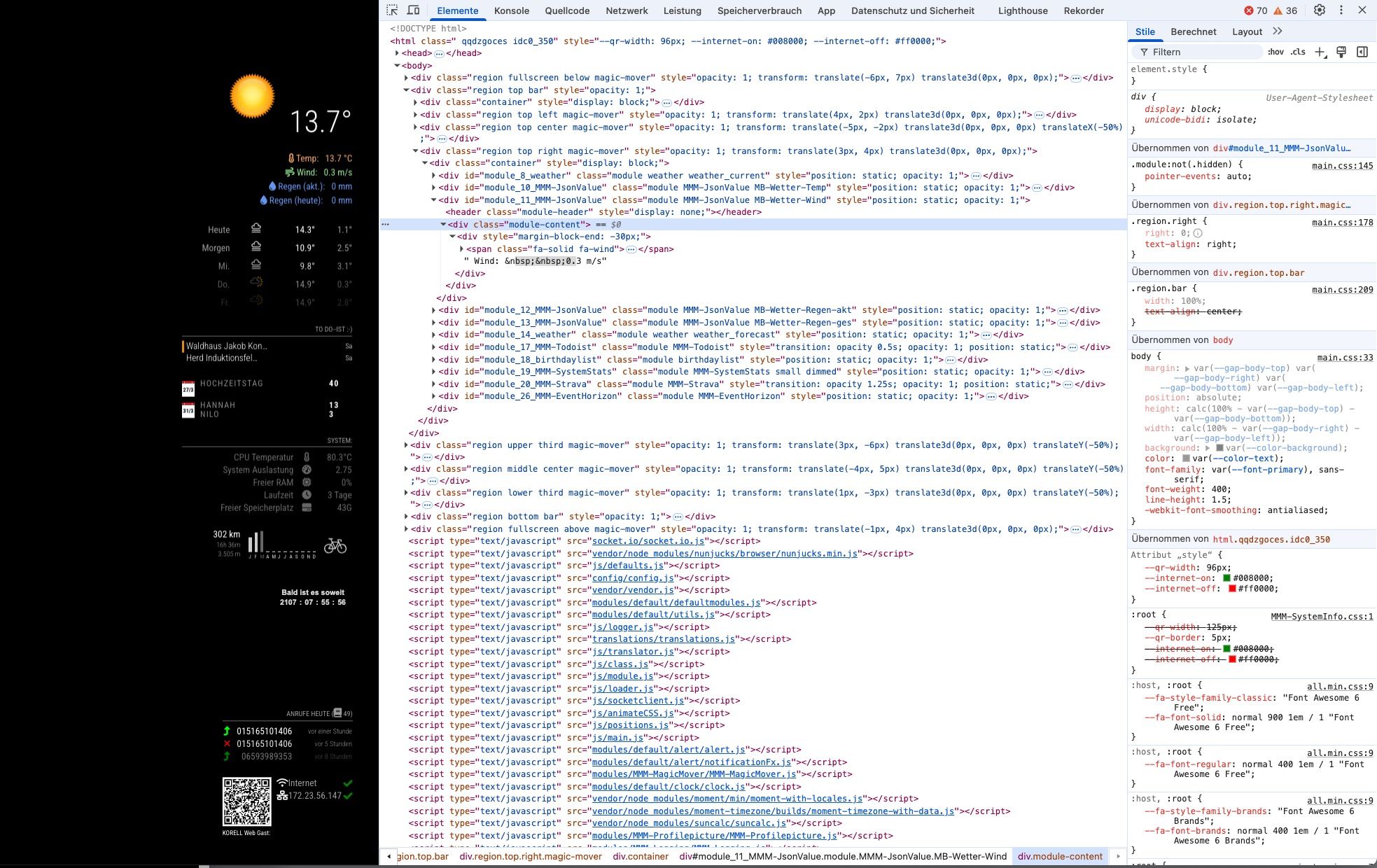
                            ScreenFloat Bildschirmfoto von Google Chrome am 24_03_2025, 16_04_05 24_03_2025, 16-04-05.jpg

                            ???

                            Greetings,
                            Ralf

                            S 1 Reply Last reply Reply Quote 0
                            • S Do not disturb
                              sdetweil @rkorell
                              last edited by sdetweil

                              @rkorell yes you do
                              the full html of that section

                              <div id="module_26_MMM-JsonValue" class="module MMM-JsonValue MB-Wetter-Wind MMM-JsonValue">
                                   <header class="module-header" style="display: none;"></header>
                                   <div class="module-content" style="color: red;">   // you are trying THIS div
                                          <div>  // but it needs to be THIS div -------------
                                             <span class="fa-solid fa-wind"></span>  Wind:  3.5 m/s
                                          </div>
                                   </div>
                              </div>
                              

                              .MB-Wetter-Wind // the class name on the div id=
                              .module-content // then the div with the module content class
                              div // then the div that HOLDS the text value

                              ..MB-Wetter-Wind  .module-content (means whatever element has this defined) div 
                              

                              could also do

                              ..MB-Wetter-Wind  div.module-content (means ONLY A DIV with class, a span with the same class would not match)  div 
                              

                              many styles are NOT inherited DOWN the tree

                              because the span holds the icon, you can remove it for css design consideration of the text

                              <div id="module_26_MMM-JsonValue" class="module MMM-JsonValue MB-Wetter-Wind MMM-JsonValue">
                                   <header class="module-header" style="display: none;"></header>
                                   <div class="module-content" style="color: red;">   // you are trying THIS div
                                         <div>  // but it needs to be THIS div -------------
                                               Wind:  3.5 m/s
                                         </div>
                                   </div>
                              </div>
                              

                              Sam

                              How to add modules

                              learning how to use browser developers window for css changes

                              S R 2 Replies Last reply Reply Quote 0
                              • S Do not disturb
                                sdetweil @sdetweil
                                last edited by sdetweil

                                @rkorell I think your div has the class margin-block-end added (maybe thru custom.css)

                                Sam

                                How to add modules

                                learning how to use browser developers window for css changes

                                1 Reply Last reply Reply Quote 0
                                • R Offline
                                  rkorell @sdetweil
                                  last edited by rkorell

                                  @sdetweil

                                  <div id="module_11_MMM-JsonValue" class="module MMM-JsonValue MB-Wetter-Wind" style="opacity: 1; position: static;">
                                  <header class="module-header" style="display: none;"></header>
                                  <div class="module-content">
                                  <div style="margin-block-end: -30px;">
                                  <span class="fa-solid fa-wind"></span>  Wind:  &nbsp;&nbsp;4 m/s
                                  </div>
                                  </div>
                                  </div>


                                  Is my complete HTML block for this…
                                  Interesting enough YOU do not have this

                                  "margin-block-end: -30px;"
                                  

                                  in your HTML …
                                  THIS style is hard coded in the *.js file of module…

                                  I give up.
                                  Problem solved…

                                  THANK you SO much!

                                  Ralf

                                  S 1 Reply Last reply Reply Quote 0
                                  • S Do not disturb
                                    sdetweil @rkorell
                                    last edited by sdetweil

                                    @rkorell said in CSS modifications on a module which has no own css styles?:

                                    I give up.

                                    but its the SAME result… you need to target the div INSIDE the module-content div

                                    .module-content div {
                                    color: …
                                    }

                                    this means
                                    find the element(s) with class module-content
                                    AND THEN
                                    the div(s) inside that

                                    selector is ALWAYS ALL that match

                                    as the color style is not inherited down

                                    Sam

                                    How to add modules

                                    learning how to use browser developers window for css changes

                                    R 1 Reply Last reply Reply Quote 0
                                    • R Offline
                                      rkorell @sdetweil
                                      last edited by

                                      @sdetweil You are - as always - right.
                                      For some reasons NOW it works - tried again.
                                      (And I already HAD tried exactly THIS dozens of times …).

                                      THANKS!

                                      Ralf

                                      S 1 Reply Last reply Reply Quote 0
                                      • S Do not disturb
                                        sdetweil @rkorell
                                        last edited by

                                        @rkorell said in CSS modifications on a module which has no own css styles?:

                                        (And I already HAD tried exactly THIS dozens of times …).

                                        I think it failed on the previous because of the quotes around the color name

                                        Sam

                                        How to add modules

                                        learning how to use browser developers window for css changes

                                        R 1 Reply Last reply Reply Quote 0
                                        • R Offline
                                          rkorell @sdetweil
                                          last edited by

                                          @sdetweil said in CSS modifications on a module which has no own css styles?:

                                          I think it failed on the previous because of the quotes around the color name

                                          No.
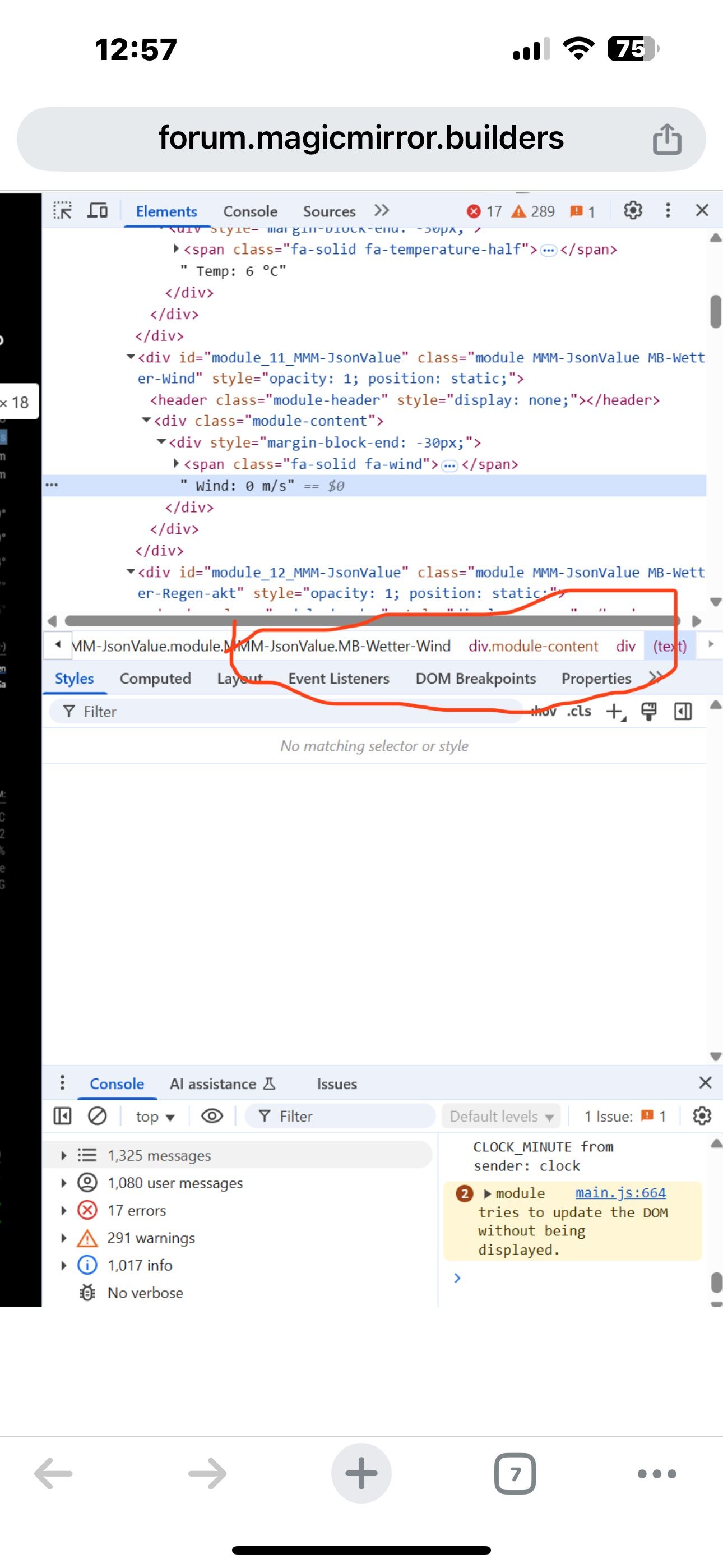
                                          I’ve tried this (see screenshot) with already working colors on these items …
                                          May something buffering wrong…
                                          (I’ve pressed ctrl-R several times so reloading has happened …)

                                          S 1 Reply Last reply Reply Quote 0
                                          • S Do not disturb
                                            sdetweil @rkorell
                                            last edited by

                                            @rkorell hm… only other thing is MM is case sensitive… css class names too

                                            you got it tho

                                            Sam

                                            How to add modules

                                            learning how to use browser developers window for css changes

                                            1 Reply Last reply Reply Quote 1
                                            • S sdetweil referenced this topic on

                                            Hello! It looks like you're interested in this conversation, but you don't have an account yet.

                                            Getting fed up of having to scroll through the same posts each visit? When you register for an account, you'll always come back to exactly where you were before, and choose to be notified of new replies (either via email, or push notification). You'll also be able to save bookmarks and upvote posts to show your appreciation to other community members.

                                            With your input, this post could be even better 💗

                                            Register Login

                                            • 1
                                            • 2
                                            • 1 / 2
                                            • First post
                                              Last post
                                            Enjoying MagicMirror? Please consider a donation!
                                            MagicMirror created by Michael Teeuw.
                                            Forum managed by Sam, technical setup by Karsten.
                                            This forum is using NodeBB as its core | Contributors
                                            Contact | Privacy Policy