Read the statement by Michael Teeuw here.
Netatmo module will not shown
-
hello everyone, i have a netatmo station with with an out sensor and a windsensor and rain sensor…now i will show it on the MM but it will not show. Can everyone help me…i installed the module from fenner here:
https://github.com/CFenner/MMM-Netatmo
an my Config will show so:
{
  module: 'netatmo',
  position: 'top_right', // the location where the module should be displayed
  header: 'Netatmo', // a header if you like one
  config: {
		clientId: 'xxec', // your app id
		clientSecret: '123', // your app secret
		refresh_token: '12345', // your generated refresh token
		refreshInterval: '3',
		dataOrder: ["Noise","Pressure","CO2","Humidity","Temperature","Rain"],
		design: 'bubbles',
		horizontal: 'true',
		showBattery: 'true',
		showWiFi: 'true',
		showTrend: 'true',
		showMeasurementIcon: 'true',
		showStationName: 'true',
		showModuleNameOnTop: 'false',
		fontClassModuleName: 'xsmall',
		fontClassPrimary: 'xsmall',
		fontClassSecondary: 'xsmall',
		fontClassMeasurement: 'xsmall',
		thresholdCO2Average: '1200',
		thresholdCO2Bad: '1800',

  }
	},
It´s only standing “Netatmo load”
about an answer thanks a lot in future
-
@Lusbueb said in Netatmo module will not shown:
@kusselin
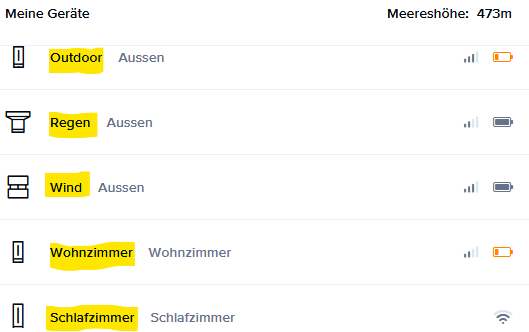
In your configuration, I’m missing the entry modulOrder. This entry was essential for me! I initially used the default name until I realized that it only works if the module name is stored exactly as you configured it in the web-app (https://auth.netatmo.com/de-de/access/login):my config:
		{
		module: 'netatmo',
		position: 'middle_center', // the location where the module should be displayed
		config: {
			clientId: '*myID*', // your app id
			clientSecret: '*mysecret*', // your app secret
			refresh_token: *'mytoken*', // your generated refresh token
			moduleOrder: ["Outdoor","Regen","Wind","Schlafzimmer","Wohnzimmer"], //take same names from web-app!
			updateInterval: 6, // every 3 minutes, refresh interval on netatmo is 10 minutes
			animationSpeed: 1000,
			design: 'bubbles', // classic or bubbles
			horizontal: false,
			lastMessageThreshold: 600, // in seconds (10 minutes)
			showLastMessage: true,
			showBattery: true,
			showRadio: true,
			showWiFi: true,
			showTrend: true,
			showMeasurementIcon: true,
			showMeasurementLabel: true,
			showStationName: false,
			showModuleNameOnTop: true,
			fontClassModuleName: 'small', // xsmall, small, medium, large, xlarge
			fontClassPrimary: 'large',
			fontClassSecondary: 'xsmall',
			fontClassMeasurement: 'xsmall',
			thresholdCO2Average: 800,
			thresholdCO2Bad: 1800,
			mockData: false,
		}
		},
https://home.netatmo.com/control/dashboard
MM:
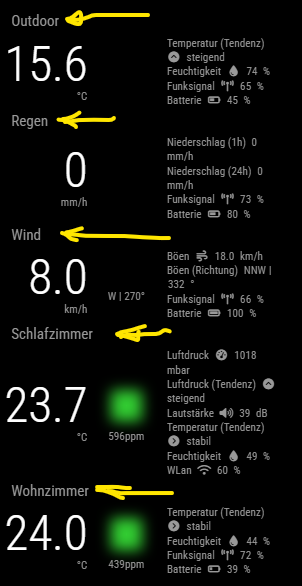
Thanks s lot for your config…i changed it and now ist good and the netatmo Modul is running very well
-
Hi,
Is no one here who can help me for the Netatmo module and the Config?Best regsrds all in advance
-
@kusselin Are there any error messages?
Check log as well as dev-console …
“Netatmo load” could be an indicator that module stucks in the middle of nowhere…Regards,
Ralf -
@kusselin
Also check that your registration is correct. Make sure you have a current “token.js”. -
@rkorell said in Netatmo module will not shown:
@kusselin Are there any error messages?
Check log as well as dev-console …
“Netatmo load” could be an indicator that module stucks in the middle of nowhere…Regards,
RalfHello, thank you for the information.
Here from the console in Mozilla Firefox with the F12 keyInitializing MagicMirror². main.js:582:8 Bootstrapping module: alert loader.js:151:7 Bootstrapping module: updatenotification loader.js:151:7 Bootstrapping module: clock loader.js:151:7 Bootstrapping module: calendar loader.js:151:7 Bootstrapping module: compliments loader.js:151:7 Bootstrapping module: MMM-OpenmapWeather loader.js:151:7 Bootstrapping module: netatmo loader.js:151:7 Bootstrapping module: MMM-Blitzer loader.js:151:7 Bootstrapping module: MMM-F1 loader.js:151:7 Bootstrapping module: MMM-ApothekenNotdienst loader.js:151:7 Bootstrapping module: MMM-ioBroker loader.js:151:7 Bootstrapping module: MMM-Carousel loader.js:151:7 Bootstrapping module: MMM-PublicTransportHafas loader.js:151:7 Bootstrapping module: MMM-RNV loader.js:151:7 Bootstrapping module: MMM-Fuel loader.js:151:7 Bootstrapping module: MMM-Carousel loader.js:151:7 Bootstrapping module: MMM-Remote-Control loader.js:151:7 Bootstrapping module: newsfeed loader.js:151:7 Starting module: alert alert.js:43:7 Starting module: updatenotification updatenotification.js:19:7 Starting module: clock clock.js:43:7 Starting module: calendar calendar.js:96:7 Starting module: compliments compliments.js:40:7 Starting module: MMM-OpenmapWeather MMM-OpenmapWeather.js:127:7 Starting module: netatmo netatmo.js:71:9 Starting module: MMM-F1 MMM-F1.js:24:13 Starting module: MMM-ApothekenNotdienst with identifier: module_10_MMM-ApothekenNotdienst MMM-ApothekenNotdienst.js:13:9 Starting module: MMM-ioBroker MMM-ioBroker.js:52:9 Starting module: MMM-Carousel with identifier: module_12_MMM-Carousel MMM-Carousel.js:99:9 Starting module: MMM-PublicTransportHafas with identifier: module_13_MMM-PublicTransportHafas MMM-PublicTransportHafas.js:61:9 Starting module: MMM-RNV MMM-RNV.js:14:664 Starting module: MMM-Fuel MMM-Fuel.js:180:13 Starting module: MMM-Carousel with identifier: module_16_MMM-Carousel MMM-Carousel.js:99:9 Starting module: MMM-Remote-Control MMM-Remote-Control.js:22:9 Starting module: newsfeed newsfeed.js:67:7 All modules started! main.js:601:8 sorting events count=0 calendar.js:704:7 slicing events total maxcount=10 calendar.js:744:7 sorting events count=63 calendar.js:704:7 sorting events count=10 calendar.js:704:7 slicing events total maxcount=10 calendar.js:744:7 event fullday 10 calendar.js:506:12 sorting events count=63 calendar.js:704:7 sorting events count=10 calendar.js:704:7 slicing events total maxcount=10 calendar.js:744:7 event fullday 10 calendar.js:506:12Yes, I had them generate a token and ID for me on the developer page like on the Fenner github page.
Do I have to name my devices like this? I have a wind sensor, rain sensor and an outdoor station. Is that correct with humidity etc…in English? -
@det said in Netatmo module will not shown:
@kusselin
Also check that your registration is correct. Make sure you have a current “token.js”.Yes, what should I check there…is clearly described…the ClientSecret, the refresh_token and the ClientID…
the ID and the clientSecret are already there and the token can be generated with the “read station” in the selection.Do you also have netatmo running?
Generally speaking, it’s already running, isn’t it?
Where can i found the logs? under pm2 or npm?? i installed the MM from here in a proxmox container
https://community-scripts.github.io/ProxmoxVE/scripts?id=magicmirror
-
@kusselin so, where does the ui for this module run?
are you doing npm run server in the container?
this module depends on the ui running to kick off the helper
you should see messages wherever you start MagicMirror
npm start
pm2 launches a script, which does nom start or npm run server
then pm2 captures all the outputin a docker/proxmox container you should see the output in the container logs
-
@sdetweil
Thank you. I installed MM using the proxmox helpers script. When I restart MM, it always starts automaticallylook please…can you see what:
root@magicmirror-live:/opt/magicmirror# npm run server > magicmirror@2.31.0 server > node ./serveronly [2025-04-25 19:25:22.927] [LOG] Starting MagicMirror: v2.31.0 [2025-04-25 19:25:22.939] [LOG] Loading config ... [2025-04-25 19:25:22.940] [LOG] config template file not exists, no envsubst [2025-04-25 19:25:23.250] [INFO] Checking config file /opt/magicmirror/config/config.js ... [2025-04-25 19:25:23.343] [INFO] Your configuration file doesn't contain syntax errors :) [2025-04-25 19:25:23.344] [INFO] Checking modules structure configuration ... [2025-04-25 19:25:23.398] [INFO] Your modules structure configuration doesn't contain errors :) [2025-04-25 19:25:23.787] [LOG] Loading module helpers ... [2025-04-25 19:25:23.797] [LOG] No helper found for module: alert. [2025-04-25 19:25:23.814] [LOG] Initializing new module helper ... [2025-04-25 19:25:23.822] [LOG] Module helper loaded: updatenotification [2025-04-25 19:25:23.822] [LOG] No helper found for module: clock. [2025-04-25 19:25:24.047] [LOG] Initializing new module helper ... [2025-04-25 19:25:24.047] [LOG] Module helper loaded: calendar [2025-04-25 19:25:24.048] [LOG] No helper found for module: compliments. [2025-04-25 19:25:24.048] [LOG] No helper found for module: MMM-OpenmapWeather. [2025-04-25 19:25:24.052] [LOG] Initializing new module helper ... [2025-04-25 19:25:24.052] [LOG] Module helper loaded: netatmo [2025-04-25 19:25:24.053] [WARN] No /opt/magicmirror/modules/MMM-OpenWeatherForecast/MMM-OpenWeatherForecast.js found for module: MMM-OpenWeatherForecast. [2025-04-25 19:25:24.053] [LOG] No helper found for module: MMM-OpenWeatherForecast. [2025-04-25 19:25:24.053] [LOG] No helper found for module: MMM-Blitzer. [2025-04-25 19:25:24.250] [LOG] Initializing new module helper ... [2025-04-25 19:25:24.251] [LOG] Module helper loaded: MMM-F1 [2025-04-25 19:25:24.252] [LOG] Initializing new module helper ... [2025-04-25 19:25:24.252] [LOG] Module helper loaded: MMM-ApothekenNotdienst [2025-04-25 19:25:24.253] [LOG] Initializing new module helper ... [2025-04-25 19:25:24.253] [LOG] Module helper loaded: MMM-ioBroker [2025-04-25 19:25:24.253] [LOG] No helper found for module: MMM-Carousel. [2025-04-25 19:25:24.256] [LOG] Initializing new module helper ... [2025-04-25 19:25:24.263] [LOG] Module helper loaded: MMM-PublicTransportHafas [2025-04-25 19:25:24.464] [LOG] Initializing new module helper ... [2025-04-25 19:25:24.465] [LOG] Module helper loaded: MMM-RNV [2025-04-25 19:25:24.465] [LOG] Initializing new module helper ... [2025-04-25 19:25:24.466] [LOG] Check MagicMirror² version for node helper 'MMM-Fuel' - Minimum version: 2.15.0 - Current version: 2.31.0 [2025-04-25 19:25:24.466] [LOG] Version is ok! [2025-04-25 19:25:24.466] [LOG] Module helper loaded: MMM-Fuel [2025-04-25 19:25:24.494] [LOG] Initializing new module helper ... [2025-04-25 19:25:24.495] [LOG] Module helper loaded: MMM-Remote-Control [2025-04-25 19:25:24.544] [LOG] Initializing new module helper ... [2025-04-25 19:25:24.545] [LOG] Module helper loaded: newsfeed [2025-04-25 19:25:24.545] [LOG] All module helpers loaded. [2025-04-25 19:25:24.549] [LOG] Starting server on port 8080 ... [2025-04-25 19:25:24.550] [WARN] You're using a full whitelist configuration to allow for all IPs [2025-04-25 19:25:24.561] [ERROR] Whoops! There was an uncaught exception... [2025-04-25 19:25:24.561] [ERROR] Error: listen EADDRINUSE: address already in use 0.0.0.0:8080 at Server.setupListenHandle [as _listen2] (node:net:1939:16) at listenInCluster (node:net:1996:12) at node:net:2205:7 at process.processTicksAndRejections (node:internal/process/task_queues:90:21) { code: 'EADDRINUSE', errno: -98, syscall: 'listen', address: '0.0.0.0', port: 8080 } [2025-04-25 19:25:24.561] [ERROR] MagicMirror² will not quit, but it might be a good idea to check why this happened. Maybe no internet connection? [2025-04-25 19:25:24.561] [ERROR] If you think this really is an issue, please open an issue on GitHub: https://github.com/MagicMirrorOrg/MagicMirror/issues [2025-04-25 19:25:24.648] [INFO] System information: ### SYSTEM: manufacturer: ; model: ; virtual: false ### OS: platform: linux; distro: Debian GNU/Linux; release: 12; arch: x64; kernel: 6.8.12-8-pve ### VERSIONS: electron: undefined; used node: 22.15.0; installed node: 22.15.0; npm: 10.9.2; pm2: 5.4.3 ### OTHER: timeZone: Europe/Berlin; ELECTRON_ENABLE_GPU: undefined -
@kusselin netatmo is not in the module list
also the address already in use means the server is running already from whatever script is launched at container startup
in container you cannot run manual npm run server if the container does that
same as if pm2 autostarted on native os or virtual machine
-
@sdetweil
And what does that tell me now? Does that mean I can’t change anything…netatmo won’t work? -
@kusselin
Sorry I‘m out here because I do not have any experience with proxmox containers.But in general, what Sam means is that your last log-output indicates that you had tried to start a seond instance of MagicMirror -which fails.
So I guess it is necessary to identify the primary instance and look for logs there .
What I have seen in addition but cannot justify: Your above output looks like you‘re working with root permission.root@magicmirror-live:/opt/magicmirror# npm run serverAs far as I remember correctly, this may causes difficulties as well - at least I remember to read something like this - context was different and it‘s possible that this doesn‘t apply to container-environments …
Good luck!
Regards,
Ralf -
@kusselin no, just have to restart the container…
I am installing proxmox on a vmware VM now,
-
@kusselin so with the script I get a container starting to be built, but it has no network
I see it in the list, can start/stop. but no network.this is proxmox in a VM, not native on the hardware…
I did get a vmware warning that proxmox was trying to set promiscuous mode, but that is not allowed
-
@rkorell said in Netatmo module will not shown:
@kusselin
Sorry I‘m out here because I do not have any experience with proxmox containers.But in general, what Sam means is that your last log-output indicates that you had tried to start a seond instance of MagicMirror -which fails.
So I guess it is necessary to identify the primary instance and look for logs there .
What I have seen in addition but cannot justify: Your above output looks like you‘re working with root permission.root@magicmirror-live:/opt/magicmirror# npm run serverAs far as I remember correctly, this may causes difficulties as well - at least I remember to read something like this - context was different and it‘s possible that this doesn‘t apply to container-environments …
Good luck!
Regards,
RalfOne question: Do you have Netatmo installed and running at home as hardware and searching in MM…?
-
@sdetweil said in Netatmo module will not shown:
@kusselin so with the script I get a container starting to be built, but it has no network
I see it in the list, can start/stop. but no network.this is proxmox in a VM, not native on the hardware…
I did get a vmware warning that proxmox was trying to set promiscuous mode, but that is not allowed
Ok du hast dir die mühe gemacht einen proxmox container zu installieren und den MM dort zu installieren…danke erstmal für das machen und testen…
Heisst im Container läuft der NM nicht so wie er auf einem Raspberry läuft…richtig?
Heisdt am besten man installiert den MM auf einem Raspi, dann hat man nicht den Ärger…richtig?
Ich kann halt nicht verdtehen das hier keiner im Forum ist der auch netatmo als Modul installiert hat :-(
Englisch:
Ok you made the effort to install a proxmox container and install the MM there…thanks for doing and testing…That means the NM does not run in the container the way it runs on a raspberry…right?
It’s best to install the MM on a Raspi, then you don’t have the trouble…right?
I just can’t understand that there is no one here in the forum who has also installed netatmo as a module :-(
What do you mean by “no network”?
I have a connection and other modules are displayed correctly, so I don’t understand this
-
@kusselin said
One question: Do you have Netatmo installed and running at home as hardware and searching in MM…?
Nope, Netatmo not used by me …
Regards,
Ralf -
@kusselin no network
the script says there is no network card for the container so it cannot talk to anything
from the script output see <---- below__ ___ _ __ ____ / |/ /___ _____ _(_)____/ |/ (_)_____________ _____ / /|_/ / __ `/ __ `/ / ___/ /|_/ / / ___/ ___/ __ \/ ___/ / / / / /_/ / /_/ / / /__/ / / / / / / / / /_/ / / /_/ /_/\__,_/\__, /_/\___/_/ /_/_/_/ /_/ \____/_/ /____/ 🧩 Using Advanced Settings on node pve 🖥️ Operating System: debian 🌟 Version: 12 📦 Container Type: Unprivileged 🔐 Root Password: ******** 🆔 Container ID: 101 🏠 Hostname: magicmirror 💾 Disk Size: 3 GB 🧠 CPU Cores: 1 🛠️ RAM Size: 512 MiB 🌉 Bridge: vmbr0 📡 IP Address: dhcp 🌐 Gateway IP Address: Default 📡 APT-Cacher IP Address: Default 🚫 Disable IPv6: yes ⚙️ Interface MTU Size: Default 🔍 DNS Search Domain: Host 📡 DNS Server IP Address: Host 🏷️ Vlan: Default 📡 Tags: community-script;magicmirror 🔑 Root SSH Access: yes Warning: No SSH key provided. 🔍 Verbose Mode: yes 🚀 Creating a MagicMirror LXC using the above advanced settings ✔️ Using local for Template Storage. ✔️ Using local-lvm for Container Storage. ✔️ Updated LXC Template List ✔️ LXC Template is ready to use. ✔️ LXC Container 101 was successfully created. ✔️ Started LXC Container net.ipv6.conf.all.disable_ipv6 = 1 ⠇ ✖️ No Network! ner OS <---- ✖️ No Network After 10 Tries <--- 📡 Check Network Settings /dev/fd/63: line 72: SPINNER_PID: unbound variable -
@kusselin problem here was disk and memory too small… 10g disk and 2048g memory and install finished…
-
@kusselin so I had to use the mockdata: true option as I don’t have any server for this
I set the clientid… to garbage numbers . module fails if not set
and mockdata: true and after a while I see this on the lxc container MM instance
(MMM-Config generated config entry){ module: "netatmo", position: "bottom_left", order: "*", animateIn: "None", animateOut: "None", config: { clientId: '1234567', // your app id clientSecret: '1212123', // your app secret refresh_token: '3223232', // your generated refresh token mockData: true }, disabled: false, hiddenOnStartup: false, configDeepMerge: false },the system service is setup without logging, so the MM app logging is lost…
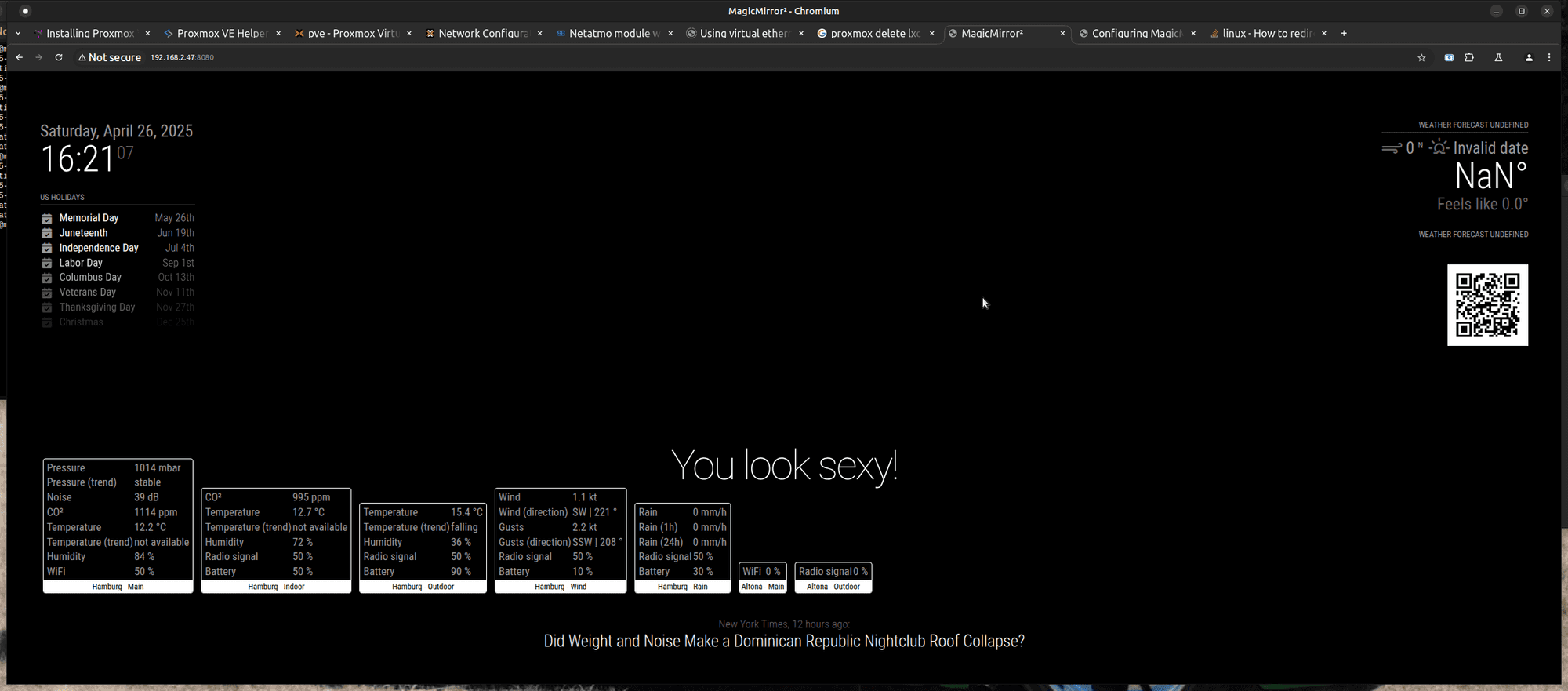
for me lxc container looks and acts like a Virtual machine, (restricted to OS structure proxmox is running on)
-
@sdetweil
Hello sam, first of all thank you for your support and your testing!Then why create MM for Proxmox? If it can’t find a network?
But in your screenshot I see Netatmo, it is displayed, or are you missing the values?
What does your testing and your statements tell me as a layman from MM?
Can I now not use Netatmo in the LXC container with Proxmox?
Other modules such as calender, clock public transfer hafas and RNV work perfectly.Thank you for any clarification so that I can understand it.
EDIT:
Hello Sam, if I use your config posted here and copy it in exactly the same way, netatmo is displayed but only with Hamburg and not my station…but it works…
I have used my code stored in the developer account as ID and secret key.
Shouldn’t MM then also show my location?
as soon as I set “MockData” to false, netatmo is no longer displayed…so you can say that the module itself works but not with the real data…think it’s the secret token…I read something here on the board
look:
https://forum.magicmirror.builders/topic/18690/mmm-netatmothermostat/2


Hello! It looks like you're interested in this conversation, but you don't have an account yet.
Getting fed up of having to scroll through the same posts each visit? When you register for an account, you'll always come back to exactly where you were before, and choose to be notified of new replies (either via email, or push notification). You'll also be able to save bookmarks and upvote posts to show your appreciation to other community members.
With your input, this post could be even better 💗
Register Login