Read the statement by Michael Teeuw here.
MMM-JsonTable - error and does not load
-
Hi,
I am trying to read and display from a local json file using this module.
config:
url: ‘https://localhost:8080/modules/MMM-JsonTable/myList.json’,
arrayName: ‘items’,
keepColumns: ‘name’I get following errors:
[2025-06-29 19:01:30.116] [ERROR] (node:109589) UnhandledPromiseRejectionWarning: TypeError: fetch failed
at node:internal/deps/undici/undici:13502:13
at process.processTicksAndRejections (node:internal/process/task_queues:105:5)
[2025-06-29 19:01:30.116] [ERROR] (node:109589) UnhandledPromiseRejectionWarning: Unhandled promise rejection. This error originated either by throwing inside of an async function without a catch block, or by rejecting a promise which was not handled with .catch(). To terminate the node process on unhandled promise rejection, use the CLI flag--unhandled-rejections=strict(see https://nodejs.org/api/cli.html#cli_unhandled_rejections_mode). (rejection id: 2)myList.json in module directory -from the example on github with item and name only.
It stays at loading with those errors.
What am I doing wrong? Please help. Thanks..
-
Sam,
Yes, it was the file content. I had copied it from the git example but obviously did something wrong.
-
@sankum unless you enable it and provide a certificate, MagicMirror is http only
your url is https;// -
Thanks Sam. I changed it to http:// and even tried local IP address instead of localhost and the result is the same. Still the same error, and does not load.?
-
@sankum if you change to a file url in a browser
file:///home/userid/MagicMirror/modules/....does the file load? this proves the file path and character case
remember linux is case sensitivethen replace in front of /modules
withhttp://localhost:8080 -
Hi Sam,
file:/home/sankum/… loads with 1 slash in the browser. But nhttp://localhost:8080/modules/… does not, same errors as before? -
-
Sam, MagicMirror is configured to port 8080. nhtp was a typo. It is http://…
As I said the file path and name are correct as I can read it in browser using file:/… (single slash). So not quite sure what is going on? -
@sankum what is your address: setting in config.js
-
Sam,
address: “localhost”, -
@sankum I used the sample from the readme
{
  "items": [
    {
      "name": "Watt",
      "value": "270 Watt"
    },
    {
      "name": "Today",
      "value": "5.85 kWh"
    },
    {
      "name": "ThisWeek",
      "value": "5.83 kWh"
    },
    {
      "name": "ThisMonth",
      "value": "12.8 kWh"
    },
    {
      "name": "LastMonth",
      "value": "246.75 kWh"
    }
  ]
}
in the module folder
and this config (from the readme){ module: 'MMM-JsonTable', position: 'top_right', classes:'page1', header: 'HouseDB Sevensegment', config: { url: 'http://localhost:8090/modules/MMM-JsonTable/foobar.json', // Required arrayName: 'items' // Required--- } }and it displayed as expected
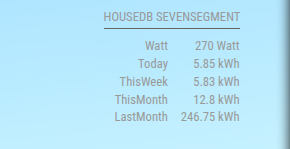
-
Thanks Sam.
So do I need port 8090 based on your config?. In my config port definition I have:
port: “8080”,Other than that I don’t see any difference. Do I need to change router setting? Any missing package you think? Thanks.
-
Hi Sam,
Never mind!! It is port 8080.
I copied the json file you have shown and it worked. So it must be my json file. I will try to figure out what is the difference. Thanks for your help. -
@sankum sorry intended to change that in
my post, too early -
@sankum i use this online to to validate and format json
-
Thank you, Sam.
-
@sankum did you get it fixed?
-
Sam, sorry I overlooked your question
Yes, I did get it fixed. Thanks. -
@sankum was it the file contents?
-
Sam,
Yes, it was the file content. I had copied it from the git example but obviously did something wrong.
-
S sdetweil has marked this topic as solved on
Hello! It looks like you're interested in this conversation, but you don't have an account yet.
Getting fed up of having to scroll through the same posts each visit? When you register for an account, you'll always come back to exactly where you were before, and choose to be notified of new replies (either via email, or push notification). You'll also be able to save bookmarks and upvote posts to show your appreciation to other community members.
With your input, this post could be even better 💗
Register Login