Read the statement by Michael Teeuw here.
Cal EXT3 - understanding transforming
-
Hello again guys
I am using the 3rd cal-mod from @MMRIZE and try to bring it up a bit more specific regarding styling.
So the documention says:
Transforming
You can manipulate or change the properties of the event.eventTransformer: (ev) => { if (ev.title.search("John") > -1) ev.color = "blue"; return ev; };This example shows how you can transform the color of events when the event title has specific text.
Would this mean, it looks up, if the events text is exact like the named text ( “John” in this example )
OR the event starts with the word
OR the event contains this word?Also I wondered, if I can specify the icon used for this event, besides defining the events color?
Thank you very much and as always, regards from Germany -
@_V_ said in Cal EXT3 - understanding transforming:
ev.title.search
search() searches the string for the specified characters and IF those characters are found, it returns the position of the text in the string…(0= 1st char/start of string). if NOT found it returns -1
this is a javascript string function
there is also startsWith() and endsWith()
search() = containsthe code could have used includes()
The includes() method of String values performs a case-sensitive search to determine whether a given string may be found within this string, returning true or false as appropriate.
if you wanted case insensitive, you would do
ev.title.toLowerCase().includes(‘john’) -
@_V_ transforming, you must ALWAYS return the event, modified or not
-
Hello Sam
Thanks for the input.
Ok now what would this search method mean for “title”Like, what is it the case of the EXT3 cal module?
It says “title”?
Anybody knows about my last question for icon change too?Thanks
-
@_V_ from his readme
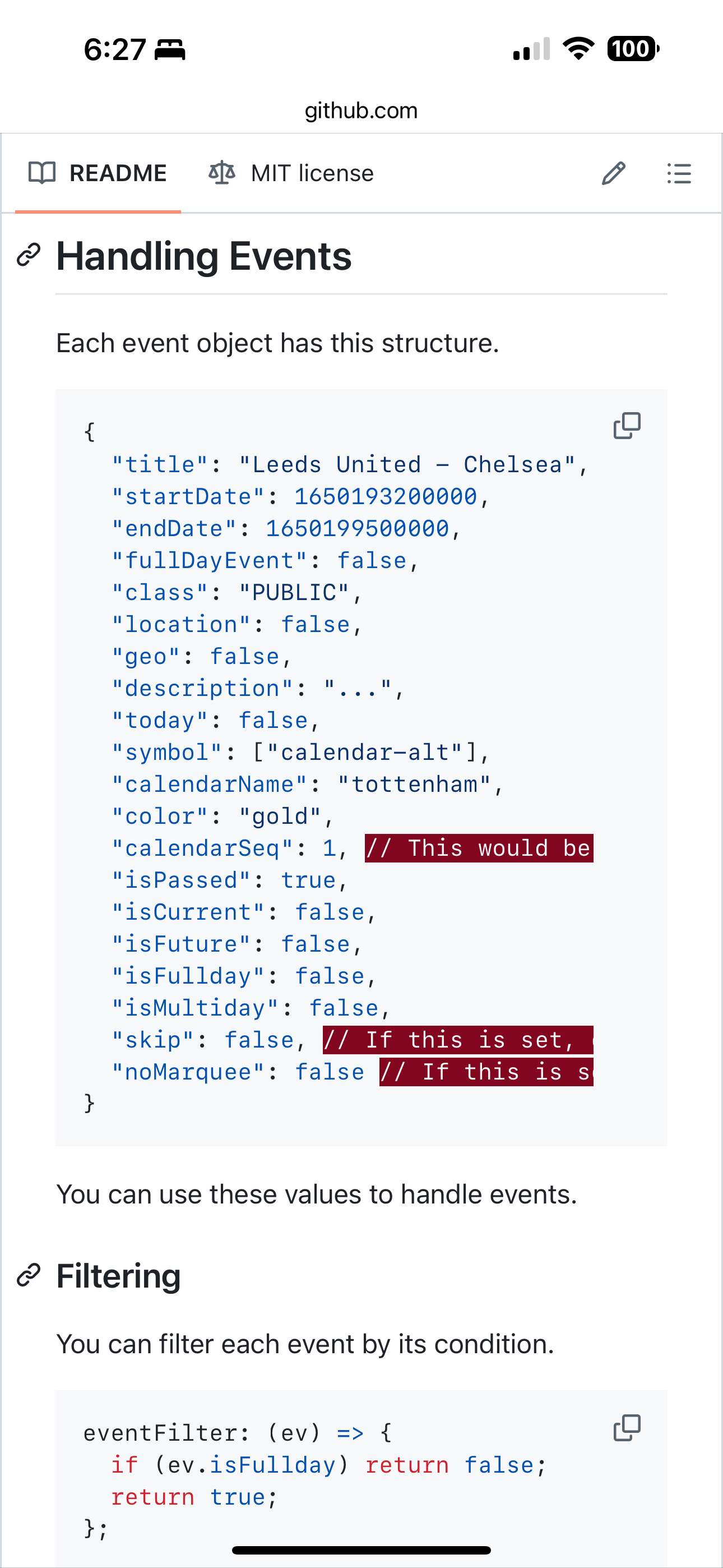
-
@_V_ what do you mean for title? We just searched title
If you want to change it. Then do thatev.title=‘new string’
Same with symbol
-
@_V_ you can change any property of the event
-
I get the idea but since Im quite new to this, I cant follow completely.
Again the exampleeventTransformer: (ev) => { if (ev.title.search("John") > -1) ev.color = "blue"; return ev; };Now you told me, “search” is a look up in form of “if contains” - this means if it contains the value, it will give out a value bigger than -1 and the effect will be set; other wise it will return -1 and the event stays unedited, correct?
This would also mean, I have to set up every possible event title class inbefore.
If I want to change/assign a specific symbol is a thing I dont understand.
I use the Iconify function from the module - do I have to put in a link to the desired symbol now or what is it I have to enter?
I could also imagine that I have to download the symbols and put in a directory to make the module be able to access them?Thanks a lot
-
If I search this field, and find ‘John’
Then
I change the event color
ev.color=You could change to symbol the same way
ev.symbol=. Whatever symbol nameYou are writing code here
The filter routine sees every event, one at a timeYou can have more than one if stmt
Can use if else if else, use a switch /case logic block -
@sdetweil Sam good evening
I wonder how to set up multiple ev transformations in one config.
I got working
{
eventTransformer: (ev) => {
if (ev.title.search("Geburtstag") > -1) {ev.color= "#ff00ff"; };
return ev; },
But putting another one to it is puzzling me. I tried different methods, but cant get it done.
When I simply put a second complete command after the first, like this:{ eventTransformer: (ev) => { if (ev.title.search("Arzt") > -1) {ev.color= "#ff0000"; }; return ev; },it will just negate the first applied effect from birthday and uses this effect instead on the named events.
Can you help me out please? -
all in one… there is only ONE eventTransformer, it has to do ALL the work for ALL events
I used else if here… if it matched the first, there is no reason to check again
eventTransformer: (ev) => { if (ev.title.search("Geburtstag") > -1) {ev.color= "#ff00ff"; } else if (ev.title.search("Arzt") > -1) {ev.color= "#ff0000"; }; return ev; }, -
@_V_ as you might have overseen you can not only check several conditions (as Sam (@sdetweil ) suggested) - separated by else or not but you can make several changes to the same event at one check.
e.g.:
eventTransformer: (ev) => {
  if (ev.title.search("Restmüll & Papier & Gelber Sack") !== -1) {ev.isFullday = [true], ev.title = "Alle Tonnen", ev.symbol = [ "fa-regular fa-trash-can" ], ev.color = "fuchsia"}
  if (ev.title.search("Therapie") !== -1) { ev.title = "Sitzung", ev.symbol = [ "fa-solid fa-mug-hot" ], ev.color = "Forestgreen"}
return ev
   			  }, // end Eventtransformer
In the above example you can see
- the modification of the color (as you already had identified,
- the change of the kind of event (from “scheduled” to “Fullday-Event”)
- the assignment of a different symbol (with font-awesome-symbols: double check their web-page, keep in mind that only the “STANDARD” (non-payed) versions will be shown in Magic Mirror) and
- the change of the title of the event.
Hope this helps.
Good luck!
Ralf -
@rkorell his issue is not knowing JavaScript language and syntax
-
@sdetweil Yes :-)
therefore I thought a detailed example would be beneficial …
Warmest regards,
Ralf
Hello! It looks like you're interested in this conversation, but you don't have an account yet.
Getting fed up of having to scroll through the same posts each visit? When you register for an account, you'll always come back to exactly where you were before, and choose to be notified of new replies (either via email, or push notification). You'll also be able to save bookmarks and upvote posts to show your appreciation to other community members.
With your input, this post could be even better 💗
Register Login