Read the statement by Michael Teeuw here.
Use local data from weatherstation
-
Hi,
I`m searching for a module which shows my local data from my weatherstation (ecowitt clone), similar to this one, but directly from my local station and not by using any cloud service. mmm- WunderGround-PWS-Observations
This could be happen by using the FOSHK plugin or weewx.
I know that there is a module to show soil-moisture from ecowitt stations. That would be a possibility if you can expand it to use all of the other data like temperature, wind, …
Kind regards
Florian
-
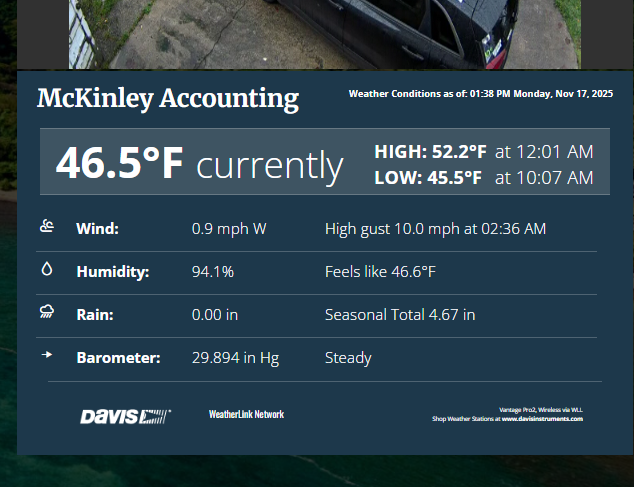
@Jose1701 what I ended up doing with my Davis weatherstation was use their web display interface with MMM-EmbedURL to just show their full screen weather display on the mirror.
-
Thats`s a nice idea, too. But I like to have it much more simple like this one mentioned above. (mmm- WunderGround-PWS-Observations)
-
Found a solution by the help of a member of another forum. Now everything works great and just the way I wanted it.
If you are interested in, have a look here. Unfortunately it is in German language.
Use data from local weatherstation
Kind regards
Jose
-
Hi!
There is now also an English-language text Displaying local PWS data with FOSHKplugin on a MagicMirror on this topic and a module MMM-FOSHKplugin-PWS-Observations.
Oliver
-
@Jose1701 I have the froggit WH2600 Pro and wrote a module. From what I know this is also a clone from ecowitt. My station includes a wifi gateway and is reachable in the local network via ip.
https://github.com/st3v0rr/MMM-WH2600 -
Hi,
I`ve seen that. Looks good.
Well, I could try if this works, too. I let you know.
Regards
Jose -
jose1701; I’m very interested in how you got the FOSKplugin to work. I just purchased a Ecowitt WS90 weather station and their GW3000 gateway. When I started the plugin it ran through a setup script and there were a few items that I had no idea what the answer was. The biggest on was the port the gateway is working on. I have seen nothing on that in the documentation. Do you know where I can find the port number? Some of the other things I can play with but the port number I have no idea.
I appreciate you help,
Ron R -
@RonR said in Use local data from weatherstation:
jose1701; I’m very interested in how you got the FOSKplugin to work.
Do you know where I can find the port number? Some of the other things I can play with but the port number I have no idea.
Installing FOSHKplugin is actually quite simple and is described in detail here.
The port is selected automatically during installation, so you shouldn’t have any problems with that.However, you may have installed the old “stable” version, which is known to cause problems these days. It is better to use the public beta.
Regards, Oliver
-
Yes, I attempted installed to install the ‘stable’ version and it did not automatically select the gateway port number. I will attempt to install the ‘beta’ version tonight.
Thanks for the help.
BTW, I ran Wireshark last night and found the port number, at least for the GW3000, it is 53374. I would never have guessed it.

Hello! It looks like you're interested in this conversation, but you don't have an account yet.
Getting fed up of having to scroll through the same posts each visit? When you register for an account, you'll always come back to exactly where you were before, and choose to be notified of new replies (either via email, or push notification). You'll also be able to save bookmarks and upvote posts to show your appreciation to other community members.
With your input, this post could be even better 💗
Register Login