Read the statement by Michael Teeuw here.
A few CalExt3 questions: background images, glance, and symbols
-
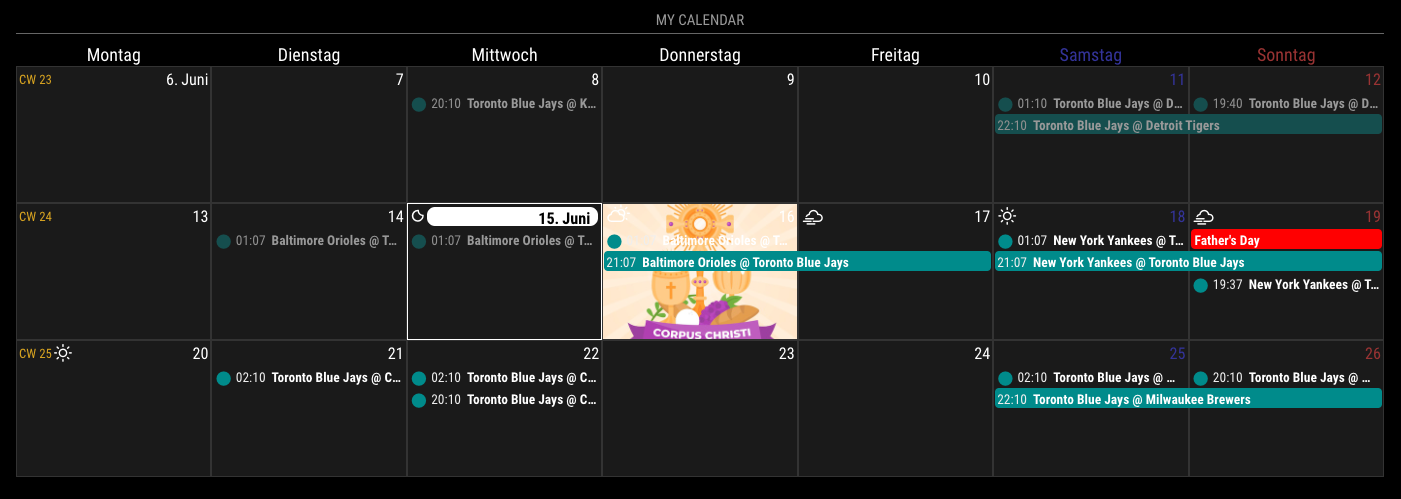
.CX3 .month_6.date_16 {
  background-image: url("https://img.freepik.com/free-vector/flat-corpus-christi-illustration_23-2148934727.jpg?w=400");
  background-position: center center;
  background-size: cover;
  background-repeat: no-repeat;
}
-
You need any “Commandable” module like MMM-Touch for touchscreen or MMM-GroveGestures for gesture sensor or MMM-RemoteControl or MMM-GoogleAssistant or any module which can emit custom notifications by your intentional condition.
-
Show me your config. which symbol were you trying? With default symbol everything was ok?
-
-
-
Thanks! I was so close. I thought I had to specify .cell. Also, I had completely forgotten to make an images folder, but that only took me 10 minutes to remember. :beaming_face_with_smiling_eyes:
-
Thanks. I’ll look at MMM-Touch.
-
Here’s my code. Yes, default works fine. It only messes up when I try to specify an icon.
Default Calendar
{
                        module: "calendar",
                        //position: "bottom_center",
                        config: {
                                colored: true,
                                broadcastPastEvents: true,
                                calendars: [
                                        {
                                        url: ...
                                        name: "CJ",
                                        color: "#3061E3",
                                        auth: {
                                              user: ...,
                                              pass: ...
                                        }
                                        },
                                        {
                                        url: ...
                                        name: "Family",
                                        color: "#DA2528",
                                        auth: {
                                              user: ...,
                                              pass:  ...
                                        }
                                        },
                                        {
                                        url: ...
                                        name: "Fiji",
                                        color: "#d2cf2a",
                                        auth: {
                                              user: ...,
                                              pass: ...
                                        }
                                        },
                                        {
                                        url:
                                        name: "Clararee",
                                        color: "#a716b8",
                                        auth: {
                                              user: ...,
                                              pass: ...
                                        }
                                        },
                                        url: ...
                                        name: "Birthdays",
                                        symbol: "fa-solid fa-cake-candles",
                                        auth: {
                                              user: ...,,
                                              pass: ...
                                        }
                                        },
                                        {
                                        url: ...
                                        name: "Music",
                                        symbol: "fa-solid fa-music",
                                        auth: {
                                              user: ...,
                                              pass: ...
                                        }
                                        },
                                ],
                        }
                },
CalExt3
{ module: "MMM-CalendarExt3", position: "middle_center", config: { mode: "month", instanceID: "currentMonth", firstDayOfWeek: 0, useSymbol: true, calendarSet: [], } }, -
-
your example works as you posted it. but if i want to target a local file as a background image for a specfic day. i cant get it to work. any HTTPS: i use works fine. i feel ive tried every variation i could find online. What’s the proper way to do that in calext3? thank you.
-
I’ll assume your target local file would locate in
~/MagicMirror/modules/MMM-CalendarExt3/resources/target.pngAND you might run your MM on localhost like this;
http://localhost:8080Then, you can access like below;
background-image: url("/modules/MMM-CalendarExt3/resources/target.png");OR
background-image: url("http://localhost:8080/modules/MMM-CalendarExt3/resources/target.png"); -
works! my syntax was correct. i think having the folder of .jpgs outside the MMM-CalendarExt3 folder was why it wasn’t working.
How would I target cells for holidays that don’t fall on the same day every year? Is there a way to target the 328th day of the year?
again thank you very much.
-
@blouzbee
DayOfYear is not supported yet, but I’ll consider it in the future version. -
@MMRIZE said in A few CalExt3 questions: background images, glance, and symbols:
1
.CX3 .month_6.date_16 {
  background-image: url("https://img.freepik.com/free-vector/flat-corpus-christi-illustration_23-2148934727.jpg?w=400");
  background-position: center center;
  background-size: cover;
  background-repeat: no-repeat;
}
Can I use this to add a background image to every date/square with “background-repeat” as a default and override it for specific dates?

-
@greedyvegan
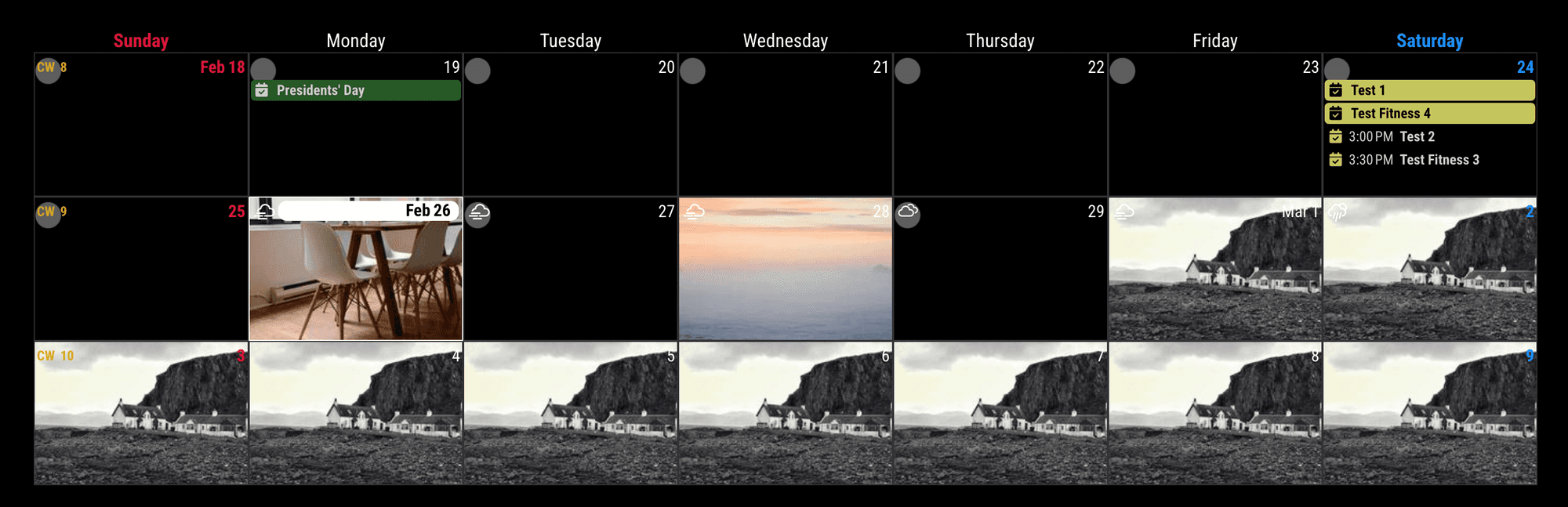
Of course, you may need some adjusting size and position, anyway, its possible./* In your css/custom.css */ .CX3 .cell { background-image: url("https://forum.magicmirror.builders/assets/uploads/files/1708912838487-calendar-background.001.png"); background-position: top left; background-size: cover; background-repeat: no-repeat; } .CX3 .cell.today { background-image: url("https://picsum.photos/200?1"); background-position: center center; } .CX3 .cell.month_2.date_28 { background-image: url("https://picsum.photos/200?2"); background-position: center center; } .CX3 .cell.month_3 { background-image: url("https://picsum.photos/200?3"); background-position: center center; }You can also use other prepred selectors like
thisWeek,thisMonth,thisYear,year_2025,weekday_3, and its combination.
And this method was by the static date.
If you want to change the background of the specific cell dynamically by the event, See the cell manipulation parts in README. -
thank you very much
-
CX3 is definitely one of the most versatile modules, but getting the CSS right for those background images can be a bit of a rabbit hole! I’ve found that if the background image is too ‘busy,’ it completely kills the readability of the event symbols.
I’ve actually been using https://solidbg.com/ to quickly strip the backgrounds off custom icons or logos before I host them for my mirror. It’s way faster than manually editing PNGs when you just want a clean, transparent symbol that doesn’t clash with the CX3 ‘glance’ view.
Are you applying the background image to the .CX3 .event container specifically, or are you trying to do a full module background? Sometimes the z-index acts up depending on the position of other modules.
Hello! It looks like you're interested in this conversation, but you don't have an account yet.
Getting fed up of having to scroll through the same posts each visit? When you register for an account, you'll always come back to exactly where you were before, and choose to be notified of new replies (either via email, or push notification). You'll also be able to save bookmarks and upvote posts to show your appreciation to other community members.
With your input, this post could be even better 💗
Register Login