MagicMirror Forum
    • Recent
    • Tags
    • Unsolved
    • Solved
    • MagicMirror² Repository
    • Documentation
    • 3rd-Party-Modules
    • Donate
    • Discord
    • Register
    • Login
    A New Chapter for MagicMirror: The Community Takes the Lead
    Read the statement by Michael Teeuw here.

    MMM-OpenWeatherForecast formatting problem?

    Scheduled Pinned Locked Moved Unsolved Troubleshooting
    12 Posts 4 Posters 59 Views 4 Watching
    Loading More Posts
    • Oldest to Newest
    • Newest to Oldest
    • Most Votes
    Reply
    • Reply as topic
    Log in to reply
    This topic has been deleted. Only users with topic management privileges can see it.
    • R Offline
      rmonkey
      last edited by

      MMM-OpenWeatherForecast looks like the weather module I want to use.

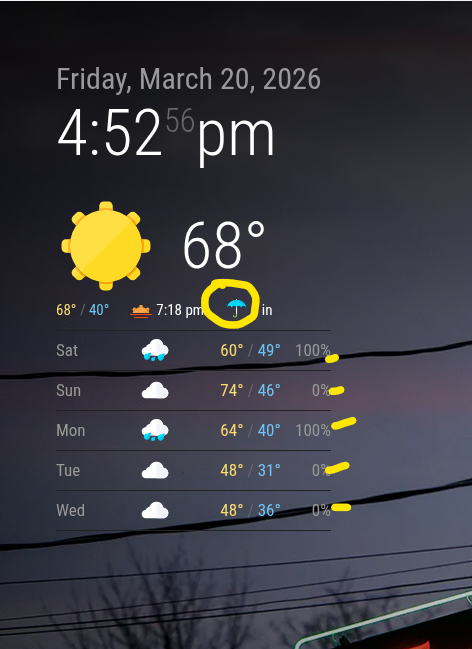
      But I’m getting a strange formatting thing – look at the attached screenshot. The icons are giant and the module runs off the screen.

      Any ideas? It’s installed per the insrtuctions and up-to-date.

      R S 2 Replies Last reply Reply Quote 0
      • R Offline
        rmonkey @rmonkey
        last edited by

        Oops, the screenshot didn’t take, here it is:

        Screenshot 2026-03-16 152343.jpg

        1 Reply Last reply Reply Quote 0
        • S Do not disturb
          sdetweil @rmonkey
          last edited by

          @rmonkey can you show the config for this module. Xxx the apikey

          Use the code block around config

          Sam

          How to add modules

          learning how to use browser developers window for css changes

          R 1 Reply Last reply Reply Quote 0
          • R Offline
            rmonkey @sdetweil
            last edited by rmonkey

            Sure thing, Sam:

            {
                module: "MMM-OpenWeatherForecast",
                disabled: true,
                position: "top_left",
                header: "MMM-OpenWeatherForecast",
                config: {
                  // apiBaseURL: "https://api.openweathermap.org/data/3.0/onecall?",
                  apikey: "XXXX", // only string here
                  latitude: "39.214510",            // number works here
                  longitude: "-76.875990",          // so does a string
                  iconset: "4c",
                  forecastLayout: "table",
                  showSummary: false,
                }
              },
            

            (The disabled: true is temporary for now)

            S 1 Reply Last reply Reply Quote 0
            • S Do not disturb
              sdetweil @rmonkey
              last edited by

              @rmonkey is it this one

              https://github.com/Tom-Hirschberger/MMM-OpenWeatherForecast

              Sam

              How to add modules

              learning how to use browser developers window for css changes

              R 1 Reply Last reply Reply Quote 0
              • R Offline
                rmonkey @sdetweil
                last edited by

                Yes, can confirm, it’s from https://github.com/Tom-Hirschberger/MMM-OpenWeatherForecast

                S 2 Replies Last reply Reply Quote 0
                • S Do not disturb
                  sdetweil @rmonkey
                  last edited by

                  @rmonkey if you comment out forecastLayout what happens
                  Use // at the front of that line

                  Sam

                  How to add modules

                  learning how to use browser developers window for css changes

                  1 Reply Last reply Reply Quote 0
                  • V Offline
                    videogame95
                    last edited by

                    Your need look On MMM- openwesthermapforcast
                    Look for css style sheets you may find a copy and paste into you magic mirror modules css or see if you can change the size in your css that’s custom style sheet,
                    Just an idea haven’t look at it my self. But give it a try.

                    S 1 Reply Last reply Reply Quote 0
                    • S Do not disturb
                      sdetweil @videogame95
                      last edited by

                      @videogame95 one shouldn’t have to load more css for out of the box setup.

                      Sam

                      How to add modules

                      learning how to use browser developers window for css changes

                      1 Reply Last reply Reply Quote 0
                      • S Do not disturb
                        sdetweil @rmonkey
                        last edited by

                        @rmonkey I’d also post an issue in the repo GitHub, for the author. Tom is usually very responsive.

                        Sam

                        How to add modules

                        learning how to use browser developers window for css changes

                        wishmaster270W 1 Reply Last reply Reply Quote 0
                        • wishmaster270W Offline
                          wishmaster270 Module Developer @sdetweil
                          last edited by

                          @sdetweil Hi Sam.
                          I am here 😂

                          @rmonkey
                          At the moment I do not have a clue how this can happen in the default setup.
                          The only thing I can imagine is that you change some other CSS which interfences with the CSS of this module.
                          Maybe a change to the basic font sizes ore stuff like this.

                          Can you post your custom css config if you have one?

                          S 1 Reply Last reply Reply Quote 0
                          • S Do not disturb
                            sdetweil @wishmaster270
                            last edited by

                            @wishmaster270 thx… I know you get busy sometimes…

                            Sam

                            How to add modules

                            learning how to use browser developers window for css changes

                            1 Reply Last reply Reply Quote 0

                            Hello! It looks like you're interested in this conversation, but you don't have an account yet.

                            Getting fed up of having to scroll through the same posts each visit? When you register for an account, you'll always come back to exactly where you were before, and choose to be notified of new replies (either via email, or push notification). You'll also be able to save bookmarks and upvote posts to show your appreciation to other community members.

                            With your input, this post could be even better 💗

                            Register Login

                            • 1 / 1
                            • First post
                              Last post
                            Enjoying MagicMirror? Please consider a donation!
                            MagicMirror created by Michael Teeuw.
                            Forum managed by Sam, technical setup by Karsten.
                            This forum is using NodeBB as its core | Contributors
                            Contact | Privacy Policy