Read the statement by Michael Teeuw here.
MMM-DBF does not work, no error messages
-
Hi!
@sdetweil - I referred to that topic, I only opened a new one because the forum recommended me to do so and include the reference…
@KristjanESPERANTO - Thanks for the effort to remind Helpi90 :)
The software actually also notified me about the updates. I pulled the updates and ran npm install afterwards. The update message is gone so I think it has worked.
Now I’m… still not getting any timetable entries when using the table mode. I now also tried to use the app mode instead. That works fine (just doesn’t look as good).
My entry in the config.js is as follows:
{
    module: 'MMM-DBF',
    position: 'bottom_bar',
    config: {
        showApp: false,
        station: "Dresden Mitte",
        updateInterval: 60000, // 60 s
        // App configuration
        height:"600px",
        width:"960px",
        // Table configuration
        timeOption: "time",
        showDelayMsg: true,
        setTableWidth: "960px",
        numberOfResults: 10,
    }
},
I’m using also MMM-BackgroundSlideShow. On its installation page it is recommended to add the following to the custom.css “to make the text a little brighter” (and I did that). Maybe it has such consequences? (As I mentioned I’m quite the noob regarding MagicMirror and node.js…)
.normal,
.dimmed,
header,
body {
  color: #fff;
}
Also, maybe it is important - when I start up MagicMirror, it gives the following error messages:
[4016:0517/200920.270717:ERROR:gbm_wrapper.cc(79)] Failed to get fd for plane.: Datei oder Verzeichnis nicht gefunden (2)
[4016:0517/200920.274895:ERROR:gbm_wrapper.cc(261)] Failed to export buffer to dma_buf: Datei oder Verzeichnis nicht gefunden (2)

Datei oder Verzeichnis nicht gefunden --> file or folder not found
Thanks in advance for your help!
Best regards,
sletrabf -
@sletrabf With your config and the changes to the custom.css file, the module works on my system.
Please show us the system information provided in the terminal when you start MM. It looks like this:
[2025-05-18 11:54:32.378] [INFO] System information: ### SYSTEM: manufacturer: Notebook; model: N650DU; virtual: false ### OS: platform: linux; distro: Debian GNU/Linux; release: 12; arch: x64; kernel: 5.10.0-20-amd64 ### VERSIONS: electron: 35.1.2; used node: 24.0.1; installed node: 24.0.1; npm: 10.9.0; pm2: 5.4.3 ### OTHER: timeZone: Europe/Berlin; ELECTRON_ENABLE_GPU: undefined -
The same appears with app mode and table mode:
[2025-05-18 15:53:57.429] [INFO]  System information:
### SYSTEM:   manufacturer: Raspberry Pi Foundation; model: Raspberry Pi 4 Model B Rev 1.1; virtual: false
### OS:       platform: linux; distro: Debian GNU/Linux; release: 12; arch: arm64; kernel: 6.12.25+rpt-rpi-v8
### VERSIONS: electron: 35.1.2; used node: 22.15.1; installed node: 22.15.1; npm: 10.9.2; pm2: 5.4.3
### OTHER:    timeZone: Europe/Berlin; ELECTRON_ENABLE_GPU: undefined
[2025-05-18 15:53:59.735] [INFO]  updatenotification: Updater Class Loaded!
[2025-05-18 15:53:59.737] [INFO]  updatenotification: Checking PM2 using...
[2025-05-18 15:53:59.743] [INFO]  updatenotification: [PM2] You are not using pm2
I could try more different things, also reinstall the whole MM if needed :)
best regards,
Felix -
@sletrabf Have you tried deactivating all modules except for MMM-DBF to see if the problem disappears?
-
OK, I temporarily disabled all other modules following this advice here except for MMM-DBF.
With
showApp: false,I now get a black (blank) screen; with “true” it is showing the timetable app but nothing else (as expected).
Is there any way to enable a (verbose) logging output to show what this module does?
-
showApp: false,
disabled: true,is the option setting to disable modules. Where did you findshowApp?it is showing the timetable app
So it works without the other modules and doesn’t work when you activate the other modules? Can you figure out with which module it stops working?
Is there any way to enable a (verbose) logging output to show what this module does?
Seem that this module doesn’t have debug outputs. Only errors you could see in the browser console.
Also, maybe it is important - when I start up MagicMirror, it gives the following error messages:
I’m quit sure this is unrelated to this issue. You can try using the Wayland start option (
npm run start:wayland) instead of the default start option (npm run start). -
@KristjanESPERANTO said in MMM-DBF does not work, no error messages:
showApp: false,
disabled: true,is the option setting to disable modules. Where did you findshowApp?I did use the setting
disabled: true,to disable the other modules (as explained here). The settingshowApp: false,tells MMM-DBF to not load the table in the iFrame but generate a HTML table from the loaded information.showApp: true,works whereasshowApp: false,does not.So it works without the other modules and doesn’t work when you activate the other modules? Can you figure out with which module it stops working?
No, disabling the other modules doesn’t change anything.
Is there any way to enable a (verbose) logging output to show what this module does?
Seem that this module doesn’t have debug outputs. Only errors you could see in the browser console.
OK, I’ll try to see something there!
-
I installed the module MMM-ViewNotifications and then I added several notifications to the file MMM-DBF.js, see: https://pastebin.com/YZEYgPpA
Now the outcome is as follows:
showApp: true,- The message “MMM_DBF_LOADED” is not shown. From my understanding this means that start() is not being (fully) executed?
- The following messages are shown (in this order): MMM_DBF_GENERATING_URL, MMM_DBF_IFRAME_URL_GENERATED, MMM_DBF_ERROR_PROCESSING_DATA.
showApp: false,- The message “MMM_DBF_LOADED” is not shown. From my understanding this means that start() is not being (fully) executed?
- Only the following message is shown: MMM_DBF_ERROR_PROCESSING_DATA
So, from my understanding, the error occurs here, possibly in the line
await fetch (urlApi):async getData() { const self = this; const urlApi = `${this.generateUrl()}&mode=json&version=3`; const dataRequest = await fetch(urlApi); if (!dataRequest.ok) { // Show that the data request is being processed this.sendNotification("MMM_DBF_ERROR_PROCESSING_DATA", { message: '[MMM-DBF] Data processing returned an error.'}); let message = `An error has occurred: ${dataRequest.status}`; if (dataRequest.status === 300) { message += " - Ambiguous station name."; } throw new Error(message); } else { const data = await dataRequest.json(); // Show that the data request is being processed this.sendNotification("MMM_DBF_START_PROCESSING_DATA", { message: '[MMM-DBF] Data processing started.'}); self.processData(data); } self.scheduleUpdate(self.config.retryDelay); },I’m somehow not able to see the actual error that happened. Could you maybe please point out where I have to look for the value of
dataRequest.status?Thanks in advance!
Best regards,
sletrabf -
@sletrabf open the developers window
ctrl-shift-i
select the console tab
enter a unique part of the module name in the filter field, dbfand see what you see
-
Hello,
It took me some time to answer//retry that because life was happening.
I have reinstalled the system and the Magic Mirror application:
- I have upgraded the system with an SSD and reinstalled the Raspberry OS based on Debian Trixie
- My version of Magic Mirror is now 2.37.0.
- Installed modules: MMM-DBF, MMM-DVB, MMM-ViewNotifications, MMM-BackgroundSlideShow
- The module MMM-DBF was modified by me. Most importantly, log messages were added, but I also fixed a small error regarding departure/arrival times --> https://pastebin.com/x7EJVzKg
Additionally, I’ve set up some things to make the configuration and the debugging easier:
- A service file to be able to start, stop, and restart Magic Mirror as a systemd service
- A graphical remote connection (VNC) to be able to access the Magic Mirror screen from my laptop
It didn’t take long until I have gotten the same error - at some point, the table doesn’t get reloaded. I logged in remotely and pressed CTRL + SHIFT + I. Apparently, the server could not be reached and the script cannot handle that.
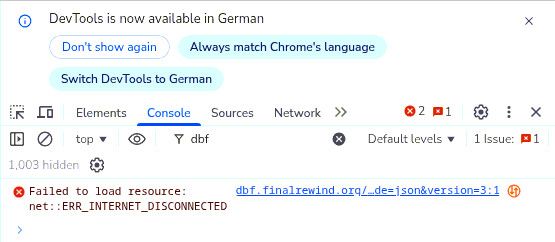
Unfortunately, I was not able to see any other of the debug messages that were issued before (maybe they were deleted because a long time has elapsed). I’ll try to read the error closer after it occurs.
Best regards,
sletrabf -
@sletrabf error recovery is always a challenge.
You could access the MagicMirror server from another browser anywhere , just change the address and IpWhitelist config options. Interesting in the module fails there too
And the pm2 app makes setup of ‘service’ like apps a lot easier
-
“the pm2 app makes setup of ‘service’ like apps a lot easier”
I haven’t seen that Magic Mirror actually has a help page for that. --> https://docs.magicmirror.builders/configuration/autostart.html
I’ll be looking into that when I need to change the config again, at the moment my service file looks very similar to the one proposed in that link.
BTW, I looked past that autostart link that exists on the left side when opening the installation guide --> https://docs.magicmirror.builders/getting-started/installation.html
Maybe it would be good to add the reference to the autostart also to the bottom of the installation guide page?“You could access the MagicMirror server from another browser anywhere , just change the address and IpWhitelist config options. Interesting in the module fails there too”
I could do that, probably by opening my MagicMirror to my whole home network (https://forum.magicmirror.builders/topic/9513/how-to-display-the-mirror-remotely/13?page=2). But I don’t understand what different information I can get from accessing the page from another client? The module still runs on the pi, doesn’t it? Thus, if the information cannot be retrieved somehow, I should also not see it with an external client?best regards,
sletrabf -
@sletrabf this module runs completely in browser
So two clients will operate independently wherever they are.I provide the scripted install and upgrade scripts mentioned in the alternative install section of the doc
And use pm2 to setup auto start, and commanded restartI also provide other scripts to add pm2 , etc if you change your mind after install
I also provide scripts for backup/restore

Hello! It looks like you're interested in this conversation, but you don't have an account yet.
Getting fed up of having to scroll through the same posts each visit? When you register for an account, you'll always come back to exactly where you were before, and choose to be notified of new replies (either via email, or push notification). You'll also be able to save bookmarks and upvote posts to show your appreciation to other community members.
With your input, this post could be even better 💗
Register Login