Read the statement by Michael Teeuw here.
Blank Black Screen - noob
-
I am running MagicMirror but all I get is a black blank screen. All I have is the default script. I am running on a Pi Zero with WiFi an have used instructions that I found here. When I run node serveronly it runs without any errors. I can connect to it but it is just a blank screen.
Config.js file is:
* Magic Mirror Config Sample
 * By Michael Teeuw http://michaelteeuw.nl
 * MIT Licensed.
 */

var config = {
    port: 8080,
    ipWhitelist: ["127.0.0.1", "::ffff:127.0.0.1", "::1", "::ffff:192.168.1.1/120" , "192.168.1.6"],
    language: 'en',
    timeFormat: 24,
    units: 'metric',

    modules: [
        {
            module: 'alert',
        },
        {
            module: 'clock',
            position: 'top_left',
            config: {
                displayType: 'analog',
                analogFace: 'face-001',
            }
        },
        {
            module: 'calendar',
            header: 'UK Holidays',
            position: 'top_right',
            config: {
                calendars: [
                    {
                        symbol: 'calendar-check-o ',
                        url: 'webcal://www.calendarlabs.com/templates/ical/UK-Holidays.ics'
                    }
                ]
            }
        },
        {
            module: 'newsfeed',
            position: 'bottom_bar',
            config: {
                feeds: [
                    {
                        title: "BBC UK News",
                        url: "http://feeds.bbci.co.uk/news/uk/rss.xml"
                    }
                ],
                showSourceTitle: true,
                showPublishDate: true,
                showDescription: true,
            }
        },
    ]
};

/*************** DO NOT EDIT THE LINE BELOW ***************/
if (typeof module !== 'undefined') {module.exports = config;}
Any help is appreciated.
-
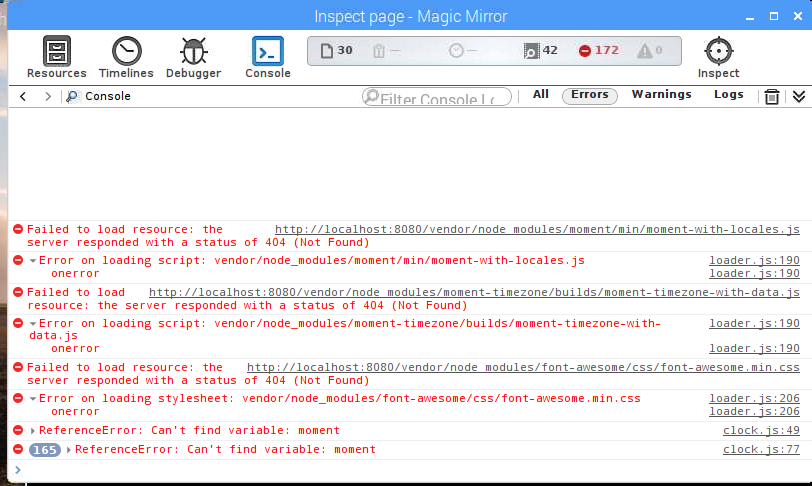
@dslucki your config looks good, I guess one of these functions uses es6 features which the midori browser doesnt support. You can open the developer console on your browser and see the errors
-
@strawberry-3.141 OK, that was a good tip. So here is a screen shot of the inspect in Midori. It is all Greek to me. Anyone have any ideas?
-
@dslucki you forgot to do npm install in MagicMirror directory
-
@strawberry-3.141 I thought I did that. I ran it again and here is the output
pi@raspberrypi:~/MagicMirror $ npm install
npm ERR! Linux 4.4.50+
npm ERR! argv "/usr/local/bin/node" "/usr/local/bin/npm" "install"
npm ERR! node v4.2.1
npm ERR! npm  v2.14.7
npm ERR! path /home/pi/MagicMirror/node_modules/.bin/stylelint
npm ERR! code EACCES
npm ERR! errno -13
npm ERR! syscall unlink

npm ERR! Error: EACCES: permission denied, unlink '/home/pi/MagicMirror/node_modules/.bin/stylelint'
npm ERR!     at Error (native)
npm ERR!  { [Error: EACCES: permission denied, unlink '/home/pi/MagicMirror/node_modules/.bin/stylelint']
npm ERR!   errno: -13,
npm ERR!   code: 'EACCES',
npm ERR!   syscall: 'unlink',
npm ERR!   path: '/home/pi/MagicMirror/node_modules/.bin/stylelint' }
npm ERR!
npm ERR! Please try running this command again as root/Administrator.

npm ERR! Please include the following file with any support request:
npm ERR!     /home/pi/MagicMirror/npm-debug.log
Then I ran it as: sudo npm install
pi@raspberrypi:~/MagicMirror $ sudo npm install npm WARN cannot run in wd magicmirror@2.1.1 cd vendor && npm install (wd=/home/pi/MagicMirror) npm WARN cannot run in wd magicmirror@2.1.1 sh installers/postinstall/postinstall.sh (wd=/home/pi/MagicMirror) -
@dslucki you dont have the permission to access, you probably did sudo npm install before and so your normal pi user has restricted access to it.
try
npm install --unsafe-perm -
@strawberry-3.141 SUCCESS! Thanks.
pi@raspberrypi:~/MagicMirror $ sudo npm install --unsafe-perm
-
> magicmirror@2.1.1 install /home/pi/MagicMirror
> cd vendor && npm install

npm WARN package.json magicmirror-vendors@ No README data
font-awesome@4.7.0 node_modules/font-awesome

moment-timezone@0.5.13 node_modules/moment-timezone

weathericons@2.1.0 node_modules/weathericons

moment@2.18.1 node_modules/moment

> magicmirror@2.1.1 postinstall /home/pi/MagicMirror
> sh installers/postinstall/postinstall.sh

MagicMirror installation successful!
pi@raspberrypi:~/MagicMirror $

Hello! It looks like you're interested in this conversation, but you don't have an account yet.
Getting fed up of having to scroll through the same posts each visit? When you register for an account, you'll always come back to exactly where you were before, and choose to be notified of new replies (either via email, or push notification). You'll also be able to save bookmarks and upvote posts to show your appreciation to other community members.
With your input, this post could be even better 💗
Register Login