Read the statement by Michael Teeuw here.
Office 365 calendar issues
-
Hi all,
I’m trying to add my private calendar feed from the office 365 calendar of my job. I successfully added my google calendar but with the office 365 from work I ran in to some issues.If I try to load in my main calendar named “agenda” the MagicMirror is constantly displaying loading. Then I added a new agenda and put in one appointment to test if this will work. The answers is not quite: It displayed the appointment but it says its ending within an Invalid date (see attached picture)
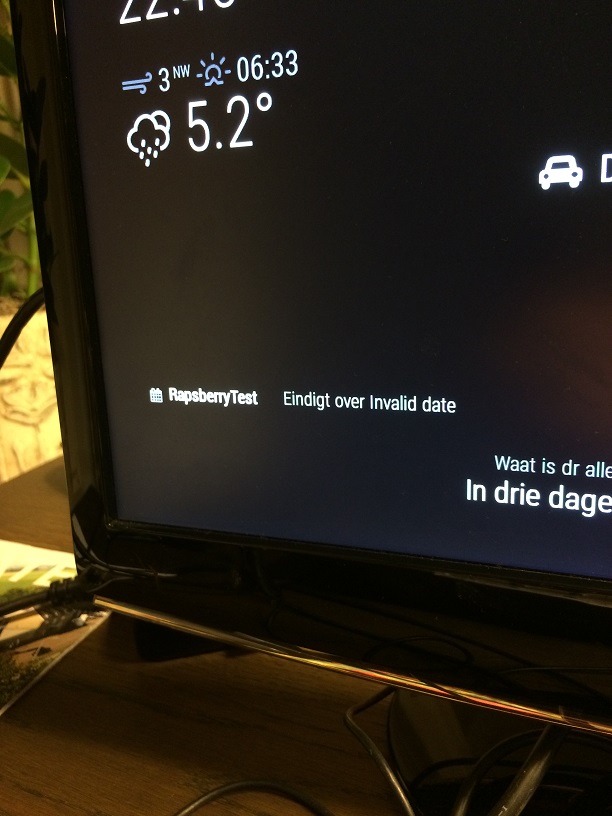
The question is if there is something wrong with the ics generated by Office 365 for business? Does anyone managed to get his work-agenda up and running? Here is he code from my config file:
{ module: "calendar", position: "bottom_left", config: { calendars: [ //{ // url: 'https://calendar.google.com/calendar/ical/mailadres@gmail.com/private-string/basic.ics' //}, { symbol: 'calendar', url: 'https://outlook.office365.com/owa/calendar/string@work.com/private-string/calendar.ics' }, { symbol: 'calendar', url: 'https://outlook.office365.com/owa/calendar/string@work.com/private-string/calendar.ics' }, ], } }, -
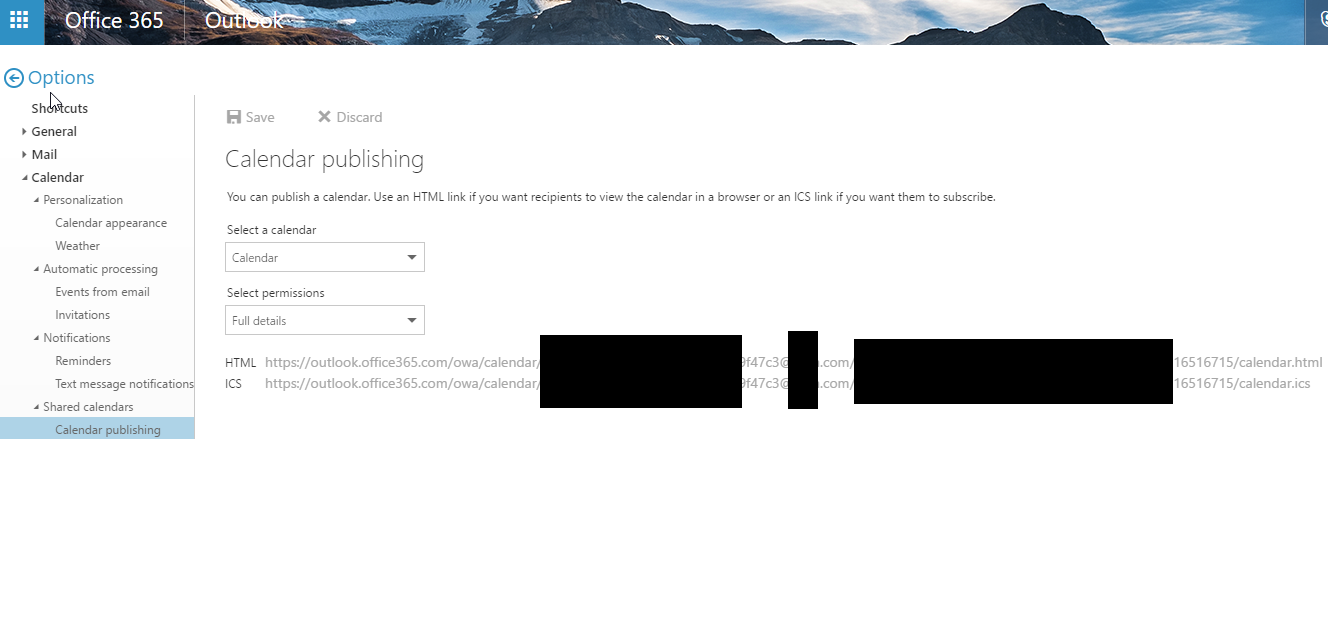
I have my work calendar functioning properly. I believe this is where I got my link from. also make sure permissions are good.
-
@cohron Yeah that’s exactly the page were i generated my ICS with Full details in the permissions ;) Maybe it has something to do with the tasks in my agenda that returns weekly and are scheduled till infinity in the calendar.? This weekend I will troubleshoot the problem again and maybe i come to a answer why my calendar won’t load…
-
@hermpi I have a few weekly and monthly and annual re-occurring meetings with no end date, they show up fine, I wouldnt think that is the issue. I notice your config is not populated, probably not neccessary but different than mine. Here is mine:
config: {
colored: true,
maxTitleLength: 25,
warpEvents: true,
maximumEntries: 30,
getRelative: 0,
dateFormat: “ddd, MMM Do h:mm A”,
timeFormat: “absolute”,
urgency: 0,
calendars: [
{
symbol: “bank”,
color: “#00e5ee”, //work ical
url: "https://outlook.office365.com/owa/…
},
{
symbol: “heartbeat”,
color: “#fa4616”, //Shelby UF ical
url: "http://p07-calendarws.icloud.com/ca/… -
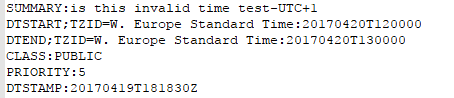
@cohron I just start up my PI and yes the calendar works partially… I don’t know if the reason is the deleting of the re-announcing tasks or there was something wrong with the server Sunday night. De strange thing is that most of my tasks show a invalid date error. Only the tasks that have the “whole day” option checked are displaying correctly. I don’t know if you familiar with ICS files but I think it has to do with these line of codes:
// This works (Whole day checked)
DTSTART;VALUE=DATE:20170421
DTEND;VALUE=DATE:20170423

// This gives invalid date error
DTSTART;TZID="(UTC+01:00) Amsterdam, Berlijn, Bern, Rome, Stockholm, Wenen":2
 0170412T080000
DTEND;TZID="(UTC+01:00) Amsterdam, Berlijn, Bern, Rome, Stockholm, Wenen":201
 70412T090000
Could you check what is set for DTSTART and DTEND in your ICS file?
-
Oh, yes some of my tasks had the invalid date error, only 4 or 5 tasks though. It was only occurring on appointments that had the timezone showing. Unfortunately I already fixed it by removing the (show) timezones and resaving the appointment. Sorry didnt catch that earlier. I set up a test appointment and will look at the MM when I get home. I havent picked apart the Calendar MMM but im guessing you found the same bug i had. Wont know if i recreated the error until i get him and look at MM.
Keep your “bad” ICS file for the programmers (or you) to test, recreate, and fix if you submit a bug report.


-
@hermpi
Well i checked my calendar and everything looked fine. I havent been able to get the invalid date to show up again (even with timezones enabled/showing). I’d say open a bug report and send them your ICS file.should be fine really.
-
@cohron Oke, I will do that. I just checked my own calendar again and only if I save the appointment in timezone “Coordinated Universal Time” it works. Or if I set my overall timezone to UTC… But that’s not a solution because then everything is set to that time and I’m living in the UTC+1 zone.
-
@cohron (#*$&,. I just figured out that this only happens when you set to a time zone with multiple cities… So i can set the timezone to a same one as I live in with only one name like: “UTC+01:00 Windhoek”. I ask if this is a problem we/they need to fix in MM or that our big friend from Microsoft had to set up there ical files right. I keep you updated ;)
-
@hermpi said in Office 365 calendar issues:
is a problem we/they need to fix in MM
I’m going to guess MM is going to have to fix their parsing, it appears to be a well formed ics file (or at least the portion you and i looked at), I doubt we are going to get Microsoft to change.
-
@cohron Everything works fine now thanks to: https://github.com/MichMich/MagicMirror/pull/875
cheers!
-
@hermpi Curious. I dropped those changes into my mirror and it didn’t resolve the problem at all. Hrm.
-
@bhepler Oke first off all, sorry for my late reaction I was luckily enough to have a long vacation… :) I finally finished the housing of the mirror and planning to fasten it in my bedroom today. The last time I checked (3 days ago) my office 365 calendar runs just fine. Maybe you cant make an test appointment in your agenda and DM me the Ical file so I can check how my MM response to your generated Ical file.
-
@hermpi Will do. I’ll try to get that file to you this evening. Thanks.
-
Same problem here with the ordinary Outlook calendar.
[Edit] Got it working, I already updated the scripts but after deleting 2 appointments from history and rebooting it worked!!! -
Hi all, I had the same problems with my calendar and Timezone (Amsterdam, Berlin…)
The fix resoled my problems with outlook365 calendar
https://github.com/MichMich/MagicMirror/pull/875/commits/4c702eaaad525c0b549ba02cf3ceb1a2f79b5ebc… after installing the fix I had to delete 2 old calendar entries and reboot my mirror


Hello! It looks like you're interested in this conversation, but you don't have an account yet.
Getting fed up of having to scroll through the same posts each visit? When you register for an account, you'll always come back to exactly where you were before, and choose to be notified of new replies (either via email, or push notification). You'll also be able to save bookmarks and upvote posts to show your appreciation to other community members.
With your input, this post could be even better 💗
Register Login