Read the statement by Michael Teeuw here.
MM & Google Maps Traffic
-
Hi all,
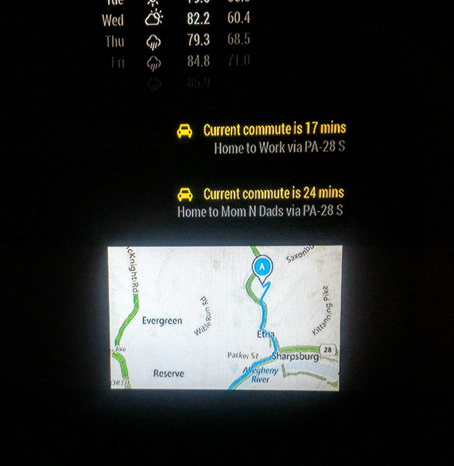
I was looking in the forum and internet, but couldn’t find a solution. Did anyone on you managed to show the google maps route (from A to B) and trafic?
Like this (example from this forum):
 .
.I (hope i did) intalled the module MMM-googlemaps. Sometimes I read I need an iFrame, sometimes: it won’t work with an iFrame.
My code:// { module: "MMM-googlemaps", position: 'bottom_right', config: { apikey: '*my API*', origin: 'Köln,+Deutschland', destination: 'Essen,+Deutschland', mode: driving, } },Thx for your support!
Birdy -
Yes! I did it with the MMM-Traffic module. A bit of hacks and unclean code 😑 but yeah was able to get it working. Will try to share the same
-
/* global Module */
/* Magic Mirror
- Module: MMM-Traffic
- By Sam Lewis https://github.com/SamLewis0602
- MIT Licensed.
*/
Module.register(‘MMM-Traffic’, {
defaults: {
    api_key: '',
    mode: 'driving',
    interval: 300000, //all modules use milliseconds
    origin: '',
    destination: '',
    mon_destination: '',
    tues_destination: '',
    wed_destination: '',
    thurs_destination: '',
    fri_destination: '',
    traffic_model: 'best_guess',
    departure_time: 'now',
    arrival_time: '',
    loadingText: 'Loading commute...',
    prependText: 'Current commute is',
    changeColor: false,
    limitYellow: 10,
    limitRed: 30,
    showGreen: true,
    language: config.language,
    show_summary: true,
    showWeekend: true,
    allTime: true,
    startHr: 7,
    endHr: 22,
    avoid:'',
      summaryText:'via',
      leaveByText:'Leave by',
      arriveByText:'to arrive by',
    hideOffHours: false,
},
setLocalParams: function(){
	// These parameters are populated mostly
	// by node_helper
    this.loaded = false;
    this.mapLoaded= false;
    this.leaveBy = '';
    this.symbols = {
        'driving': 'fa fa-car',
        'walking': 'fa fa-odnoklassniki',
        'bicycling': 'fa fa-bicycle',
        'transit': 'fa fa-train'
    };
    this.commute = '';
    this.summary = '';
},
start: function() {
    Log.info('Starting module: ' + this.name);
    if (this.data.classes === 'MMM-Traffic') {
      this.data.classes = 'bright medium';
    }
    this.loaded = false;
    this.mapLoaded= false;
    this.leaveBy = '';
    var myURL = 'https://maps.googleapis.com/maps/api/directions/json' + this.getParams();
    console.log("Querying with loc = " + myURL);
    this.url = encodeURI('https://maps.googleapis.com/maps/api/directions/json' + this.getParams());
    this.symbols = {
        'driving': 'fa fa-car',
        'walking': 'fa fa-odnoklassniki',
        'bicycling': 'fa fa-bicycle',
        'transit': 'fa fa-train'
    };
    this.commute = '';
    this.summary = '';
    this.updateCommute(this);
},
// Handler for notifications from any other module asking for
// TRAFFFIC update.
// This will invoke updateCommute with new source and destination
// TODO: The new source and destination will continue to get displayed untill
// it is reset. Will try to revert that
notificationReceived: function(notification, payload, sender){
	Log.log(notification+" received from "+sender);
	var myURL = "";
	if(notification === "TRAFFIC_ACTION_NEEDED"){
		console.log("Received new traffic update request for start: "+payload.start_location+" end:"+payload.end_location);
		myURL = 'https://maps.googleapis.com/maps/api/directions/json' +
			    this.getParam_specific(payload.start_location, payload.end_location);
		console.log("Querying with "+myURL);
	    this.url = encodeURI(myURL);
		this.updateCommute(this);
	}
},

updateCommute: function(self) {
	console.log("updateCommute called");
    timeConfig = {
      showWeekend:    self.config.showWeekend,
      allTime:        self.config.allTime,
      startHr:        self.config.startHr,
      endHr:          self.config.endHr
    };

    if (self.config.arrival_time.length == 4) {
      self.sendSocketNotification('LEAVE_BY', {'url':self.url, 'arrival':self.config.arrival_time, 'timeConfig':timeConfig});
    } else {
      self.sendSocketNotification('TRAFFIC_URL', {'url':self.url, 'timeConfig':timeConfig});
    }
    setTimeout(self.updateCommute, self.config.interval, self);
},
getStyles: function() {
    return ['traffic.css', 'font-awesome.css'];
},
createMap_area: function(start_location, end_location){
	console.log("createMap_area invoked");
	if(document.getElementById('map'))
	{
		console.log("Map Div available "+start_location.lat);
		var map_options = {
			center: new google.maps.LatLng(start_location.lat, start_location.lng),
			zoom: 20,
            size: '300x300',
			panControl: true,
			mapTypeControl: false,
			panControlOptions: {
				position: google.maps.ControlPosition.RIGHT_CENTER
			},
			zoomControl: true,
			zoomControlOptions: {
				style: google.maps.ZoomControlStyle.LARGE,
				position: google.maps.ControlPosition.RIGHT_CENTER
			},
			scaleControl: false,
			streetViewControl: false,
			streetViewControlOptions: {
				position: google.maps.ControlPosition.RIGHT_CENTER
			}
		};
	    // map div is added to document.body
    	var map = new google.maps.Map(document.getElementById("map"), map_options);

		var start_bound = new google.maps.LatLng(start_location.lat, start_location.lng);

		var end_bound = new google.maps.LatLng(end_location.lat, end_location.lng);
		var marker = new google.maps.Marker({
			position: start_bound,
			map: map
		});

		var marker = new google.maps.Marker({
			position: end_bound,
			map: map
		})

		var bounds = new google.maps.LatLngBounds();
		bounds.extend(start_bound);
		bounds.extend(end_bound);
		map.fitBounds(bounds);
		// the preserveViewport is almost mandatory to prevent zoom/pan out of the screen
       var directionsDisplay = new google.maps.DirectionsRenderer({
           map: map,
		   zoom: 20,
		   preserveViewport: true
       });
	   directionsDisplay.setMap(map);

       // Set destination, origin and travel mode.
       var request = {
         destination: end_location,
         origin: start_location,
         travelMode: 'DRIVING'
       };
       // Pass the directions request to the directions service.
       var directionsService = new google.maps.DirectionsService();
       directionsService.route(request, function(response, status) {
           if (status == 'OK') {
               // Display the route on the map.
               directionsDisplay.setDirections(response);
           }
       });
       // Pass the directions request to the directions service.
	   this.mapLoaded = true;
	}
	return document.getElementById('map');
},
createMap: function(){
    var wrapper = document.createElement('div');
    wrapper.style.height = this.config.height;
    wrapper.style.width = this.config.width;
	wrapper.setAttribute("id", "map");

    // This script is appended to the main body
    var outer_script = document.createElement("script");
    outer_script.type = "text/javascript";
    outer_script.src = "https://maps.googleapis.com/maps/api/js?key=" + this.config.api_key;
	outer_script.setAttribute("async","");
	outer_script.setAttribute("defer","");
    document.body.appendChild(outer_script);
    outer_script.onload = function(){
		console.log("Added the map script to document body");
    }
    return wrapper;
},


getDom: function() {
    var wrapper = document.createElement("div");
    var commuteInfo = document.createElement('div');
    var routeName = document.createElement('div');
    // Map display

    if (!this.loaded) {
        console.log("[MMM-Traffic]Pre-loading invoked");
        //wrapper.innerHTML = this.config.loadingText;
		// Invoke adding the Google Maps base script to the dcoument.body
		// It needs to be invoked only once.
        wrapper.appendChild(this.createMap());

        return wrapper;
    }

    if ((this.commute == '' || this.commute == '--') && this.config.hideOffHours && !this.config.allTime) {
        wrapper.innerHTML = '';
        return wrapper;
    }
    // Obtain start/end co-ordinates
    var start_loc = this.start_location;
    var end_loc = this.end_location;
    console.log("Start lat "+start_loc.lat+" long "+start_loc.lng);
    wrapper.appendChild(this.createMap_area(this.start_location, this.end_location));


    //symbol
    var symbol = document.createElement('span');
    symbol.className = this.symbols[this.config.mode] + ' symbol';
    commuteInfo.appendChild(symbol);


    if (this.config.arrival_time == '') {
      //commute time
      var trafficInfo = document.createElement('span');
      trafficInfo.innerHTML = this.config.prependText + ' ' + this.commute;
      commuteInfo.appendChild(trafficInfo);

      //routeName
      if (this.config.route_name) {
        routeName.className = 'dimmed small';
        if (this.summary.length > 0 && this.config.show_summary){
          routeName.innerHTML = this.config.route_name + ' ' + this.config.summaryText + ' ' + this.summary;
        } else {
          routeName.innerHTML = this.config.route_name;
        }
      }
    } else {
      //leave-by time
      var trafficInfo = document.createElement('span');
      trafficInfo.innerHTML = this.config.leaveByText + ' ' + this.leaveBy;
      commuteInfo.appendChild(trafficInfo);

      //routeName
      if (this.config.route_name) {
        routeName.className = 'dimmed small';
        if (this.summary.length > 0 && this.config.show_summary){
          routeName.innerHTML = this.config.route_name + ' ' + this.config.summaryText + ' ' + this.summary + ' ' + this.config.arriveByText + ' ' + this.config.arrival_time.substring(0,2) + ":" + this.config.arrival_time.substring(2,4);
        } else {
      console.log(typeof this.config.arrival_time );
          routeName.innerHTML = this.config.route_name + ' ' + this.config.arriveByText + ' ' + this.config.arrival_time.substring(0,2) + ":" + this.config.arrival_time.substring(2,4);
        }
      }
    }

    //change color if desired
    if (this.config.changeColor) {
      if (this.trafficComparison >= 1 + (this.config.limitRed / 100)) {
        commuteInfo.className += ' red';
      } else if (this.trafficComparison >= 1 + (this.config.limitYellow / 100)) {
        commuteInfo.className += ' yellow';
      } else if (this.config.showGreen) {
        commuteInfo.className += ' green';
      }
    }

    wrapper.appendChild(commuteInfo);
    wrapper.appendChild(routeName);
    return wrapper;
},
getParam_specific: function(origin, destination){
    var params = '?';
    params += 'mode=' + this.config.mode;
    params += '&origin=' + origin;
    params += '&destination=' + destination;
    params += '&key=' + this.config.api_key;
    params += '&traffic_model=' + this.config.traffic_model;
    params += '&language=' + this.config.language;
    if (this.config.avoid.length > 0) {
      params += '&avoid=' + this.config.avoid;
    }
    return params;
},

getParams: function() {
    var params = '?';
    params += 'mode=' + this.config.mode;
    params += '&origin=' + this.config.origin;
    params += '&destination=' + this.getTodaysDestination();
    params += '&key=' + this.config.api_key;
    params += '&traffic_model=' + this.config.traffic_model;
    params += '&language=' + this.config.language;
    if (this.config.avoid.length > 0) {
      params += '&avoid=' + this.config.avoid;
    }
    return params;
},

getTodaysDestination: function() {
    var todays_destination = "";
    switch (new Date().getDay()) {
      case 1:
        todays_destination = this.config.mon_destination;
        break;
      case 2:
        todays_destination = this.config.tues_destination;
        break;
      case 3:
        todays_destination = this.config.wed_destination;
        break;
      case 4:
        todays_destination = this.config.thurs_destination;
        break;
      case 5:
        todays_destination = this.config.fri_destination;
        break;
      default:
        //to handle Sat and Sun (GoogleAPI may raise error if no destination set)
        todays_destination = this.config.destination;
    }

    if(todays_destination === ""){ //if no weekday destinations defined in config.js, set to default
        todays_destination = this.config.destination;
    }

    return todays_destination;
},

socketNotificationReceived: function(notification, payload) {
    this.leaveBy = '';
    this.start_location = payload.start_location;
    this.end_location = payload.end_location;
    if (notification === 'TRAFFIC_COMMUTE' && payload.url === this.url) {
        Log.info('received TRAFFIC_COMMUTE');
        this.commute = payload.commute;
        this.summary = payload.summary;
        this.trafficComparison = payload.trafficComparison;
        this.loaded = true;
        this.updateDom(1000);
    } else if (notification === 'TRAFFIC_TIMING' && payload.url === this.url) {
        Log.info('received TRAFFIC_TIMING');
        this.leaveBy = payload.commute;
        this.commute = payload.commute; //support for hideOffHours
        this.summary = payload.summary;
        this.loaded = true;
        this.updateDom(1000);
    }
}
});
-
Please install the MMM-Traffic module and replace the MMM-Traffic.js with the above code.
Below is a sample entry in config.js{ module: 'MMM-Traffic', position: 'top_left', classes: 'dimmed medium', //optional, default is 'bright medium', only applies to commute info not route_name config: { api_key: '', // Your Google Maps API_KEY needs to go here mode: 'driving', origin: '', destination: '', mon_destination: '', arrival_time: '', //optional, but needs to be in 24 hour time if used. route_name: 'Home to Work', changeColor: true, showGreen: false, limitYellow: 5, //Greater than 5% of journey time due to traffic limitRed: 20, //Greater than 20% of journey time due to traffic traffic_model: 'best_guess', interval: 60000, //2 minutes showWeekend: true, allTime: true, width: '300px', height: '300px' } }, -
There are two catches which I will try to correct:
- The Google Maps have their own lifecycle which I could not align with MM module’s. So you may not see the map in the first instance but it will get uploaded within the next interval (as configured in config.interval).
- The Maps div element keeps getting refreshed after every interval which is a bit irritating :(
-
@birdy you are missing quotes around the drivin mode, should be
mode: 'driving' -
@Mirrorolentia - I was thinking of trying this too, but looks like you have made some progress. I hope to dig into what you have later this week. I had seen some further customization I would like to add when time allows. Thanks for the work on this!
-
@devtech8
Sure that would be great! Thanks! -
@Mirrorolentia - wow, thx!! I will test it later :) can’t await
-
so, as a complete noobie, I just pasted the code (adding Google Api key) in both files.
I can see, there is a gap in the corner (I hope for the map) and if I get you correctly, the map will load “soon”(?).
Thank you one more time and will keep u posted.
Cheers
Birdy -
@birdy
Yes that is correct. You will need to copy the lines from /global module**/ all the way till end…somehow the comments didn’t embed the code correctly -
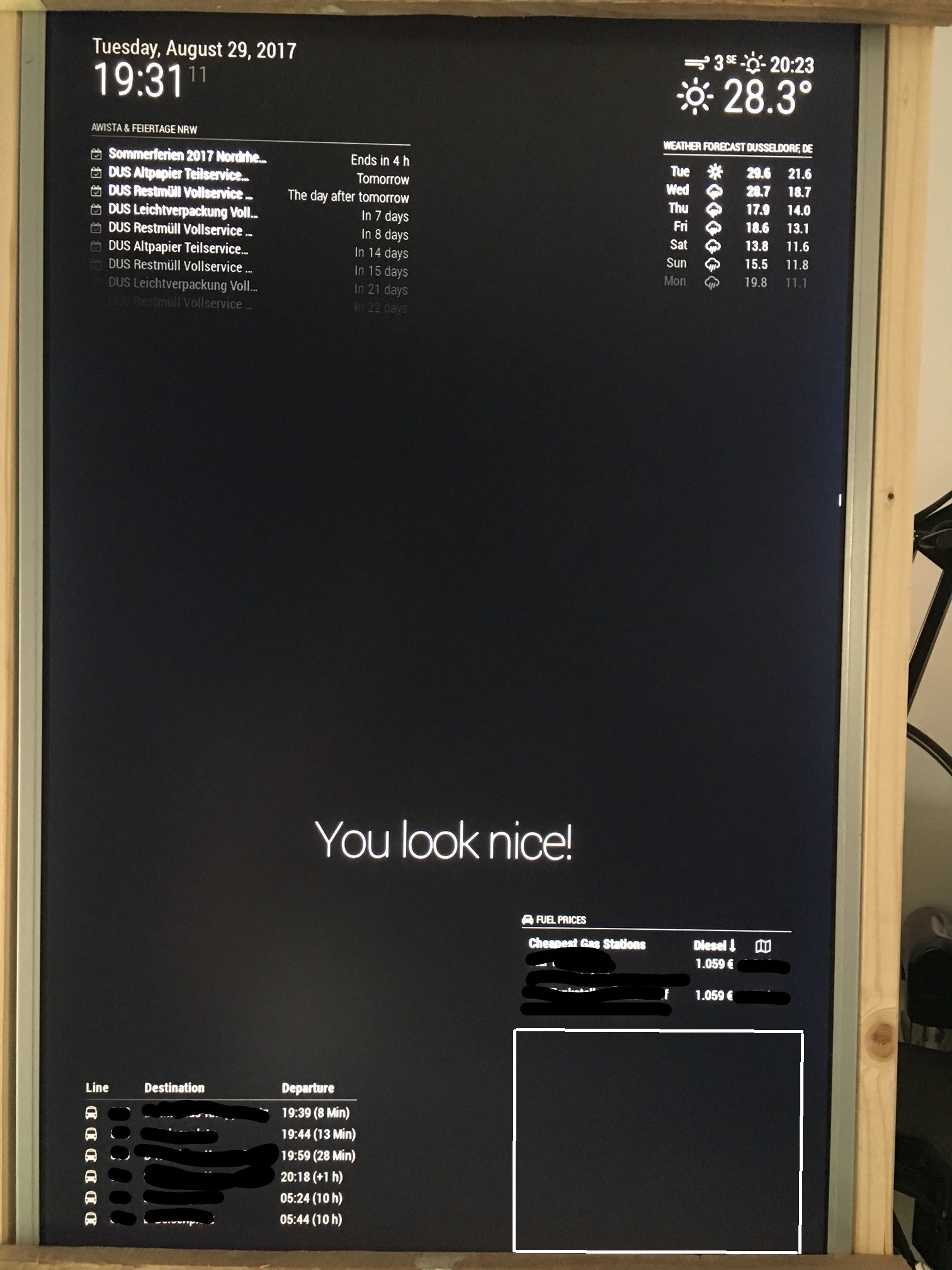
somehow it’s not working:
-
@birdy
Seems like the MM system didn’t initialize the module itself :(
Are you seeing any errors on the console from where you run “node serveronly” or on the chromium browser i.e from More Tools–> Developer Tools–>Console. -
you mean like this:
Connecting socket for: MMM-Traffic MMM-Traffic helper started ... Sockets connected & modules started ... Ready to go! Please point your browser to: http://localhost:8080 Whoops! There was an uncaught exception... { Error: listen EADDRINUSE :::8080 at Object.exports._errnoException (util.js:1020:11) at exports._exceptionWithHostPort (util.js:1043:20) at Server._listen2 (net.js:1258:14) at listen (net.js:1294:10) at net.js:1404:9 at _combinedTickCallback (internal/process/next_tick.js:83:11) at process._tickCallback (internal/process/next_tick.js:104:9) at Module.runMain (module.js:606:11) at run (bootstrap_node.js:389:7) at startup (bootstrap_node.js:149:9) code: 'EADDRINUSE', errno: 'EADDRINUSE', syscall: 'listen', address: '::', port: 8080 } MagicMirror will not quit, but it might be a good idea to check why this happened. Maybe no internet connection? If you think this really is an issue, please open an issue on GitHub: https://github.com/MichMich/MagicMirror/issues -
@birdy
Sorry for the delayed response. Got caught with stuff :(
By any chance do you have some other server running in parallel which is also listening on 8080 and using any available IPv6 address. Ideally you should have only “node” running with the specified port
You can check this with netstat.netstat -nalp | grep 8080 tcp6 0 0 ::: 8080 ::: * LISTEN 2350/node tcp6 0 0 ::1:43558 ::1:8080 ESTABLISHED 2103/libpepflashpla tcp6 0 0 ::1:8080 ::1:43558 ESTABLISHED 2350/nodeYou can try killing that service (In the last column i.e 2350/node, 2350 represents PID. You can use "kill -9 ") and then probably restart the Magic Mirror.
Also this may not be related to the actual problem.
Please see if you can post your config.js. -
@Mirrorolentia
thanks for helping me and sorry for late reply.Here comes the config:
/* Magic Mirror Config Sample
 *
 * By Michael Teeuw http://michaelteeuw.nl
 * MIT Licensed.
 *
 * For more information how you can configurate this file
 * See https://github.com/MichMich/MagicMirror#configuration
 *
 */

var config = {
	port: 8080,
	ipWhitelist: ["127.0.0.1", "::ffff:127.0.0.1", "::1"], // Set [] to allow all IP addresses
	                                                       // or add a specific IPv4 of 192.168.1.5 :
	                                                       // ["127.0.0.1", "::ffff:127.0.0.1", "::1", "::ffff:192.168.1.5"],
	                                                       // or IPv4 range of 192.168.3.0 --> 192.168.3.15 use CIDR format :
	                                                       // ["127.0.0.1", "::ffff:127.0.0.1", "::1", "::ffff:192.168.3.0/28"],

	language: "en",
	timeFormat: 24,
	units: "metric",

	modules: [
		{
			module: "alert",
		},
		{
			module: "updatenotification",
			position: "top_bar"
		},
		{
			module: "clock",
			position: "top_left"
		},
		{
			module: "calendar",
			header: "AWISTA & Feiertage NRW",
			position: "top_left",
			config: {
				calendars: [
					{
						symbol: "calendar-check-o ",
						url: "https://calendar.google.com/calendar/ical/**********/public/basic.ics"
					}
				]
			}
		},
		{
			module: "compliments",
			position: "lower_third"
		},
		{
			module: "currentweather",
			position: "top_right",
			config: {
				location: "Dusseldorf",
				locationID: "2934246",  //ID from http://www.openweathermap.org/help/city_list.txt
				appid: "************"
			}
		},
		{
			module: "weatherforecast",
			position: "top_right",
			header: "Weather Forecast",
			config: {
				location: "Dusseldorf",
				locationID: "2934246",  //ID from http://www.openweathermap.org/help/city_list.txt
				appid: "***********"
			}
		},
		{
    			module: 'MMM-Vrr',
    			position: "bottom_left",
    			config: {
        			city: 'Düsseldorf',
        			station: '***********',
        			numberOfResults: 6,
        			displayTimeOption: 'time+countdown'
		        }
		},
		{
		    module: "MMM-Fuel",
		    position: "bottom_right",
		    config: {
		        api_key: "************",
		        lat: *********,
		        lng: ************,
		        types: ["diesel"],
			radius: 1.4,
			max: 2,
			rotate: false,
		    	}
		},
		{
		module: 'MMM-Traffic',
		position: 'bottom_right',
		classes: 'dimmed medium', //optional, default is 'bright medium', only applies to commute info not route_name
		config: {
			api_key: '*********',
			mode: 'driving',
			origin: '******+Düsseldorf,+Deutschland',
			destination: '**********+Essen,+Deutschland',
			route_name: 'Home to Work',
			changeColor: true,
			showGreen: false,
			limitYellow: 5, //Greater than 5% of journey time due to traffic
			limitRed: 20, //Greater than 20% of journey time due to traffic
			traffic_model: 'best_guess',
			departure_time: 'now',
			interval: 60000,
			showWeekend: false,
			allTime: true,
	                width: '300px',
	                height: '300px'
			}
		},
	]
};

/*************** DO NOT EDIT THE LINE BELOW ***************/
if (typeof module !== "undefined") {module.exports = config;}
and here is netstat:
pi@raspberrypi:~ $ netstat -nalp | grep 8080
(Es konnten nicht alle Prozesse identifiziert werden; Informationen über
nicht-eigene Processe werden nicht angezeigt; Root kann sie anzeigen.)
tcp6       0      0 :::8080                 :::*                    LISTEN      1119/electron.js
tcp6       0      0 ::1:51608               ::1:8080                VERBUNDEN   1119/electron.js
tcp6       0      0 ::1:8080                ::1:51610               VERBUNDEN   1119/electron.js
tcp6       0      0 ::1:51606               ::1:8080                VERBUNDEN   1119/electron.js
tcp6       0      0 ::1:51600               ::1:8080                VERBUNDEN   1119/electron.js
tcp6       0      0 ::1:51610               ::1:8080                VERBUNDEN   1119/electron.js
tcp6       0      0 ::1:51604               ::1:8080                VERBUNDEN   1119/electron.js
tcp6       0      0 ::1:8080                ::1:51608               VERBUNDEN   1119/electron.js
tcp6       0      0 ::1:8080                ::1:51598               VERBUNDEN   1119/electron.js
tcp6       0      0 ::1:8080                ::1:51600               VERBUNDEN   1119/electron.js
tcp6       0      0 ::1:51602               ::1:8080                VERBUNDEN   1119/electron.js
tcp6       0      0 ::1:8080                ::1:51606               VERBUNDEN   1119/electron.js
tcp6       0      0 ::1:8080                ::1:51604               VERBUNDEN   1119/electron.js
tcp6       0      0 ::1:8080                ::1:51602               VERBUNDEN   1119/electron.js
tcp6       0      0 ::1:51598               ::1:8080                VERBUNDEN   1119/electron.js
pi@raspberrypi:~ $

Hello! It looks like you're interested in this conversation, but you don't have an account yet.
Getting fed up of having to scroll through the same posts each visit? When you register for an account, you'll always come back to exactly where you were before, and choose to be notified of new replies (either via email, or push notification). You'll also be able to save bookmarks and upvote posts to show your appreciation to other community members.
With your input, this post could be even better 💗
Register Login