Read the statement by Michael Teeuw here.
Any MMM-Hive Users that can help, please?
-
Hello
Cloned MMM-Hive to cd MagicMirror/modules.It’s there.
Then went to get it’s dependencies in a new window
cd MagicMirror/modules/MMM-Hive
$ npm installNpm Warn enoent Enoent: no such file or directory, open ‘/home/pi/MagicMirror/modules/package.json’
Can someone tell me what has went wrong? Or is it simply that none are required?
As the outside temp shows ok as 3C, but inside temp says Null C?My config.js contains the following
{
			module: "MMM-Hive",
			header: "Hive",
			position: "top_left",
			config: {
				temperatureSuffix: "°C",
				username: "MY USERNAME",
				password: "MY PASSWORD",
				postcode: 'MY POSTCODE',
				showNext: true,
                                insideText: 'Inside:',
		                outsideText: 'Outside:',
		                targetTempText: '25:',
		                insideIconSet: 'fa fa-home',
		                showNext: true,
		                highestTemp: '30',
		                highTemp: '25',
		               lowTemp: '20',
		               lowestTemp: '15',
		               animatedLoading: true,
		               nodeName: 'Receiver 1',
		               outsideUrl: 'http://weather-prod.bgchprod.info/weather?postcode=',
		               insideUrl: 'https://api-prod.bgchprod.info:443/omnia',
		               debug: false,
			}
		},
I changed the outside url from https to http, as I sesrched for help before posting here, and saw that a poster found this worked to show the outside temp… without removing the ‘s’ it produced “Error Loading”
I then tried that with the inside temp url, but that had the opposite effect and created “Error Loading” until I put the ‘s’ back on.
The outside temp now is a steady 3C although my car temp shows higher, and my inside temp is not showing - just saying Null C.
My thermostat is named Receiver 1 as I have put into the config too, I then tried again by changing it to ‘Livingroom’ on both config, and in the Hive app… but still cant get the inside temp to show!
Do I need an Omnia-Access-Token? There is no mention of this in the read-me, or a place to put one? Looked online for one but no results
Thanks
-
If I enter the outside url as it is into a wed browser - http://weather-prod.bgchprod.info/weather?postcode= , it shows error as no postcode set.
If I then enter my postcode at the end after the = - http://weather-prod.bgchprod.info/weather?postcode=MYPOSTCODE, it will show me the correct output.
Does this url, inside the config, auto attach the postcode I entered in the config under my username and password? as If I enter it into the url in the config after the = It just says unable to find postcone for Hive? so adding it after the = in the config breaks it.
If I then enter https://api-prod.bgchprod.info/omnia into a browser, it says Not Authorised, so thinking this is why I cannot get my inside Temp? and there is something, that is mentioned nowhere, that I need to Authorise?
I have read the Read-Me several times, and read the very little help posts in the search function, changed nodename several times, and matched that on my Hive app, but nothing seems to get my inside temp to show.
Can anyone at all point me to what I need to focus on as all I seem to be doing is chase my tail, by doing it the exact way the read-me says to do it :-(
I have messaged @mongo116 - The creator, but he is unavailable and not been seen around here in 3 months, so not able to ask him for a quck fix to steer me towards what I should try :-(
-
Hi Damian,
I’d love to help, but unfortunately I moved house 2 weeks ago and didn’t bring the Hive with me so there is currently no way for me to test this.
From what I do remember the way that Hive works is that you have to authenticate initially and then you can request the info from the hub:
So first call is made to https://api-prod.bgchprod.info:443/omnia/auth/sessions which pulls back the session ID
Then the session ID is used in the header for the request to https://api-prod.bgchprod.info:443/omnia/nodes
For testing I used Postman in Chrome to make the requests etc so that way I could at least see if data was being pulled back.
Have you enabled debug? Might be worth a go and then view the console under the browsers developer tools to check whether data is being pulled from the above urls.
Thanks
-
@Damian 1st of all, I don’t think you need to do an npm install after cloning the repo (doesn’t say it in the readme… although its been a while since I set up my hive so cant remember although I dont have a ‘node_modules’ subfolder in my MMM-Hive folder so unlikely).
Not sure if thats 100% your problem but you could start off removing the folder & then recloning.
I modified my outside url to be http instead of https as I was getting that issue so that should work.
I’d recommend that you go back to basics… 1) does your mirror work with the MMM-Hive removed from the config? Check that 1st
2) As you’ve used just about every config option its hard to see which (if any) could be causing the issue. I’d start off adding in just the basics- u/n, password, receiver name (note I haven’t set this as I just use the default so cant advise where this may screw up). Then you can add in options one at a time.As @mongo116 says the ‘debug’ option could also help to see a bit more where its going wrong.
-
I was just about to post about the nodeName setting as remembered that can cause issues if you have multiple Hive bits - I only ever had the hub and thermostat… Cheers randomnoise :)
-
@mongo116 no, thank you for making the module! I had a crack at making a hive module a while back & gave up as I couldn’t get it working so it was great when I saw you’d done all the hard work :)
-
Thanks very much for getting back to me on this.
I’m not at all familiar with how things work behind the scenes, so do not understand what you mean by I have to authenticate initially? and request info from the hub?
Then to use the session ID? … I see these are the same up to last points - Auth/session… and /nodes,whereas the one in the config is https://api-prod.bgchprod.info:443/omniaDo I need to enter those url’s somewhere?
My outside temp looks to be working just fine, and even increased today by 1C so it is okay, just the inside one that shows no house icon, and says Null C. Really wanted this to work, and took my time reading the steps, but I cannot see what I have done wrong, or what I should add.
-
@randomnoise
Thanks, Yeah It was your post from Seven months back that I read, and did as you said to remove the ‘s’ and the outside worked… so many thanks for posting back about that or I would never have known to even try that.I will go look in my sub folder and check if there is a node_modules folder.
Yeah if I remove MMM-Hive from config, MM works as normal.What do you mean about adding just the basics? - You mean to just add in what it says in the read-me about sample config? Leave everything else out that I copied in?
I’m not sure how the debugging works as never done that before, or what info I should look at and then to know what is relevant… although I remember you did mention things on your post seven months back, so maybe I should head back there to see if it is mentioned what I need to do to get those files up?
If you think of anything else at all that you did on your setup, please advise, as I am only using one unit… no seperate hot water as I have a Combi. and my receiver was already named as Receiver 1… same as my Thermostat, but as you know, Thermostat cannot be changed, so thought I had better keep both at default names - Receiver 1, and have this as my node name in config.
Is it worth just deleting it from MM, and recloning and hope this makes a difference, or as stated above to mongo116 do I need to add or do anything with those ulr’s he mentioned, as this was not mentioned to do this, so unsure if this is where I went wrong? did you do anything with these url’s?
-
@Damian Yes I think it would be best to just use the basic config from the readme 1st & see if that works (obvs with your username / password combo).
All @mongo116’s comments about authenticating / session IDs etc are more for if you are stepping through the code yourself with a debugger in your browser. I don’t think that’s what you’re trying to do. You don’t need to worry about any of that if you’re just wanting to view the module on your mirror as it should do all that in the background. If you did want to start trying to see where its going wrong you can enable the
debug : trueoption and then connect your web browser on a computer to the mirror and use the web developer console too see some more detailed info on whats happening in the background.
-
@randomnoise
Thanks, I will delete MMM-Hive 2mor and start afresh.There is no node_modules folder, just a node.js… maybe that is what confused me there?
I am assuming that the only 2 things you changed in the whole setup was the ‘s’ in the main file url, and you named your nodename Receiver 2 as you have 2 units, and as I have only one named Receiver 1, I shall remain using that.
Other than those 2, you never changed, moved, or added anything, and it simply worked?Fingers X all works as it should 2mor?
Thanks again to you, and @mongo116 for the help, really appreciate it.
-
Ok, deleted MMM-Hive from Pi MM, and started again… still got same result😣
Did as you suggested and opened up deb on PC, but no clue whatsoever what or where to find info that you need to see? - I have debug - true set in configThen thought to put MMM-Hive onto my PC MM… just to see if it would work on there any better… nope ! 😣
One thing I did notice, and this could mean nothing? But my Thermostat and receiver are both named Receiver 1… and as such, I duly named the nodename Receiver 1… but, when looking at the debug info, that has retained the default Your Receiver… so, is that a possible problem? Why has that not changed since I have changed it in my config?I have attached a couple shots in the hope you can tell me what I should do in the debugger and what info you need me to look at and show you here.
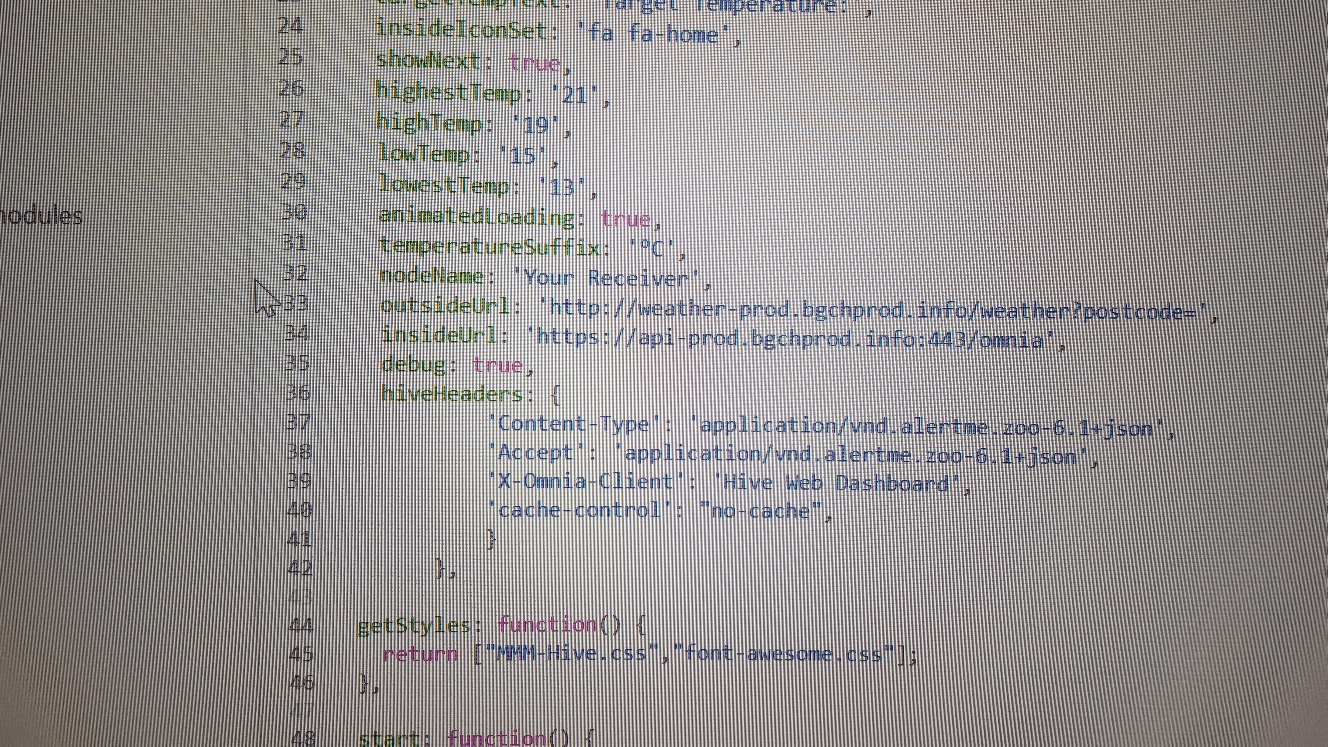
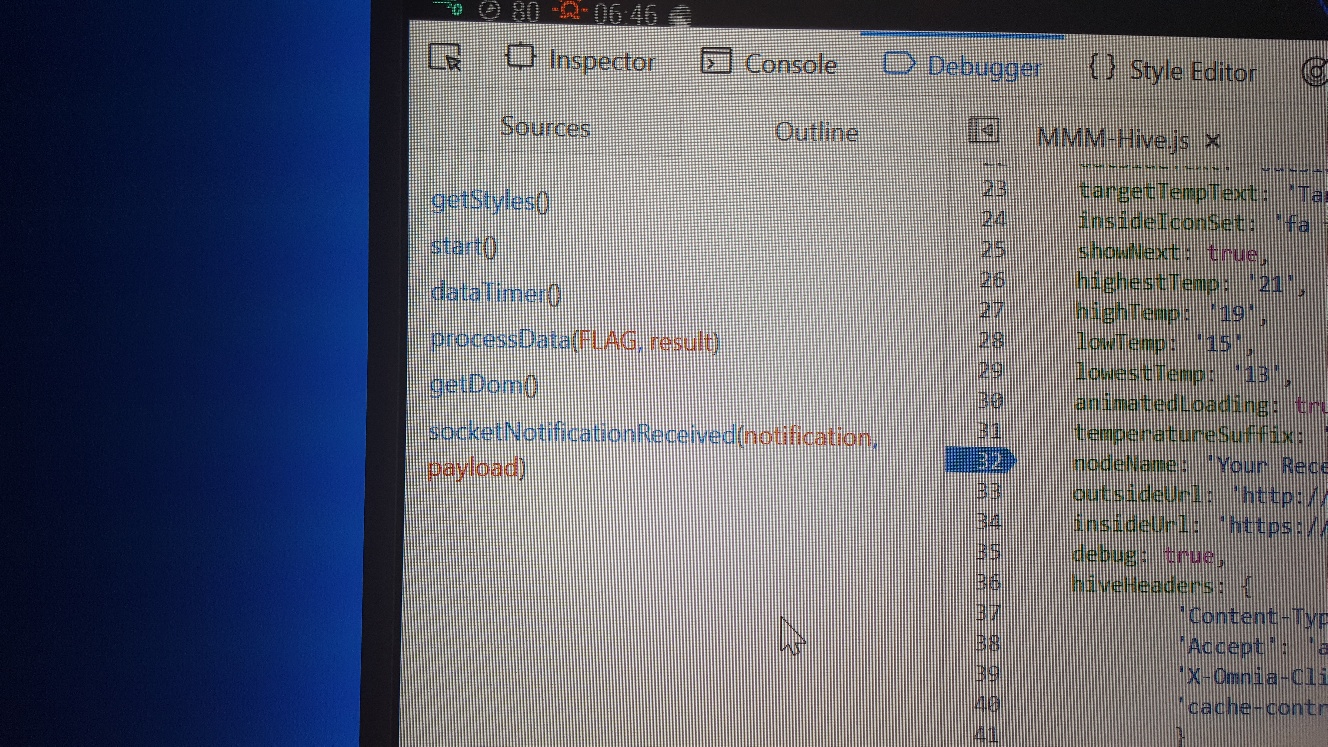
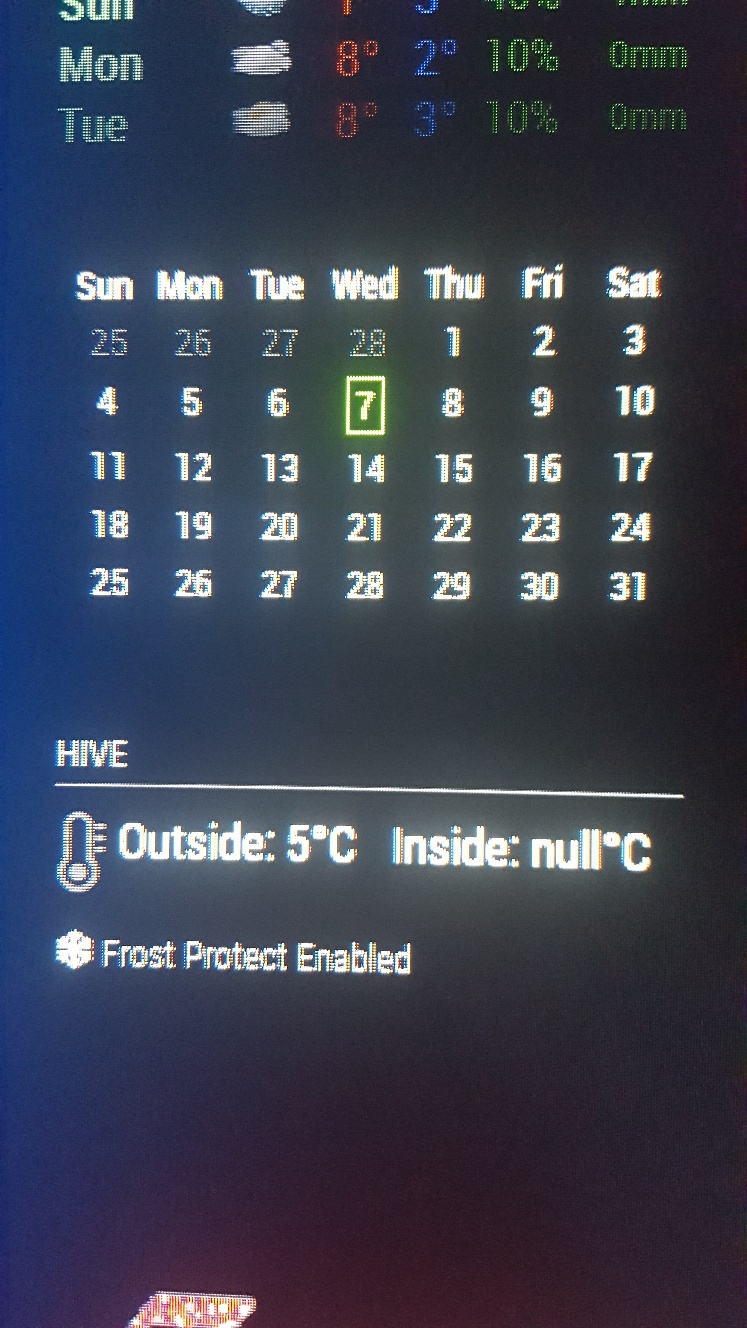
-
Hi,
The last screenshot shows Frost Protect Enabled. Is this actually active on your hive?
-
@mongo116
Yeah, by default… I thought this was normal as the only other setting on thermostat is child lock… or lower/raise the frost protect. I took that screenshot when heating was on, but mirror shows it when on and off. -
You have this too in your post of 7 months ago …
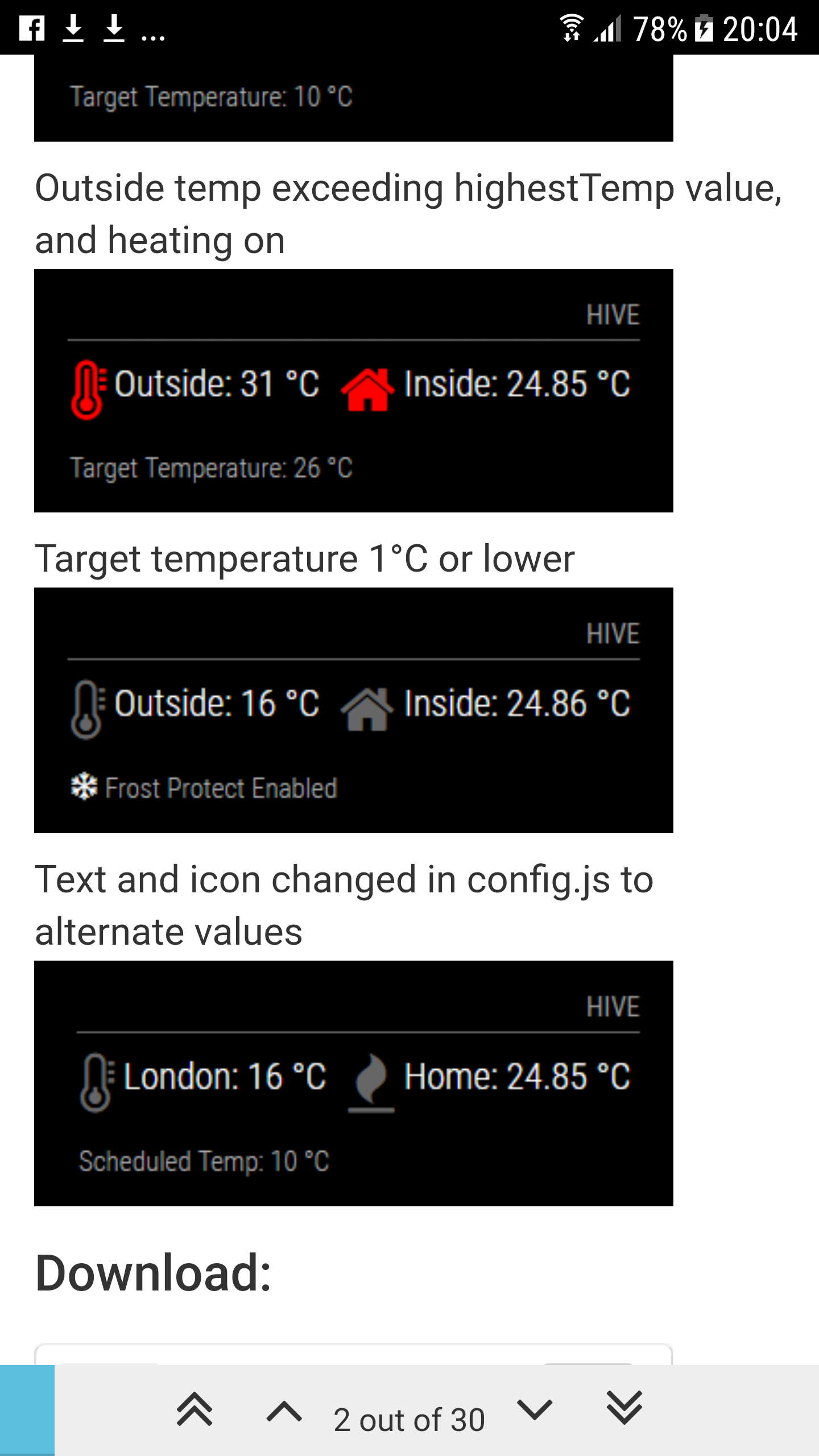
-
@Damian Hi, yeah the frost protect should only show when the target temperature is below a certain value. I would guess the issue here is the data being received from Hive. I won’t ask you to paste the data here (which should show up under the browser’s developer console, when debug is enabled) as it contains data related to your account (from what I remember anyway). The most likely issue is that the receiver name is incorrect or that the relevant data relating to temperature etc is not where the module is expecting it to be. Unfortunately now I no longer have access to Hive there’s not much I can do to look into this. Sorry…
-
-
Sorry… I know you no longer have Hive, and unable to help, but I found this and wondered if this could have any bearing on it?
https://community.smartthings.com/t/release-hive-connect-v3-0-british-gas-hive/103473
-
@Damian Hi. I will give it a read and check the code. I just had a quick look and I may just be able to update the requests etc. Might be a bugger to test, but leave this with me and I will take a look.
Thanks… -
Thanks very much … I realise you do not use Hive now, so it will be hard for you to test out changes, but I will try out everything you suggest and report back so you will know if they work or not.
Agree it will be tough this way, but if this is what your module needs in order to function, then it may be the only way to keep your module alive for Hive users eh?
-
@Damian I think I am making some headway into this issue. I will spend a bit of time when I can and hopefully get a new version out soonish
Cheers

Hello! It looks like you're interested in this conversation, but you don't have an account yet.
Getting fed up of having to scroll through the same posts each visit? When you register for an account, you'll always come back to exactly where you were before, and choose to be notified of new replies (either via email, or push notification). You'll also be able to save bookmarks and upvote posts to show your appreciation to other community members.
With your input, this post could be even better 💗
Register Login