MagicMirror Forum
    • Recent
    • Tags
    • Unsolved
    • Solved
    • MagicMirror² Repository
    • Documentation
    • 3rd-Party-Modules
    • Donate
    • Discord
    • Register
    • Login
    A New Chapter for MagicMirror: The Community Takes the Lead
    Read the statement by Michael Teeuw here.

    MagicMirror Pimatic (Home Automation) Dashboard

    Scheduled Pinned Locked Moved Show your Mirror
    35 Posts 10 Posters 39.4k Views 10 Watching
    Loading More Posts
    • Oldest to Newest
    • Newest to Oldest
    • Most Votes
    Reply
    • Reply as topic
    Log in to reply
    This topic has been deleted. Only users with topic management privileges can see it.
    • Z Offline
      Zinkeler @yawns
      last edited by

      @yawns
      Vielen Dank !!
      Genau das war das Problem, jetzt klappte es :-)

      1 Reply Last reply Reply Quote 0
      • P Offline
        Peter
        last edited by

        Who can help me with this?
        I am running MM on one RPI and Pimatic on another one.
        But I have no idea how to get the information of Pimatic on the MM screen.
        If somebody can tell me what to install where …
        Thanks in advance!
        Peter

        1 Reply Last reply Reply Quote 0
        • Mr.SpontiM Offline
          Mr.Sponti
          last edited by

          @Peter
          I’ve reworked my MMM-Pimatic modul but need now to adjust the description on gihub. The modul connects to a pimatic server to listen on device attribute changes and displays changes as notifications on the MagicMirror screen. Temperature values can be displayed in a separate table. As soon as I’ve completed the Readme, I will send you a message.

          P 1 Reply Last reply Reply Quote 0
          • P Offline
            Peter @Mr.Sponti
            last edited by

            @Mr.Sponti thanks!
            Would be great!
            Peter

            1 Reply Last reply Reply Quote 0
            • Mr.SpontiM Offline
              Mr.Sponti
              last edited by

              @Peter Here you can find the latest version of my MMM-Pimatic module. The README isn’t yet covering all features but should be sufficient for the installation and basic configuration of the module.
              Please feel free to contact me if you need help to get it running.

              P 1 Reply Last reply Reply Quote 0
              • P Offline
                Peter @Mr.Sponti
                last edited by

                @Mr.Sponti thanks!
                I will try it as soon as possible.
                I will let you know the results!
                Peter

                1 Reply Last reply Reply Quote 0
                • P Offline
                  Peter
                  last edited by

                  pi@magicrpi:~/MagicMirror/modules/MMM-Pimatic $ npm install
                  npm WARN enoent ENOENT: no such file or directory, open '/home/pi/MagicMirror/modules/package.json'
                  npm WARN enoent ENOENT: no such file or directory, open '/home/pi/MagicMirror/modules/node_modules/node_helper/package.json'
                  npm WARN modules No description
                  npm WARN modules No repository field.
                  npm WARN modules No README data
                  npm WARN modules No license field.


                  And I have no idea what to do (how to install) socket.io-client.
                  Peter

                  Mr.SpontiM 1 Reply Last reply Reply Quote 0
                  • Mr.SpontiM Offline
                    Mr.Sponti @Peter
                    last edited by

                    @Peter , you can ignore these Warnings, but you need to install the socket.io-client modul:

                    cd  ~/MagicMirror/modules/MMM-Pimatic
                    npm install socket.io-client
                    
                    1 Reply Last reply Reply Quote 0
                    • G Offline
                      ganther
                      last edited by

                      Hello,

                      I also installed your great module to observe the pimatic-sensor data on my MM.
                      The normal systemsensor-temps are perfectly shown. But how can I get the values of my dht22-sensor because the class dhtsensor has no attributes. It delivers 2 values (Temp and humidity).

                      Is there any solution?

                      Thanks a lot.
                      Sandy

                      1 Reply Last reply Reply Quote 0
                      • Mr.SpontiM Offline
                        Mr.Sponti
                        last edited by

                        @ganther said in MagicMirror Pimatic (Home Automation) Dashboard:

                        dhtsensor

                        Hi Sandy, how is your dht22-sensor connected? Is the sensor direct connected to the Rasperry GPIO pins and you use the plugin “dht-sensors”?
                        What shows up for the sensor if you create a listing of “variables” from your pimatic menu?

                        G 1 Reply Last reply Reply Quote 0
                        • G Offline
                          ganther @Mr.Sponti
                          last edited by

                          @Mr.Sponti
                          Thanks for your response.
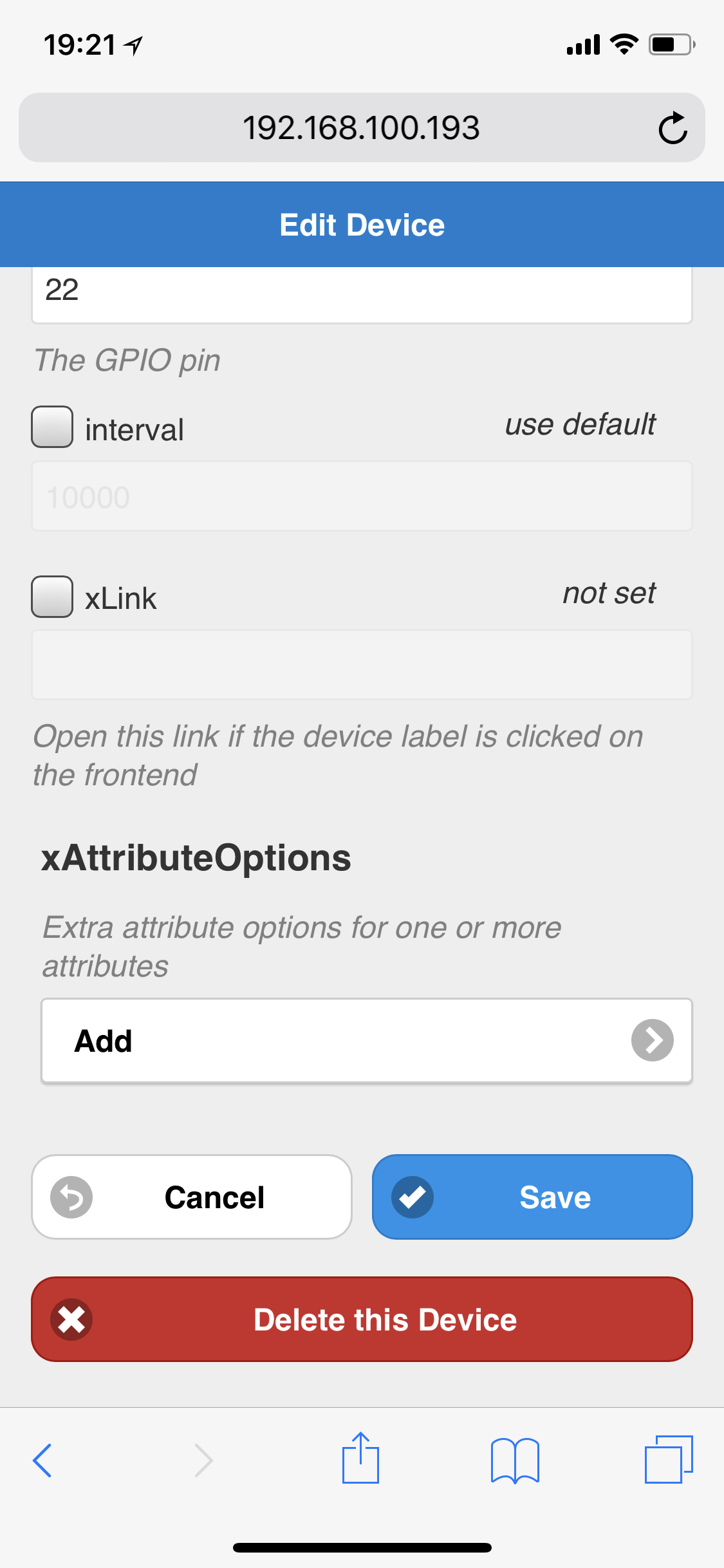
                          Yes, i use the dht-sensors plugin. It is directly connected to GPIO-Pin22

                          Here is a Screenshot of a part of the device-config. Perhaps it‘s helpful.
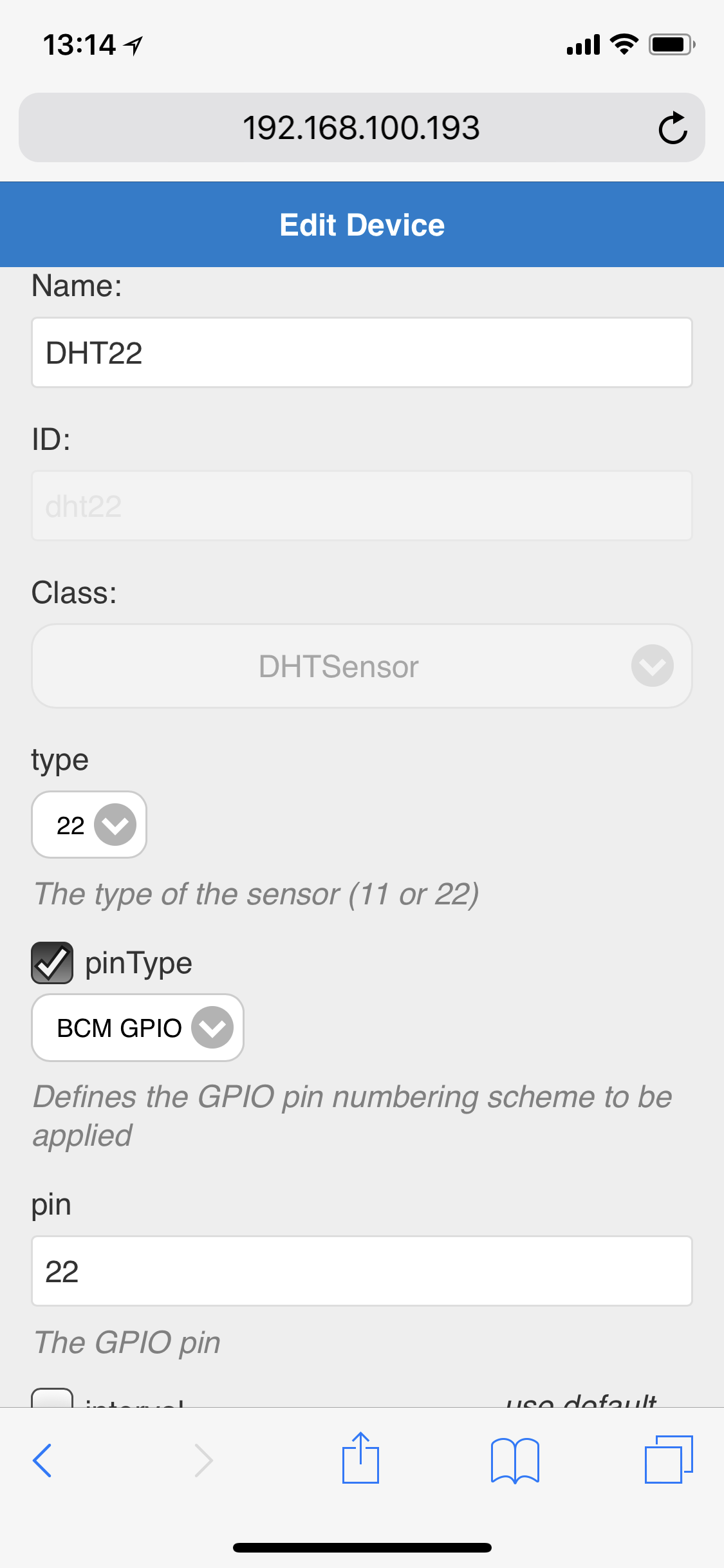
                          0_1524503788527_6D37A3E0-7FC5-4B74-9818-F8EAF370BD47.png

                          Thank you
                          Sandy

                          G 1 Reply Last reply Reply Quote 0
                          • G Offline
                            ganther @ganther
                            last edited by

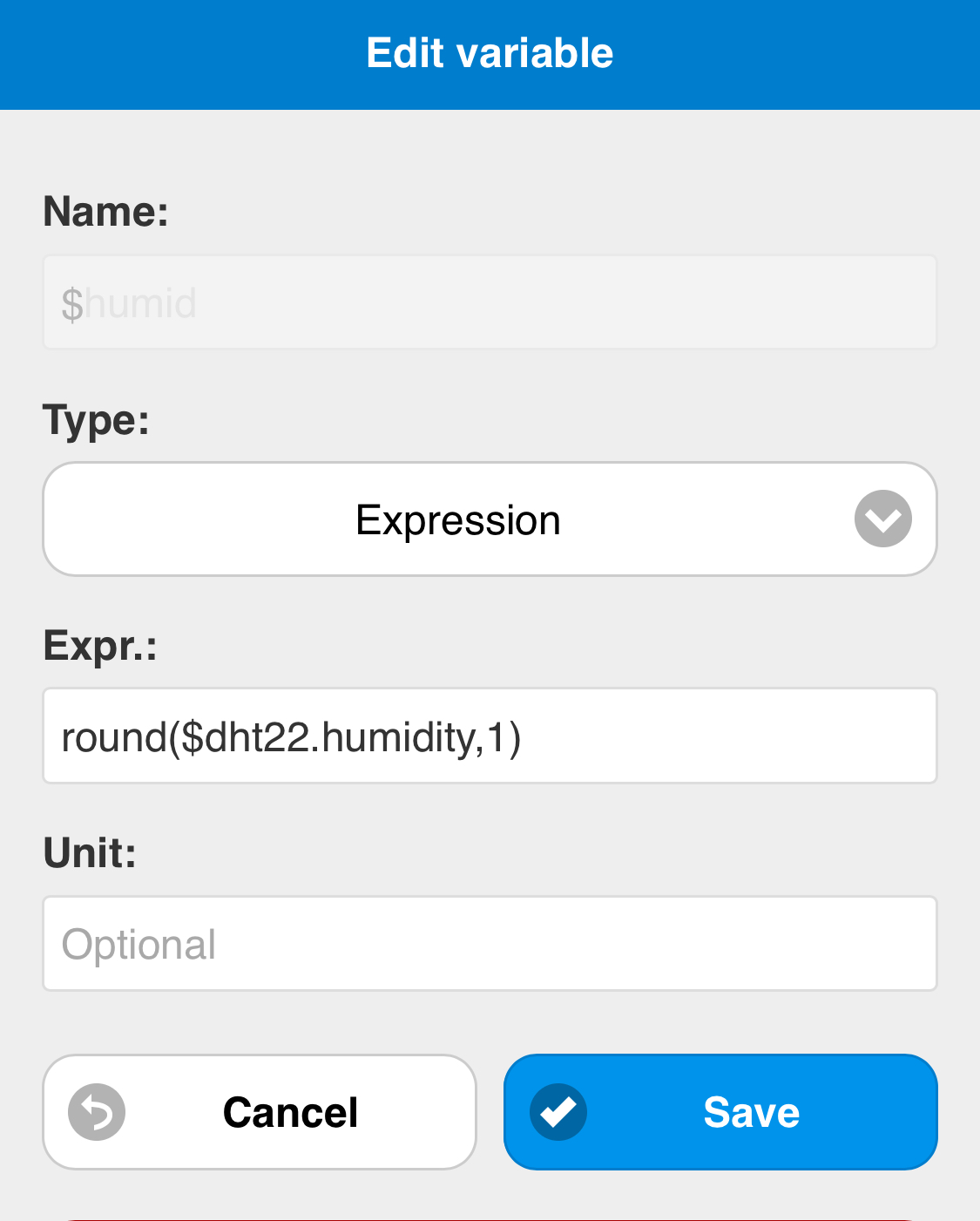
                            And the second menu area:

                            0_1524504173601_EAAF835E-1BBC-4158-8E86-03658E10C918.png

                            G 1 Reply Last reply Reply Quote 0
                            • G Offline
                              ganther @ganther
                              last edited by

                              Oh sorry, I didn‘t recognize the variables menue entry before oO🤦‍♂️

                              It shows $dht22.temperature and .humidity

                              I will try these ones in config.

                              1 Reply Last reply Reply Quote 0
                              • G Offline
                                ganther
                                last edited by

                                Yes, Temperatur is shown.
                                But with 13 digits behind ‚.‘ just like 24.1234567890123

                                Is there a way to cut after 1 or 2 digits behind ‚.‘?
                                And a way to select another unit (% instead of degree) or do i have to move it to the notification board?

                                Thanks again
                                Sandy

                                1 Reply Last reply Reply Quote 0
                                • Mr.SpontiM Offline
                                  Mr.Sponti
                                  last edited by

                                  Rounding of the values is not a big issue as there is a method '.toFixed(2) ’ available. At the moment the unit specified in the config file is assigned to all values in the table. To implement the value rounding and a individual unit for every value I need to enhance the code. I will put it on my action list for the next version.

                                  G 1 Reply Last reply Reply Quote 0
                                  • G Offline
                                    ganther @Mr.Sponti
                                    last edited by

                                    @Mr.Sponti said in MagicMirror Pimatic (Home Automation) Dashboard:

                                    Rounding of the values is not a big issue as there is a method '.toFixed(2) ’ available. At the moment the unit specified in the config file is assigned to all values in the table. To implement the value rounding and a individual unit for every value I need to enhance the code. I will put it on my action list for the next version.

                                    Thank you very much!

                                    G 1 Reply Last reply Reply Quote 0
                                    • G Offline
                                      ganther @ganther
                                      last edited by

                                      One last thought:

                                      If you add this feature in one of the next versions, it would be fantastic, if you could implement it on notification-board too (rounding and unit).
                                      Then one module would be enough, it looks very nice and I would save one module-space.

                                      Sandy

                                      1 Reply Last reply Reply Quote 0
                                      • Mr.SpontiM Offline
                                        Mr.Sponti
                                        last edited by

                                        Hi Sandy,
                                        to display temperature and the humidity of your DST sensor in the Notification Board with rounded values and the right units should already possible. Try to use the following approach:

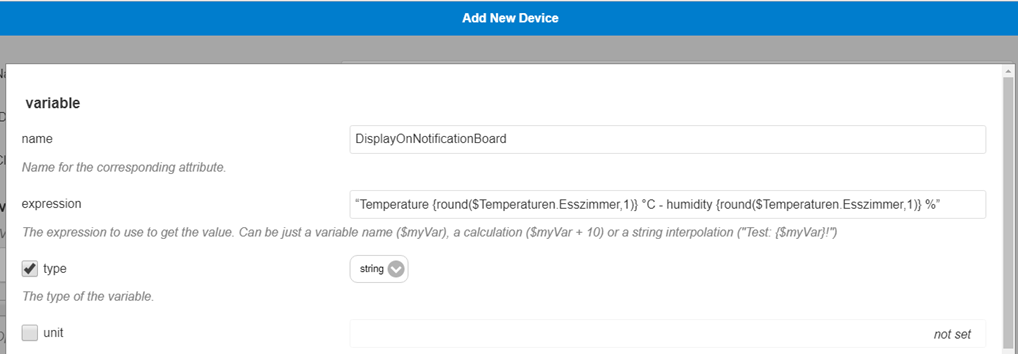
                                        1. In pimatic create a VariableDevice with a string variable and assign a string including your temperature and humidity Variable.attributes of your DST sensor.
                                          (e.q. “Livingroom temperature {round($DST_Temperature,1)} °C - humidity {round($DST_Humidity,1)} %”

                                        2. Configure the new VariableDevice into the Notification Board of the MMM-Pimatic module

                                        I didn’t test that, but it should work in that way.

                                        G 1 Reply Last reply Reply Quote 0
                                        • G Offline
                                          ganther @Mr.Sponti
                                          last edited by

                                          @Mr.Sponti

                                          Yes, Great! Both values are shown now rounded.
                                          How can I get the unit also be shown?
                                          In pimatic variables the units are declared and are shown.
                                          But not in notification board.

                                          Thank you!

                                          1 Reply Last reply Reply Quote 0
                                          • Mr.SpontiM Offline
                                            Mr.Sponti
                                            last edited by

                                            @Mr.Sponti said in MagicMirror Pimatic (Home Automation) Dashboard:

                                            “Livingroom temperature {round($DST_Temperature,1)} °C - humidity {round($DST_Humidity,1)} %”

                                            Sandy, I’ve tested the notification board with the following string varibale. The units of your measured values need to be part of the string defined in the field expression of your variable device.

                                            “Livingroom temperature {round($Temperaturen.Esszimmer,1)} °C - humidity {round($Temperaturen.Esszimmer,1)} %”

                                            G 1 Reply Last reply Reply Quote 0

                                            Hello! It looks like you're interested in this conversation, but you don't have an account yet.

                                            Getting fed up of having to scroll through the same posts each visit? When you register for an account, you'll always come back to exactly where you were before, and choose to be notified of new replies (either via email, or push notification). You'll also be able to save bookmarks and upvote posts to show your appreciation to other community members.

                                            With your input, this post could be even better 💗

                                            Register Login

                                            • 1
                                            • 2
                                            • 2 / 2
                                            • First post
                                              Last post
                                            Enjoying MagicMirror? Please consider a donation!
                                            MagicMirror created by Michael Teeuw.
                                            Forum managed by Sam, technical setup by Karsten.
                                            This forum is using NodeBB as its core | Contributors
                                            Contact | Privacy Policy