Read the statement by Michael Teeuw here.
Fitbit
-
I’m having a problem with my fitbit module. (mods if this should be a new thread just let me know).
I can start the MM and the FB data loads, then after a time my ‘credentials.ini’ file gets changed to “undefined” for both entries[Credentials] c_id = undefined c_secret = undefinedNow, when I ran setupAccess.py the file was correct and my tokens file was created. What I’m seeing happen is that after a while the FB module stops refreshing. I’m guessing it’s because the tokens need to be refreshed and because my credentials are gone, it can’t authorize.
Any thoughts?
I’m not sure how to get any logs or info out of the system. I’m running MM through pm2 and I don’t see any log files.TIA
-
Solved my issues.
Saw the following when starting up MM
results: [{"message":"Writing credentials to credentials.ini","type":"status"},{"message":"Writing id: undefined and secret: undefined","type":"status"},{"message":"Credentials write successful","type":"status"}]
Create new todo fetcher for list: Groceries - Interval: 60000
Create new todo fetcher for list: Family - Interval: 60000
Whoops! There was an uncaught exception...
{ Error: process exited with code 1
    at terminateIfNeeded (/home/pi/MagicMirror/modules/node_modules/python-shell/index.js:100:23)
    at ChildProcess.<anonymous> (/home/pi/MagicMirror/modules/node_modules/python-shell/index.js:88:9)
    at emitTwo (events.js:106:13)
    at ChildProcess.emit (events.js:191:7)
    at Process.ChildProcess._handle.onexit (internal/child_process.js:204:12)
  executable: 'python',
  options: null,
  script: 'modules/MMM-fitbit/python/getData.py',
  args: null,
  exitCode: 1 }
MagicMirror will not quit, but it might be a good idea to check why this happened. Maybe no internet connection?
If you think this really is an issue, please open an issue on GitHub: https://github.com/MichMich/MagicMirror/issues
Tracing the information back, it was in the config.js file. I had an extra set of [] around the credentials data. Not sure how or why I had it that way, but all cleared up now.
-
Hi Guys,
Firstly thank you for creating this module it’s exactly what I wanted!
I’m having an issue with the module running for extended periods of time where it loses connection to fitbit and I need to run “sudo python setupAccess.py” on the python directory again to get it to pull my latest stats from Fitbit.
Do you have any way it can check in with Fitbit every 30 mins or every hour to reconnect and pull the latest stats?
Many thanks
Ollie -
Hi Guys,
this Module is freaking me out… (123456789 are just examples for my API ID)
I just entered this Code in my config.js{ module: 'MMM-fitbit', position: 'top_center', config: [ credentials: { client_id: 123456789, client_secret: 123456789, }, resources: [ 'steps', 'floors', 'caloriesOut', 'distance', 'activeMinutes', 'sleep', 'heart' ] ] },if i try to start magicmirror it doesnt load because he says there is no valid config.
I opened an issue in github for that and Venditteli says there are some issues with the file ownership of any ini file. Any hint or any workaround is very pleased wellcome.Thank you guys.
Regards
Hellangel
Note from admin: Please use Markdown on code snippets for easier reading!
-
Hi Hellangle1978,
Try the below I saw a few errors in the example code;
{
	module: ‘MMM-fitbit’,
	position: ‘top_center’,
	config: {
		credentials: {
			client_id: '123456789',
			client_secret: '123456789',
			},
		resources: [
			‘steps’,
			‘floors’,
			‘caloriesOut’,
			‘distance’,
			‘activeMinutes’,
			‘sleep’,
			‘heart’
			]
		}
},
Note from admin: Please use Markdown on code snippets for easier reading!
-
i used your code - not working.
I created as followed in instructions an token.ini worked all out no problem.
Just wen pasting the code in my config.js then after that the mirror will not start. Even if i use sudo npm start on desktop.
Mirror is aways asking for an config or an error in my config after pasting that in config :( -
@Hellangel1987 Can you post the config code you’re using please?
-
Im using your code as provided
-
@Hellangel1987
Yes If possible please paste your entire config file as the error might be elsewhere -
here we go
/* Magic Mirror Config Sample
 *
 * By Michael Teeuw http://michaelteeuw.nl
 * MIT Licensed.
 */

var config = {
	port: 8080,

	language: 'de',
	timeFormat: 24,
	units: 'metric',

	modules: [
    		{
        		module: 'MMM-FRITZ-Box-Callmonitor',
        		position: 'top_right',  // This can be any of the regions. Best results in left or right regions.
        		header: "Letzte Anrufe", // This is optional
        		config: {
            		// See 'Configuration options' for more information.
        	}
    		},
			{
				module: ‘MMM-fitbit’,
				position: ‘top_center’,
				config: {
				credentials: {
				client_id: ‘123456789’,
				client_secret: ‘123456789’,
			},
				resources: [
				‘steps’,
				‘floors’,
				‘caloriesOut’,
				‘distance’,
				‘activeMinutes’,
				‘sleep’,
				‘heart’
			]
			}
			},
		{
			module: 'alert',
		},
		{
			module: 'clock',
			position: 'top_left'
		},
		{
			module: 'calendar',
			header: 'Feiertage',
			position: 'top_left',
			config: {
				calendars: [
		{
						symbol: 'calendar-check-o ',
						url: 'webcal://www.schulferien.org/media/ical/deutschland/ferien_bayern_2016.ics'
		}
				]
		}
		},
		{
			module: 'calendar',
			header: 'Termine NetApp',
			position: 'top_left',
			config: {
				calendars: [
		{
						symbol: 'calendar-check-o ',
						url: '################################'
		}
					   ]
		}
		},
		{
  			module: 'localtransport',
			header: 'Verbindungen NBG HBF',
  			position: 'top_left',
  			config: {
    			api_key: '###########',
    			origin: 'Nuremberg Dunantstr',
    			destination: 'Nuremberg HBF'
  		}
		},
		{
    			module: 'MMM-Traffic',
    			header: 'Verkehr',
			position: 'top_left',
    			classes: 'dimmed medium', //optional, default is 'bright medium', only applies to commute info not route_name
    			config: {
        		api_key: '#############',
        		mode: 'driving',
        		origin: 'Nuernberg',
        		destination: 'Muenchen',
             		route_name: 'Route nach NetApp Muc',
			show_summary: true,
        		changeColor: true,
        		showGreen: true,
        		limitYellow: 5, //Greater than 5% of journey time due to traffic
        		limitRed: 20, //Greater than 20% of journey time due to traffic
        		traffic_model: 'best_guess',
        		interval: 120000 //2 minutes
    		}
		},
		{
			module: 'compliments',
			position: 'lower_third'
		},
		{
			module: 'currentweather',
			position: 'top_right',
			config: {
				location: 'Nuremberg',
				locationID: '',  //ID from http://www.openweathermap.org
				appid: '#################'
		}
		},
		{
			module: 'weatherforecast',
			position: 'top_right',
			header: 'Wettervorhersage',
			config: {
	            		location: 'Nuremberg',
				locationID: '2861650',  //ID from http://www.openweathermap.org
	            		appid: '##############'
		}
		},
		{
    			module: 'MMM-MovieInfo',
    			position: 'top_right',
    			config: {
        		api_key: '#############'
    		}
		},
    		{
        		module: 'email',
            		position: 'bottom_bar',
            		header: 'Emails',
            		config:{
                	user: '##############',
                	password: '#############',
                	host: 'imap.mail.me.com',
                	port: 993,
                	tls: true,
                	authTimeout: 10000,
                	numberOfEmails: 5,
                	fade: true
        	}
    		},
		{
			module: 'newsfeed',
			position: 'bottom_bar',
			config: {
				feeds: [
		{
						title: "Focus Eilmeldungen",
						url: "http://rss.focus.de/fol/XML/rss_folnews_eilmeldungen.xml"
		}
				],
				showSourceTitle: true,
				showPublishDate: true
		}
		},
	]

};

/*************** DO NOT EDIT THE LINE BELOW ***************/
if (typeof module !== 'undefined') {module.exports = config;}
Note from admin: Please use Markdown on code snippets for easier reading!
-
Looks like you’re using the wrong quote marks around elements, you’re using ‘ try using ’
There is a difference.
or use the code below; I’ve tested it working.
Looks like you’re using the wrong quote marks around elements, you’re using ‘ try using ’
There is a difference.
or use the code attached; I’ve tested it working.
-
Thanks for publishing this module but i got some issues with it.
When i’m running
sudo python setupAccess.pyand put my client and secret it, the script looks frozen. (Same behaviour after multiple retries)Anyone having the same issue ?
I don’t know why, i’ve followed instructions here :
https://github.com/SVendittelli/MMM-fitbit -
-
@Hellangel1987
No Problem.When you run #sudo python setupAccess.py# on the python directory inside the MMM-fitbit folder does it redirect you to log into you fitbit account in an internet browser?
Also what fitbit model are you using? I tried this with a fitbit alta and it didn’t work. Then I tried with my fitbit ChargeHR and it works perfect* see attached. I changed the CSS to display vertically.
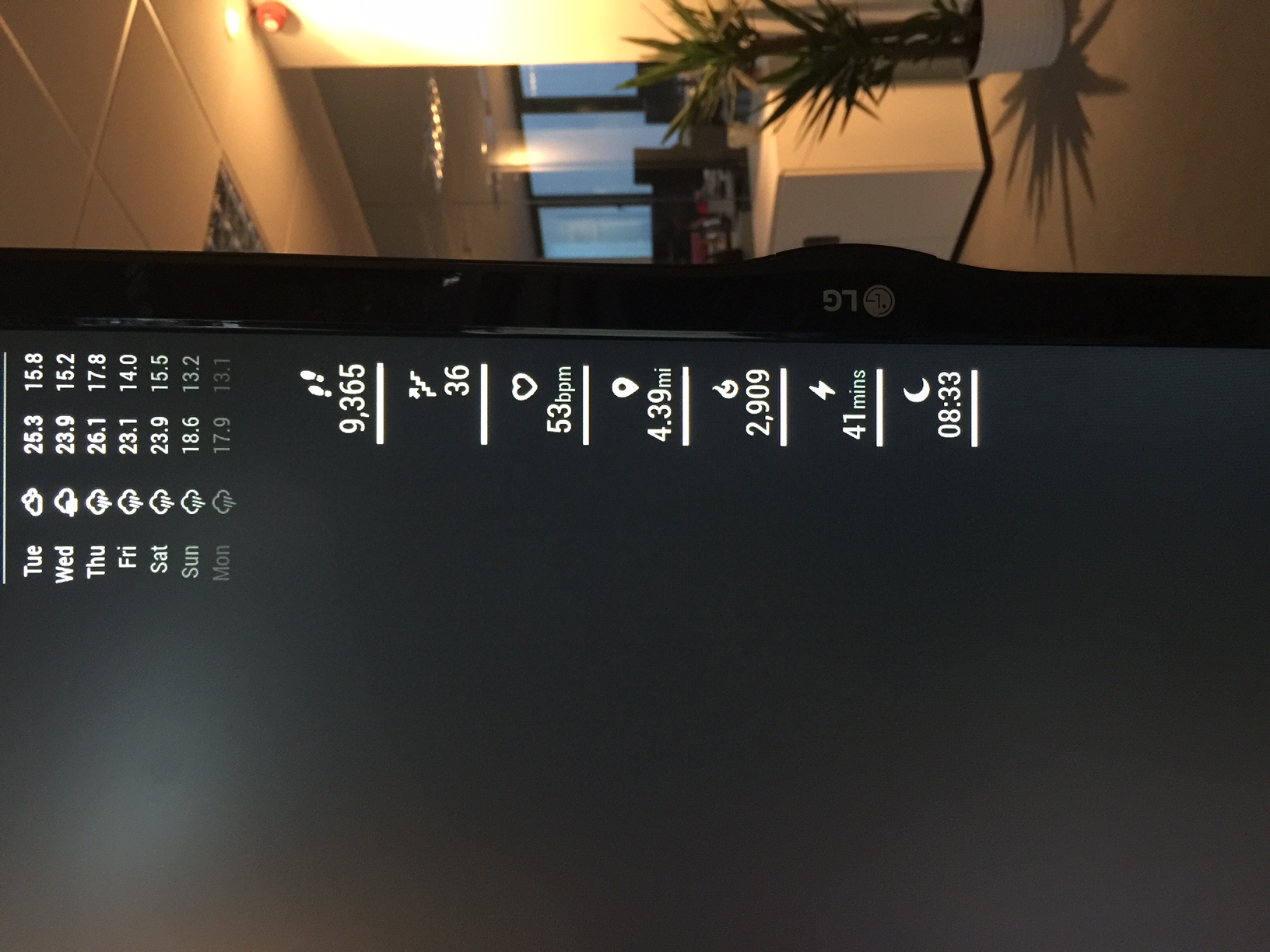
*i say it works perfect i just need a way to keep the connection to my fitbit account over a long period of time without having to re-run sudo python setupAccess.py on the python directory once a day.
-
Im using The Fitbit Charge HR
-
@Hellangel1987
When you run #sudo python setupAccess.py# on the python directory inside the MMM-fitbit folder does it redirect you to log into you fitbit account in an internet browser? -
yepp works perfect. i have the token and autorized that app in browser.
after that i startet mirror with sudo npm start. but only zero numbers are shown :(Did i have to do this once a day? Any cronjob for that ?
-
-
@olliewarren411 can you describe your steps and your configs ? i think there is any missconfiguration in my credentials config i think soo.
-
I cant easily explain as I had to play around a lot to get it to work… and then it just did.
When setting up your app on the fitbit website did you get the below steps?
Check browser and personal for OAuth settings
Callback URL MUST BE http://127.0.0.1:8080/
Give your app read & write permissions (read-only untested)I could not set the Personal and OAuth settings until I got my personal URL wrong. When the page reloaded these two extra options appeared.

Hello! It looks like you're interested in this conversation, but you don't have an account yet.
Getting fed up of having to scroll through the same posts each visit? When you register for an account, you'll always come back to exactly where you were before, and choose to be notified of new replies (either via email, or push notification). You'll also be able to save bookmarks and upvote posts to show your appreciation to other community members.
With your input, this post could be even better 💗
Register Login