MagicMirror Forum
    • Recent
    • Tags
    • Unsolved
    • Solved
    • MagicMirror² Repository
    • Documentation
    • 3rd-Party-Modules
    • Donate
    • Discord
    • Register
    • Login
    A New Chapter for MagicMirror: The Community Takes the Lead
    Read the statement by Michael Teeuw here.

    Kalliope assistant + MM

    Scheduled Pinned Locked Moved Fun & Games
    58 Posts 10 Posters 47.3k Views 12 Watching
    Loading More Posts
    • Oldest to Newest
    • Newest to Oldest
    • Most Votes
    Reply
    • Reply as topic
    Log in to reply
    This topic has been deleted. Only users with topic management privileges can see it.
    • D Offline
      dmwilsonkc
      last edited by

      @sispheor I am interested in duplicating your work for a different AI. So I figured the best place to start is to install your module and get it working before I make changes to suit my needs with the other AI. I have installed the MMM-Kalliope module, but the curl commands do not display on my mirror. I am not sure what I am doing wrong. Here’s my entry in config.js

      {
          module: "MMM-kalliope",
          position: "upper_third",
                              config: {
                                      max: "5",
                                      keep_seconds: "8",
                                      title: "Kalliope"
                                      }
      
      },
      

      I do receive a json response indicating success, however, nothing gets displayed on the mirror.

      Here’s the curl command:

      curl -H "Content-Type: application/json" -X POST -d '{"notification":"KALLIOPE", "payload": "my message"}' http://localhost:8080/kalliope
      

      Here’s the response:

      {"status": "success"}
      

      Yet nothing gets displayed. Do you have any suggestions?

      S 1 Reply Last reply Reply Quote 0
      • S Offline
        sispheor @dmwilsonkc
        last edited by

        @dmwilsonkc seems good anyway.
        I don’t see any errors. Maybe test another position. This one is not already used by another module?

        D S 2 Replies Last reply Reply Quote 0
        • D Offline
          dmwilsonkc @sispheor
          last edited by

          @sispheor I’ve tried multiple positions for the module, still nothing gets displayed. Not sure why though. I’ve tried refresh, reboot etc. still nothing. Maybe I should delete the module and try a fresh install. The curl should work with just the module installed right?

          1 Reply Last reply Reply Quote 0
          • S Offline
            sdetweil @sispheor
            last edited by

            @sispheor trying to help, I installed the module on my mirror… but… curl notifications don’t work…

            is there an install step missing? or a package.json that defines the install process for the dependencies?

            cut paste from the module readme…

            ~/MagicMirror/modules$ curl -H "Content-Type: application/json" -X POST -d '{"notification":"KALLIOPE", "payload": "my message"}' http://localhost:8080/kalliope
            curl: (7) Failed to connect to localhost port 8080: Connection refused
            

            netstat shows nothing listening on 8080

            so, my mirror is NOT on 8080, but 8086, due to other components on the normal MM ports…

            you should update the instructions to say use the MM port on the curl…

            now… I got the notification, and see the debug log (ctrl-shft-i) say

            MMM-kalliope received a socket notification: KALLIOPE Payload: my message
            

            and the content shows for the configured amount of time (8 seconds per the above config settings)

            Sam

            How to add modules

            learning how to use browser developers window for css changes

            S 1 Reply Last reply Reply Quote 0
            • D Offline
              dmwilsonkc
              last edited by

              @sispheor So using the ctrl-shift-i I was able to find the error that it is throwing.

              Uncaught TypeError: console.log is not a function
              

              This error is repeated in the log each time it receives the post request.

              What are your suggestions?

              S 1 Reply Last reply Reply Quote 0
              • S Offline
                sdetweil @dmwilsonkc
                last edited by

                @dmwilsonkc edit the MM/modules/MMM-kalliope/MMM-kalliope.js and change all console. to Log.

                console.log is ONLY allowed in the node_helper.js and Log.log is ONLY allowed in the module.js

                Sam

                How to add modules

                learning how to use browser developers window for css changes

                D 1 Reply Last reply Reply Quote 1
                • D Offline
                  dmwilsonkc
                  last edited by

                  @sispheor So… I figured out how to get rid of the error. I deleted line 86 of MMM-kalliope.js .

                  console.log(this.name + " received a socket notification: " + notification + " - Payload: " + payload);
                  

                  Everything works fine for now. Not sure why this is, but I’m assuming the chromium browser does not like the console.log code, but I could be wrong.

                  S 1 Reply Last reply Reply Quote 0
                  • S Offline
                    sispheor @sdetweil
                    last edited by

                    @sdetweil huumm… yes it is obvious that you have to call your magic mirror url. Including the port if you changed it.

                    S 1 Reply Last reply Reply Quote 0
                    • S Offline
                      sispheor @dmwilsonkc
                      last edited by

                      @dmwilsonkc indeed it’s weird, I use this code as it in prod on my mirror without any issue.
                      Maybe a recent update of chromium or MM.

                      1 Reply Last reply Reply Quote 0
                      • D Offline
                        dmwilsonkc @sdetweil
                        last edited by

                        @sdetweil Thanks for the info, I didn’t see it in time. I deleted the entire line of code. It worked after that. I will replace the line with your suggestion this evening.

                        1 Reply Last reply Reply Quote 0
                        • S Offline
                          sdetweil
                          last edited by

                          i have 5 lines of console.log on my MMM-kalliope.js

                          Sam

                          How to add modules

                          learning how to use browser developers window for css changes

                          1 Reply Last reply Reply Quote 0
                          • S Offline
                            sdetweil @sispheor
                            last edited by

                            @sispheor well, as a new MM user, obvious is not so…

                            Sam

                            How to add modules

                            learning how to use browser developers window for css changes

                            1 Reply Last reply Reply Quote 0
                            • S Offline
                              sispheor
                              last edited by

                              Guys, don’t hesitate to send a pull request to the project with your update. Including the “port” documentation part.

                              1 Reply Last reply Reply Quote 0
                              • D Offline
                                dmwilsonkc
                                last edited by

                                @sispheor @sdetweil Hey guys, thanks for your help! I got things working over the weekend.

                                Here’s a short video.

                                Cheers!

                                1 Reply Last reply Reply Quote 1
                                • D Offline
                                  dmwilsonkc
                                  last edited by dmwilsonkc

                                  @sispheor I have made a minor tweak in your code on my fork to display the mycroft icon just above the title, which in my case I have changed to Mycroft. But I was wondering, any ideas on how I could tweak your code to display the message for an interval based on how long the message is? I played with it a little bit, but I think I’m missing exactly how it works. I tried to add an if statement for example:

                                  for(var i = 0; i < this.messages.length; i++){
                                              var dif = currentDate.getTime() - this.messages[i].timestamp.getTime();
                                              if (this.message.length > 30){
                                                var secondsFromCurrentDateToMessageDate = dif / 1500;
                                                }else{
                                                  var secondsFromCurrentDateToMessageDate = dif / 1000;
                                                }
                                              var secondsBetweenDates = Math.abs(secondsFromCurrentDateToMessageDate);
                                  
                                              // delete the message if to old
                                              if (secondsBetweenDates > this.config.keep_seconds){
                                                  this.messages.splice(i, 1);
                                              }
                                          }
                                      },
                                  

                                  But the old messages never get cleaned off the mirror.

                                  Any thoughts about how to increase the time interval that the message is displayed based on the length of the message?

                                  Any help would be much appreciated!

                                  Edit:
                                  Nevermind, I see what I’m doing wrong here. I will work on getting messages to display for different intervals based on how long they are and let you know what I come up with.:face_savouring_delicious_food:

                                  1 Reply Last reply Reply Quote 0
                                  • J Offline
                                    jchenaud
                                    last edited by

                                    Hello , I want to use Kalliope on my MM but I Have installed Kalliope (and its work i can say “hello” ) i Have MMM-kalliope on my modules.

                                    i have made config.js but nothing display on my MM :(
                                    what i suppose to do ?
                                    my Englishis is not good so don’t blame me please
                                    have a nice day !

                                    S 1 Reply Last reply Reply Quote 0
                                    • S Offline
                                      sispheor @jchenaud
                                      last edited by

                                      @jchenaud delete the line 86

                                      console.log(this.name + " received a socket notification: " + notification + " - Payload: " + payload);
                                      

                                      I need to update this part.

                                      1 Reply Last reply Reply Quote 0
                                      • J Offline
                                        jchenaud
                                        last edited by

                                        thk but i have the same problème i have check my console and i have 3 Error ! 0_1532422046242_Capture.PNG
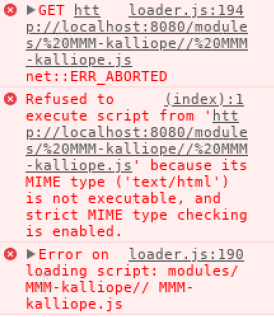
                                        sorry, but I am beginning with MM and Kaliope i think i have missed somthing

                                        S 1 Reply Last reply Reply Quote 0
                                        • S Offline
                                          sispheor @jchenaud
                                          last edited by

                                          @jchenaud Kalliope and MM are on the same host?

                                          1 Reply Last reply Reply Quote 0
                                          • J Offline
                                            jchenaud
                                            last edited by jchenaud

                                            my MM are on http://localhost:8080/
                                            i dont now for Kalliope
                                            i try to find with --debug but nothing

                                            i try to make my .yml but i have somme error.

                                            
                                            Traceback (most recent call last):
                                              File "/usr/local/bin/kalliope", line 11, in <module>
                                                load_entry_point('kalliope==0.5.1', 'console_scripts', 'kalliope')()
                                              File "/usr/local/lib/python2.7/dist-packages/kalliope-0.5.1-py2.7.egg/kalliope/__init__.py", line 136, in main
                                                brain_loader = BrainLoader(file_path=brain_file)
                                              File "/usr/local/lib/python2.7/dist-packages/kalliope-0.5.1-py2.7.egg/kalliope/core/Models/Singleton.py", line 6, in __call__
                                                cls._instances[cls] = super(Singleton, cls).__call__(*args, **kwargs)
                                              File "/usr/local/lib/python2.7/dist-packages/kalliope-0.5.1-py2.7.egg/kalliope/core/ConfigurationManager/BrainLoader.py", line 33, in __init__
                                                sl = SettingLoader()
                                              File "/usr/local/lib/python2.7/dist-packages/kalliope-0.5.1-py2.7.egg/kalliope/core/Models/Singleton.py", line 6, in __call__
                                                cls._instances[cls] = super(Singleton, cls).__call__(*args, **kwargs)
                                              File "/usr/local/lib/python2.7/dist-packages/kalliope-0.5.1-py2.7.egg/kalliope/core/ConfigurationManager/SettingLoader.py", line 66, in __init__
                                                self.settings = self._get_settings()
                                              File "/usr/local/lib/python2.7/dist-packages/kalliope-0.5.1-py2.7.egg/kalliope/core/ConfigurationManager/SettingLoader.py", line 102, in _get_settings
                                                default_stt_name = self._get_default_speech_to_text(settings)
                                              File "/usr/local/lib/python2.7/dist-packages/kalliope-0.5.1-py2.7.egg/kalliope/core/ConfigurationManager/SettingLoader.py", line 161, in _get_default_speech_to_text
                                                raise SettingNotFound("%s setting not found" % e)
                                            kalliope.core.ConfigurationManager.SettingLoader.SettingNotFound: 'default_speech_to_text' setting not found
                                            
                                            1 Reply Last reply Reply Quote 0

                                            Hello! It looks like you're interested in this conversation, but you don't have an account yet.

                                            Getting fed up of having to scroll through the same posts each visit? When you register for an account, you'll always come back to exactly where you were before, and choose to be notified of new replies (either via email, or push notification). You'll also be able to save bookmarks and upvote posts to show your appreciation to other community members.

                                            With your input, this post could be even better 💗

                                            Register Login

                                            • 1
                                            • 2
                                            • 3
                                            • 3 / 3
                                            • First post
                                              Last post
                                            Enjoying MagicMirror? Please consider a donation!
                                            MagicMirror created by Michael Teeuw.
                                            Forum managed by Sam, technical setup by Karsten.
                                            This forum is using NodeBB as its core | Contributors
                                            Contact | Privacy Policy