Read the statement by Michael Teeuw here.
MMM-MirrorMirrorOnTheWall installation issue
-
when building the alexa model and enter the interaction model, is this the correct model?
{
“interactionModel”: {
“languageModel”: {
“invocationName”: “magic mirror”,
“intents”: [
{
“name”: “AMAZON.FallbackIntent”,
“samples”: []
},
{
“name”: “AMAZON.CancelIntent”,
“samples”: []
},
{
“name”: “AMAZON.HelpIntent”,
“samples”: []
},
{
“name”: “AMAZON.StopIntent”,
“samples”: []
},
{
“name”: “MirrorMirrorHelloIntent”,
“slots”: [],
“samples”: [
“good evening”,
“good afternoon”,
“good morning”,
“hey”,
“hi”,
“hello”
]
},
{
“name”: “ShowTextIntent”,
“slots”: [
{
“name”: “displayText”,
“type”: “LIST_OF_TEXT”
}
],
“samples”: [
“say {displayText}”,
“display text of {displayText}”,
“show text of {displayText}”
]
},
{
“name”: “TurnOnModuleIntent”,
“slots”: [
{
“name”: “moduleName”,
“type”: “LIST_OF_MODULES”
}
],
“samples”: [
“open {moduleName}”,
"open module {moduleName} ",
“show {moduleName}”,
"show module {moduleName} ",
“turn on {moduleName}”,
"turn on module {moduleName} ",
“start {moduleName}”,
"start module {moduleName} "
]
},
{
“name”: “TurnOnAllModuleIntent”,
“slots”: [],
“samples”: [
“open all”,
“open all modules”,
“open every module”,
“open each module”,
“show all modules”,
“show me all modules”,
“show every module”,
“show each module”,
“turn on all”,
“turn on all modules”,
“turn on every module”,
“turn on each module”,
“start all”,
“start all modules”,
“start every module”,
“start each module”
]
},
{
“name”: “TurnOffAllModuleIntent”,
“slots”: [],
“samples”: [
“close all”,
“close all modules”,
“close every module”,
“close each module”,
“hide all”,
“hide all modules”,
“hide every module”,
“hide each module”,
“turn off all”,
“turn off all modules”,
“turn off every module”,
“turn off each module”
]
},
{
“name”: “TurnOffModuleIntent”,
“slots”: [
{
“name”: “moduleName”,
“type”: “LIST_OF_MODULES”
}
],
“samples”: [
“close {moduleName}”,
"close module {moduleName} ",
“hide {moduleName}”,
"hide module {moduleName} ",
“turn off {moduleName}”,
“turn off module {moduleName}”
]
},
{
“name”: “ShowImagesIntent”,
“slots”: [
{
“name”: “searchTerm”,
“type”: “LIST_OF_IMAGES”
}
],
“samples”: [
“find {searchTerm}”,
“find images of {searchTerm}”,
“find pictures of {searchTerm}”,
“show me {searchTerm}”,
“show me pictures of {searchTerm}”,
“show me images of {searchTerm}”,
“show pictures of {searchTerm}”,
“show images of {searchTerm}”,
“display pictures of {searchTerm}”,
“display images of {searchTerm}”
]
},
{
“name”: “ShowVideoIntent”,
“slots”: [
{
“name”: “searchTermVideo”,
“type”: “LIST_OF_VIDEOS”
}
],
“samples”: [
“show me how to {searchTermVideo}”,
“show me video of {searchTermVideo}”,
“show me a video of {searchTermVideo}”,
“show video of {searchTermVideo}”,
“show a video of {searchTermVideo}”,
“display video of {searchTermVideo}”,
“display a video of {searchTermVideo}”,
“find video of {searchTermVideo}”,
“find a video of {searchTermVideo}”
]
},
{
“name”: “AMAZON.MoreIntent”,
“samples”: []
},
{
“name”: “AMAZON.NavigateHomeIntent”,
“samples”: []
},
{
“name”: “AMAZON.NavigateSettingsIntent”,
“samples”: []
},
{
“name”: “AMAZON.NextIntent”,
“samples”: []
},
{
“name”: “AMAZON.PageUpIntent”,
“samples”: []
},
{
“name”: “AMAZON.PageDownIntent”,
“samples”: []
},
{
“name”: “AMAZON.PreviousIntent”,
“samples”: []
},
{
“name”: “AMAZON.ScrollRightIntent”,
“samples”: []
},
{
“name”: “AMAZON.ScrollDownIntent”,
“samples”: []
},
{
“name”: “AMAZON.ScrollLeftIntent”,
“samples”: []
},
{
“name”: “AMAZON.ScrollUpIntent”,
“samples”: []
}
],
“types”: [
{
“name”: “LIST_OF_TEXT”,
“values”: [
{
“name”: {
“value”: “hello”
}
},
{
“name”: {
“value”: “hello everyone”
}
},
{
“name”: {
“value”: “good morning”
}
},
{
“name”: {
“value”: “good morning to you”
}
},
{
“name”: {
“value”: “how are you doing”
}
}
]
},
{
“name”: “LIST_OF_MODULES”,
“values”: [
{
“name”: {
“value”: “calendar”
}
},
{
“name”: {
“value”: “current weather”
}
},
{
“name”: {
“value”: “smile test”
}
},
{
“name”: {
“value”: “compliments”
}
}
]
},
{
“name”: “LIST_OF_IMAGES”,
“values”: [
{
“name”: {
“value”: “queen”
}
},
{
“name”: {
“value”: “snow white”
}
},
{
“name”: {
“value”: “seven dwarfs”
}
},
{
“name”: {
“value”: “sharks”
}
},
{
“name”: {
“value”: “elon musk”
}
},
{
“name”: {
“value”: “apples”
}
},
{
“name”: {
“value”: “sea animals”
}
},
{
“name”: {
“value”: “octopus”
}
},
{
“name”: {
“value”: “volcanoes”
}
},
{
“name”: {
“value”: “birds”
}
},
{
“name”: {
“value”: “bill gates”
}
},
{
“name”: {
“value”: “animals”
}
},
{
“name”: {
“value”: “rattle snakes”
}
}
]
},
{
“name”: “LIST_OF_VIDEOS”,
“values”: [
{
“name”: {
“value”: “draw”
}
},
{
“name”: {
“value”: “paint”
}
},
{
“name”: {
“value”: “make slime”
}
},
{
“name”: {
“value”: “unlock locks”
}
},
{
“name”: {
“value”: “apples”
}
},
{
“name”: {
“value”: “bananas”
}
},
{
“name”: {
“value”: “movie trailer”
}
},
{
“name”: {
“value”: “video games”
}
},
{
“name”: {
“value”: “volcanoes”
}
},
{
“name”: {
“value”: “birds”
}
},
{
“name”: {
“value”: “bill gates”
}
},
{
“name”: {
“value”: “animals”
}
},
{
“name”: {
“value”: “rattle snakes”
}
},
{
“name”: {
“value”: “cats”
}
},
{
“name”: {
“value”: “dogs”
}
},
{
“name”: {
“value”: “lego superman”
}
},
{
“name”: {
“value”: “lego batman”
}
},
{
“name”: {
“value”: “apple and orange”
}
},
{
“name”: {
“value”: “evil queen”
}
}
]
}
]
}
}
} -
@oceank does it compile? what happens when you test? That model can vary, mine has been customized a bit.
-
@blackpanda OK well i think i got it to work but not really …it doesn’t seem like it is working right!!!
I changed the alexa.appId = APP_ID but when i test Lambda it is still giving this error onthe Lamda Test: application Id must be unique.START RequestId: 12e0e369-111e-11e9-9390-b5c3e0fcc19a Version: $LATEST 2019-01-05T19:14:08.827Z 12e0e369-111e-11e9-9390-b5c3e0fcc19a The applicationIds don't match: amzn1.ask.skill.[unique-value-here] and amzn1.ask.skill.e0223a06-d061-48bd-9b1c-XXX9a950fcf 2019-01-05T19:14:08.850Z 12e0e369-111e-11e9-9390-b5c3e0fcc19a { "errorMessage": "Invalid ApplicationId: amzn1.ask.skill.e0223a06-d061-48bd-9b1c-XXXX9a950fcf", "errorType": "Error", "stackTrace": [ "AlexaRequestEmitter.ValidateRequest (/var/task/node_modules/alexa-sdk/lib/alexa.js:157:27)", "HandleLambdaEvent.i18n.use.init (/var/task/node_modules/alexa-sdk/lib/alexa.js:123:29)", "/var/task/node_modules/i18next/dist/commonjs/i18next.js:190:9", "done (/var/task/node_modules/i18next/dist/commonjs/i18next.js:281:21)", "/var/task/node_modules/i18next/dist/commonjs/i18next.js:302:7", "I18n.loadResources (/var/task/node_modules/i18next/dist/commonjs/i18next.js:238:7)", "I18n.changeLanguage (/var/task/node_modules/i18next/dist/commonjs/i18next.js:301:10)", "load (/var/task/node_modules/i18next/dist/commonjs/i18next.js:186:14)", "I18n.init (/var/task/node_modules/i18next/dist/commonjs/i18next.js:195:7)", "AlexaRequestEmitter.HandleLambdaEvent (/var/task/node_modules/alexa-sdk/lib/alexa.js:114:32)" ] } END RequestId: 12e0e369-111e-11e9-9390-b5c3e0fcc19a REPORT RequestId: 12e0e369-111e-11e9-9390-b5c3e0fcc19a Duration: 208.20 ms Billed Duration: 300 ms Memory Size: 128 MB Max Memory Used: 65 MBOn a good note:
When i start the MMM-MirrorMirrorOnTheWall now i can see:cd ~/MagicMirror Display=:0 npm startConnected to AWS IoT:
Subscribed: etc etc …for all 4: new-text, new-images, change-module, new-video just like yours so it is connected to IoTHowever when i go to developer.alexa site and try to build the new interaction model using the drag and drop template i get this error
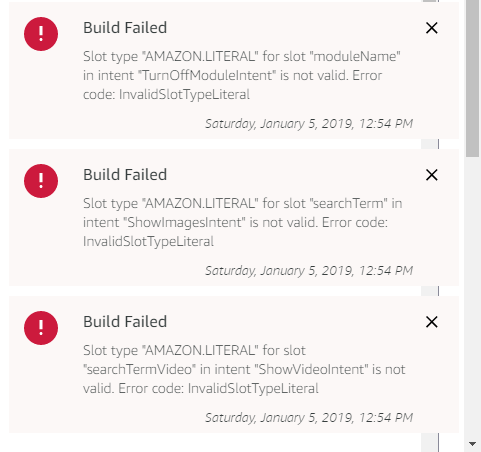
Again the Interaction Model Is the stock one that comes with the package form github
Lets get this sucker going it is driving me nuts… i can confirm that the AppID is the right one
Denis
-
@richland007 Yep. Ran into that one. The interaction model from the project is outdated. You’ll have to refactor it a bit.
AMAZON.LITERAL was deprecated and you’ll have to create a Custom literal (pretty easy to do from the UI).
Check this out: https://developer.amazon.com/docs/custom-skills/literal-slot-type-reference.html
Regarding the app id, you’re sure you copied the skill value and added it to the APP_ID variable before uploading it to Lambda? Also, did you disable skill verification in Lambda (this was mentioned in the install doc)?
-
@blackpanda said in MMM-MirrorMirrorOnTheWall installation issue:
Regarding the app id, you’re sure you copied the skill value and added it to the APP_ID variable before uploading it to Lambda? Also, did you disable skill verification in Lambda (this was mentioned in the install doc)?
Yes i sure did copy and paste it to the index.js file before uploading i tried it also twice just now i also made sure that i disabled the skill verification on Alexa Skill Kit (it says right now on Lambda: "We recommend you enable skill verification for Alexa Skill Kit to do that delete and read the skill etc etc…)
Its so wired … i just found that AMAZON.LITERAL post right before you posted here i will try to work as much asi can on it and ask for help again
D
-
@blackpanda OMG!!! thanx a MILION DUDE! im so happy, its all working now, video, pcitures, modules…everything =)
YES!
-
@blackpanda last question: If I made a picture search I see the pictures. But how do I clear those? same goes to video.
-
@oceank Cool beans. I think this was referenced in the installation doc passively. But you have to use your invocation command again and then “turn off {whatever you module is named}”
-
@blackpanda hmmm ok. So for example if I say " magic mirror…show pictures of dogs"
I can see all pictures of dogs on the mirror…how do I clear that? I mean what is the module name for that?
then I understand that I can say turn off (whatever) but I dont get what that module name is for clearing the pictures…
-
@oceank magic mirror… turn off {whatever you named your mm module}. Check out ModuleNames.json in your local mm module. There’s a mapping of variables to modules.
-
@blackpanda so this is what I have in my Modulenames.json
{
“alert”: “alert”,
“calendar”: “calendar”,
“clock”: “clock”,
“compliments”: “compliments”,
“current weather”: “currentweather”,
“weather forecast”: “weatherforecast”,
“news feed”: “newsfeed”,
“facial recognition”: “MMM-Facial-Recognition”,
“smile test”: “MMM-Smile”,
“globe”: “MMM-Globe”,
“jokes”: “MMM-jokes”,
“magic mirror”: “MMM-MirrorMirrorOnTheWall”
}witch one is for turning off pictures? or videos? to clear it.
-
@oceank Note: To clear the text/images/video displayed by this module, you can simply turn this module off.
I suppose that means closing MMM-MirrorMirrorOnTheWall module
-
@OceanK @Radu_Stancu “turn off magic mirror”
-
maybe something is wrong with my interaction model because when I say magic mirror…and then say turn off magic mirror…I get " closing all modules"
how does your interaction model look like? something is missing from mine I guess I posted earlier?
-
I have not managed to get the JSON code to build so I can
t help. Im trying to use the one you have posted. -
@Radu_Stancu aaah ok. Well that one posted is working great except I cannot clear videos nor pictures. So thats no good.
@blackpanda is clearing video/photos working for you? if so…any suggestion for solving it?
-
This post is deleted! -
@oceank Did you modify the AMAZON.LITERAL?
-
@oceank you have to understand what you’ve configured in your interaction model.
{ “name”: “TurnOffModuleIntent”, “slots”: [ { “name”: “moduleName”, “type”: “LIST_OF_MODULES” } ], “samples”: [ “close {moduleName}”, "close module {moduleName} ", “hide {moduleName}”, "hide module {moduleName} ", “turn off {moduleName}”, “turn off module {moduleName}” ] },Check and understand your interaction model and intents. Does the type “LIST_OF_MODULES” defined in your interaction model include the module that you are trying to turn off?
-
@blackpanda thanx for the info! I have to check it! because I can hide all other modules etc, except clearing video/pictures. Thanx a million!

Hello! It looks like you're interested in this conversation, but you don't have an account yet.
Getting fed up of having to scroll through the same posts each visit? When you register for an account, you'll always come back to exactly where you were before, and choose to be notified of new replies (either via email, or push notification). You'll also be able to save bookmarks and upvote posts to show your appreciation to other community members.
With your input, this post could be even better 💗
Register Login