Read the statement by Michael Teeuw here.
Google-route Citys disappear changing height/width
-
Hey Guys,
colud somebody explain to me why the citys are disappearing when i change the width or the height?
When they are on 250 px erverything is normal.
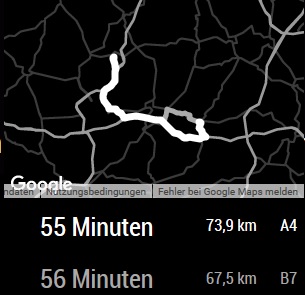
-
Tried to change the size of the modul in der custom.css. When i do that, the modul just moves to down or to side, out of the display.
Nobody with the same issue? -
This post is deleted! -
Changing the size of the module might not be enough. You might have to change the size of the map as well. Use the inspector that comes up when you start MM with
npm start devto figure out what elements you need to target in your CSS. -
Could you explain me how to do this?
-
@thedk start by reading through this thread:
It goes through how to use the dev tools console to inspect HTML elements for the CSS is use
If you still have questions, post back here and I’ll help as best I can.
-
Thanks for your help.
So i have to change the size of the region where the modul is i guess. -
@thedk and maybe the region where the map is displayed too. Very possiblenit is sized independently of the outer module wrapper. I can’t say for sure since I haven’t used the module but it would be where I would start looking if I wanted to resize it.
-
tested it and i dont know why, but it doesnt work.
Thats my custom.cssbody { } .normal { color: #fff; } .region.top.right, .region.top.left, .region.top.center { top: 80%; } .region.bottom.right, .region.bottom.center, .region.bottom.left { bottom: 80%; } -
Also with max-width and max-height the map doesnt get smaller, it just moves out of the Display.
Hello! It looks like you're interested in this conversation, but you don't have an account yet.
Getting fed up of having to scroll through the same posts each visit? When you register for an account, you'll always come back to exactly where you were before, and choose to be notified of new replies (either via email, or push notification). You'll also be able to save bookmarks and upvote posts to show your appreciation to other community members.
With your input, this post could be even better 💗
Register Login