MagicMirror Forum
    • Recent
    • Tags
    • Unsolved
    • Solved
    • MagicMirror² Repository
    • Documentation
    • 3rd-Party-Modules
    • Donate
    • Discord
    • Register
    • Login
    A New Chapter for MagicMirror: The Community Takes the Lead
    Read the statement by Michael Teeuw here.

    How to use the 'node_helper', 'serialport'

    Scheduled Pinned Locked Moved Development
    23 Posts 2 Posters 7.9k Views 2 Watching
    Loading More Posts
    • Oldest to Newest
    • Newest to Oldest
    • Most Votes
    Reply
    • Reply as topic
    Log in to reply
    This topic has been deleted. Only users with topic management privileges can see it.
    • N Offline
      nhpunch @sdetweil
      last edited by

      @sdetweil

      Thank you very much for your reply.

      You said that hardware and modules did not communicate, but communication is possible.

        serialport.open(function () {
              console.log('connect...');
              serialport.on('data', function(data) { // 아두이노로부터 전달된 데이터
                console.log('data received: ' + data);
              });
      
              setInterval( function() { // 2초마다 아두이노에게 문자열을 전송하는 예
                led = !led;
                serialport.write(led==true ? "1" : "0", function(err, result){
                  if(err){
                   console.log(err);
                  }
                });
              }, 5000);
            });


      In this code, it is possible to send a string to Arduino

      What I’m wondering is how to do sendSocketNotification ().

      I referenced https://github.com/MichMich/MagicMirror/tree/master/modules but did not understand

      Please let me know how to send it. Then I will be very thankful:folded_hands_light_skin_tone:

      S 1 Reply Last reply Reply Quote 0
      • S Offline
        sdetweil @nhpunch
        last edited by

        @nhpunch there are two parts of a MagicMirror module

        1. node_helper, runs on server, can use require(…some other library…)
        2. module_name.js, runs in browser, manages data presented on screen, cannot use require(…)

        so, the two parts can talk to each other by sending socket messages, using the supplied function
        sendSocketNotification(some_id_string, some_data_packet)

        the receiver of the message gets called at the function socketNotificationReceived(some_id_string, some_data_packet)

        get my sample module that has both parts, and uses timer,

        https://github.com/sdetweil/SampleModule
        

        also see the developers doc here

        https://github.com/MichMich/MagicMirror/tree/master/modules
        

        my sample implements all the functions so you can see them…
        not all are needed… so u can comment out the ones u don’t need to use

        config for my sample, to add to config.js is

          {
            module: "SampleModule",
            position: "center",
            config: {
              message: "this is a test from config entry"
            }
          },
        

        Sam

        How to add modules

        learning how to use browser developers window for css changes

        N 1 Reply Last reply Reply Quote 0
        • N Offline
          nhpunch @sdetweil
          last edited by

          @sdetweil

          I was really grateful and ran the sample code.

          But I do not know what to send as a module to do what I want.

          Can you help me with my module and node_helper?

          S 1 Reply Last reply Reply Quote 0
          • S Offline
            sdetweil @nhpunch
            last edited by

            @nhpunch sorry, i don’t understand

            Sam

            How to add modules

            learning how to use browser developers window for css changes

            S 1 Reply Last reply Reply Quote 0
            • S Offline
              sdetweil @sdetweil
              last edited by sdetweil

              @sdetweil you make up your own messages…

              so, you have a push button on the screen (done by module_name,js)… when push button,
              send button name and 1 to node helper… when it gets 1, it uses serial port to send to arduino.

              when u let up on button , you send 0…

              write out what you WANT the system to do… (design)

              then implement THAT design

              Sam

              How to add modules

              learning how to use browser developers window for css changes

              N 1 Reply Last reply Reply Quote 0
              • N Offline
                nhpunch @sdetweil
                last edited by

                @sdetweil

                I’m doing what you said, but I do not know how to send it to the node_helper when the button is pressed.

                I’m so sorry.

                S 1 Reply Last reply Reply Quote 0
                • S Offline
                  sdetweil @nhpunch
                  last edited by sdetweil

                  @nhpunch this.sendSocketNotification(…,…)

                  from the doc

                  this.sendSocketNotification(notification, payload)

                  notification String - The notification identifier.
                  payload AnyType - Optional. A notification payload.

                  If you want to send a notification to the node_helper, use the sendSocketNotification(notification, payload). Only the node_helper of this module will receive the socket notification.

                  Example:

                  this.sendSocketNotification('SET_CONFIG', this.config);
                  

                  you’ll see in the sample that this is used twice… once by the module_name.js to send the config over to the node_helper and once by the node_helper to send a new text string to the module_name.js to display

                  its also used in your module, from the first post above

                    start: function () {
                      Log.info("Starting module: " + this.name);
                      this.sendSocketNotification('CONFIG', this.config)
                    },
                  

                  Sam

                  How to add modules

                  learning how to use browser developers window for css changes

                  1 Reply Last reply Reply Quote 0
                  • N Offline
                    nhpunch
                    last edited by

                    @sdetweil

                    I did my best, but I did not succeed.

                    I’m a real idiot.

                    Can you take a look at my code?

                    S 1 Reply Last reply Reply Quote 0
                    • S Offline
                      sdetweil @nhpunch
                      last edited by

                      @nhpunch sure. Make a GitHub repo, and let me know

                      Sam

                      How to add modules

                      learning how to use browser developers window for css changes

                      1 Reply Last reply Reply Quote 0
                      • N Offline
                        nhpunch
                        last edited by nhpunch

                        https://github.com/nhpunch/sohard
                        

                        I created ‘is_Pushed’ and tried to work by repeating false, true when the button was pressed

                        S 1 Reply Last reply Reply Quote 0
                        • S Offline
                          sdetweil @nhpunch
                          last edited by sdetweil

                          @nhpunch said in How to use the 'node_helper', 'serialport':

                          https://github.com/nhpunch/sohard

                          Ok, the fundamental problem is what happens in getDom()…

                          until getDom() returns this modules contribution to the single web page… that content is NOT IN the DOM… It is just in memory in your module.

                          so the jquery $(button) will not work. ($ means document.) and the content is NOT IN the document… (yet)

                          SO, you could change to use the non jquery

                          button.addEventListener('click', ()=> {
                             	
                             	//$(button).on("click", function(){
                             		if(self.hidden){
                             		//	$(overlay).fadeIn(1000);
                             		//	$(button).fadeTo(1000, 0.3);
                             		//	$(text).html('OFF');
                                                         Log.log("button pushed 'on' ")
                             			self.hidden = false;  
                             			self._isPushed = false;
                             		}else{
                             		//	$(overlay).fadeOut(1000);
                             		//	$(button).fadeTo(1000, 1);  
                             		//	$(text).html('ON');
                                                         Log.log("button pushed 'off' ")
                             			self.hidden = true;
                             			self._isPushed = true;
                             		}
                             	});
                             	return wrapper;
                          

                          but… all the data elements button, overlay and text will be long gone by the time the button is pushed.
                          so you will have to redesign finding them again (document.getElementByID()… or something, a different jquery selector.)

                          OR

                          you can push the jquery code off into a timeout handler (wait a second or 2)…
                          but you will still have to redesign how to find the button… as its data element on the stack of getDom() will be long gone.

                          think of getDom() as a person taking notes… they write it down on their notepad.
                          then LATER they edit a big document and add their text…

                          until they complete that task, you can search thru the big document all u want, the text will NOT be there…

                          when I used the sample above, the button responded…

                          u know you can open the developers window (npm start dev) and select the console window,
                          and messages from the module_name.js will show there

                          message from the node_helper will appear in the terminal window where u issued npm start dev & (note the & at the end to allow the prompt to come back)…

                          Sam

                          How to add modules

                          learning how to use browser developers window for css changes

                          N 1 Reply Last reply Reply Quote 0
                          • N Offline
                            nhpunch @sdetweil
                            last edited by nhpunch

                            @sdetweil

                            const NodeHelper = require('node_helper')
                            const Serialport = require("serialport");
                            
                            module.exports = NodeHelper.create({
                            
                              start: function () {
                              },
                            
                              socketNotificationReceived: function (notification, payload) {
                            
                                if (notification === 'CONFIG') {
                                  const self = this;
                                  self.config = payload;
                                }
                                else if(notification ==='BUTTON_PRESSED')
                                {
                                var serialport = new Serialport('/dev/ttyACM0', {   
                            		baudRate: 9600
                            		});
                            
                                var led = 0;
                            
                                  serialport.open(function () {
                                    console.log('connect...');
                                    serialport.on('data', function(data) { // 아두이노로부터 전달된 데이터
                                      console.log('data received: ' + data);
                                    });
                                    
                                    if(this._isPushed==false)
                                    {
                                      serialport.write("0");
                                    }
                                    else if(this._isPushed==true)
                                    {
                                      serialport.write("1");
                                    }
                                  });
                                }
                              }, 
                            })


                            Thank you very much…!!! Overlay is not important.

                            It was working as you told me.

                            Currently, node_helper sets the following, but serial.write does not work. May I ask you one last time?

                            I’m really desperate:folded_hands_light_skin_tone: :folded_hands_light_skin_tone: :folded_hands_light_skin_tone: :folded_hands_light_skin_tone:

                            https://github.com/nhpunch/sohard
                            

                            I uploaded the Arduino code.

                            int led = 13;
                            
                            void setup() {
                              Serial.begin(9600);
                              pinMode(led, OUTPUT);
                              Serial.println(“hello”);
                            }
                            
                            void loop() {
                              static int incomingValue = 0; // nodeJS에서 보낸값
                            
                              if ( Serial.available() > 0 ) { // 뭔가 입력값이 있다면
                                incomingValue = Serial.read();
                                Serial.println(incomingValue);
                              }
                              
                              if ( incomingValue == 49 ) { // 값이 ‘1’ 이면
                              digitalWrite(13, HIGH); // LED를 켠다.
                              }
                              if ( incomingValue == 48 ) { // 값이 ‘0’ 이면
                              digitalWrite(13, LOW); // LED를 끈다.
                              }
                              deayl(2000);
                            }
                            
                            1 Reply Last reply Reply Quote 0
                            • S Offline
                              sdetweil
                              last edited by sdetweil

                              @nhpunch said in How to use the 'node_helper', 'serialport':

                                 if(this._isPushed==false)
                              

                              where is _isPushed defined or set?

                              i know it is in module_name.js, but node_helper cannot see it…

                              you should send that as the payload on button_pressed message

                              Sam

                              How to add modules

                              learning how to use browser developers window for css changes

                              1 Reply Last reply Reply Quote 0
                              • N Offline
                                nhpunch
                                last edited by

                                socketNotificationReceived: function (notification, payload) {
                                
                                    if (notification === 'CONFIG') {
                                      const self = this;
                                      self.config = payload;
                                    }
                                    else if(notification ==='BUTTON_PRESSED')
                                    {
                                      this._isPushed = payload;
                                    var serialport = new Serialport('/dev/ttyACM0', {   
                                		baudRate: 9600
                                		});


                                Is that right? I’m really sorry for you.

                                S 1 Reply Last reply Reply Quote 0
                                • S Offline
                                  sdetweil @nhpunch
                                  last edited by sdetweil

                                  @nhpunch yes if you send it that way

                                  this.sendSocketNotification(“BUTTON_PUSHED”,this._isPushed)

                                  Sam

                                  How to add modules

                                  learning how to use browser developers window for css changes

                                  N 2 Replies Last reply Reply Quote 0
                                  • N Offline
                                    nhpunch @sdetweil
                                    last edited by

                                    @sdetweil

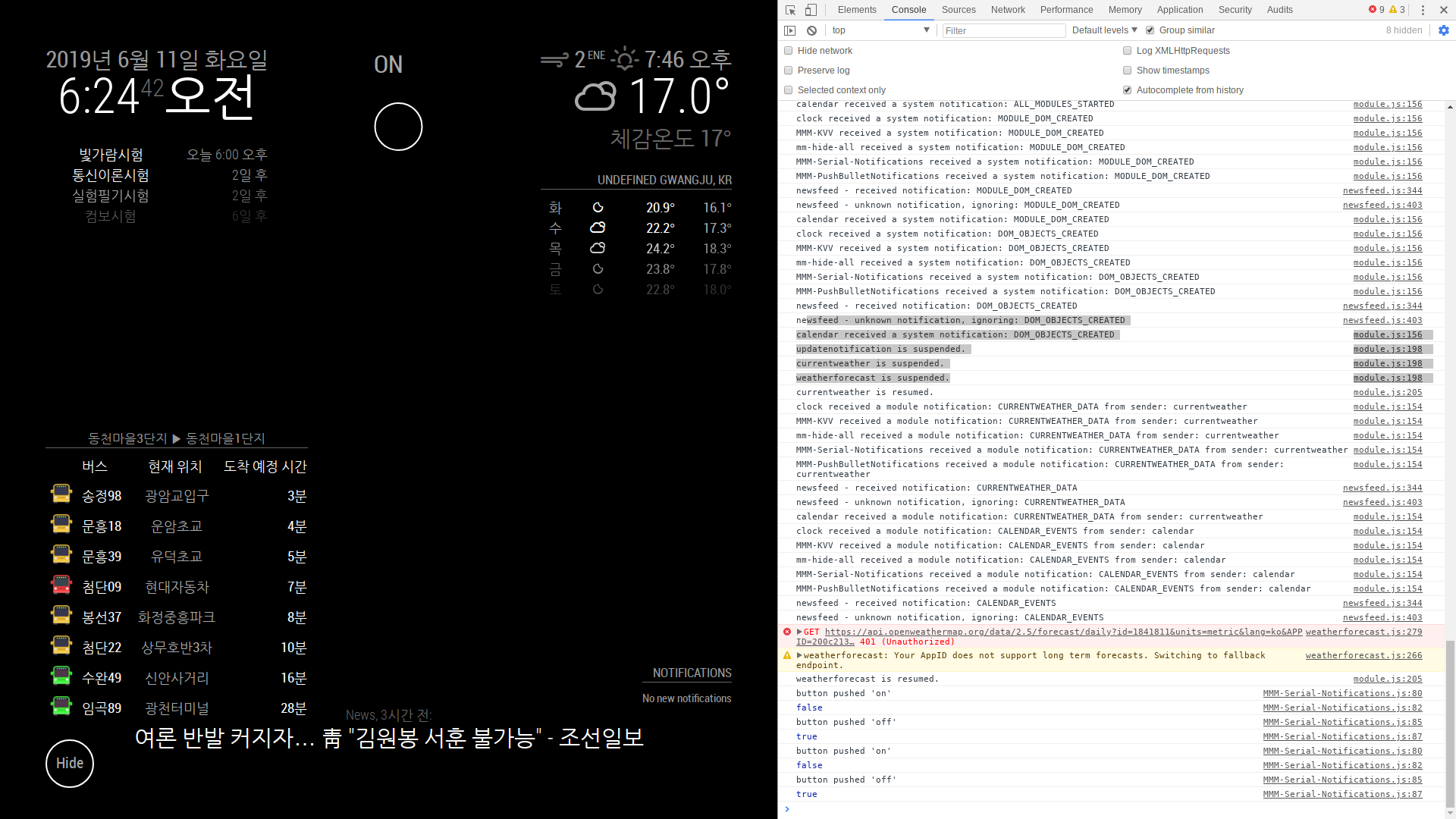
                                    0_1560202018149_2019-06-11-062442_1920x1080_scrot.png
                                    false, true works with two button in module

                                    It seems that the value can not be sent to the node_helper

                                    why?

                                    	buttonoff.addEventListener('click', ()=> {
                                    			Log.log("button pushed 'on'")
                                       			this._isPushed = false;
                                    			console.log(this._isPushed);
                                       	});
                                    	button.addEventListener('click', ()=> {
                                    			Log.log("button pushed 'off' ")
                                       			this._isPushed = true;
                                    			console.log(this._isPushed);
                                       	});
                                    

                                    this is module

                                              serialport.write(this._isPushed==true? '1' : '0');
                                    

                                    this is node_helper

                                    S 1 Reply Last reply Reply Quote 0
                                    • N Offline
                                      nhpunch @sdetweil
                                      last edited by

                                      @sdetweil

                                          else if(notification ==='BUTTON_PRESSED')
                                          {
                                            this._isPushed = payload;
                                            console.log(payload);
                                      

                                      ‘false’ is displayed in the terminal window

                                      ._isPushed is passed to node_helper, but I think that the changed value is not sent when the button is pressed.

                                      Please advise…:folded_hands_light_skin_tone: :folded_hands_light_skin_tone: :folded_hands_light_skin_tone:

                                      If this is solved, it’s really a success.:flexed_biceps_light_skin_tone:

                                      1 Reply Last reply Reply Quote 0
                                      • S Offline
                                        sdetweil @nhpunch
                                        last edited by

                                        @nhpunch said in How to use the 'node_helper', 'serialport':

                                        	buttonoff.addEventListener('click', ()=> {
                                        			Log.log("button pushed 'on'")
                                           			this._isPushed = false;
                                        			console.log(this._isPushed);
                                                                this.sendSocketNotification(“BUTTON_PUSHED”,this._isPushed)
                                           	});
                                         	 button.addEventListener('click', ()=> {
                                         			Log.log("button pushed 'off' ")
                                            			this._isPushed = true;
                                         			console.log(this._isPushed);
                                                                this.sendSocketNotification(“BUTTON_PUSHED”,this._isPushed)
                                                 });
                                        

                                        Sam

                                        How to add modules

                                        learning how to use browser developers window for css changes

                                        1 Reply Last reply Reply Quote 0
                                        • N Offline
                                          nhpunch
                                          last edited by

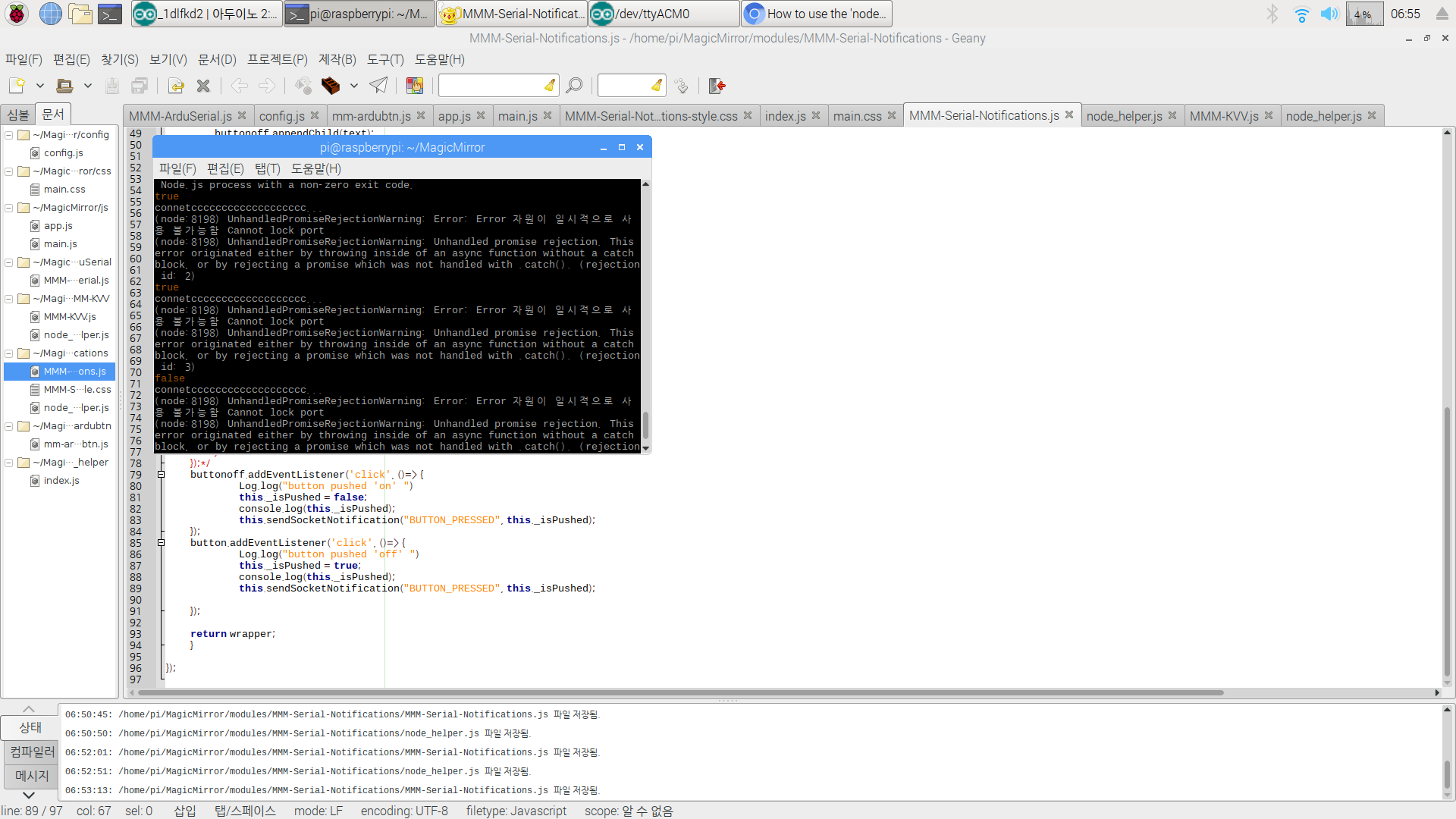
                                          0_1560203753373_2019-06-11-065545_1920x1080_scrot.png

                                          ._isPushed was sent

                                          but there was an error… im really sad

                                          S 1 Reply Last reply Reply Quote 0
                                          • S Offline
                                            sdetweil @nhpunch
                                            last edited by sdetweil

                                            @nhpunch that is in the node_helper, serial library

                                            looks like serialport.write(data: string|Buffer|Array,

                                            i don’t know anything about serial port api… looks like promise based, so would need callbacks or .then()

                                            Sam

                                            How to add modules

                                            learning how to use browser developers window for css changes

                                            N 1 Reply Last reply Reply Quote 0

                                            Hello! It looks like you're interested in this conversation, but you don't have an account yet.

                                            Getting fed up of having to scroll through the same posts each visit? When you register for an account, you'll always come back to exactly where you were before, and choose to be notified of new replies (either via email, or push notification). You'll also be able to save bookmarks and upvote posts to show your appreciation to other community members.

                                            With your input, this post could be even better 💗

                                            Register Login

                                            • 1
                                            • 2
                                            • 1 / 2
                                            • First post
                                              Last post
                                            Enjoying MagicMirror? Please consider a donation!
                                            MagicMirror created by Michael Teeuw.
                                            Forum managed by Sam, technical setup by Karsten.
                                            This forum is using NodeBB as its core | Contributors
                                            Contact | Privacy Policy