Read the statement by Michael Teeuw here.
YAPi0 Installer Stretch Lite
-
@bdream said in YAPi0 Installer Stretch Lite:
cd ~
export ELECTRON_MIRROR=“https://npm.taobao.org/mirrors/electron/”u need to be in the MagicMirror folder
cd ~/MagicMirror
I get the same error as you in the home folder
every command MagicMirror related MUST be done from the MagicMirror folder (except the install script from the product or forum links)
-
@sdetweil looks like once its messed up, its messed up, and u have to start over with
npm install --arch=armv71(from the magicmirror folder)
at least I had to…
-
Hi Sam, that was the first attempt I did anyway, starting in MagicMirror folder.
Only last I missed it :frowning_face:
I tried it again in this folder, but result is bad.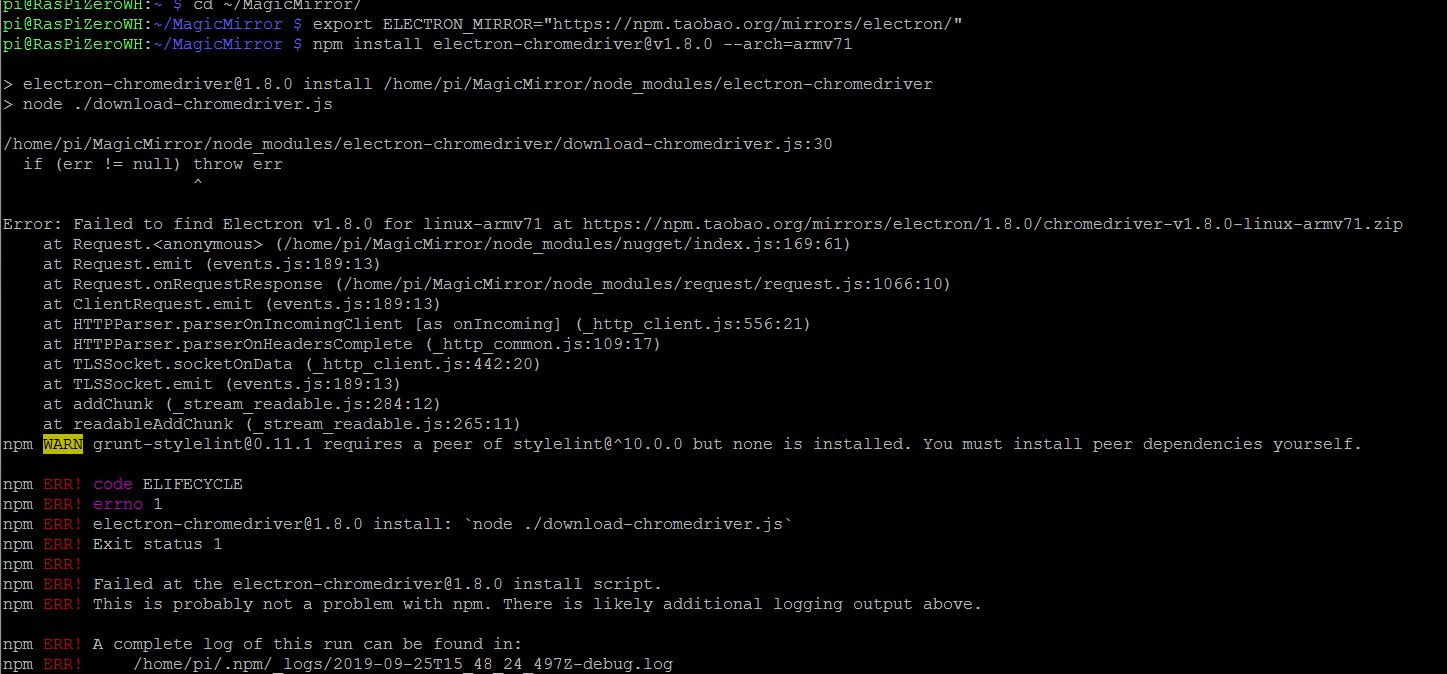
I guess it makes no sense working on this.
You said you have running multiple Pi0… let me try another one.Not starting with wrong way let me ask if my understanding is right.
-
It dosn’t matter if I run SSH or direkt with keyboard attached. Also changing for the different steps?
-
preperation as shown are done
sudo apt-get update sudo apt-get upgrade sudo apt-get dist-upgrade sudo apt-get autoremove && sudo reboot- I will run your updated script
bash -c "$(curl -sL https://www.dropbox.com/s/rlh710ng0zwv3vp/raspberry.sh?dl=0)"- start MM
Is this right?
-
-
@bdream my script does all the system updates too…
and it will start MM at the end if u use pm2.
I do all my work on my mirrors over ssh.
-
that’s great :grinning_face:
at the beginning it asks that’s not an Raspberry 2 or 3… continue?
So I try with Raspberry Zerro again.hope it will work now as I will be off next 2-3 weeks.
-
@bdream correct, just hit enter to continue
-
it’s running now.:crossed_fingers_medium-light_skin_tone:
-
Just get following warnings similar to my post 3 days ago
npm WARN npm npm does not support Node.js v10.15.2 npm WARN npm You should probably upgrade to a newer version of node as we npm WARN npm can't make promises that npm will work with this version. npm WARN npm Supported releases of Node.js are the latest releases of 4, 6, 7, 8, 9. npm WARN npm You can find the latest version at https://nodejs.org/ /usr/local/bin/npm -> /usr/local/lib/node_modules/npm/bin/npm-cli.js /usr/local/bin/npx -> /usr/local/lib/node_modules/npm/bin/npx-cli.js + npm@6.11.3 added 430 packages from 833 contributors in 299.269s npm installation Done! -
also this warning
Installing dependencies ... npm WARN deprecated time-grunt@2.0.0: Deprecated because Grunt is practically unmaintained. Move on to something better. This package will continue to work with Grunt v1, but it will not receive any updates. -
@bdream so far so good… ignore warnings… 1st upgraded npm to latest
-
< magicmirror2.8.0 install /home/pi/MagicMirror > cd vendor && npm install npm WARN optional SKIPPING OPTIONAL DEPENDENCY: fsevents@1.2.4 (node_modules/fsevents): npm WARN notsup SKIPPING OPTIONAL DEPENDENCY: Unsupported platform for fsevents@1.2.4: wanted {"os":"darwin","arch":"any"} (current: ("os":"linux","arch":"arm") -
@bdream so far so good…
-
npm WARN grunt-stylelint@0.11.1 requires a peer of stylelint@^10.0.0 but none is installed. You must install peer dependencies yourself. -
@bdream still good
-
now the question if I want to use pm2 for autostart MM I will state YES
-
@bdream correct, reply yes or y
-
[PM2][WARN] Application MagicMirror not running, starting...
[PM2] App [MagicMirror] launched (1 instances)

App name | id | version | node | pid | status | restart | uptime | cpu | mem | user | watching
MagicMirror | 0 | 2.8.0 | fork | 4835 | online | 0 | 3s | 0% | 2.5 MB | pi | enabled

use 'pm2 show <id|name>' to get more details about an app
I used pm2 show mm and got [PM2][WARN] mm doesn’t exist
-
@bdream said in YAPi0 Installer Stretch Lite:
pm2 show mm
correct,
its called MagicMirror
App name | id | version |
MagicMirror | 0 | 2.8.0 |says its running…
show me pm2 logs
you can also use the id, instead of the name
pm2 start 0,
pm2 stop 0,
pm2 show 0…etc
-
here you are
last 3 rows coming multiple times
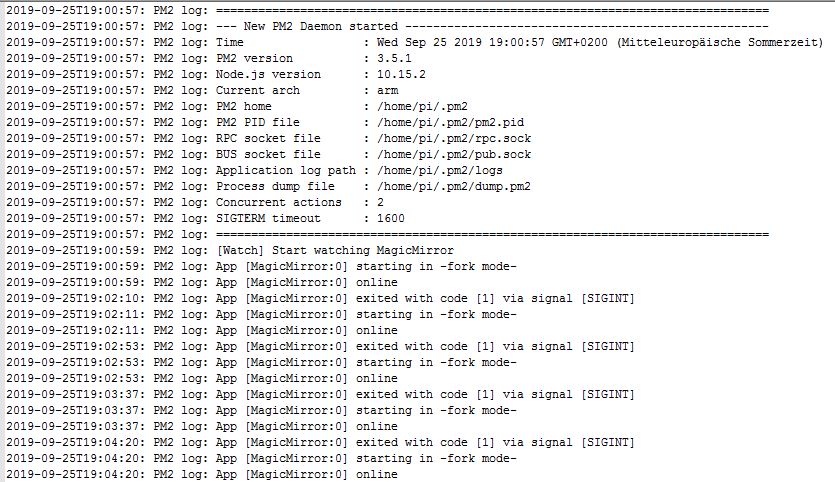
-
@bdream ok, there are two logs… error and out…
maybe best to do
cd ~/MagicMirror
pm2 stop 0
npm start
Hello! It looks like you're interested in this conversation, but you don't have an account yet.
Getting fed up of having to scroll through the same posts each visit? When you register for an account, you'll always come back to exactly where you were before, and choose to be notified of new replies (either via email, or push notification). You'll also be able to save bookmarks and upvote posts to show your appreciation to other community members.
With your input, this post could be even better 💗
Register Login