MagicMirror Forum
    • Recent
    • Tags
    • Unsolved
    • Solved
    • MagicMirror² Repository
    • Documentation
    • 3rd-Party-Modules
    • Donate
    • Discord
    • Register
    • Login
    A New Chapter for MagicMirror: The Community Takes the Lead
    Read the statement by Michael Teeuw here.

    MMM-CalendarExtMinimonth

    Scheduled Pinned Locked Moved Utilities
    13 Posts 4 Posters 4.0k Views 4 Watching
    Loading More Posts
    • Oldest to Newest
    • Newest to Oldest
    • Most Votes
    Reply
    • Reply as topic
    Log in to reply
    This topic has been deleted. Only users with topic management privileges can see it.
    • ? Offline
      A Former User
      last edited by

      MMM-CalendarExtMinimonth

      Mini month plugin for MMM-CalendarExt/MMM-CalendarExt2

      This module is a plugin of MMM-CalendarExt/MMM-CalendarExt2 modules. So it couldn’t work standalone. You need MMM-CalendarExt or MMM-CalendarExt2

      Screenshot

      screenshot

      [card:eouia/MMM-CalendarExtMinimonth]

      LordyL 1 Reply Last reply Reply Quote 1
      • LordyL Offline
        Lordy @Guest
        last edited by Lordy

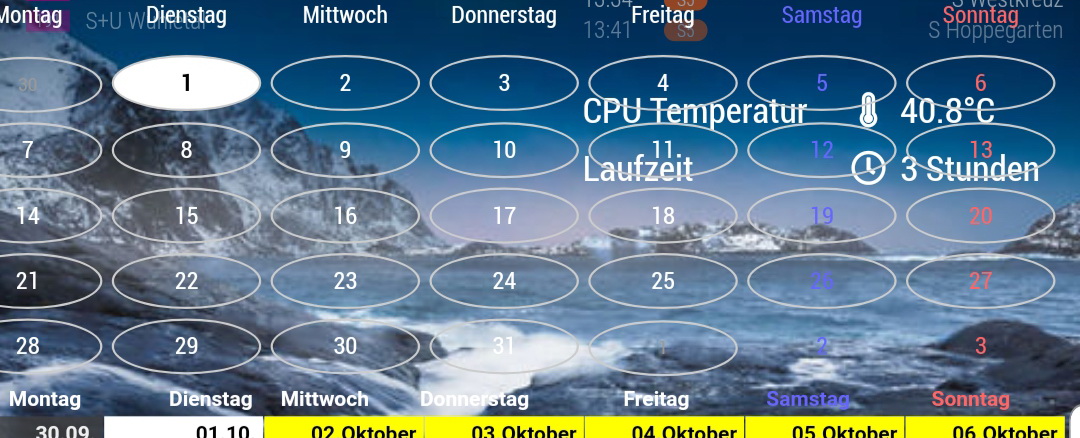
        @Sean Hello Sean,
        the calendar looks good. Can you please tell me where you can remove the outline of the “not this month”?

        Kind regards Lordy0_1569928343596_Screenshot_20191001-130713_Samsung Internet.jpg image url)

        ? 1 Reply Last reply Reply Quote 0
        • ? Offline
          A Former User @Lordy
          last edited by

          @Lordy sorry I can’t catch you. tell me details more?

          LordyL 1 Reply Last reply Reply Quote 0
          • LordyL Offline
            Lordy @Guest
            last edited by

            @Sean !
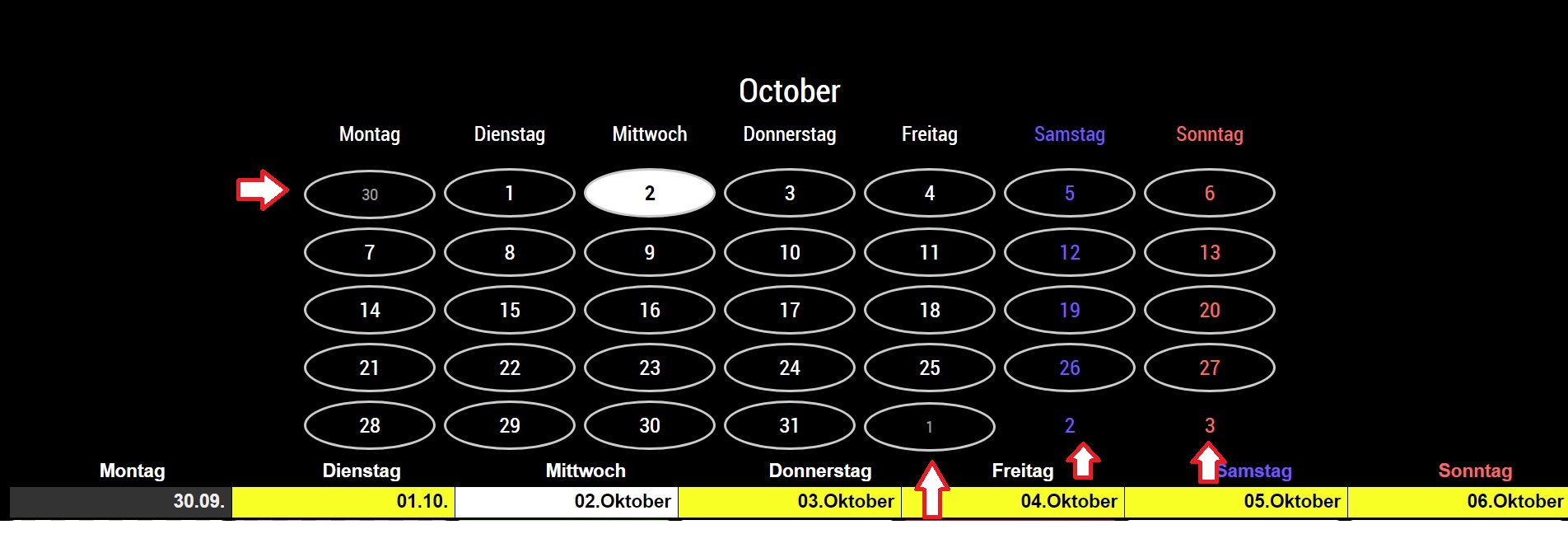
            0_1569999902855_Calendar.jpg

            Hello,

            As you can see at the arrows, I am different in the border of the days (not this month).
            How do I get that all borders are the same? Either all or all gone (not this month).
            I hope you will be satisfied with the picture for explanation.
            (“translate by google”)

            Lordy

            LordyL 1 Reply Last reply Reply Quote 0
            • LordyL Offline
              Lordy @Lordy
              last edited by

              Hello,

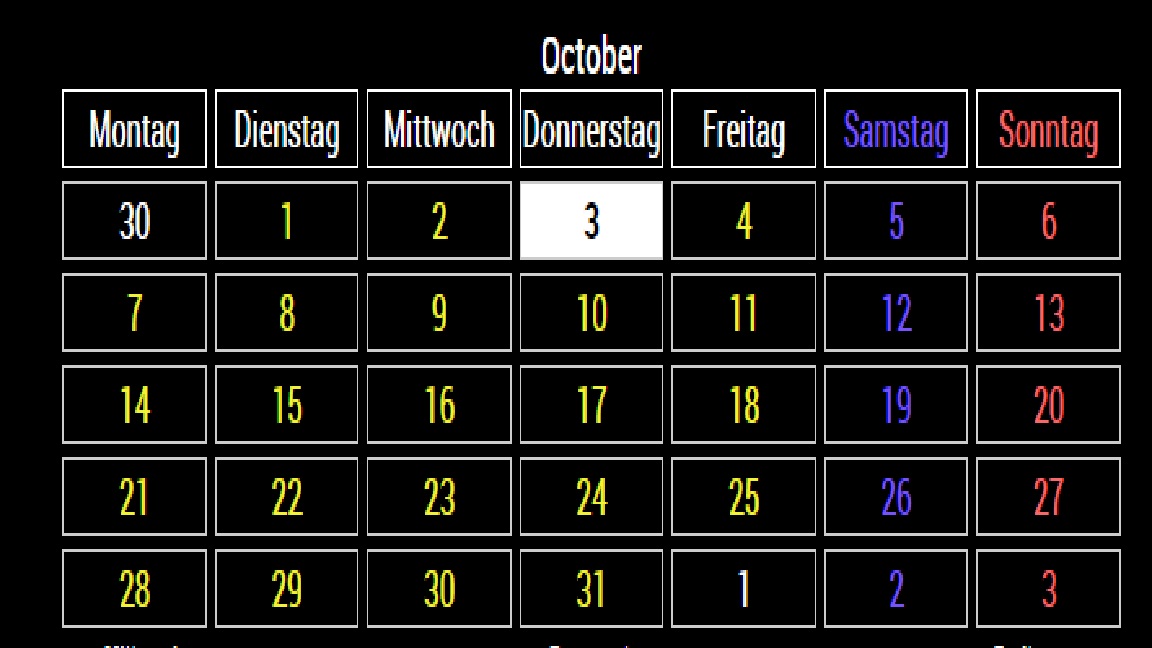
              It has resolved itself.
              The border had something to do with the events, if there were no events, then the border was missing.
              Good work, looks good. :)

              Thanks Lordy
              0_1570085738990_Calendar 2.jpg

              ? 1 Reply Last reply Reply Quote 0
              • ? Offline
                A Former User @Lordy
                last edited by

                @Lordy
                Sorry, late for the reply. I’m on vacation in Budapest. :D
                As I described in CSS, the border will be displayed when the event exists. Of course, you can modify it in your css/custom.css

                LordyL 1 Reply Last reply Reply Quote 0
                • LordyL Offline
                  Lordy @Guest
                  last edited by

                  @Sean said in MMM-CalendarExtMinimonth:

                  Sorry, late for the reply. I’m on vacation in Budapest.
                  As I described in CSS, the border will be displayed when the event exists. Of course, you can modify it in your

                  Hello,
                  Have fun on holiday and enjoy it. :)
                  Lordy

                  1 Reply Last reply Reply Quote 0
                  • M Offline
                    mrdenmark
                    last edited by

                    @Sean ,
                    i’m trying to modify this module to display 3 months,could you point me in the direction of which lines of code to change?

                    ? 1 Reply Last reply Reply Quote 0
                    • ? Offline
                      A Former User @mrdenmark
                      last edited by

                      @mrdenmark
                      Impossible. Sorry. If you are a kind of Javascript Guru, you can modify or make a new one for yourself without my help. But it is not so easy to direct some specific point to modify simply to unexperienced.

                      M 1 Reply Last reply Reply Quote 0
                      • M Offline
                        mrdenmark @Guest
                        last edited by

                        @Sean
                        Definitely not a JavaScript guru unfortunately!
                        Is it possible to make it show a different month and run 2 instances of the module then?

                        ? 1 Reply Last reply Reply Quote 0
                        • ? Offline
                          A Former User @mrdenmark
                          last edited by A Former User

                          @mrdenmark
                          I think multi-instances are possible, but all the instances will display same result unless you modify the source of each instance.
                          To modify the range of events to get, edit updateRequest2() function (for MMM-CalendarExt2).

                          So to do as your wish,

                          1. Copy the module twice, and rename them.
                          2. Modify some unique DOM ids to another, for preventing duplication.
                          dom.id = "CXMM"
                          

                          (https://github.com/eouia/MMM-CalendarExtMinimonth/blob/21b46f72ea48c581c032623b64e8db66f7a1ac53/MMM-CalendarExtMinimonth.js#L40 )

                          colors.id = "CXMM_COLOR_TRICK"
                          

                          (https://github.com/eouia/MMM-CalendarExtMinimonth/blob/21b46f72ea48c581c032623b64e8db66f7a1ac53/MMM-CalendarExtMinimonth.js#L65)

                          var trick = document.getElementById("CXMM_COLOR_TRICK")
                          

                          (https://github.com/eouia/MMM-CalendarExtMinimonth/blob/21b46f72ea48c581c032623b64e8db66f7a1ac53/MMM-CalendarExtMinimonth.js#L109)
                          3. Modify filter of events to get.
                          https://github.com/eouia/MMM-CalendarExtMinimonth/blob/21b46f72ea48c581c032623b64e8db66f7a1ac53/MMM-CalendarExtMinimonth.js#L232-L233

                          var from = moment().add(1, "month").startOf("month").startOf('week').format("X")
                          var to = moment().add(1, "month").endOf("month").endOf('week').format("X")
                          

                          Above code will get the next month’s events. (not tested, but you can catch the idea)

                          Anyway, I still doubt it is really useful? This plugin module shows only whether event is or not on that day. Is it really needed?

                          M 1 Reply Last reply Reply Quote 0
                          • M Offline
                            mrdenmark @Guest
                            last edited by

                            @Sean
                            thanks for the info,i’ll give it a try.
                            i’m not actually trying to this for the events but for when you want to look at dates several months ahead,for planning a holiday or similar,it was the second picture in this thread which gave me the idea-https://forum.magicmirror.builders/topic/11552/my-second-magic-mirror-without-a-mirror/2
                            it’s possible of course with other modules but i prefer the looks of yours better.
                            again,thanks for the advice.

                            1 Reply Last reply Reply Quote 0
                            • BKeyportB Offline
                              BKeyport Module Developer
                              last edited by BKeyport

                              For those who run across this and want to do it yourself:

                              @Sean said in MMM-CalendarExtMinimonth:

                              @mrdenmark
                              I think multi-instances are possible, but all the instances will display same result unless you modify the source of each instance.

                              This is correct. I’ve got it completely solved. Instructions are written for Raspberry Pi.

                              1. Install the module once using original directions.
                              2. Change to the modules home directory:
                              cd ~/MagicMirror/modules
                              
                              1. Copy the module from it’s install directory to a new directory, so you have multiple copies (I used MMM-CalendarExtMinimonth2):
                              cp -r MMM-CalendarExtMinimonth MMM-CalendarExtMinimonth2
                              
                              1. Change to new directory:
                              cd MMM-CalendarExtMinimonth2
                              
                              1. Rename files MMM-CalendarExtMinimonth.css and MMM-CalendarExtMinimonth.js to new directory name.
                              mv MMM-CalendarExtMinimonth.css MMM-CalendarExtMinimonth2.css
                              mv MMM-CalendarExtMinimonth.js MMM-CalendarExtMinimonth2.js
                              
                              5.  Modify the following lines - // and everything after it is my note: 
                              
                              ```js
                              dom.id = "CXMM" // Change "CXMM" to another id, I used CXMM2
                              colors.id = "CXMM_COLOR_TRICK" // Change CXMM to same as dom.id  
                              var trick = document.getElementById("CXMM_COLOR_TRICK") // Change CXMM again
                              Module.register("MMM-CalendarExtMinimonth", { // Change MMM-CalendarExtMinimonth to name of directory
                              return ["MMM-CalendarExtMinimonth.css"] // change to name of CSS file. 
                              
                              1. Change every instance of ‘moment()’ to ‘moment().add(1, “month”)’ in the file except for the two “Today” calls:

                              Example:

                              // Change
                              
                              var startCalDate = moment().locale(locale).startOf('month').startOf('week')
                              var endCalDate = moment().locale(locale).endOf('month').endOf('week')
                              
                              // To: 
                              
                              var startCalDate = moment().add(1, "month").locale(locale).startOf('month').startOf('week')
                              var endCalDate = moment().add(1, "month").locale(locale).endOf('month').endOf('week')
                              ```js 
                              // DO NOT CHANGE THESE
                              // var startToday (If today is the 15th, it'll mark the 15th of next month as today if it's changed)
                              // var endToday (If today is the 15th, it'll mark the 15th of next month as today if it's changed)
                              // moment. (No "()") - Other function, not using moment library
                              //  moment(anything) - special function
                              
                              1. In the renamed CSS file change all instances of CXMM to new dom.id name - If you don’t do this, you’ll get a string of numbers up the side.

                              2. In your config.js file - call it as a separate module:

                              {
                              module: "MMM-CalendarExtMinimonth2",
                              position: "bottom_right",
                              refreshInterval: 60*2.5*1000,
                              }, 
                              {
                              module: "MMM-CalendarExtMinimonth",
                              position: "bottom_right",
                              refreshInterval: 60*2.5*1000,
                              }, 
                              

                              Make other changes to CSS as for default instructions.

                              Enjoy!
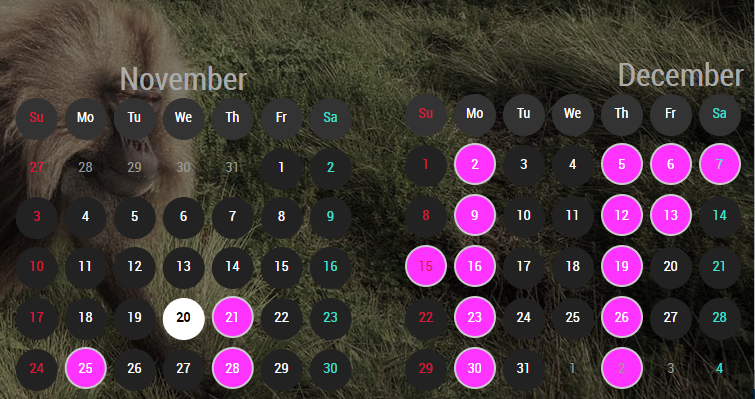
                              0_1574317441674_Capture.PNG

                              The "E" in "Javascript" stands for "Easy"

                              1 Reply Last reply Reply Quote 1

                              Hello! It looks like you're interested in this conversation, but you don't have an account yet.

                              Getting fed up of having to scroll through the same posts each visit? When you register for an account, you'll always come back to exactly where you were before, and choose to be notified of new replies (either via email, or push notification). You'll also be able to save bookmarks and upvote posts to show your appreciation to other community members.

                              With your input, this post could be even better 💗

                              Register Login

                              • 1 / 1
                              • First post
                                Last post
                              Enjoying MagicMirror? Please consider a donation!
                              MagicMirror created by Michael Teeuw.
                              Forum managed by Sam, technical setup by Karsten.
                              This forum is using NodeBB as its core | Contributors
                              Contact | Privacy Policy