MagicMirror Forum
    • Recent
    • Tags
    • Unsolved
    • Solved
    • MagicMirror² Repository
    • Documentation
    • 3rd-Party-Modules
    • Donate
    • Discord
    • Register
    • Login
    A New Chapter for MagicMirror: The Community Takes the Lead
    Read the statement by Michael Teeuw here.

    MMM-DumpsterDay

    Scheduled Pinned Locked Moved Utilities
    83 Posts 11 Posters 57.8k Views 12 Watching
    Loading More Posts
    • Oldest to Newest
    • Newest to Oldest
    • Most Votes
    Reply
    • Reply as topic
    Log in to reply
    This topic has been deleted. Only users with topic management privileges can see it.
    • B Offline
      BD0G
      last edited by BD0G

      0_1573536694796_basic_red.png

      Save the file I uploaded (right click -Save Image As) to this directory MagicMirror/modules/MMM-DumpsterDay/imgs

      Then change your MagicMirror/modules/MMM-DumpsterDay/MMM-DumpsterDay.css file so that it has this entry

      .basicDiv{
      	height:70px;
      	width:20%;
      	background-image: url(imgs/basic_red.png);
      	background-repeat: no-repeat;
      	background-position: center center;
      	background-size: contain;
      	overflow: auto;
      	display:inline-block;
      
      
      M 1 Reply Last reply Reply Quote 0
      • B Offline
        BD0G
        last edited by

        I have learned alot during the process to get this module working.

        1. Getting only 2 of the cans to show up.

        One must set all of the cans to true and adjust the dates within the MagicMirror/config/config.js file the very first time and save the file.

        So these lines must be set to true
        enableBasic: true,
        enablePlastic: true,
        enableLandscape: true,

        Then launch MagicMirror. Then shut down MagicMirror and change the can or cans that one does not want to be shown on screen by changing the setting to false.

        For instance,
        enableBasic: true,
        enablePlastic: false,
        enableLandscape: true,

        Save the file and restart MagicMirror. This will display the cans selected.
        Strange behavior , but thats what I found.

        I also needed to change the date on each of the cans within the same MagicMirror/config/config.js file

        basicStartDate: “11.13.2019”,
        plasticStartDate: “11.13.2019”,
        landscapeStartDate: “11.13.2019”,

        to reflect the same dates . If I left
        plasticStartDate: “11.13.2019”,

        as the default date then the recycle nor the landscape can would show up.

        1. Changing the size of the cans. Initially the can size on my MagicMirror were way too big and I needed to modify the

        MagicMirror/modules/MMM-DumpsterDay/MMM-DumpsterDay.css file.

        I changed the value for height from 120 px (I think this was the default size -maybe 200px) to 70px and that turned out to be a good size.

        .basicDiv{
        	height:70px; // I changed this line to 70px
        	width:20%;
        	background-image: url(imgs/basic.png);
        	background-repeat: no-repeat;
        	background-position: center center;
        	background-size: contain;
        	overflow: auto;
        	display:inline-block;
        }
        
        .landscapeDiv{
        	height:70px;  // I changed this line to 70px
        	width:20%;
        	background-image: url(imgs/landscape.png);
        	background-repeat: no-repeat;
        	background-position: center center;
        	background-size: contain;
        	overflow: auto;
        	display:inline-block;
        }
        
        
        .plasticDiv{
        	height:70px;  //I changed this line to 70px
        	width:20%;
        	background-image: url(imgs/recycle_yellow.png);
        	background-repeat: no-repeat;
        	background-position: center center;
        	background-size: contain;
        	overflow: auto;
        	display:inline-block;
        
        D 1 Reply Last reply Reply Quote 0
        • M Offline
          mrdenmark @BD0G
          last edited by

          @BD0G
          fantastic,thankyou,the helpfulness of people on tghis forum never ceases to surprise me!

          B 1 Reply Last reply Reply Quote 0
          • B Offline
            BD0G @mrdenmark
            last edited by BD0G

            @mrdenmark So I take it that worked as intended? :)

            You are welcome. I have just been focused on getting this module to work. Trash day is in 2 days. LOL!

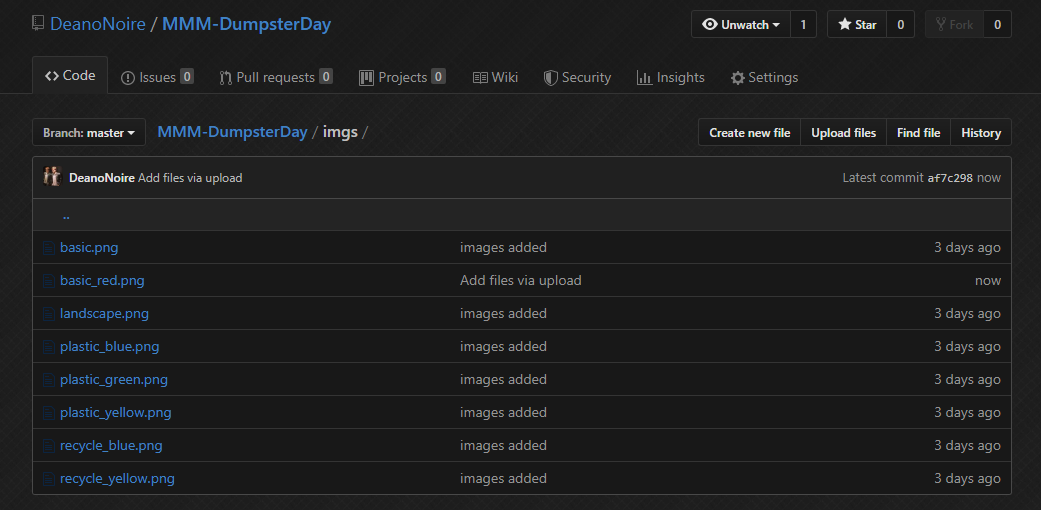
            Hopefully we can have @DeanoNoire add the red trashcan to the github repository under images just in case someone else wants that color for thier trash can as well.

            D M 2 Replies Last reply Reply Quote 0
            • B Offline
              BD0G
              last edited by BD0G

              What I have yet to figure out is how to get the basic trash can and the landscape can to be shown with less space between them. It appears as if there is enough space between those 2 cans to show the recycle can and since its set to false it is not shown onscreen , but there is a blank space between the cans for it to fit.

              I want the 2 cans centered and with less space between them.

              Here is the current spacing
              DropBox Link

              D 1 Reply Last reply Reply Quote 0
              • D Offline
                DeanoNoire @BD0G
                last edited by DeanoNoire

                @BD0G

                I also needed to change the date on each of the cans within the same MagicMirror/config/config.js file

                basicStartDate: “11.13.2019”,
                plasticStartDate: “11.13.2019”,
                landscapeStartDate: “11.13.2019”,

                Please note the date format in the config should be DD.MM.YYYY, the only format making sense :P

                If you were testing this on 11.11.2019, the month and day commutable :D

                B 1 Reply Last reply Reply Quote 0
                • B Offline
                  BD0G @DeanoNoire
                  last edited by BD0G

                  @DeanoNoire Thats not how the default dates in the MagicMirror/config/config.js were listed from what I recall. They were/are MM.DD.YYYY.

                  Here is the sample entry that is on the github repository and it lists 24.10.2019 which has to be MM:DD:YYYY. There is no 24th month. :)

                  enableBasic: true, 				// Enable basic trashcan 
                  	basicStartDate: "24.10.2019", 	// The first dumpster day (Always use 2 digit dates (01 instead of 1))
                  	basicDateDiff_1: 14,			// Trashday reoccurance - Default: 14 (every 14 days)
                  	basicNotifyDayBefore: true,		//Default: true - If you want the notification to appear also the day before the dumpster day
                  	
                  enablePlastic: true,			// Same values as basic but for Plastic
                  	plasticStartDate: "16.01.2019", 
                  	plasticDateDiff_1: 28,
                  	plasticNotifyDayBefore: true,	
                  
                  	enableLandscape: false,			// Same values as basic but for Landscape
                  	landscapeStartDate: "29.10.2019",
                  	landscapeDateDiff_1: 28,		
                  	landscapeNotifyDayBefore: true,
                  
                  
                  D 1 Reply Last reply Reply Quote 0
                  • D Offline
                    DeanoNoire @BD0G
                    last edited by

                    @BD0G That would be playing with the width of the elements in the css file. I will check the options of making it a config key as well. But later today - just got to work :)
                    Thanks for all the ideas and work done! :)

                    1 Reply Last reply Reply Quote 0
                    • D Offline
                      DeanoNoire @BD0G
                      last edited by

                      @BD0G
                      0_1573539688283_433415f3-f6fa-4bc0-a71a-25f00520e2cd-image.png
                      added :)

                      B 1 Reply Last reply Reply Quote 0
                      • B Offline
                        BD0G @DeanoNoire
                        last edited by BD0G

                        @DeanoNoire Just saw that! Thanks!
                        Error in spelling of the word clone in the instructions. Its spelled colne.

                        Just FYI.

                        1 Reply Last reply Reply Quote 0
                        • D Offline
                          DeanoNoire @BD0G
                          last edited by

                          @BD0G Exactly: 24 = DD, 10=MM, 2019=YYYY, so 24.10.2019 is DD.MM.YYYY, an European standard format :)
                          What I quoted from your post: 11.13.2019 is not applicable as there is no 13th month :)

                          var startDateYear = startDate.substring(6,10);
                          var startDateMonth = startDate.substring(3,5);
                          var startDateDay = startDate.substring(0,2);

                          That’s the exact code that cuts the date to year, month and day variables, so day is the first two numbers, month are another two numbers and year are last four numbers :)

                          B 1 Reply Last reply Reply Quote 1
                          • B Offline
                            BD0G
                            last edited by

                            This post is deleted!
                            1 Reply Last reply Reply Quote 0
                            • B Offline
                              BD0G @DeanoNoire
                              last edited by

                              @DeanoNoire Ahh , thats what is causing the issue.
                              US Format is Month:Day:Year and not
                              the European Standard Day:Month:Year.

                              1 Reply Last reply Reply Quote 1
                              • M Offline
                                mrdenmark @BD0G
                                last edited by

                                @BD0G
                                i thought i had it working but no,all the icons show up ok but i can’t get them showing on the correct days,either all or basic.
                                what did you change on the date?both entries look the same to me,also,did you leave the entry at false?does it still show on the expected day?

                                1 Reply Last reply Reply Quote 0
                                • B Offline
                                  BD0G
                                  last edited by

                                  I set up my config.js to todays date (for testing) so that I could see the trash can icons show up. The format that one needs to use is Day.Month.Year on the
                                  basicStartDate:
                                  plasticStartDate:
                                  landscapeStartDate:
                                  lines

                                  Here is my config.js which does display the cans as it should.

                                  		{
                                  	module:"MMM-DumpsterDay",
                                  	position:"bottom_bar",
                                  	config: {
                                  		refreshInterval: 18000000, // Default: 18000000 = 5 hours
                                  		pulse: true, 			   // Default: true - Makes the module pulsating
                                  
                                  		enableBasic: true, 				// Enable basic trashcan 
                                  		basicStartDate: "11.11.2019", 	// The first dumpster day (Always use 2 digit dates (01 instead of 1))
                                  		basicDateDiff_1: 7,			// Trashday reoccurance - Default: 14 (every 14 days)
                                  		basicNotifyDayBefore: true,		//Default: true - If you want the notification to appear also the day before the dumpster day
                                  		
                                  		enablePlastic: false,			// Same values as basic but for Plastic
                                  		plasticStartDate: "11.11.2019", 
                                  		plasticDateDiff_1: 28,
                                  		plasticNotifyDayBefore: true,	
                                  
                                  		enableLandscape: true,			// Same values as basic but for Landscape
                                  		landscapeStartDate: "11.11.2019",
                                  		landscapeDateDiff_1: 14,		
                                  		landscapeNotifyDayBefore: true,
                                  		}		
                                  		},
                                  

                                  When I change the dates to the 13th of this month then the trash cans are not shown as they should not be shown until the day BEFORE trash day and the DAY of trash day. Which would be tomorrow and the day after.

                                  M 1 Reply Last reply Reply Quote 0
                                  • M Offline
                                    mrdenmark @BD0G
                                    last edited by

                                    @BD0G
                                    and you leave enableplastic set to false?and it still shows up on the weeks it should?

                                    1 Reply Last reply Reply Quote 0
                                    • M Offline
                                      mrdenmark
                                      last edited by sdetweil

                                      if i use this config all bins show-

                                      {
                                      	module:"MMM-DumpsterDay",
                                      	position:"top_left",
                                      	config: {
                                      		refreshInterval: 18000000, // Default: 18000000 = 5 hours
                                      		pulse: false, 			   // Default: true - Makes the module pulsating
                                      
                                      		enableBasic: true, 				// Enable basic trashcan 
                                      		basicStartDate: "12.11.2019", 	// The first dumpster day (Always use 2 digit dates (01 instead of 1))
                                      		basicDateDiff_2: 7,			// Trashday reoccurance - Default: 14 (every 14 days)
                                      		basicNotifyDayBefore: true,		//Default: true - If you want the notification to appear also the day before the dumpster day
                                      		
                                      		enablePlastic: true,			// Same values as basic but for Plastic
                                      		plasticStartDate: "12.11.2019", 
                                      		plasticDateDiff_2: 14,
                                      		plasticNotifyDayBefore: true,	
                                      
                                      		enableLandscape: true,			// Same values as basic but for Landscape
                                      		landscapeStartDate: "12.11.2019",
                                      		landscapeDateDiff_2: 14,		
                                      		landscapeNotifyDayBefore: true,
                                      		}		
                                      		},
                                      

                                      if i use this then 2 bins show-

                                      {
                                      	module:"MMM-DumpsterDay",
                                      	position:"top_left",
                                      	config: {
                                      		refreshInterval: 18000000, // Default: 18000000 = 5 hours
                                      		pulse: false, 			   // Default: true - Makes the module pulsating
                                      
                                      		enableBasic: true, 				// Enable basic trashcan 
                                      		basicStartDate: "12.11.2019", 	// The first dumpster day (Always use 2 digit dates (01 instead of 1))
                                      		basicDateDiff_2: 7,			// Trashday reoccurance - Default: 14 (every 14 days)
                                      		basicNotifyDayBefore: true,		//Default: true - If you want the notification to appear also the day before the dumpster day
                                      		
                                      		enablePlastic: false,			// Same values as basic but for Plastic
                                      		plasticStartDate: "12.11.2019", 
                                      		plasticDateDiff_2: 14,
                                      		plasticNotifyDayBefore: true,	
                                      
                                      		enableLandscape: true,			// Same values as basic but for Landscape
                                      		landscapeStartDate: "12.11.2019",
                                      		landscapeDateDiff_2: 14,		
                                      		landscapeNotifyDayBefore: true,
                                      		}		
                                      		},


                                      but if i change it to either of these then only the basic shows up -

                                      enablePlastic: true,			// Same values as basic but for Plastic
                                      		plasticStartDate: "18.11.2019",
                                      

                                      or

                                      enablePlastic: false,			// Same values as basic but for Plastic
                                      		plasticStartDate: "18.11.2019",code_text
                                      

                                      maybe i’m misunderstanding but it seems the second last one is the one i require.

                                      for reference my red get picked up every monday and the other 2 alternate every 2 weeks,again on monday

                                      M D 2 Replies Last reply Reply Quote 0
                                      • M Offline
                                        mrdenmark @mrdenmark
                                        last edited by

                                        @mrdenmark apologies foe formatting above!

                                        S 1 Reply Last reply Reply Quote 0
                                        • D Offline
                                          DeanoNoire @mrdenmark
                                          last edited by

                                          @mrdenmark if you set the date to 18.11.2019 and the occurance is every 14 days then it’s correct :)
                                          If the enable value is true - the image is not visible as it’s not a trashcan day.
                                          If the enable value is false - the part of the module is disabled and is not evaluated at all. Also I recommend to use start dates from the past, not future :)

                                          1 Reply Last reply Reply Quote 0
                                          • B Offline
                                            BD0G
                                            last edited by BD0G

                                            Since the Red Can graphic was added to the github repository my MagicMirror update-notification module indicates an update is needed to the MMM-DumpsterDay module. This made me think that it would be good to add the update process to the github repository instructions.

                                            I just did a
                                            git fetch and then a
                                            git pull

                                            from within the MagicMirror/modules/MMM-DumpsterDay sub directory and that updated the module.

                                            D 1 Reply Last reply Reply Quote 0

                                            Hello! It looks like you're interested in this conversation, but you don't have an account yet.

                                            Getting fed up of having to scroll through the same posts each visit? When you register for an account, you'll always come back to exactly where you were before, and choose to be notified of new replies (either via email, or push notification). You'll also be able to save bookmarks and upvote posts to show your appreciation to other community members.

                                            With your input, this post could be even better 💗

                                            Register Login

                                            • 1
                                            • 2
                                            • 3
                                            • 4
                                            • 5
                                            • 2 / 5
                                            • First post
                                              Last post
                                            Enjoying MagicMirror? Please consider a donation!
                                            MagicMirror created by Michael Teeuw.
                                            Forum managed by Sam, technical setup by Karsten.
                                            This forum is using NodeBB as its core | Contributors
                                            Contact | Privacy Policy