MagicMirror Forum
    • Recent
    • Tags
    • Unsolved
    • Solved
    • MagicMirror² Repository
    • Documentation
    • 3rd-Party-Modules
    • Donate
    • Discord
    • Register
    • Login
    A New Chapter for MagicMirror: The Community Takes the Lead
    Read the statement by Michael Teeuw here.

    Magic Mirror will not boot but Pi will, Cache issue?

    Scheduled Pinned Locked Moved Unsolved Troubleshooting
    25 Posts 2 Posters 7.7k Views 2 Watching
    Loading More Posts
    • Oldest to Newest
    • Newest to Oldest
    • Most Votes
    Reply
    • Reply as topic
    Log in to reply
    This topic has been deleted. Only users with topic management privileges can see it.
    • T Offline
      tkaauf32
      last edited by tkaauf32

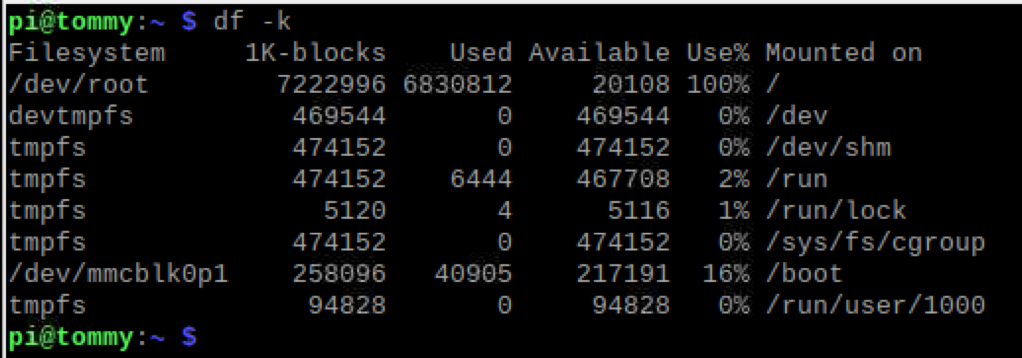
      0_1577725265087_95c0ffa2-6bf6-459a-9e75-d1ee858e6efa-image.png Screen Shot 2019-12-30 at 11.00.55 AM

      So this is what that displays. And I really don’t understand why it is taking up so much space because it worked previously. I don’t know what to remove to give more space?

      S 1 Reply Last reply Reply Quote 0
      • S Offline
        sdetweil @tkaauf32
        last edited by

        @tkaauf32 thats only of your home folder… usually not a problem

        notice I had /

        du -a / 2>/dev/null | sort -n -r | head -n 10
        

        Sam

        How to add modules

        learning how to use browser developers window for css changes

        1 Reply Last reply Reply Quote 0
        • T Offline
          tkaauf32
          last edited by

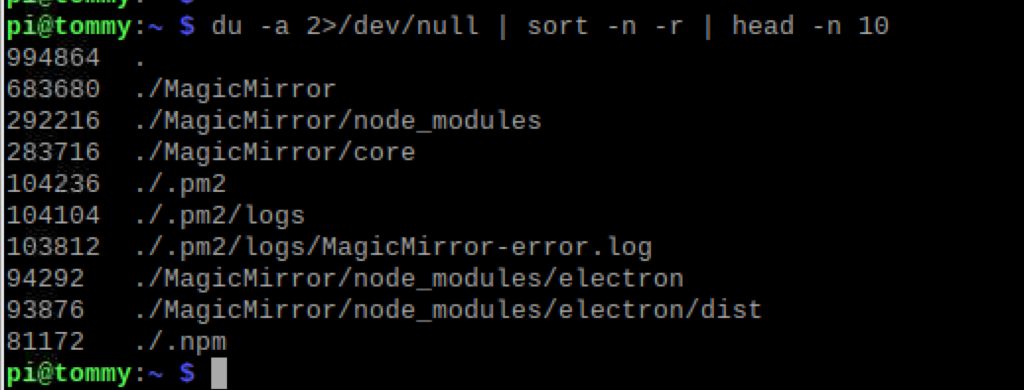
          Okay so after typing correctly (my apologies, im not very savvy in this)
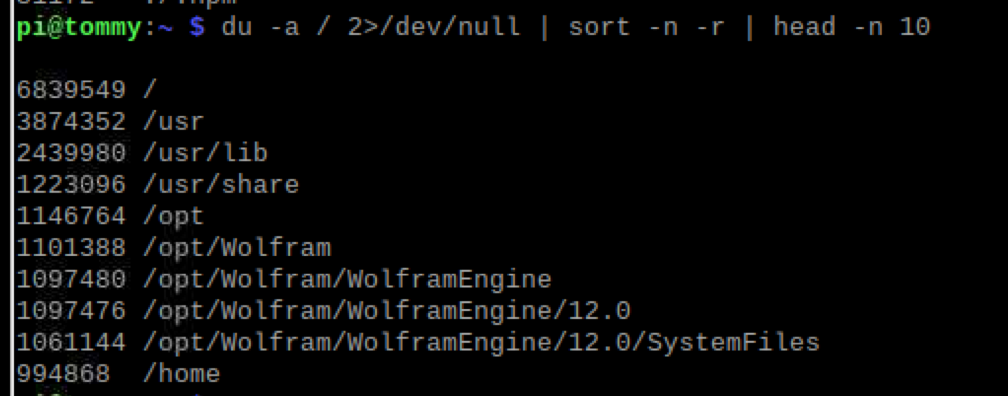
          0_1577725523781_910bc738-b0da-4dea-96a3-1b1e1ecdf7ba-image.png

          Screen Shot 2019-12-30 at 11.04.44 AM

          S 1 Reply Last reply Reply Quote 0
          • S Offline
            sdetweil @tkaauf32
            last edited by

            @tkaauf32 change head -n 10 to -n 20

            Sam

            How to add modules

            learning how to use browser developers window for css changes

            1 Reply Last reply Reply Quote 0
            • T Offline
              tkaauf32
              last edited by

              I hope you can decipher this haha

              0_1577726759666_d55e67d9-9db4-4a13-9820-e92f4186c64d-image.png Screen Shot 2019-12-30 at 11.04.44 AM

              S 1 Reply Last reply Reply Quote 0
              • S Offline
                sdetweil @tkaauf32
                last edited by

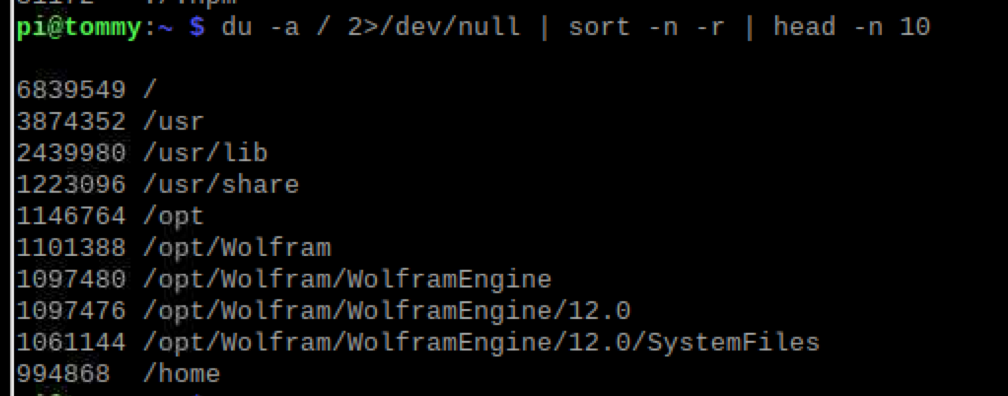
                @tkaauf32 need with head -n 20, to give more lines of output

                /opt/Wolfram is taking a bit of space

                Sam

                How to add modules

                learning how to use browser developers window for css changes

                T 1 Reply Last reply Reply Quote 0
                • T Offline
                  tkaauf32 @sdetweil
                  last edited by

                  @sdetweil I pasted the wrong image. Thanks for your patience with me
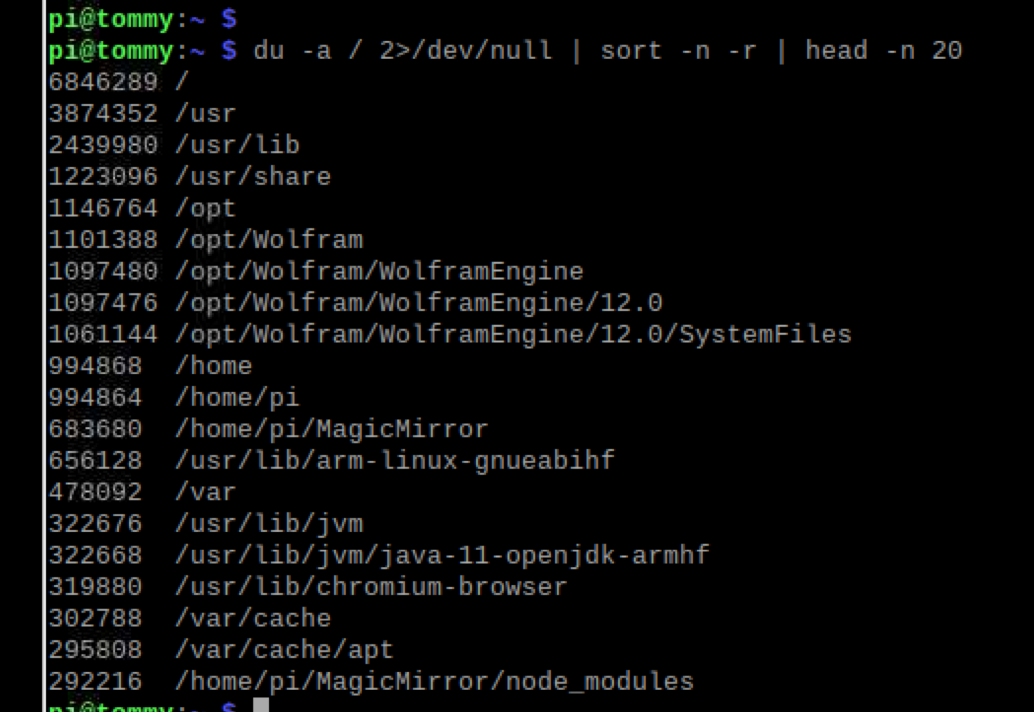
                  0_1577727269763_ff6f75b7-7d77-4203-b3c3-6b434617c8a2-image.png Screen Shot 2019-12-30 at 11.25.35 AM

                  S 1 Reply Last reply Reply Quote 0
                  • S Offline
                    sdetweil @tkaauf32
                    last edited by

                    @tkaauf32 its not the logs… not even showing in the top 20.

                    that /opt/Wolfram is taking 16.7 % or disk space (1146764/6846289)
                    /usr/lib & share is taking 53%
                    I would guess that your memory card is too small…

                    what size is it?
                    what did u add last?

                    Sam

                    How to add modules

                    learning how to use browser developers window for css changes

                    T 1 Reply Last reply Reply Quote 0
                    • T Offline
                      tkaauf32 @sdetweil
                      last edited by

                      @sdetweil I guess I need to delete the wolfram. I’m using an 8GB but I have’t manually changed anything so I’m surprised that it doesn’t work anymore. Maybe the logs put it over the edge.

                      S 1 Reply Last reply Reply Quote 0
                      • S Offline
                        sdetweil @tkaauf32
                        last edited by

                        @tkaauf32 logs are pretty small… do the du /var/logs | sort | head thing, just on the logs folder…

                        Sam

                        How to add modules

                        learning how to use browser developers window for css changes

                        T 1 Reply Last reply Reply Quote 0
                        • T Offline
                          tkaauf32 @sdetweil
                          last edited by

                          @sdetweil Permission denied. Also tried it with /logs and /log. /log says “is a directory” and the latter says permission denied

                          S 1 Reply Last reply Reply Quote 0
                          • S Offline
                            sdetweil @tkaauf32
                            last edited by sdetweil

                            @tkaauf32 sorry, typo

                             du  /var/log 2>/dev/null
                            

                            may need sudo

                            sudo du  /var/log 2>/dev/null
                            

                            Sam

                            How to add modules

                            learning how to use browser developers window for css changes

                            T 1 Reply Last reply Reply Quote 0
                            • T Offline
                              tkaauf32 @sdetweil
                              last edited by

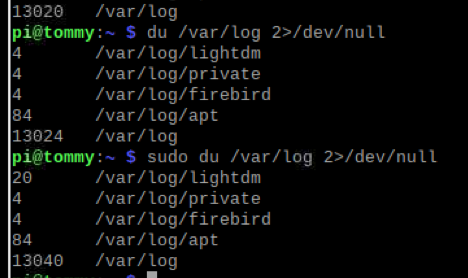
                              @sdetweil 0_1577729903525_58f7d43d-6607-4c09-9993-a57e643fa893-image.png

                              S 1 Reply Last reply Reply Quote 0
                              • S Offline
                                sdetweil @tkaauf32
                                last edited by sdetweil

                                @tkaauf32 so, all the space is used IN the /var/log folder itself, not subfolders…

                                but 13040 is a tiny 0.1% WAY below the critical threshold… (if u are over 80% used, you are in trouble)

                                Sam

                                How to add modules

                                learning how to use browser developers window for css changes

                                T 1 Reply Last reply Reply Quote 0
                                • T Offline
                                  tkaauf32 @sdetweil
                                  last edited by

                                  @sdetweil said in Magic Mirror will not boot but Pi will, Cache issue?:

                                  o

                                  I don’t know what that means haha

                                  S 1 Reply Last reply Reply Quote 0
                                  • S Offline
                                    sdetweil @tkaauf32
                                    last edited by

                                    @tkaauf32 said in Magic Mirror will not boot but Pi will, Cache issue?:

                                    I don’t know what that means haha

                                    the du command dumps out blocks used, and does it by folder.

                                    in the last screenshot, there are 13040 blocks used for the entire /var/log subtree
                                    there are 6846289 blocks of space on the memory card disk volume… so, divide

                                    (13040*100) by 6846289 to get the percentage used = 0.19046815%

                                    in system design, if u ever got over 80% used of the total capacity (memory, cpu, disk space), the system is in danger of failure ‘soon’… (I am a long time (45 yrs) computer system solution designer)

                                    Sam

                                    How to add modules

                                    learning how to use browser developers window for css changes

                                    T 1 Reply Last reply Reply Quote 0
                                    • T Offline
                                      tkaauf32 @sdetweil
                                      last edited by

                                      @sdetweil I’m just curious how you think it went over 80% total capacity? Will this continue to happen over time? Or should i just buy a 16gig SD and it will likely solve the issue?

                                      S 1 Reply Last reply Reply Quote 0
                                      • S Offline
                                        sdetweil @tkaauf32
                                        last edited by

                                        @tkaauf32 the bigger disk will help…

                                        the Wolfram stuff is eating a lot of space.,

                                        but I don’t see anything else really large taking a lot of space… MagicMirror is only taking about 10%
                                        home folder is under 15%

                                        Sam

                                        How to add modules

                                        learning how to use browser developers window for css changes

                                        1 Reply Last reply Reply Quote 0

                                        Hello! It looks like you're interested in this conversation, but you don't have an account yet.

                                        Getting fed up of having to scroll through the same posts each visit? When you register for an account, you'll always come back to exactly where you were before, and choose to be notified of new replies (either via email, or push notification). You'll also be able to save bookmarks and upvote posts to show your appreciation to other community members.

                                        With your input, this post could be even better 💗

                                        Register Login

                                        • 1
                                        • 2
                                        • 1 / 2
                                        • First post
                                          Last post
                                        Enjoying MagicMirror? Please consider a donation!
                                        MagicMirror created by Michael Teeuw.
                                        Forum managed by Sam, technical setup by Karsten.
                                        This forum is using NodeBB as its core | Contributors
                                        Contact | Privacy Policy