Read the statement by Michael Teeuw here.
MMM-TelegramBot error.
-
@Sean
/home/pi/MagicMirror/modules/MMM-TelegramBot/.git/logs/HEAD
0000000000000000000000000000000000000000 9fbce6fe4439d56d46527cd4441bf4cd823bc56b pi <pi@pi.(none)> 1581112213 +0300 clone: from https://github.com/eouia/MMM-TelegramBot.git -
@Sean
I do not know how to view the log file -
@Mrtrol2013
:(If you are using
pm2to execute MagicMirror,pm2 logsOr,
just stoppm2and executenpm start devon MagicMirror directory.pm2 stop all cd ~/MagicMirror npm start devIt will show runtime log on your terminal shell.
-
-
@Sean said in MMM-TelegramBot error.:
Or,
just stop pm2 and execute npm start dev on MagicMirror directory.
pm2 stop all
cd ~/MagicMirror
npm start dev
It will show runtime log on your terminal shell.
http://skrinshoter.ru/s/090220/qvC2cwfM?a
http://skrinshoter.ru/s/090220/38fGJyAM?a -
@Mrtrol2013
Usuallyconnect ETIMEDOUTerror will occur when your device would be behind a proxy. Was it accessing the internet via a proxy server? (perhaps from a school or company)
Or your firewall would be blocking it. Check it. (Sorry I can’t help these kinds of issues. Discuss with your network admin.) -
@Mrtrol2013
Anyway, I’ll make some patch for using under a proxy. But cannot guarantee when it is done. -
@Sean thank you
-
@Sean I’m very interested in your module, I can use it with a proxy at the moment. Can you explain how to make it work?
-
@Mrtrol2013
adding some proxy host and path info on request to telegram server, might be needed. not so complex, but real test be required. -
@Sean
Please can you have a look at my log file. I have made a fresh install but my problem still persist. When i use the /help and the other commands in the help file, then i get the expected response. But when i use the
/commands or
/mychatid then i get a responce of“Unrecognized command. Say what?”
I have played with some of the settings of my phone and tried to whitelist my phones ip in the config file but still no joy. Any idea from your side looking at the log? I also dont see my log file grow as i try the commands on my phone
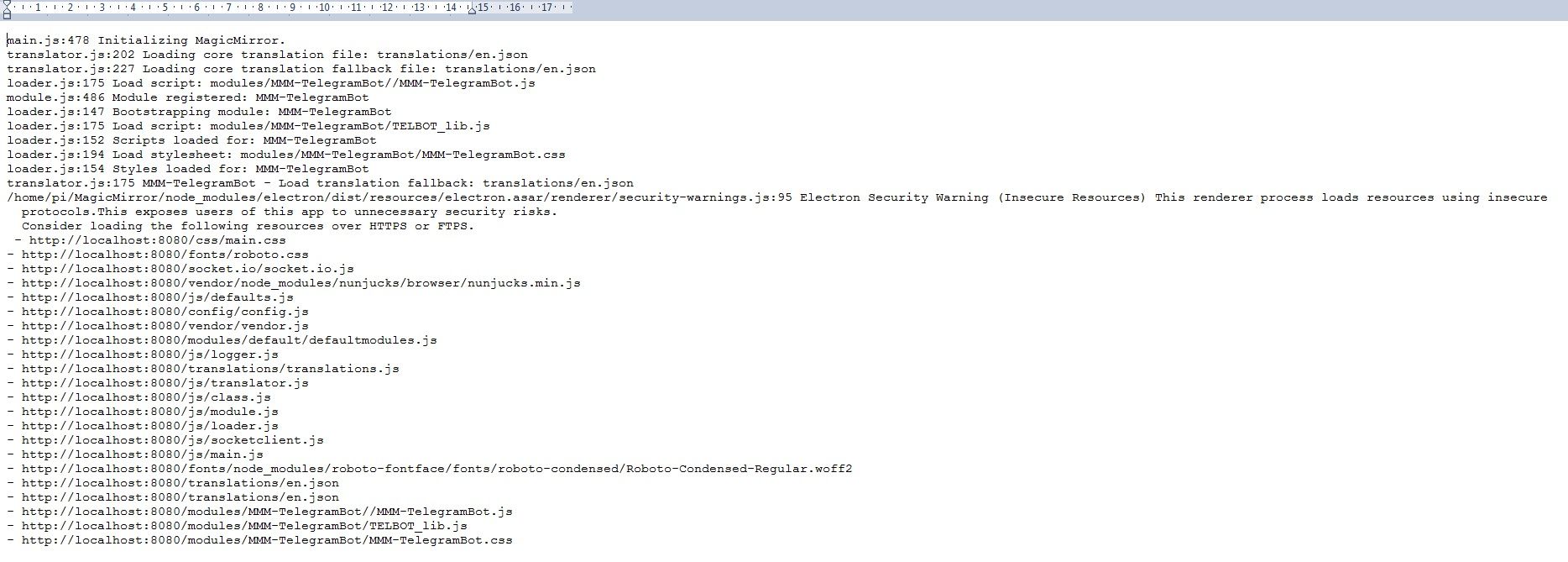
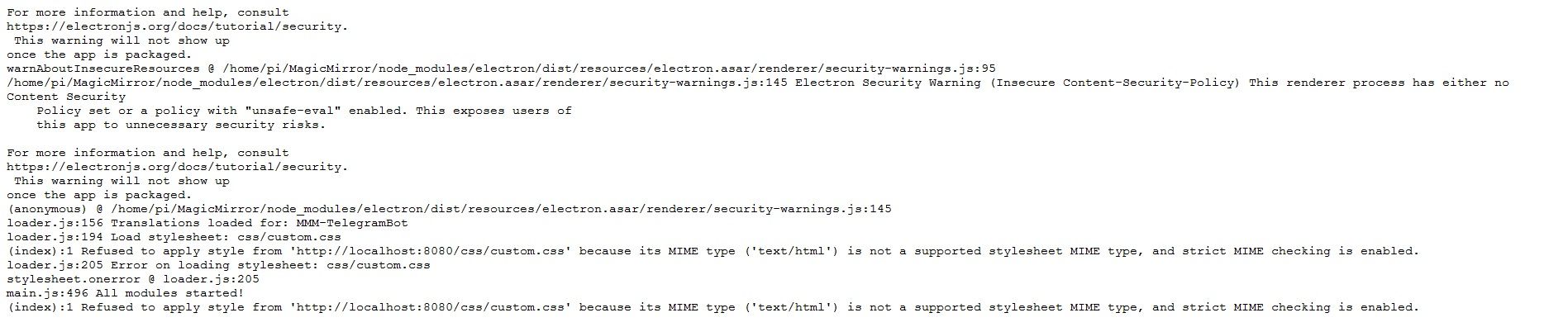
-
Hi, You need to launch a conversation with your new bot created. Not with BotFather.
To talk to your bot:
above the token you have the link to talking to your bot !
like : t.me/ just click on it :) -
@Bugsounet
Fantastic, thanks Cedric, much appreciated. I am onboard again :-) -
@Bugsounet This is not working for me. Step 4 in the install instructions just responds with “You are not allowed to command me. Ask Admin.”
My config:
                {
                        disabled: false,
                        module: "MMM-TelegramBot",
                        config: {
                                telegramAPIKey: "12XXXXX892:AAHXXXXXXXXXXXXXXXX_0Dme-XXXXXXX",
                                allowedUser: "BXXXXXdBXXXXFXXXX",
                        },
                },
Console show MMM-TelegramBot started ok.
Log file:
[2020-08-13 13:45:32.619] [ERROR] TelegramError: ETELEGRAM: 404 Not Found at /home/pi/MagicMirror/modules/MMM-TelegramBot/node_modules/node-telegram-bot-api/src/telegram.js:213:15 at tryCatcher (/home/pi/MagicMirror/modules/MMM-TelegramBot/node_modules/bluebird/js/release/util.js:16:23) at Promise._settlePromiseFromHandler (/home/pi/MagicMirror/modules/MMM-TelegramBot/node_modules/bluebird/js/release/promise.js:547:31) at Promise._settlePromise (/home/pi/MagicMirror/modules/MMM-TelegramBot/node_modules/bluebird/js/release/promise.js:604:18) at Promise._settlePromise0 (/home/pi/MagicMirror/modules/MMM-TelegramBot/node_modules/bluebird/js/release/promise.js:649:10) at Promise._settlePromises (/home/pi/MagicMirror/modules/MMM-TelegramBot/node_modules/bluebird/js/release/promise.js:729:18) at _drainQueueStep (/home/pi/MagicMirror/modules/MMM-TelegramBot/node_modules/bluebird/js/release/async.js:93:12) at _drainQueue (/home/pi/MagicMirror/modules/MMM-TelegramBot/node_modules/bluebird/js/release/async.js:86:9) at Async._drainQueues (/home/pi/MagicMirror/modules/MMM-TelegramBot/node_modules/bluebird/js/release/async.js:102:5) at Immediate.Async.drainQueues [as _onImmediate] (/home/pi/MagicMirror/modules/MMM-TelegramBot/node_modules/bluebird/js/release/async.js:15:14) at processImmediate (internal/timers.js:439:21) { code: 'ETELEGRAM', response: IncomingMessage { _readableState: ReadableState { objectMode: false, highWaterMark: 16384, buffer: BufferList { head: null, tail: null, length: 0 }, length: 0, pipes: null, pipesCount: 0, flowing: true, ended: true, endEmitted: true, reading: false, sync: true, needReadable: false, emittedReadable: false, readableListening: false, resumeScheduled: false, paused: false, emitClose: true, autoDestroy: false, destroyed: false, defaultEncoding: 'utf8', awaitDrain: 0, readingMore: true, decoder: null, encoding: null }, readable: false, _events: [Object: null prototype] { end: [Array], close: [Array], data: [Function], error: [Function] }, _eventsCount: 4, _maxListeners: undefined, socket: TLSSocket { _tlsOptions: [Object], _secureEstablished: true, _securePending: false, _newSessionPending: false, _controlReleased: true, _SNICallback: null, servername: 'api.telegram.org', alpnProtocol: false, authorized: true, authorizationError: null, encrypted: true, _events: [Object: null prototype], _eventsCount: 9, connecting: false, _hadError: false, _parent: null, _host: 'api.telegram.org', _readableState: [ReadableState], readable: true, _maxListeners: undefined, _writableState: [WritableState], writable: true, allowHalfOpen: false, _sockname: null, _pendingData: null, _pendingEncoding: '', server: undefined, _server: null, ssl: [TLSWrap], _requestCert: true, _rejectUnauthorized: true, parser: null, _httpMessage: null, [Symbol(res)]: [TLSWrap], [Symbol(asyncId)]: -1, [Symbol(kHandle)]: [TLSWrap], [Symbol(lastWriteQueueSize)]: 0, [Symbol(timeout)]: null, [Symbol(kBytesRead)]: 0, [Symbol(kBytesWritten)]: 0, [Symbol(connect-options)]: [Object] }, connection: TLSSocket { _tlsOptions: [Object], _secureEstablished: true, _securePending: false, _newSessionPending: false, _controlReleased: true, _SNICallback: null, servername: 'api.telegram.org', alpnProtocol: false, authorized: true, authorizationError: null, encrypted: true, _events: [Object: null prototype], _eventsCount: 9, connecting: false, _hadError: false, _parent: null, _host: 'api.telegram.org', _readableState: [ReadableState], readable: true, _maxListeners: undefined, _writableState: [WritableState], writable: true, allowHalfOpen: false, _sockname: null, _pendingData: null, _pendingEncoding: '', server: undefined, _server: null, ssl: [TLSWrap], _requestCert: true, _rejectUnauthorized: true, parser: null, _httpMessage: null, [Symbol(res)]: [TLSWrap], [Symbol(asyncId)]: -1, [Symbol(kHandle)]: [TLSWrap], [Symbol(lastWriteQueueSize)]: 0, [Symbol(timeout)]: null, [Symbol(kBytesRead)]: 0, [Symbol(kBytesWritten)]: 0, [Symbol(connect-options)]: [Object] }, httpVersionMajor: 1, httpVersionMinor: 1, httpVersion: '1.1', complete: true, headers: { server: 'nginx/1.16.1', date: 'Thu, 13 Aug 2020 17:45:32 GMT', 'content-type': 'application/json', 'content-length': '55', connection: 'keep-alive', 'strict-transport-security': 'max-age=31536000; includeSubDomains; preload', 'access-control-allow-origin': '*', 'access-control-expose-headers': 'Content-Length,Content-Type,Date,Server,Connection' }, rawHeaders: [ 'Server', 'nginx/1.16.1', 'Date', 'Thu, 13 Aug 2020 17:45:32 GMT', 'Content-Type', 'application/json', 'Content-Length', '55', 'Connection', 'keep-alive', 'Strict-Transport-Security', 'max-age=31536000; includeSubDomains; preload', 'Access-Control-Allow-Origin', '*', 'Access-Control-Expose-Headers', 'Content-Length,Content-Type,Date,Server,Connection' ], trailers: {}, rawTrailers: [], aborted: false, upgrade: false, url: '', method: null, statusCode: 404, statusMessage: 'Not Found', client: TLSSocket { _tlsOptions: [Object], _secureEstablished: true, _securePending: false, _newSessionPending: false, _controlReleased: true, _SNICallback: null, servername: 'api.telegram.org', alpnProtocol: false, authorized: true, authorizationError: null, encrypted: true, _events: [Object: null prototype], _eventsCount: 9, connecting: false, _hadError: false, _parent: null, _host: 'api.telegram.org', _readableState: [ReadableState], readable: true, _maxListeners: undefined, _writableState: [WritableState], writable: true, allowHalfOpen: false, _sockname: null, _pendingData: null, _pendingEncoding: '', server: undefined, _server: null, ssl: [TLSWrap], _requestCert: true, _rejectUnauthorized: true, parser: null, _httpMessage: null, [Symbol(res)]: [TLSWrap], [Symbol(asyncId)]: -1, [Symbol(kHandle)]: [TLSWrap], [Symbol(lastWriteQueueSize)]: 0, [Symbol(timeout)]: null, [Symbol(kBytesRead)]: 0, [Symbol(kBytesWritten)]: 0, [Symbol(connect-options)]: [Object] }, _consuming: false, _dumped: false, req: ClientRequest { _events: [Object: null prototype], _eventsCount: 5, _maxListeners: undefined, outputData: [], outputSize: 0, writable: true, _last: false, chunkedEncoding: false, shouldKeepAlive: true, useChunkedEncodingByDefault: true, sendDate: false, _removedConnection: false, _removedContLen: false, _removedTE: false, _contentLength: null, _hasBody: true, _trailer: '', finished: true, _headerSent: true, socket: [TLSSocket], connection: [TLSSocket], _header: 'POST /botAAHXXXXXXXXXXXXXXXX_0Dme-XXXXXXX/getUpdates ' + 'HTTP/1.1\r' + '\nhost: api.telegram.org\r' + '\ncontent-type: application/x-www-form-urlencoded\r' + '\ncontent-length: 19\r' + '\nConnection: keep-alive\r' + '\n\r' + '\n', _onPendingData: [Function: noopPendingOutput], agent: [Agent], socketPath: undefined, method: 'POST', path: '/botAAHXXXXXXXXXXXXXXXX_0Dme-XXXXXXX/getUpdates', _ended: true, res: [Circular], aborted: false, timeoutCb: null, upgradeOrConnect: false, parser: null, maxHeadersCount: null, [Symbol(isCorked)]: false, [Symbol(outHeadersKey)]: [Object: null prototype] }, request: Request { _events: [Object: null prototype], _eventsCount: 5, _maxListeners: undefined, method: 'POST', simple: false, resolveWithFullResponse: true, forever: true, readable: true, writable: true, explicitMethod: true, _qs: [Querystring], _auth: [Auth], _oauth: [OAuth], _multipart: [Multipart], _redirect: [Redirect], _tunnel: [Tunnel], _rp_resolve: [Function], _rp_reject: [Function], _rp_promise: [Promise [Object]], _rp_callbackOrig: undefined, callback: [Function], _rp_options: [Object], headers: [Object], setHeader: [Function], hasHeader: [Function], getHeader: [Function], removeHeader: [Function], localAddress: undefined, pool: [Object], dests: [], __isRequestRequest: true, _callback: [Function: RP$callback], uri: [Url], proxy: null, tunnel: true, setHost: true, originalCookieHeader: undefined, _disableCookies: true, _jar: undefined, port: 443, host: 'api.telegram.org', body: 'offset=0&timeout=10', path: '/botAAHXXXXXXXXXXXXXXXX_0Dme-XXXXXXX/getUpdates', httpModule: [Object], agentClass: [Function: Agent], agentOptions: [Object], agent: [Agent], _started: true, href: 'https://api.telegram.org/botAAHXXXXXXXXXXXXXXXX_0Dme-XXXXXXX/getUpdates', req: [ClientRequest], ntick: true, response: [Circular], originalHost: 'api.telegram.org', originalHostHeaderName: 'host', responseContent: [Circular], _destdata: true, _ended: true, _callbackCalled: true }, toJSON: [Function: responseToJSON], caseless: Caseless { dict: [Object] }, body: { ok: false, error_code: 404, description: 'Not Found' } } -
Bump for @Bugsounet
-
@sonicgoose said in MMM-TelegramBot error.:
ETELEGRAM: 404 Not Found
allowedUser: "BXXXXXdBXXXXFXXXX",try with:
allowedUser: ["BXXXXXdBXXXXFXXXX"],sorry for last response ! I just return from vacations :)
-
@Bugsounet Thanks. That seems to have done the trick. I didn’t notice the square brackets when reading the instructions.
Hello! It looks like you're interested in this conversation, but you don't have an account yet.
Getting fed up of having to scroll through the same posts each visit? When you register for an account, you'll always come back to exactly where you were before, and choose to be notified of new replies (either via email, or push notification). You'll also be able to save bookmarks and upvote posts to show your appreciation to other community members.
With your input, this post could be even better 💗
Register Login