MagicMirror Forum
    • Recent
    • Tags
    • Unsolved
    • Solved
    • MagicMirror² Repository
    • Documentation
    • 3rd-Party-Modules
    • Donate
    • Discord
    • Register
    • Login
    A New Chapter for MagicMirror: The Community Takes the Lead
    Read the statement by Michael Teeuw here.

    covid bell curve line graph tracker

    Scheduled Pinned Locked Moved Solved Requests
    89 Posts 6 Posters 63.2k Views 8 Watching
    Loading More Posts
    • Oldest to Newest
    • Newest to Oldest
    • Most Votes
    Reply
    • Reply as topic
    Log in to reply
    This topic has been deleted. Only users with topic management privileges can see it.
    • S Do not disturb
      sdetweil @humdinger44
      last edited by

      @humdinger44 the data source I have doesn’t have areas inside countries, so I cannot add that

      refresh is broken(I guessed new data would be available at 2am, wasn’t until 7am! oops)… testing fix now

      Sam

      How to add modules

      learning how to use browser developers window for css changes

      1 Reply Last reply Reply Quote 1
      • S Do not disturb
        sdetweil
        last edited by

        update for refresh when no data available, keep trying!

        Sam

        How to add modules

        learning how to use browser developers window for css changes

        1 Reply Last reply Reply Quote 0
        • S Do not disturb
          sdetweil
          last edited by sdetweil

          another fix for refresh (starting after midnight , but no data available yet left a blank display)…

          also fixed to add two more charts

          new cases and new deaths by day
          new cases for the US ‘may’ show effect of distancing… need more days
          (or maybe not, one day drop)

          todays data, 2020-03-26, is still not yet posted…(as of 8:40 am central time us)
          2020-03-26 data has arrived, 08:56 us central time, (and update worked!)

          alt text

          Sam

          How to add modules

          learning how to use browser developers window for css changes

          A 1 Reply Last reply Reply Quote 1
          • A Offline
            almostgithub @sdetweil
            last edited by

            @sdetweil kind of a simple question, but i cannot for the life of me figure out how to change the color of the dates, and the countries names to white?? I looked everywhere and tried my custom css file to no avail…

            S 2 Replies Last reply Reply Quote 0
            • S Do not disturb
              sdetweil @almostgithub
              last edited by

              @almostgithub >change the color of the dates, and the countries names to white??

              sorry, don’t understand… they are white already (not bright white)

              I currently don’t provide access to those settings…

              this is all controlled by the charting library I am using…
              I would have to add settings to enable access

              Sam

              How to add modules

              learning how to use browser developers window for css changes

              1 Reply Last reply Reply Quote 0
              • S Do not disturb
                sdetweil @almostgithub
                last edited by sdetweil

                @almostgithub Ok I’ve added some.

                git pull in the module folder,

                here are the things u can set… will get to the doc in the morning

                    legendTextColor:'white',
                
                    chartTitleColor: 'white',
                    chart_title: '',
                
                    xAxisLabel:"by date",
                    xAxisLabelColor:'white',
                    xAxisTickLabelColor:'white',
                
                    yAxisLabel:"Count",
                    yAxisLabelColor:'white',
                    yAxisTickLabelColor:'white',
                

                Sam

                How to add modules

                learning how to use browser developers window for css changes

                A 1 Reply Last reply Reply Quote 0
                • A Offline
                  almostgithub @sdetweil
                  last edited by almostgithub

                  @sdetweil oh wow! Thanks so much, thats awesome!! They are grey on my mirror and makes it hard to read the legend and dates.

                  edit: after a git pull and npm install, it seems to be stuck on MyCovid19 Loading data for chart “cumulative_deaths”

                  edit: Saw this in the issues tab, will ask there

                  1 Reply Last reply Reply Quote 0
                  • S Do not disturb
                    sdetweil
                    last edited by

                    new update, data source changed … after git pull, need to run npm install again to update the library used to read the data (csv instead of xlsx)

                    Sam

                    How to add modules

                    learning how to use browser developers window for css changes

                    H 1 Reply Last reply Reply Quote 0
                    • H Offline
                      humdinger44 @sdetweil
                      last edited by humdinger44

                      @sdetweil can you drop an example of the config for two graphs displayed at once?

                      Edit: nevermind, I was overthinking it.

                      1 Reply Last reply Reply Quote 0
                      • S Do not disturb
                        sdetweil
                        last edited by

                        grrr… data source not yet updated today… waiting, sent them a note…

                        I switched to the csv file (available earlier)…

                        now xlsx is right, csv, json and xml files not updated… and in the xlsx, they changed the column headings…

                        Sam

                        How to add modules

                        learning how to use browser developers window for css changes

                        S 1 Reply Last reply Reply Quote 1
                        • S Do not disturb
                          sdetweil @sdetweil
                          last edited by sdetweil

                          @sdetweil after sending email, they have updated the csv file now…

                          also, uploaded new version with lots of text formatting control, see the now long readme
                          also added ability to change the start date for the chart, see startDate in the readme

                          Sam

                          How to add modules

                          learning how to use browser developers window for css changes

                          1 Reply Last reply Reply Quote 1
                          • S Do not disturb
                            sdetweil
                            last edited by sdetweil

                            now supports states charts too

                            git pull,

                            in config states:[] vs countries:[]

                            alt text

                            Sam

                            How to add modules

                            learning how to use browser developers window for css changes

                            1 Reply Last reply Reply Quote 1
                            • rafaelcotaR Offline
                              rafaelcota
                              last edited by

                              Looks great! I’m looking forward in using this module, but I just don’t get the chart dimensions to work, the size is always the same, big, and it doesn’t matter which region I use.

                              This is my config

                                          {
                                                          disabled: false,
                                                          module:"MyCovid19",
                                                          position:"top_left",
                                                          config:{
                                                                  countries:["Mexico"],
                                                                  line_colors:['red','white','green','yellow','blue'],
                                                                  chart_type:"cumulative_cases",
                                                                  chart_title:"Cumulative Cases",
                                                                  ranges:{min:0,max:10000,stepSize:1000},
                                                                  startDate: "03/01/2020",
                                                                  backgroundColor: "transparent",
                                                                  width: 300,
                                                                  height: 500,
                                                                  debug:false,
                                                          },
                                          },
                              

                              And this is the result, I’ll try to attach a screen capture, let’s see if I can!
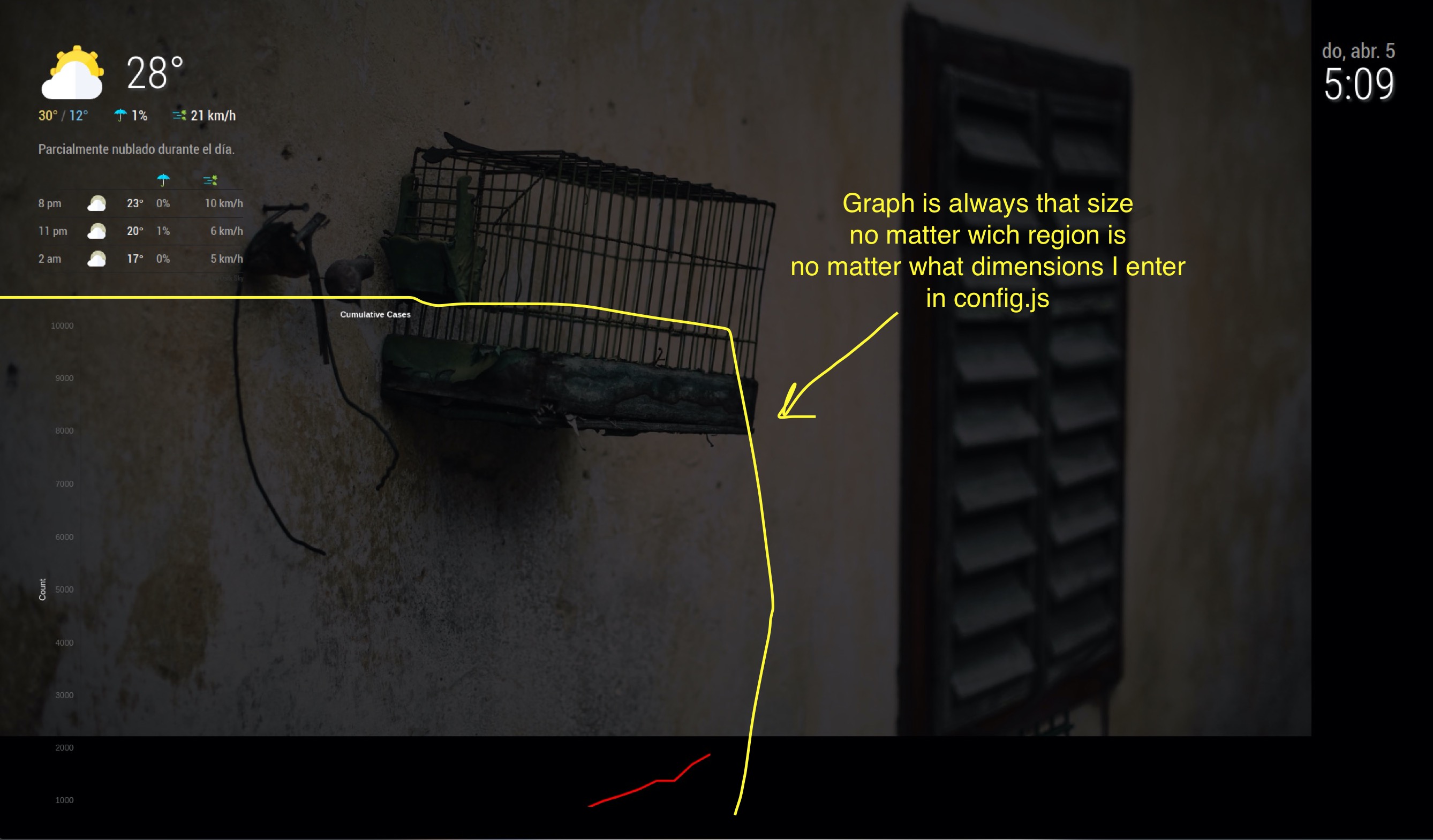
                              alt text

                              1 Reply Last reply Reply Quote 0
                              • S Do not disturb
                                sdetweil
                                last edited by

                                @rafaelcota hm… I usually have this

                                		{
                                			module:"MyCovid19",
                                			disabled:false,
                                			position:"top_left",
                                			config:{
                                				states:["Michigan", 'Texas','Illinois', 'Florida','California','Louisiana','Washington','New York',],
                                				// line colors can be any definition of color either a name ,or a hex string
                                				// one per country above, used in order,
                                				line_colors:['red','white','green','yellow','#34ebde','#34eb00','purple','orange'],
                                				//				
                                				chart_type:"deaths",  // or "cumulative deaths"
                                				chart_title:"daily new deaths by state", // however u want to label
                                				// the vertical steps on the chart.. how tall u want it to be and how mant increments 
                                				ranges:{min:0,max:000,stepSize:10},
                                				// size of the chart in pixels
                                			    width: 400,
                                			    height: 800,	
                                			    // only used if we need to debug something
                                			    //debug:true,
                                			    startDate:'03/10/2020',
                                			    debug:true,
                                			//    startLabel:['2/1/2020','3/1/2020']
                                			    //backgroundColor: 'white',
                                			}
                                		}
                                

                                400x 400 (w x h)
                                alt text

                                but changed to 400 x 800 (w x h)

                                alt text

                                Sam

                                How to add modules

                                learning how to use browser developers window for css changes

                                rafaelcotaR 1 Reply Last reply Reply Quote 1
                                • S Do not disturb
                                  sdetweil
                                  last edited by

                                  I added the calendar and changed to 300 x 800

                                  alt text

                                  Sam

                                  How to add modules

                                  learning how to use browser developers window for css changes

                                  1 Reply Last reply Reply Quote 1
                                  • rafaelcotaR Offline
                                    rafaelcota @sdetweil
                                    last edited by

                                    @sdetweil I know, that’s how it supposed to work, but not in my mirror… It’s driving me crazy… I’ve tried almost everything…

                                    S 2 Replies Last reply Reply Quote 0
                                    • S Do not disturb
                                      sdetweil @rafaelcota
                                      last edited by sdetweil

                                      @rafaelcota when was the last time you did a git pull?

                                      I just used your definition and changed height to 800 and it came out right… (wrong image before)
                                      alt text

                                      Sam

                                      How to add modules

                                      learning how to use browser developers window for css changes

                                      rafaelcotaR 1 Reply Last reply Reply Quote 1
                                      • rafaelcotaR Offline
                                        rafaelcota @sdetweil
                                        last edited by

                                        @sdetweil I’ve just downloaded today, just a few minutes before I tried.

                                        This is what I’m seeing right now with the following config (tried with states now):

                                                    {
                                                                    disabled: false,
                                                                    module:"MyCovid19",
                                                                    position:"top_center",
                                                                    config:{
                                                                            states:['Kentucky','Colorado','Arizona'],
                                                                            line_colors:['red','white','green','yellow','blue'],
                                                                            chart_type:"cumulative_cases",  // or "cumulative deaths"
                                                                            chart_title:"Cumulative Cases", // however u want to label
                                                                            ranges:{min:0,max:8000,stepSize:10000},
                                                                            width: 200,
                                                                            height: 300,
                                                                            debug: true,
                                                                    },
                                                    },
                                        

                                        alt text

                                        S 1 Reply Last reply Reply Quote 0
                                        • S Do not disturb
                                          sdetweil
                                          last edited by

                                          I don’t use any special classes

                                                    var c = document.createElement("div");   // < container for chart
                                                    c.style.width = self.config.width + "px";
                                                    c.style.height = self.config.height + "px";
                                                    self.wrapper.appendChild(c);
                                          
                                                    canvas = document.createElement("canvas");   // < --- chart itself
                                                    canvas.id = "myChart" +self.ourID ;
                                                    canvas.style.width = (self.config.width -10) + "px";
                                                    canvas.style.height = self.config.height + "px";    
                                                    canvas.style.backgroundColor=self.config.backgroundColor;
                                                    c.appendChild(canvas);
                                          

                                          Sam

                                          How to add modules

                                          learning how to use browser developers window for css changes

                                          1 Reply Last reply Reply Quote 0
                                          • S Do not disturb
                                            sdetweil @rafaelcota
                                            last edited by sdetweil

                                            @rafaelcota i don’t see it, but maybe there is a weird character between width and 400

                                            so, take the space out, for both height and width

                                            width:400,
                                            height:800,
                                            

                                            how big is your screen?

                                            Sam

                                            How to add modules

                                            learning how to use browser developers window for css changes

                                            1 Reply Last reply Reply Quote 0

                                            Hello! It looks like you're interested in this conversation, but you don't have an account yet.

                                            Getting fed up of having to scroll through the same posts each visit? When you register for an account, you'll always come back to exactly where you were before, and choose to be notified of new replies (either via email, or push notification). You'll also be able to save bookmarks and upvote posts to show your appreciation to other community members.

                                            With your input, this post could be even better 💗

                                            Register Login

                                            • 1
                                            • 2
                                            • 3
                                            • 4
                                            • 5
                                            • 2 / 5
                                            • First post
                                              Last post
                                            Enjoying MagicMirror? Please consider a donation!
                                            MagicMirror created by Michael Teeuw.
                                            Forum managed by Sam, technical setup by Karsten.
                                            This forum is using NodeBB as its core | Contributors
                                            Contact | Privacy Policy