Read the statement by Michael Teeuw here.
covid bell curve line graph tracker
-
@rafaelcota Strange i am also having the same exact problem. My PI was also set to 0.0.0.0, however i changed it to localhost, and even tried its actual IP address as well and it did not fix it. I can change the height but not the width at all. I also tried placing it in other places on my mirror, as well as deleting the white space too
-
@almostgithub weird… I have 6 different systems running the module, ALL have address:“0.0.0.0”, ipWhiteList:[],
and I cannot reproduce the problem.
do another git pull… I just force commented out the inline-block statement that should never have been executed… see if it makes a difference
-
@sdetweil Nope… didn’t work, it just don’t work with address 0.0.0.0, only with localhost as address…it’s really weird…
I’m using VNC to see my mirror remotely since it can’t be access from any other device… no problem for me, but my curious mind wonder how this can be.Thank you for your time and concern,
-
@rafaelcota can u try something… address:“0.0.0.0”,
and then open a separate browser to the pi address:port
so you will have the vnc window and the browser window open at the same time to the same server
f11 to toggle the browser to full screen and back -
@rafaelcota Strange i am also having the same exact problem. My PI was also set to 0.0.0.0, however i changed it to localhost, and even tried its actual IP address as well and it did not fix it. I can change the height but not the width at all. I also tried placing it in other places on my mirror, as well as deleting the white space too
Did another Git pull and my graph is still off the screen. Looks like there is a lot of space in between each date on the graph.
-
@almostgithub make sure these two lines are commented out in MyCovid19.js, approx line 180
if ((canvas = document.getElementById("myChart"+self.ourID )) == null) { var c = document.createElement("div"); c.style.width = self.config.width + "px"; c.style.height = self.config.height + "px"; // if (!self.config.stacked) // < ---- // c.style.display = 'inline-block'; // < ---- self.wrapper.appendChild(c); -
@sdetweil Those are both commented out. Is there anything else that may perhaps cause each date to be almost an inch apart? I may just do a fresh install to negate any other settings I may have tweaked with, but strange that @rafaelcota had a similar problem as well
-
@almostgithub could u confirm that the div still has display=inline-block, when u look thru the elements…
-
@almostgithub lets try some new debugging
git clone again, make sure debug:true, in each MyCovid19 module def in config.js
the update now only downloads the data file ONCE across all the modules (1 for countries, 1 for states if both used)add this module
git clone https://github.com/sdetweil/MMM-Loggingadd it to the TOP of the module list like this
	modules: [    // < top of module list
	{
            module: 'MMM-Logging',
            disabled: false,
            config: {
                // Module functions out of the box with nothing set here.
                // See below for configurable options.
                echoLocal: true,
                echoRemote: true,
                format: "{{message}} ({{folder}}/{{file}}:{{line}} {{method}})",
            }
        },
start MM like this from a terminal window (make sure to stop the pm2 one if u use pm2)
cd ~/MagicMirror
npm start >>somefile.txt 2>&1
run your test with 0.0.0.0
please test both on system and remote browser access
ctrl-c to stop
change to localhost
restart same commandctrl-c when done
send me somefile.txt at my email sdetweil at gmail
-
@sdetweil You’re great, man. You’ve been working with MyCovid19 to fix the bug, a weird and difficult one to identify; you’ve done tests, modifications, sent me instructions how to debug, and more modifications, and tests, and debugging; and files and emails went between us and finally, I can say IT WORKS just fine!
Address is 0.0.0.0, so I can access it from any device at port 8080 and graphs are just the size I put in config.
Thank you again for all your time, effort and concern.
Stay safe
-
@rafaelcota glad we found it… now I gotta fix another toughie…
-
I’ve been keeping an eye on the NY data so i can compare it to my home state. Any idea whats happened there? It might be nice to have a 7 day rolling average option to smooth the data out. If that’s within the realm of “Not very difficult.”
-
@humdinger44 i see it too… will mess up the charts for a while… boooo
from the data source
**NEW:** Starting with data for May 6th, this data reports the total combined number of confirmed and probable Covid-19 cases and deaths where available. Many states and localities have started to report this data using criteria that were developed by states and the federal government. This will cause a spike in the cases and deaths data for some areas while we work to revise our historical data with those probable cases and deaths. -
I posted an update to github today,
supports displaying US state county dataa little bit trickier on the data entry
counties:[ { ‘county_name’ : ‘state_name’ }, { ‘county_name2’ : ‘state_name2’} ]
on the chart only the county name is shown
-
HI guys, thanks for making this! I am trying to show daily totales, I was trying to make it easy to see the totals for each day. However the graph is starting extremly high, see below. Can someone see what I am doing wrong?
THanks !
```{ module:"MyCovid19", position:"bottom_center", config:{ states:['Arizona','Michigan','California'], line_colors:['red','white','blue'], chart_type:"cases", chart_title:"COVID Cases Reported Daily", ranges:{min:0,max:000,stepSize:100}, backgroundColor: "transparent", width: 600, height: 500, debug: true, startDate: '06/01/2020' }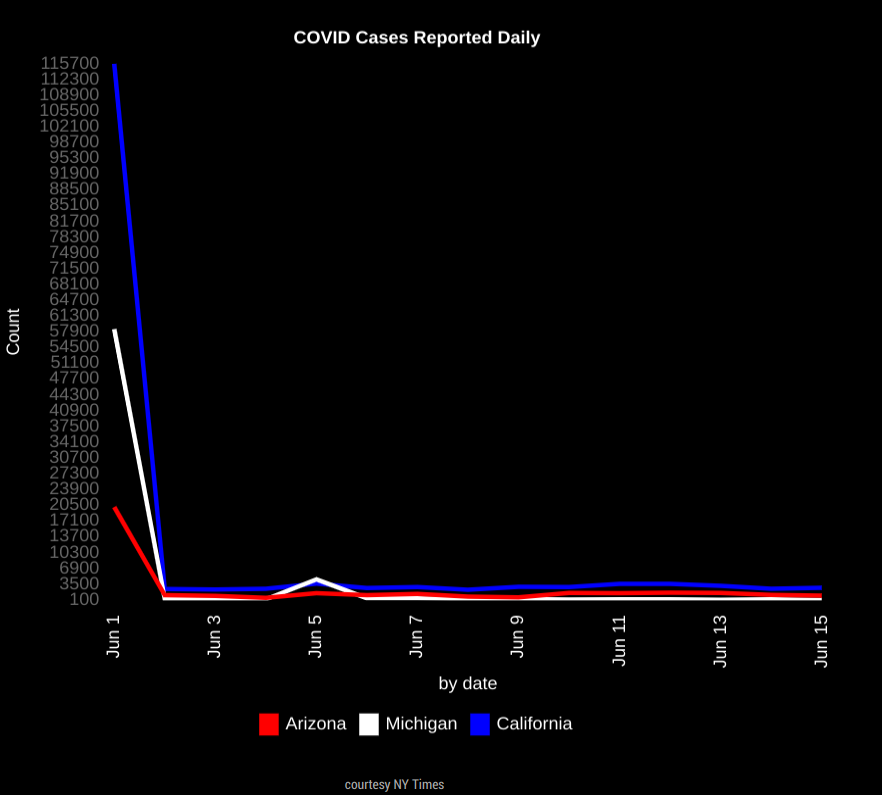 -
@darbos max is 0???
-
@sdetweil I had it set at a higher number but took that from an example I found on here. What should those be set at? Ty
-
@sdetweil my goal is really to be able to look and see the daily totals for the past few days.
-
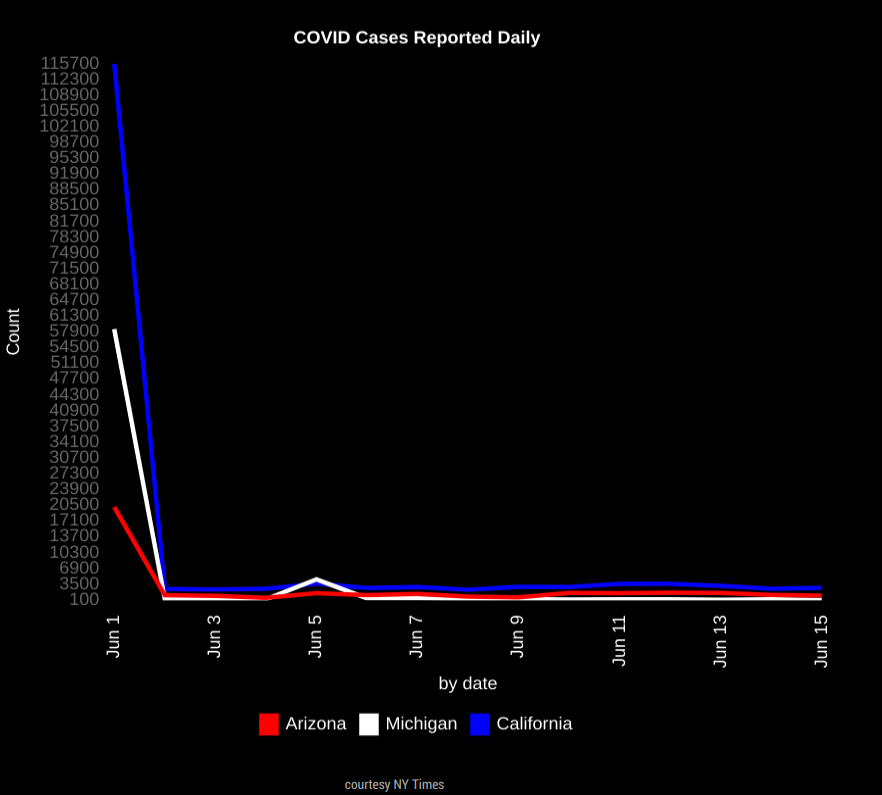
This is the big initial spike i dont know how to get rid of. Sorry last attachment wouldnt work.
-
@darbos I would start with a step of 50 and a max of 50. if the numbers are higher the chart engine will auto adjust.
if U have too many ticks on the left axis, then make the step higher (100) and raise the max to 100

Hello! It looks like you're interested in this conversation, but you don't have an account yet.
Getting fed up of having to scroll through the same posts each visit? When you register for an account, you'll always come back to exactly where you were before, and choose to be notified of new replies (either via email, or push notification). You'll also be able to save bookmarks and upvote posts to show your appreciation to other community members.
With your input, this post could be even better 💗
Register Login