MagicMirror Forum
    • Recent
    • Tags
    • Unsolved
    • Solved
    • MagicMirror² Repository
    • Documentation
    • 3rd-Party-Modules
    • Donate
    • Discord
    • Register
    • Login
    A New Chapter for MagicMirror: The Community Takes the Lead
    Read the statement by Michael Teeuw here.

    Refresh modules / MagicMirror without running pm2 restart?

    Scheduled Pinned Locked Moved Troubleshooting
    17 Posts 4 Posters 6.2k Views 4 Watching
    Loading More Posts
    • Oldest to Newest
    • Newest to Oldest
    • Most Votes
    Reply
    • Reply as topic
    Log in to reply
    This topic has been deleted. Only users with topic management privileges can see it.
    • C Offline
      cotxwx @sdetweil
      last edited by

      @sdetweil Screenshot from 2020-04-23 17-05-03.png

      Is there something specific I should be looking for here? It just locked up and this is all I see.

      S 1 Reply Last reply Reply Quote 0
      • S Offline
        sdetweil @cotxwx
        last edited by

        @cotxwx hm… I have it loaded too… we shall see

        Sam

        How to add modules

        learning how to use browser developers window for css changes

        C 1 Reply Last reply Reply Quote 1
        • C Offline
          cotxwx @sdetweil
          last edited by

          @sdetweil If you haven’t had this issue before, that pretty much rules out the module itself, I’d guess. I do have a FW at my egress, with some DNS block lists. It doesn’t seem logical that it would load initially, but fail an hour or two later, but I’ve seen weirder.

          (Unless, of course, you’ve just loaded it. In that case, ignore my last statement).

          S 1 Reply Last reply Reply Quote 0
          • S Offline
            sdetweil @cotxwx
            last edited by

            @cotxwx just loaded for 1st time ever…

            have fixed a few things already… my system does module hiding for screen sleep…
            it doesn’t… added error handler for the case I think is the problem… we will see…

            Sam

            How to add modules

            learning how to use browser developers window for css changes

            C 1 Reply Last reply Reply Quote 1
            • C Offline
              cotxwx @sdetweil
              last edited by

              @sdetweil if you’ve just loaded it, watch out for “updateOnWarning:” in the config.js - If you don’t set it to ‘0’, the entire module disappears if there are no active warnings in your area. I learned that one the hard way. :)

              Thanks for the assistance!

              S 2 Replies Last reply Reply Quote 0
              • S Offline
                sdetweil @cotxwx
                last edited by

                @cotxwx hm… mine is showing, did not set that variable

                Sam

                How to add modules

                learning how to use browser developers window for css changes

                1 Reply Last reply Reply Quote 0
                • S Offline
                  sdetweil @cotxwx
                  last edited by

                  @cotxwx mine has never stopped working and never reported an error

                  Sam

                  How to add modules

                  learning how to use browser developers window for css changes

                  C 1 Reply Last reply Reply Quote 0
                  • C Offline
                    cotxwx @sdetweil
                    last edited by

                    @sdetweil Good to know, thank you. I’ll start looking in to my FW logs and see if something stands out. I really appreciate you taking the time to do this.

                    1 Reply Last reply Reply Quote 0
                    • C Offline
                      cotxwx
                      last edited by

                      Well, temporary workaround for anyone having a similar issue…

                      Installed xdotool and created a shell script to “press” ctrl+r every hour. Now it’ll just refresh itself at the top of the hour.

                      S 1 Reply Last reply Reply Quote 0
                      • S Offline
                        sdetweil @cotxwx
                        last edited by

                        @cotxwx weird. i can’t get mine to stall…

                        Sam

                        How to add modules

                        learning how to use browser developers window for css changes

                        P 1 Reply Last reply Reply Quote 0
                        • P Offline
                          Privacywonk @sdetweil
                          last edited by

                          @cotxwx I am experiencing the same issue. Do you by chance turn your mirror monitor off? Mine is hooked up to a TV HDMI input and the issue seems to present itself when I switch between HDMI inputs…

                          S 1 Reply Last reply Reply Quote 0
                          • S Offline
                            sdetweil @Privacywonk
                            last edited by

                            @Privacywonk hm. I don’t see that at all.
                            I have 4 different devices running mm attached to the 4 HDMI ports on my tv, and don’t see any behavior problems switching

                            Pi4 (4k)
                            pi3 (1080p)
                            pi0 (1080p)
                            and
                            jetson nano (4k)

                            Sam

                            How to add modules

                            learning how to use browser developers window for css changes

                            1 Reply Last reply Reply Quote 0
                            • R Offline
                              RJDaPirate
                              last edited by

                              I’m experiencing the same issue with my MM. Module worked fine for weeks not won’t last an hour before the Rain Radar Module goes dark.

                              S 1 Reply Last reply Reply Quote 0
                              • S Offline
                                sdetweil @RJDaPirate
                                last edited by

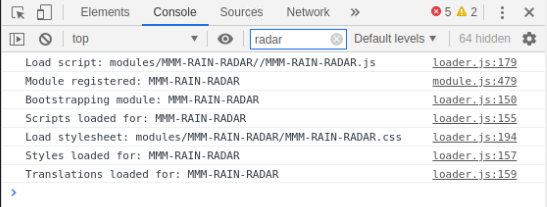
                                @RJDaPirate when it goes dark, open the developers window ctrl-shift-i on the keyboard, select the console tab and scroll up to see any errors.
                                you can also filter messages by module, by putting part of the module name in the filter field, rain, for example

                                let us know

                                Sam

                                How to add modules

                                learning how to use browser developers window for css changes

                                1 Reply Last reply Reply Quote 0

                                Hello! It looks like you're interested in this conversation, but you don't have an account yet.

                                Getting fed up of having to scroll through the same posts each visit? When you register for an account, you'll always come back to exactly where you were before, and choose to be notified of new replies (either via email, or push notification). You'll also be able to save bookmarks and upvote posts to show your appreciation to other community members.

                                With your input, this post could be even better 💗

                                Register Login

                                • 1 / 1
                                • First post
                                  Last post
                                Enjoying MagicMirror? Please consider a donation!
                                MagicMirror created by Michael Teeuw.
                                Forum managed by Sam, technical setup by Karsten.
                                This forum is using NodeBB as its core | Contributors
                                Contact | Privacy Policy