Read the statement by Michael Teeuw here.
custom.css not executed on return from GoogleAssistant. MMM-GoogleAssistant
-
I have MagicMirror2 installed on RPi4 with a PIR sensor.
MMM-Assistant2Display and MMM-GoogleAssistant are installed and working well. Thanks @bugsounet!
I added a ~/MagicMirror/css/custom.css file to locate one of my screen modules. That works well until I access Google Assistant.
On testing, I found that the custom.css file is not executed after accessing the GoogleAssistant and the module position is reset to a default.
Any help would be appreciated.
-
@gelaw: I think you can’t use custom.css for tunning GoogleAssistant. (never tested with it)
Because GoogleAssist use Iframe ouside the dom for displaying content (and Assistant2Display extension too)but you can use css files inside GoogleAssistant directly
-
@Bugsounet Thanks for the response. I am am using custom.css to place the default clock module on the screen. This custom.css file is not related to MMM-GoogleAssistant at all. My issue occurs when MMM-GoogleAssistant exits; then it returns to the MagicMirror screen but the clock is not placed correctly. When MMM-GoogleAssistant exits, it appears that ~/MagicMirror/css/main.css is executed, but my custom.css file is not executed.
However, if I then press cntl-w, then the screen resets correctly. I am wondering what commands/code are executed when MMM-GoogleAssistant exits? And can I change that? -
-
@Bugsounet Thanks again for your response. I did a quick test putting my modified .css code into main.css and the exact same behavior occurred. That is: displayed correctly when MM started, incorrectly when GA exits, and ^w corrects the display again. I am not sure where the issue occurs.
As you say, maybe @sdetweil has better insight. -
@gelaw can u open the developers window after return from GA display and look at your clock module css changes (select the elements tab, and navigate the dom tree)
click on the element you changed with custom.css and look at the bottom of the dev window, which should give the classes used top to bottom, left to right… is your modified class there? then look on the right side to see the class content definitions are your changes there,
another thing to try if address:“0.0.0.0”, and ipWhitelist:[] in config.js, you can access MM from another machine, use chrome on your PC and repeat the test… see if it fails on chrome…we are downlevel on electron (hard to test with so many changes going into it all the time)
-
@sdetweil Thanks! I will try this and report back
-
@sdetweil I did a test with Google Chrome on a second machine. As far as I can tell I get the same response - that is on a return from GoogleAssistant it does not use my custom.css settings. Cntl-W has the same effect.
I do not know how to work with the developers window. I opened the window, and the elements tab was open. I could not find the classes after that. I really do not know how to use the developers window. Can you point me to a write-up or tutorial on using the developers window?
Thanks -
@gelaw I don’t know where to find any training.
the elements tab shows the web page in the browser. ~/MagicMirror/index.html shows the format of the web page.
mm puts content in ‘positions’ which are listed in the index.html
when u get to an element, then u will see the classes used
here I have navigated to the calendar and selected an element
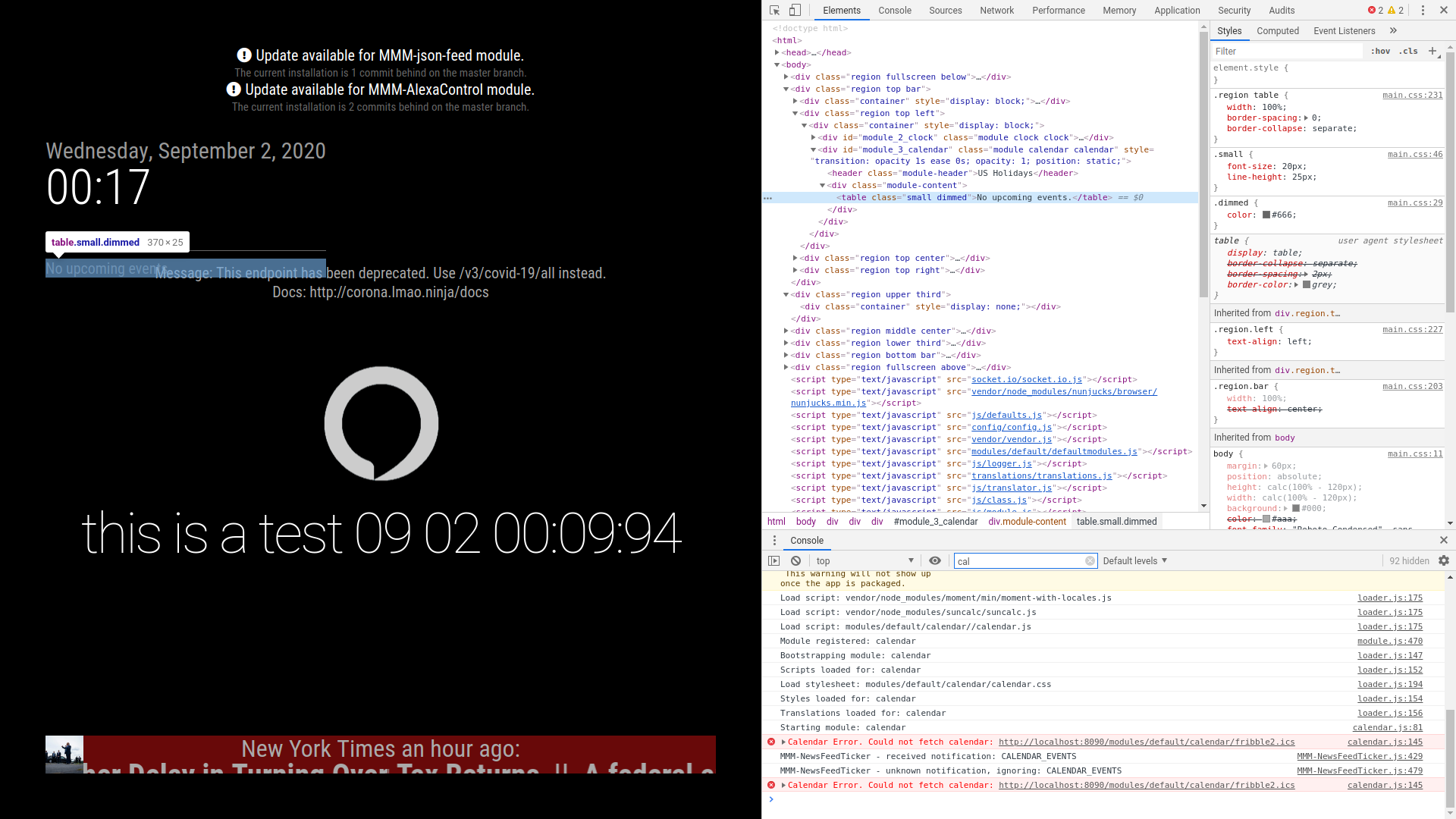
u can see the classes along the right edge, top to bottom, bottom is closer to main and custom.css
top is closest to the element selected.
You can see the class list left to right just above the console area, bottom of elements area (this machine doesn’t have an image editor on it so I can’t mark it up) -
@gelaw sure i use it ;)
I will try something
custom.css works with GA and other modules.
So maybe, i think there is an error with your custom.css codetry to correct it in real time, and past the new css code found
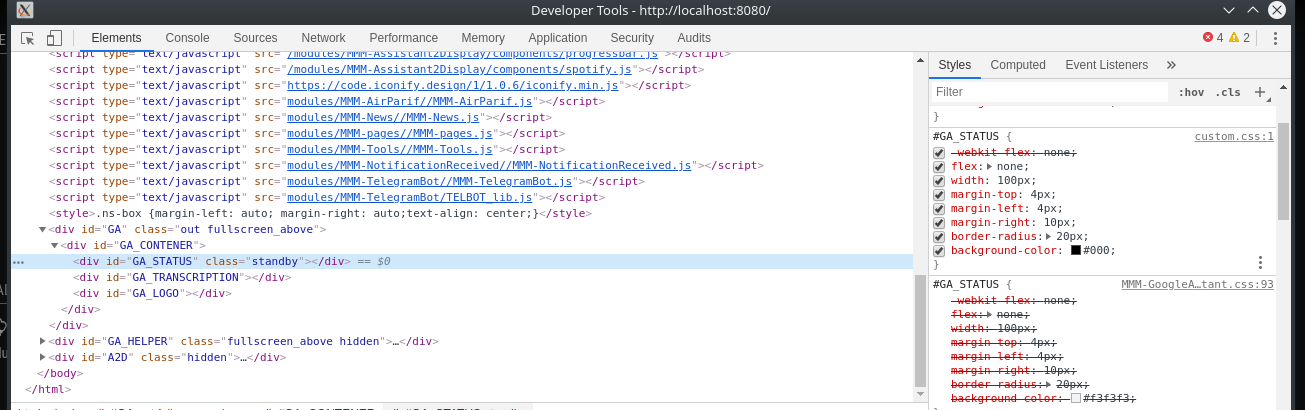
-
@sdetweil Thanks! I see it now. Here is what I found:
When I start MM:
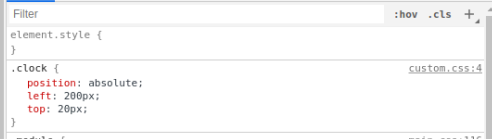
When I access GoogleAssistant:
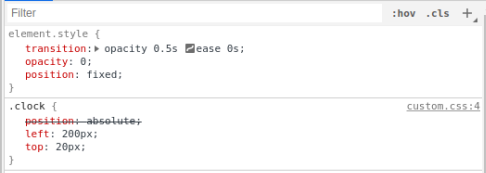
When the system exits GoogleAssistant and returns to MM the modified element.style persists and the position remains “fixed”. -
@gelaw very interesting… @Bugsounet what do you think? is iframe causing this?
-
@Bugsounet Thanks! When I navigate to the location that you posted it do not see an entry for custom.css. Perhaps I have it in the wrong location? Or I missed a setting to activate this in GoogleAssistant or Assistant2Display?
my custom.css file is simply:
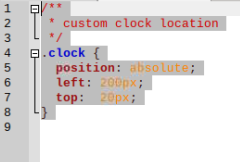
and it it located at /home/pi/MagicMirror/css
-
This post is deleted! -
@hango said in custom.css not executed on return from GoogleAssistant. MMM-GoogleAssistant:
maybe help this:
position: absolute !important;YES! That fixed my issue. Thanks!
-
@gelaw said in custom.css not executed on return from GoogleAssistant. MMM-GoogleAssistant:
@hango said in custom.css not executed on return from GoogleAssistant. MMM-GoogleAssistant:
maybe help this:
position: absolute !important;YES! That fixed my issue. Thanks!
@Bugsounet This made my display work, but it really is a brute force method. There must be a better solution. I still wonder what I missed in my original approach.
-
It’s not a brut force … it’s because i use iframe
but Really, I don’t know who can have some problem like that
-
@Bugsounet ok. Thanks!
-
@gelaw : if you want, give me a copy of your custom css … I want to inspect for fix GA (in private)
-
@Bugsounet tiny custom.css back a few posts. only for clock
Hello! It looks like you're interested in this conversation, but you don't have an account yet.
Getting fed up of having to scroll through the same posts each visit? When you register for an account, you'll always come back to exactly where you were before, and choose to be notified of new replies (either via email, or push notification). You'll also be able to save bookmarks and upvote posts to show your appreciation to other community members.
With your input, this post could be even better 💗
Register Login