MagicMirror Forum
    • Recent
    • Tags
    • Unsolved
    • Solved
    • MagicMirror² Repository
    • Documentation
    • 3rd-Party-Modules
    • Donate
    • Discord
    • Register
    • Login
    A New Chapter for MagicMirror: The Community Takes the Lead
    Read the statement by Michael Teeuw here.

    Deutsche Anleitung MagicMirror auf RaspberryPi 3

    Scheduled Pinned Locked Moved General Discussion
    118 Posts 20 Posters 172.9k Views 25 Watching
    Loading More Posts
    • Oldest to Newest
    • Newest to Oldest
    • Most Votes
    Reply
    • Reply as topic
    Log in to reply
    This topic has been deleted. Only users with topic management privileges can see it.
    • R Offline
      radioman
      last edited by

      Nabend Forum

      Ich möchte gerne bei der Kalenderanzeige erst das Datum mit der Zeit und dann das Event anzeigen lassen.
      Die Anzeige mit Datum und Zeit habe ich schon hinbekommen und in der calendar.js eingestellt.
      Nur die Position vor dem Event noch nicht.

      Danke

      lavolp3L 1 Reply Last reply Reply Quote 0
      • lavolp3L Offline
        lavolp3 Module Developer @radioman
        last edited by

        @radioman es gibt den ‘dateheaders’ Modus.
        Ist der nicht was? Siehe README.

        How to troubleshoot modules
        MMM-soccer v2, MMM-AVStock

        1 Reply Last reply Reply Quote 0
        • R Offline
          radioman
          last edited by

          Hi
          Leider kenne ich den dateheader Modus nicht
          und eine Readme habe ich auch nicht gefunden
          Bitte nähere Infos
          Danke

          lavolp3L 1 Reply Last reply Reply Quote 0
          • lavolp3L Offline
            lavolp3 Module Developer @radioman
            last edited by

            @radioman https://docs.magicmirror.builders/modules/calendar.html
            Die Readme steht in diesem Fall bei den default Modules als gesammelten Dokumentation auf der MagicMirror Homepage, und sonst bei auf der github Seite des Moduls.

            Ich meinte die config-Option ‘timeFormat’

            How to troubleshoot modules
            MMM-soccer v2, MMM-AVStock

            1 Reply Last reply Reply Quote 0
            • R Offline
              radioman
              last edited by

              @lavolp3 Die Readme habe ich schon mal gelesen.
              Ich hatte “timeFormat” in der config.js schon auf absolute gesetzt und in der calendar.js das Format geändert sihe hier:

              Module.register("calendar", {
              	// Define module defaults
              	defaults: {
              		maximumEntries: 10, // Total Maximum Entries
              		maximumNumberOfDays: 365,
              		displaySymbol: true,
              		defaultSymbol: "calendar", // Fontawesome Symbol see https://fontawesome.com/cheatsheet?from=io
              		showLocation: false,
              		displayRepeatingCountTitle: false,
              		defaultRepeatingCountTitle: "",
              		maxTitleLength: 25,
              		maxLocationTitleLength: 25,
              		wrapEvents: false, // wrap events to multiple lines breaking at maxTitleLength
              		wrapLocationEvents: false,
              		maxTitleLines: 3,
              		maxEventTitleLines: 3,
              		fetchInterval: 5 * 60 * 1000, // Update every 5 minutes.
              		animationSpeed: 2000,
              		fade: true,
              		urgency: 7,
              		timeFormat: "absolute",
              		dateFormat: "Do MM YY",
              		dateEndFormat: "LT",
              		fullDayEventDateFormat: "Do MM YY",
              		showEnd: false,
              		getRelative: 6,
              		fadePoint: 0.25, // Start on 1/4th of the list.
              		hidePrivate: false,
              		hideOngoing: false,
              		colored: false,
              		coloredSymbolOnly: false,
              		tableClass: "small",
              		calendars: [


              Das Format hat sich auch erfolgreich geändert.

              Nun möchte ich aber erst das Symbol, dann das Datum und dann den Calendereintrag (z.B. Arztbesuch) anzeigen lassen.
              Bisher war erst das Calender Symbol dann kam der Termin und dann das Datum.
              Wo kann mann die Rheinfolger festlegen.

              Danke

              1 Reply Last reply Reply Quote 0
              • R Offline
                radioman
                last edited by

                P.S.
                Ich weis leider nicht was "dateheaders"bei timeFormat bewirkt

                lavolp3L 1 Reply Last reply Reply Quote 0
                • lavolp3L Offline
                  lavolp3 Module Developer @radioman
                  last edited by

                  @radioman Warum änderst du die calendar.js? Tu das nicht wenn nicht unbedingt nötig, du wirst Probleme beim Update bekommen.
                  Für deine spezifische config ist allein die config.js zuständig.

                  Für dein Problem müsstest du jedoch um zum Ziel zu kommen wirklich die calendar.js manipulieren.
                  Ich müsste abe rnoch nachschauen wo.

                  “dateheaders” setzt alle Termine eines Tages unter das Datum als Überschrift. Also:

                  31.08.
                  Termin 1 16:00
                  Termin 2 18:00
                  01.09.
                  Termin 3 20:00
                  Termin 4 21:00

                  How to troubleshoot modules
                  MMM-soccer v2, MMM-AVStock

                  1 Reply Last reply Reply Quote 0
                  • R Offline
                    radioman
                    last edited by

                    Ok danke für die schnelle Antwort bezüglich der Erklärung des “dateheaders”
                    jetzt erschein das auch logisch.
                    Aber die Sache mit der Änderung in der calendar.js wäre ich dankbar.

                    lavolp3L 1 Reply Last reply Reply Quote 0
                    • R Offline
                      radioman
                      last edited by

                      Hallo Gemeinde
                      Hat jemand schon Erfahrung wie man mit dem Alexa Control Modul den Rain Radar ein und ausblenden lassen kann.
                      Ich habe wohl einen Code:

                      /////  Add this function to the modules you want to control with voice //////
                      
                      	notificationReceived: function (notification, payload) {
                      		if (notification === 'HIDE_RADAR') {
                      			this.hide(1000);
                      		} else if (notification === 'SHOW_RADAR') {
                      			this.show(1000);
                      		}
                      
                      	},
                      
                      });
                      

                      Ich hab das mal so probiert aber da Startet min MM nicht und ich bekommen den Scriptfehler Hinweis:

                      {
                                  module: 'MMM-AlexaControl',
                                  position: 'bottom_left',
                                  config:{
                                      image: false,
                                      pm2ProcessName: "mm",
                                      refresh: true,
                                      restart: true,
                                      reboot: false,
                                      monitorToggle: true,
                                      vcgencmd: 'vcgencmd',
                                      deviceName: "Spiegel",
                                      startPort: 12000,
                                      notificationReceived: function (notification, payload) {
                      		if (notification === 'HIDE_RADAR') {
                      			this.hide(1000);
                      		} else if (notification === 'SHOW_RADAR') {
                      			this.show(1000);
                      		}
                                     
                               }
                              },	
                      
                      
                      1 Reply Last reply Reply Quote 0
                      • lavolp3L Offline
                        lavolp3 Module Developer @radioman
                        last edited by lavolp3

                        @radioman Du müsstest die Reihenfolge der einzelnen Elemente in der getDom() Funktion ändern.
                        Es wird immer ein Tabellenelement erzeugt (timeWrapper = document.createElement("td");) und nach Erzeugung an die Tabellenzeile angehängt: (eventWrapper.appendChild("timeWrapper"))

                        Die appendChild Methoden geben an was wo liegt weil die Objekte einfach in der Reihenfolge im Code aneinander gereiht werden. Was zuerst kommt wird zuerst angehängt.
                        So kannst du versuchen die Reihenfolge zu ändern indem du folgende Zeile verschiebst:

                        eventWrapper.appendChild(titleWrapper);
                        

                        aus Zeile 284 in Zeile 377.

                        Dann sollte später dort stehen

                        eventWrapper.appendChild(timeWrapper);
                        eventWrapper.appendChild(titleWrapper);
                        

                        Du hast also das Anhängen des Titlefeldes zeitlich hinter das Zeitfeld verschoben, sodass die Zeit in der Tabelle vor dem Titel stehen sollte.

                        Das funktioniert nicht im dateheaders Modus.

                        KEINE GARANTIE dass es wirklich funktioniert. Probier es aus und gib Rückmeldung.

                        Du kannst wenn es nicht funktioniert ALLE (!) lokalen Änderungen (ausser die an den zusätzlich installierten Modulen) zurückdrehen mit

                        cd ~/MagicMirror
                        git reset --hard
                        

                        How to troubleshoot modules
                        MMM-soccer v2, MMM-AVStock

                        1 Reply Last reply Reply Quote 0
                        • R Offline
                          radioman
                          last edited by

                          Hal leider nich geklappt:confused_face:

                          1 Reply Last reply Reply Quote 0
                          • R Offline
                            radioman
                            last edited by

                            Habe noch einmal eine Frage
                            Beim booten des Magic Mirror kommen alle meine Module so wie es sei soll.
                            Ich kann mit Alexa und der Remote Funktion den Regenradar aus und einschalten.
                            Nun möchte ich gerne das beim Boozten der Regenradar erst mal nicht angezeigt wird und erst auf anforderung mit Alexa oder Remote der Regenradar eingeblendet wird.
                            Wie kann mann das umsetzen.
                            Und kann mann den mittleren Kalender auf die gleiche höhe angleichen wie der erste linke Kalender?
                            Danke schon mal
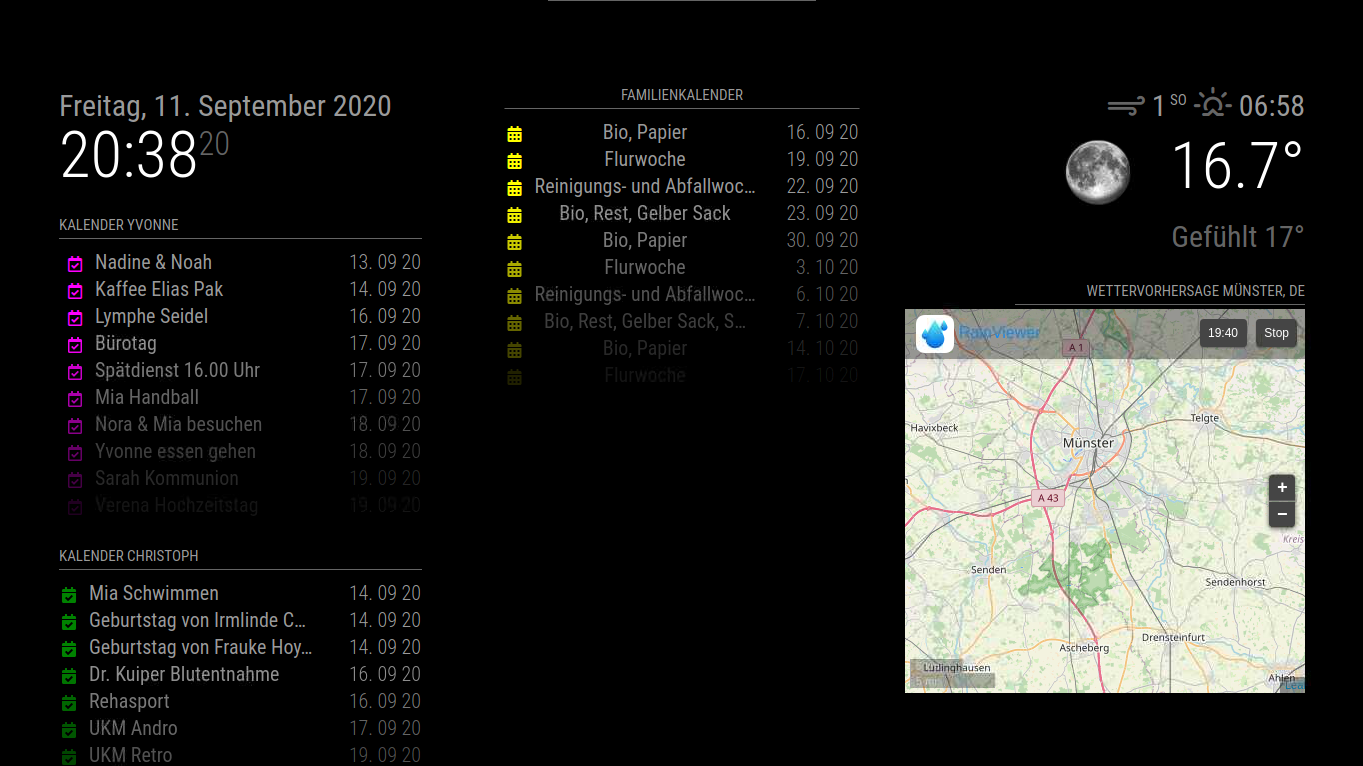
                            MM.PNG

                            1 Reply Last reply Reply Quote 0
                            • R Offline
                              radioman
                              last edited by

                              Das mit der Ausrichtung des mittleren Kalenders habe ich hinbekommen indem ich in die custom.js folgendes eingetragen habe.

                              
                              .region.top.center {
                              background : black;
                              margin-left: 10px;
                              margin-top: 130px;
                              }
                              
                              Piranha1605P 1 Reply Last reply Reply Quote 0
                              • R Offline
                                radioman
                                last edited by

                                Hat jemand Erfahrung mit dem Modul MMM-Pages

                                1 Reply Last reply Reply Quote 0
                                • Piranha1605P Offline
                                  Piranha1605 @radioman
                                  last edited by

                                  @radioman Versuche mal dein Modul zu verschieben und nicht die ganze Region.

                                  .module.calendar {
                                  background : black;
                                  margin-left: 10px;
                                  margin-top: 130px;
                                  }
                                  
                                  1 Reply Last reply Reply Quote 0
                                  • R Offline
                                    radioman
                                    last edited by

                                    Ich hab das mal versucht aber es verschiebt mir alle Kalender
                                    Ich habe alles zurückgestelt und die Verschiebung der region wieder vorgenommen so wie ich es brauche
                                    Ich hatte mir zwar schon sowas gedacht aber ich habs trotzdem mal versucht
                                    Danke aber trotzdem für den Tipp

                                    lavolp3L 1 Reply Last reply Reply Quote 0
                                    • lavolp3L Offline
                                      lavolp3 Module Developer @radioman
                                      last edited by

                                      @radioman said in Deutsche Anleitung MagicMirror auf RaspberryPi 3:

                                      Ich hab das mal versucht aber es verschiebt mir alle Kalender

                                      Das liegt daran dass .calendar die Referenz für alle calendar Module ist.
                                      Jedes Modul bekommt zusätzlich eine id die man zb im Browser mittels dev tools finden kann (weiß leidet keine andere Möglichkeit)
                                      Wem man diese id (z.b. #module_13_calendar) in css anspricht verschiebt sich nur der eine Kalender.

                                      How to troubleshoot modules
                                      MMM-soccer v2, MMM-AVStock

                                      1 Reply Last reply Reply Quote 0
                                      • R Offline
                                        radioman
                                        last edited by

                                        Hallo Gemeinde
                                        Ich habe das Modul MMM-Pages installiert (nur das Modul noch zusätzlich das MMM-Page-Indicator Modul)
                                        Meine 2 Seiten wechseln auch.

                                        	
                                        		{
                                                module: 'MMM-pages',
                                                config: {
                                                animationTime: 0,
                                        		rotationTime: 10000,
                                        		rotationDelay: 0,
                                        		pages: 2,
                                        		         modules:
                                                            [[ "calendar", "weatherforecast"],
                                                             [ "MMM-RAIN-RADAR" ]],
                                                        fixed: ["clock", "MMM-OpenmapWeather", "MMM-page-indicator"],
                                                 }        
                                                },


                                        Nun möchte ich zusätzlich mit Alexa die Seiten nach bedarf umschalten.
                                        Hier meine Config

                                        {
                                                    module: 'MMM-AlexaControl',
                                                    position: 'bottom_left',
                                                    config:{
                                                        image: false,
                                                        pm2ProcessName: "mm",
                                                        refresh: true,
                                                        restart: true,
                                                        reboot: false,
                                                        monitorToggle: true,
                                                        vcgencmd: 'vcgencmd',
                                                        deviceName: "Spiegel",
                                                        startPort: 12000,
                                                        notifications: [
                                            							  {
                                               			 					name: 'Radar',
                                               			    			    port: 11101,
                                                					        OnOff: true,
                                                		 					notification: [["SHOW_RADAR", null],["HIDE_RADAR", null]]
                                                     						},
                                                     						{
                                                							name: 'Seite eins',
                                               								port: 11102,
                                                							OnOff: true,
                                                							notification: ["PAGE_CHANGED", 0]
                                                							},
                                                							{
                                                							name: 'Seite zwei',
                                               								port: 11103,
                                                							OnOff: true,
                                                							notification: ["PAGE_CHANGED", 1]
                                                							}
                                        				]
                                                  
                                                 }
                                               	 },	


                                        Alexa findet auch Geräte aber ich kann Sie nicht einschalten
                                        Leider finde ich meinen Gedankenfehler nicht

                                        S 1 Reply Last reply Reply Quote 0
                                        • S Do not disturb
                                          sdetweil @radioman
                                          last edited by sdetweil

                                          @radioman read my other reply

                                          please don’t double post

                                          Sam

                                          How to add modules

                                          learning how to use browser developers window for css changes

                                          1 Reply Last reply Reply Quote 0
                                          • R Offline
                                            radioman
                                            last edited by

                                            Sorry I Think i Create a Post in German too
                                            OK

                                            1 Reply Last reply Reply Quote 0

                                            Hello! It looks like you're interested in this conversation, but you don't have an account yet.

                                            Getting fed up of having to scroll through the same posts each visit? When you register for an account, you'll always come back to exactly where you were before, and choose to be notified of new replies (either via email, or push notification). You'll also be able to save bookmarks and upvote posts to show your appreciation to other community members.

                                            With your input, this post could be even better 💗

                                            Register Login

                                            • 1
                                            • 2
                                            • 3
                                            • 4
                                            • 5
                                            • 6
                                            • 5 / 6
                                            • First post
                                              Last post
                                            Enjoying MagicMirror? Please consider a donation!
                                            MagicMirror created by Michael Teeuw.
                                            Forum managed by Sam, technical setup by Karsten.
                                            This forum is using NodeBB as its core | Contributors
                                            Contact | Privacy Policy
